How To

A quick maintenance operation that will prolong the life of your laptop

I upgraded the RAM in my laptop yesterday, and stumbled onto a really easy maintenance job that will most certainly prolong the life your laptop, and help it run faster, cooler and quieter. It sounds impossible to do all that in one fell swoop, but it’s really easy to do, and it works. I’ll give you a hint: it has to do with your laptop’s cooling.

I realize your laptop is going to be different than mine, so my photos may not help you much when it comes to doing this on your own laptop, but bear with me, the principle is the same, and this simple clean-up job will really help.

What I’m talking about is the laptop’s cooling fan assembly. It’s the fan that cools the processor’s heatsink, and is responsible for keeping the processor below the upper temperature threshold. It’s like your car’s radiator. If it wasn’t working, your car would overheat very fast, wouldn’t it? Same thing here, except your laptop’s “radiator” is prone to getting clogged up with dust – lots of it, too.

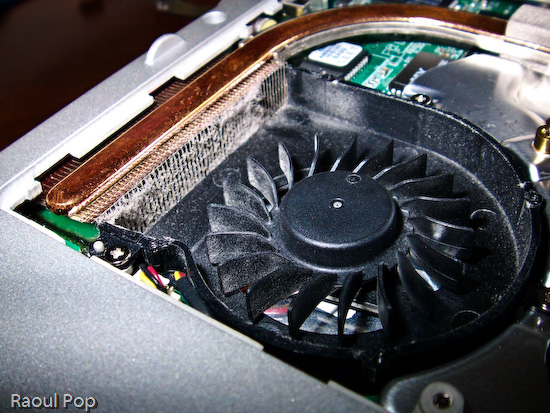
After about a year and half of using my laptop mostly on clean tables — not on carpets, or my lap, or on tablecloths, as some of us do [!] — I was very, very surprised to find out how much dust had accumulated on my laptop’s cooling grill. I didn’t even open my laptop in order to inspect it. I just wanted to install some extra RAM, but saw the cooling fan and figured, hey, let me open it up even though it looks clean enough from the outside. Boy, was I in for a shocker! Have a look at this photo to see for yourselves.
Cleaning an Averatec 6240 series laptop

You may not think that layer of dust is much, but have a look at a macro photo I took of a piece of it. I used a moist cotton swab to pull off the dust from the grill. Can you see how thick it was? It’s a wonder any air managed to get through!

Cleaning an Averatec 6240 series laptop

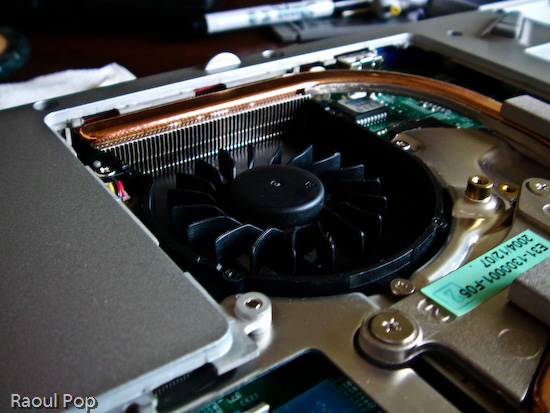
In case you’re wondering how I removed the cover from the cooling fan, it’s simple. There were four small screws holding it in place. They were each about the size of those screws you find in the frames of your eyeglasses, so you can use the small screwdriver from a frame repair kit. (If you’re a geek like me, you probably have your own mini-screwdriver set.) After using moist cotton swabs to thoroughly clean the grill, I blew through the grill from both sides of the laptop to make sure no dust was stuck inside. I was out of air spray, so I just used my lungs — if you do the same, be careful, don’t inhale the dust, it doesn’t taste good… Then I also wiped the fan blades clean with more moist cotton swabs, after which I used a couple of dry ones to wipe the entire assembly. Have a look at the finished product. Looks pretty good, doesn’t it?
Cleaning an Averatec 6240 series laptop

The important thing to remember is that most people can do this at home, and it’s a completely user-serviceable operation. I didn’t have to remove any warranty stickers (although my laptop’s out of warranty anyway). As a matter of fact, I only removed the panel that’s supposed to give me access to the RAM. It’s a big panel, so it really gives me access to a lot more stuff.

Cleaning an Averatec 6240 series laptop

If my laptop managed to get that much dust inside after only a year and a half of normal use (on tables and desks), I can’t imagine how much dust there is in other laptops that get used everywhere, and never get cleaned! To me, it’s a miracle that most survive through their projected 3-year lifetimes, and even last beyond that. I have to wonder how much better they’d run if their owners would take the time to clean them out once in a while. My suggestion is that you schedule time to do this cleaning once a year.After I finished, I noticed a difference right away. My laptop is cooler now, and runs much quieter. Before, the fan ran in overdrive most of the time. Now, it only runs at higher speeds when the processor is crunching through difficult operations, which is the way it should be. It also runs a little faster, and it’s more responsive. This also makes sense, because a cooler processor works better. It’s the same principle behind water-cooled processors, which can be overclocked because their temperatures are kept low.

At any rate, I encourage you to open up your laptops and try this for yourselves. But please, make sure they’re turned off, unplugged from any power source, and the batteries are removed before you even think of opening them up. Also, ground yourselves before you touch the circuits. You don’t want to short anything inside with any static electricity you might generate.

Standard
Reviews

Boot Camp 1.1 Beta just released by Apple

Apple Boot Camp 1.1 BetaI complained in a previous post about how I wanted to buy a Mac laptop that I’d use for both work on pleasure, but couldn’t, because I was shackled to Windows OS for most of my development work, and there were certain things that just didn’t work on the Mac, with either Boot Camp or with virtualization software.

Well, I can’t have been the only one with gripes, because Apple just released Boot Camp 1.1, addressing some of the very concerns I voiced, both here and at BlogCritics. Here’s what the new version includes:

  • Support for “the latest Intel-based Macs”: this means the Core 2 Duo chips, code-named Merom, coming out at the end of this month. It could also be referring to the new Quad Xeon chips installed in the Power Macs, but I have a feeling 1.1 covers the Merom line as well.
  • Easier partitioning: version 1.0 was somewhat limited (let’s say minimalistic and be nice about it) in the choice of partition sizes.
  • Ability to install Windows XP on any internal disk. It still stinks that we can’t install it on a USB/Firewire drive, but I assume that’s coming down the line.
  • Support for built-in iSight cameras: this was one of my biggest gripes. Trying to use the iSight camera would give the dreaded BSOD.
  • Suppor for built-in microphones: about time! This was a pretty basic requirement.
  • Right-click when pressing the right hand Apple key on Apple keyboards. Interesting, although I’ll probably still use Ctrl + Click.
  • Improved Apple keyboard support: again, about time! Keys like Delete, PrintScreen and NumLock are used by most users on a regular basis.

So what still doesn’t work? The Apple Remote doesn’t. And neither do the Bluetooth Wireless Apple Keyboard and Mouse. Now, while it’d be nice for me to control iTunes while in Windows with the Apple Remote, I can live without that, but why wouldn’t the keyboard and mouse work? So okay, they don’t – fine. But what bothers me is that the sudden motion sensor and the ambient light sensor don’t work either. Those are not only cool, they’re very practical technologies. The sudden motion sensor in particular should be a must have feature.

I can just imagine Apple Tech Support when an unfortunate fellow calls them (hopefully not me):

  • User: “My laptop was resting on its laptop stand, and when I picked it up, it slipped out of my hand and dropped on the table. Now it won’t boot up!”
  • Support: “How high was the drop?”
  • User: “Only 4-6 inches! What’s going on?”
  • Support: “Were you using Windows at the time?”
  • User: “Uh, yes?!”
  • Support: “Well, you’re out of luck. If you were using Mac OS, the sudden motion sensor would have protected the hard drive, but since you used Windows, that hard drive is kaput. Plus, we don’t support Windows. You’ll need to get a new hard drive.”

In a related note, most of the new Lithium Ion batteries are subject to meltdowns and explosions when shaken, overheated or dropped. Something to think about as you hold that laptop in your lap…

Standard
Reviews

Two great bargains: HP Pavilion dv2000 and dv6000 series laptops

As detailed in my last post, I’ve been scouring the market looking for laptop deals, and I found two that were really good. After I compared the specs for these two laptops with similarly equipped laptops, I found them to be hundreds below comparable models, and on top of that, well-made – at least when it came to their exterior.

The HP Pavilion dv2000 and dv6000 series laptops are part of HP’s re-design of its Pavilion laptop line. They feature upgraded hardware and beautiful exteriors. I can’t speak about their reliability, since I only got the chance to use them for a few minutes at a computer store, but when it comes to looks and features, they’ve got it! From the moment I touched the keyboard and used the trackpad, I could tell HP invested serious attention to detail when they made these laptops. If you’ve ever used a Dell laptop, then you know what I’m talking about. The keys are so thin, that your fingers sometimes get pinched inbetween them. Not on these two HP laptops! The keys are thicker, smoother, and have better action. The trackpad is responsive, and the left and right mouse buttons are soft to the touch. I thought the travel could be shortened a bit, but other than that, it’s a very good experience. The lines are well defined, the color tones are well chosen, the overall thickness is kept to a minimum (around 1″ height for either one) – what can I say, they look good!

A well-equipped dv2000 series laptop features Windows XP Pro, a dual core Intel 2.0 GHz processor, a 14.1″ BrightView wide screen, integrated 802.11 a/b/g and Bluetooth, an integrated webcam with dual noise-cancelling microphones, a 120GB SATA hard drive, a 128MB NVIDIA(R) GeForce(R) Go 7200 video card, 2GB of RAM, a LightScribe Super Multi 8X DVD +/- RW with Double Layer drive, a 12-cell battery that lasts up to 8 hours, a 2-year HP Accidental Damage with Express Repair extended service plan, a credit-card sized remote control for the InstantOn feature that lets you play DVDs and CDs without turning on the laptop, an HP Silver Messenger Bag, HP Mobile Noise Cancelling headphones, a retractable phone, ethernet and USB cord kit, and a FREE printer. The price for the whole set is $2,051.93 ($1801.93 without the extended service plan). Try matching these specs with another laptop (Lenovo, Sony, Dell, Acer, Asus) and see if it’s still that low. Go ahead, I’ve done it, and it isn’t.

How about the dv6000 series? A well-equipped dv6000 includes the following: Windows XP Pro, a dual core AMD 1.8 GHz processor, a 15.4″ wide screen, a 256MB NVIDIA(R) GeForce(R) Go 7200 video card, integrated 802.11 a/b/g and Bluetooth, an integrated webcam with dual noise-cancelling microphones, a 120GB SATA hard drive, 2GB of RAM, a LightScribe Super Multi 8X DVD +/- RW with Double Layer drive, a 12-cell battery that lasts up to 8 hours, a 2-year HP Accidental Damage with Express Repair extended service plan, a credit-card sized remote control for the InstantOn feature that lets you play DVDs and CDs without turning on the laptop, an HP Silver Messenger Bag, HP Mobile Noise Cancelling headphones, a retractable phone, ethernet and USB cord kit, and a FREE printer. The price for the set is just $2.111.94 ($1,861.95 without the extended service plan). Again, I dare you to match these specs and see if you can get a similar price.

I have only two bad things to say. I haven’t heard good things about HP reliability from my friends and contacts. I also know from personal experience that once HP decides to discontinue a product, their interest in supporting it goes downhill, and it’s basically forgotten. Perhaps that’s changed now that they’ve re-designed their laptops, but still, I’d recommend getting the extended support plan. The one I mentioned above includes two years (there are 1 and 3 year options as well) of Accidental Damage (in case you drop it or spill something on it) and Extended Repair (when your hardware just plain fails). I would actually recommend getting an extended support plan for any laptop or desktop you purchase, because you don’t want to be left stranded when you’re in a bind.

The second thing is more like a wish, and that is for the dv6000 line to include dual core Intel processors. It currently doesn’t. Although AMD may beat out Intel with its recent line-up of dual core processors, the Core Duo 2 line of processors, code-named Merom, that Intel will come out with in August, are already beating AMD’s line-up. Plus, they’re readily interchangeable with the current dual core Intel chips. That means you can get a laptop now, and upgrade your processor to a screaming fast Merom chip when the price for those goes down.

At any rate, I can’t find a better deal for the specs and looks that these two laptops, so if you’re in the market for a Windows laptop, get your hands on one of these!

Standard
Thoughts

To buy or not to buy an Apple

Updated 3/7/08: My opinion has changed quite a bit since I wrote this post. I am now going to get a 15″ MacBook Pro after working on a Windows laptop for the past two years. Feel free to read this further though, because it shows how far things have come since then.

I’ve been doing a lot of research lately, because I’m looking at buying a new laptop. I’ve got this terrible dichotomy in my head. On one hand, I love Macs, and I’d love to get a Mac, but on the other hand, most of the work I do (web development stuff) is still handcuffed to Windows. It’s not minor stuff, either: Access, SQL Server, ASP, ASP.NET.

Yes, I know, I can run Windows on the Mac with Boot Camp now, but have you taken a look at the caveats? Apple’s had to write the Windows drivers for the Apple hardware, and certain things simply won’t work. Among them are: the Apple Remote Control, the Apple Wireless Bluetooth keyboard and mouse, Apple USB Modem, the sudden motion sensor, the ambient light sensor, and, most importantly, the built-in iSight camera.

The very reasons I want to get an Apple – fantastic design, tight integration when it comes to software and hardware, obsessive attention to detail – are stopping me from getting one. Since I’ll need to run Windows on it, and my cool Apple hardware won’t work with Windows, what’s the point? I’ll be forever shutting down either Mac OS or Windows XP in order to use the features I want out of each system. Want to use iChat to talk with my wife? Oops, need to boot up in Mac OS. Need to do a bit of development work? Oops, got to boot up in Windows. Got to use Skype Video Chat? Double oops there, since only the Windows version can use a webcam, and iSight doesn’t work in Windows!

As if laptop hard drives aren’t small enough, I’ll need to partition the drive and share it with Windows. Not cool! On the one hand, I want to handle photos, music and videos on the Mac, filling up the drive with that stuff. On the other hand, I need to do development work and create large graphics in Photoshop and sites in Dreamweaver, both of which are Windows licenses, by the way. I work with large files there as well, and I know I’ll fill up that drive. What am I supposed to do? Shuffle files between the two operating systems using an external drive? Sounds easy enough, until you realize that Mac OS doesn’t read NTFS partitions and Windows doesn’t read Mac drives. Huh? Yup, it means you can’t copy files bigger than 4GB to that external drive, since it needs to be formatted in FAT.

Oh yes, let me not forget about emulation/virtualization software… Or rather, let me forget. I still shudder at the dismal performance of Virtual PC on my PowerBook G4 or my iMac G5. Yuck! Everything crawled, including the web browser. Copying files back and forth between the operating systems, although it was only a drag-and-drop operation, was excruciatingly slow. Running software like Dreamweaver took forever, needless to say. Virtualization software like VMWare, running Windows on Windows, albeit a little faster, was still slow in the desktop version. Although the speed should improve if virtualization software is run on the new Intel Macs, I don’t hold high hopes for it.

There are plenty of caveats with virtualization, other than performance. Software doesn’t always behave as expected, because it’s not a real computer, and certain things simply aren’t available. Then there’s that always disappointing jump between the real OS and the virtual OS. Although it’s as easy as Alt+Tab on Windows or Command+Tab on the Mac, the performance hit is depressing every time one needs to use the virtual machine. I tried other emulation software as well. Q, was one of them, and although the interface was nicer than Virtual PC’s, it still disappointed. No, no thanks.

I’ll let Parallels talk about how fast their virtualization is all they want. I’ll believe it when I see it encode video and run the latest versions of Photoshop and Visual Studio at near the full speed of the CPU. Meanwhile, I’ve had enough of emulation/virtualization. It may be good for servers, as VMWare is proving with their Enterprise suite of products, but it’s not good when one’s computing needs involve lots of high-availability graphics, memory and processing power.

It seems like I’m hopelessly caught between Scylla and Charybdis, not knowing where to turn, part of me wanting Mac OS and part of me needing Windows. What to do? Nothing to do but to hold off for now, and hope that either Apple or Windows get their act together for people like me.

Standard
Reviews

A few up and coming gadgets

Time has a great slideshow of up and coming gadgets. A few that I really like are a new cellphone from Samsung that’s thinner and lighter than the Razr, the Sanyo Xacti HD camcorder, the swivable laptop display from Intel, and the “sideshow” display that allows you to check email and play music without opening the laptop, compatible with Vista. Click on the thumbnails below to view the photos, courtesy of their manufacturers.

Standard