You are about to see several panoramic photos that have taken me well over 35 hours to create — and I’m not counting travel time, setup time, time it took to take the photos, and the time it took to write this post.
This slideshow requires JavaScript.
A couple of weekends ago, Ligia and I got into our MINI and drove up to Shenandoah National Park, for a single purpose: to take a few panoramic photos of the valley from the tops of the Appalachian Mountains. Fortunately, that simply meant driving on beautiful, scenic Skyline Drive and stopping at various points to set up the tripod and take series of shots that would later be stitched together. Unfortunately, the weather wasn’t exactly collaborating, in spite of the cheery weather report. The day was neither sunny nor cloudy. The light was diffuse and had that washed, in-between quality that doesn’t really make it good for anything. But, I was there, and if that’s what I had to work with, so be it.
As it turned out, driving out there and taking the photos was the easiest part of the whole thing. Like I mentioned in the opening paragraph, putting together the panoramas was by far the longest, most excruciatingly slow stretch of processing work I have ever done. I do not recommend it to anyone, for multiple reasons, which I’ll mention below. If you just want to see the photos, skip ahead.
A few thoughts on the whole thing
I will not do panoramas very often in the future, unless I’m commissioned to do specific ones. If and when I do another panorama for myself (not for a client), it will likely only be a 5 to 10 photo image, simply because it takes an enormous amount of time to stitch and process them on the computer if they’re made up of more images than that.
For one thing, you would need a super fast, quad-core or better computer loaded to the gills with RAM to get any sort of decent speed while processing panoramas. A Mac Pro worth about $7,000 or better should do the trick. Seriously, every single simple operation, like cropping or rotating, took at least 10 minutes or more to execute. Sometimes just assembling a single panorama in Photoshop (through the Photomerge feature) took about 45 minutes. I have the latest MacBook Pro laptop (2.5 GHz Intel Core 2 Duo processor, 512 MB video card, 4 GB RAM), and it still took what seemed like forever to get through each panorama.
The resolution of the photos also matters. My individual photos are 12-megapixels each, at 240 dpi, made by a Canon 5D. Just imagine how much processing power is needed to put together 20 or 30 of these photos into a single image!
People don’t appreciate panoramas. I bet you most people will skim this post, unimpressed, and move on. You can’t really appreciate panoramic photos unless they’re printed out in their full size and spread out on a wall, right in front of you. You can’t appreciate their size on your computer monitor, no matter how large it might be. The largest single monitors nowadays are 30″ and have a maximum resolution of 2560×1600. That’s equivalent to about 6 megapixels at 72 dpi. You can’t possibly appreciate a 12 megapixel photo at 1:1 size on a current-day monitor, much less a panorama made up of 20 of those photos.
As an aside, don’t confuse monitor size with resolution. There are LCD HDTVs on the market that are 42″, 46″ or more in size, but they can only display up to 1920×1080 pixels, which is much less resolution than a 30″ monitor.
I can’t show you the full panoramas on my site, because of photo theft. Not that I think my panoramas (these ones in particular) are spectacular and would fetch amazing prices, but I know for a fact that if I post my panoramas at full resolution, there will be people who will steal them and try to profit from them.
How does the new Lightroom 2 Beta handle panoramas?
After I processed the photos in Photoshop CS3, which worked without crashing for the whole bunch, although it ate an amazing amount of space on my hard drive for its scratch disk, I imported them into the new Lightroom 2 Beta, to see how it would handle them.
Most of the photos were over 1 GB in size, uncompressed. Because I saved most as TIFs, using ZIP compression, their file size on disk was significantly lower. Lightroom did amazingly well to start with. It created small previews very quickly, and also created the 1:1 previews much quicker than Photoshop would have been able to render them. I was able to use the spot heal brush to remove sensor dust spots, and also used the new selective retouching brushes, without any problems. Lightroom 2 was able to do these things without significant delays, and would show the effects instantaneously.
LR2 only started hiccuping when I started to add some meta-data to the photos. As I went through and added meta-data, then opened them at 1:1 size once more, it would hang, literally forever. I had to keep force quitting it, and had to do that regularly, for each and every photo that I wanted to look at. Interestingly enough, when I wanted to export the panoramas to use them here on my site, it did it without any problems, and without crashing. It’s certainly odd behavior, but it is in Beta after all.
On to the photos
While I cannot post the panoramas at full resolution here, I did post them at higher sizes than I would normally post, in order to give you a better idea of what they look like. I also created 1:1 previews of regions of each photo, to help you realize how big they really are.
If you click on each panorama (not its 1:1 detail), it will take you to its photo page, where it will tell you how large it is (in megapixels), and how many photos went into making it. If you click on it again (on that page), it will take you to its larger size. Sorry for the double-clicking, but that’s how things work in WordPress these days.
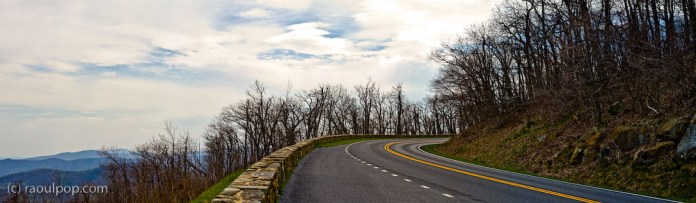
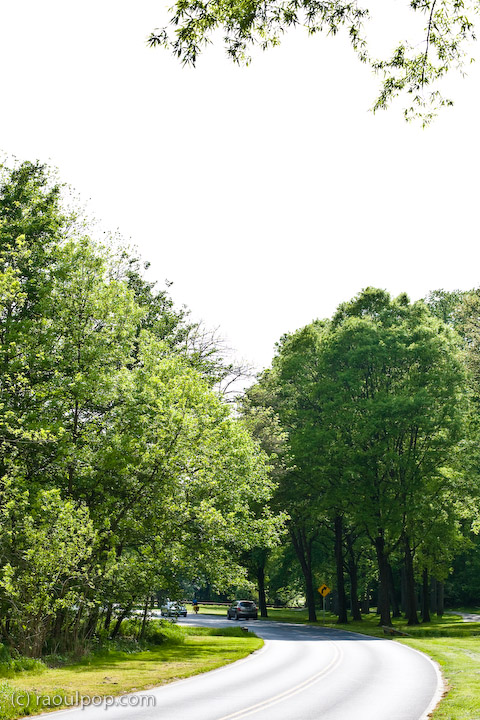
First, a panoramic of Skyline Drive itself. This road is amazing, and I’m so glad the US government decided to build it back in the 1930s. It literally hugs the tops of the Appalachian mountains and lets average John and Jane drive on top of the world (as high as possible in this area of the world, anyway).
We stopped along Skyline Drive, parked our car, and took a hike through the forest on one of the paths marked out there. In the middle of nowhere (literally), we found this cabin, called Range View.
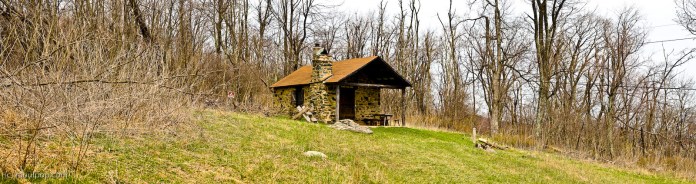
It was a darling little place built out of stone and off the grid (in spite of the fact that wires ran right above it). The fireplace was outside the cabin, by the front door. While the place was locked up and the windows equipped with thick wire and netting, Ligia and I could spot beds and various pieces of old furniture inside. Don’t know what it’s used for nowadays, but it is used, because there was an open bottle of wine standing in plain sight near one of the windows, and it was of recent vintage.
The rest of the photos, including the 1:1 previews, are found in the gallery below. Click on each to get to the photo page, then click again to see it in a larger size. Enjoy!
46.169312
24.363220






 Raoul Pop