How To

How to get T-Mobile Total Internet at 42% off

It’s easy: sign up before 11/1/2008. Why? Because the price will apparently go up to $35/month on or around that date, according to T-Mobile Customer Service.

Updated 10/27/08: Please see this comment below for an up-to-date clarification of the planned price increases. It’s not as bad as I originally thought, but a price increase will still take effect [source].

Updated 11/24/08: It looks like the rate hike will take effect on 12/1, not 11/1. And it also looks like G1 users will have to move to the new, more expensive plans, even if they signed up before the rate hike.

T-Mobile’s current Internet/Data plan for smartphones (it’s called T-Mobile Total Internet) costs $19.99/month, and includes either EDGE or 3G speeds, depending on your area. If you live in the Washington, DC area, like me, you’re currently getting EDGE speeds, but should be upgraded automatically to 3G by the end of this year.

Starting around 11/1/2008, T-Mobile will increase the price for the plan to $35/month, probably because of the G1 smartphone they’re launching, and the extra demand that’s going to place on their networks. I’m guessing they have some infrastructure upgrades to pay for. If you get the Internet plan now (which is what I did) the price for it will stay locked at $19.99/month for as long as you’re with T-Mobile. That’s what I was told by T-Mobile Customer Service yesterday afternoon.

That means you’ll be saving $15 (42%) every single month while others are going to pay $35, and you’ll get the same speeds they’re getting.

Standard
How To

A new lease on old hardware

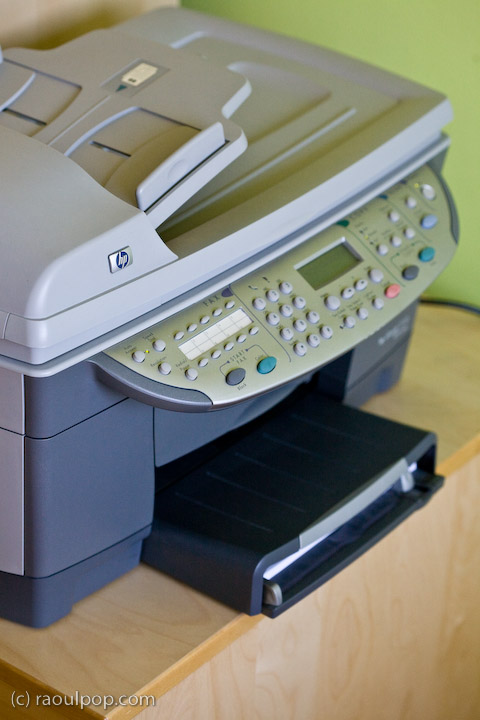
In 2003, I bought an HP OfficeJet 7110 all-in-one, a big, boxy monster that did (and still does) printing, scanning, faxing and copying. I’ve barely ever used it to fax, but the feature is there in case I need it. Now I’m using it over our wireless network with an Apple AirPort Express, and it works great.

HP couldn’t wait to retire this model. A year after I’d bought it, I had a hard time getting support for it, in spite of the fact that I’d bought an extended support plan. Less than two years after I’d bought it, HP had already discontinued it. They stopped developing the drivers for it sometime in 2003 or 2004. The development for Mac drivers stopped at 10.4 (officially) but more likely, at 10.3. I used their drivers on 10.4 and there were serious problems. Switching accounts, for example, disabled printing, and it couldn’t be re-enabled unless one restarted the computer. I complained numerous times to HP, via tech support, via messages to their executives, but no one cared. Basically, HP’s support is horrible, and my experience was no different with the OfficeJet 7110.

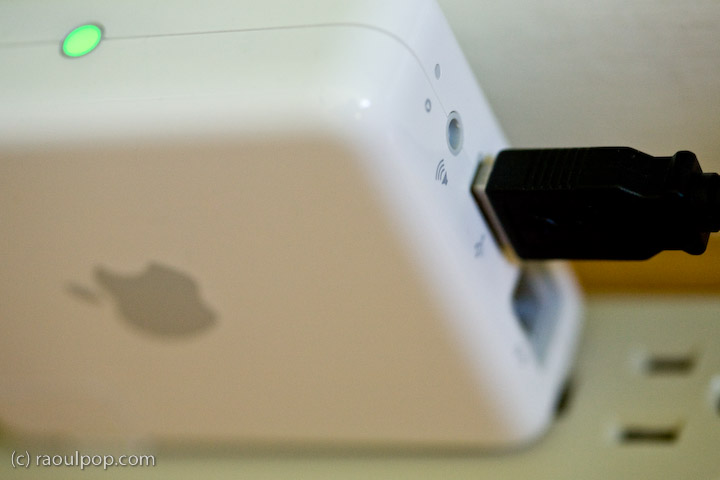
Fortunately, I found a way to get more use out of this dinosaur without needing to buy a new printer (yet). Back in 2005, I purchased an Apple AirPort Express, a small device that does quite a few things. One of them is printer sharing. You plug in a USB printer, and it will share it wirelessly.

I’d wanted to do this ever since I’d bout the AirPort Express, but there were no usable Bonjour/network drivers for the 7110. With the introduction of Leopard, however, the story changed. Quite a few CUPS drivers came pre-loaded with the OS, and one of those drivers was built exactly for the 7110.

A couple of weekends ago, I took a half hour to relocate our printer and its stand, plug it into the AirPort Express, and install it on both our Macs via Bonjour. This was after I’d joined the AirPort Express to our existing WiFi network through the AirPort Utility. The whole process is fairly easy to do, except changes to the AirPort Express may require a reset or two before they commit properly. This may only be a bug with the older version that I have (from 2005), and it may not affect the newer versions of this device, like the 802.11n that just came out.

Now our printer is networked reliably and it’s usable immediately from both our Macs, which is something that wasn’t possible before. It’s not tethered via the annoying USB cable, and we don’t have to deal with its bulk next to our desks. Although the drivers are print-only, when we need to scan something, we simply take my laptop over to it, connect it via USB, and scan to my Windows XP virtual machine, which runs on VMware Fusion on top of Leopard. This is because the XP drivers are the only ones that still work reliably for this printer.

What also satisfies me is that I get a new lease on old hardware. I don’t have to go out and buy something new to get the functionality I need. I already spent good money on working hardware, and thanks to Leopard’s built-in printer drivers and AirPort Express, I get to use it years after HP decided to discontinue it and force people to buy new printers.

Standard
Thoughts

A few suggestions for FeedBurner

FeedBurnerI’m a very happy user of FeedBurner, the wonderful feed management service from Google. I’ve been using it since early 2006, and I log on multiple times every day to keep track of my feeds. I’d like to talk about some features and options that I’d love to see on the site.

Ability to splice multiple feeds without having to add them to a network or put them in FAN. I’d love to be able to have a single feed that combines all of my content, without having to go through what I’m going now, which is to create a feed network, add my own feeds to it, and burn that feed to a feed… I know there are other services on the web that do this, but I’d rather be able to do it through FeedBurner.

Ability to splice external feeds (ones not burned at FeedBurner), into a single FeedBurner feed. This would work sort of the way that Jaiku or TwitterFeed work, in the sense that I’d take my feeds with very few subscribers, like my Twitter feed or my Vimeo feed, and add them to my single feed without needing to “burn” them as separate feeds at FeedBurner, and having them show up under My Feeds. I’m not really interested in managing those feeds at this point — I just want to add them to my single feed.

Better revenue reporting from FAN (FeedBurner Ad Network). I never know how much I’m getting, because the figures are just approximations, and the pay is somehow always less than what’s indicated in the control panel. AdSense always reports my revenues correctly, Amazon does it too, but FeedBurner always leaves me wondering how much money I’m going to get. Maybe I just don’t know where to look, but believe me, I’ve looked all over the place. There’s only one place where revenues are reported centrally, and then there are ad revenues for each individual feed in FAN, and still I don’t know how much money I’m making with my feed ads.

Ability to “refresh” feed flares. Old feed flares display with old preferences, so I have a ton of flares showing up for older posts. I understand that they’re cached, and they have to stay cached, because it would be murder on a database if the flares would be constructed dynamically for every feed item, including the older ones… But I’d like to have a manual “refresh” function for the flares, that would let all of the old posts and old feed flares inherit the most recent settings for my feed flares.

Ability to separate feed flares from the ads. I’d like to display the feed flares at the top of my posts, for example, and the ads at the bottom. Right now they’re together and there’s no way to display them but right next to each other.

The SmartCast feature is a bit confusing. Either I’m the one that doesn’t get it, or it doesn’t quite work as advertised. Here’s what it says on the site:

“Makes podcasting easy in feeds that normally cannot support it. Link to MP3s, videos, images, and other digital media in your site content and SmartCast creates enclosures for them automatically. Optionally adds elements required for a richer, more detailed listing in iTunes Podcast Directory and sites using Yahoo Media RSS.”

When I took my podcast feed, which is a simple category feed from my blog, and turned on the SmartCast option, enclosures for the media files linked from each post weren’t turned into enclosures. The iTunes elements were added to the feed, but it still didn’t become a feed that I could subscribe to from iTunes, so I gave up on it.

Now, a little more than a month since my last podcast, I see that I can subscribe to that feed in iTunes, and the podcast downloads just fine. But only the last item shows up instead of every single episode, or at least the last 10 feed items, which is the standard. Why? And why didn’t it work when I first turned on SmartCast for this feed? I can’t help but be confused by this. SmartCast can be a very elegant and easy way to turn a normal feed into a podcast feed, but it looks like it still needs some work.

Photo Splicer only works with the Flickr ID. The Photo Splicer option says I can put in either my Flickr user ID or my screen name, but it really only works with the User ID, which is annoyingly hard to find on Flickr. It would be nice if the User ID would be automatically looked up if I entered my screen name.

I know the FeedBurner folks will read this. They’re very conscientious and follow up on these things. I don’t want special treatment, but it would be very nice if they could consider my feature requests and see what can be done. FeedBurner has my thanks for a wonderful service!


Standard
Thoughts

A look at culture and technology through sound effects

I was listening to the radio one morning, and realized the sound effects they were using to advertise a website were the clicks of a keyboard likely made in the 80’s — you know, long key travel, spring-loaded action, hard clicks. But it worked.

More importantly, it is the only sound that can approximate a keyboard well, and transmit that action to an audience. Think about where keyboards are going today though. Apple is putting out keyboards that barely make any sounds — for example, see the new slim iMac keyboard, or the MacBook or MacBook Pro keyboards. Other hardware manufacturers are following suit, each advertising softer keys, more muffled sounds, etc. How do you record that? It can’t translate well over radio as a sound effect.

Remember how they used to advertise accessing the internet just a few short years ago? Through the sounds of modems. Tell me, could anyone afford to advertise internet access like that any more? No, they’d get laughed out of business, because most everyone is using high-speed access now. But is there a sound that can represent an Internet connection now? How do you represent it or record it?

What about the sound effects for phone calls? They were the simple, old-fashioned ring, right? Everyone knew what it was, and there was no confusion. Not any more. Although people still recognize the old phone ring, children growing up nowadays have so many choices when it comes to ringtones, that soon enough, the old phone ring will no longer be a recognizable sound effect for phone calls.

In some of the older movies or radio commercials, beeps, flashing lights and loud sounds were used as sound effects for computers. The starts and stops of tape reels were well known as well. What about the sounds of the punch cards, rolling through the machines and getting processed? Those are all things of the past. The only sounds computer hardware makes nowadays is the drone-like noise of the hard drives and cooling fans. It may be the representation of an efficient computing machine, but it’s pretty boring as a sound effect. Desktops or laptops (the newer ones anyway) make no sounds at all. We prize them based on how little sound they make, and rightly so, but we’ve lost the sound effects.

Remember the sound of switching TV channels? There was the manual, hard click of the round knob on the TV set (not many of you know about those anymore). If you were using a remote on older televisions, there was a sound pop, followed by a short period of static and the sound of the new channel that accompanied each channel switch. On newer televisions, that’s no longer the case. There’s no pop, click or jarring sound transition during channel switches. It’s all handled smoothly, and on some, the sound is gradually brought up to listening volume so as not to disturb you. But how do you represent a channel switch in a radio ad? You can’t, not anymore, not unless you use a decades-old sound effect.

The point of all these examples is to illustrate how technology is outpacing culture. I wanted to look at this through sound effects, but there are many ways in which it can be done. Just think of social networking sites, their invasion of privacy, and the new expectations of online behavior if you want to look at another aspect of this same issue.

One thing’s for sure — our culture has some catching up to do. While I love technology and embrace it (for the most part), we have to recognize that we’re in uncharted territory nowadays, in many, many areas of technology, particularly at its intersection with people and general culture. The rules aren’t even getting written, because no one is sure just how to grasp the situation. We each understand but a little portion of what’s going on — and that’s both scary and exciting, depending on your point of view.

Standard
Thoughts

ISPs to become IT providers for home users?

Bruce Schneier makes a solid point in his recent post entitled “Home Users: A Public Health Problem?”, where he states that computers and computer security are much too complicated for the regular home user. That’s most certainly true. No matter how much you “educate” the average user, they’re still going to mess up. Even if they’re working in IT, that’s no guarantee of know-how. There are so many things you can do in IT these days that an IT guy might not even know what a hard drive or a RAM module looks like. You really have to like working with computers to get the way they work and to be willing to put in the time to learn how to protect and operate them the right way.

But then Schneier says ISPs should become IT providers for the home user. In other words, provide real Help Desk support for software installations, router and firewall settings, anti-spyware and anti-virus software, etc. This sounds good at first until you realize there’s a very small step between that and choosing to mitigate damage to the network by controlling what software users can install and use on their computers. What’s to stop ISPs from requiring that users register their computers on their domain (or doing it automatically as users run their software CDs), then pushing down group policies that enforce their rules?

What’s the alternative? Make computers easier to use! Operating systems and the gadgets that go along with them have to become really easy to use. A certain number of security options have to be enabled by default, and those settings have to able to propagate from the OS down to the gadgets (firewalls, routers, printers, network drives, WiFi devices, etc.) automatically and where applicable. You set it once and it gets set everywhere else. I talked about this in another post of mine, entitled “It’s got to be automated“. Have a look at that as well.

The starting point should be OS X. It’s not the best OS it could be, but it’s a lot easier to use for most everyday tasks than other systems, but even it is hard to figure out for a normal user when it comes to security and special protocols like site hosting, file sharing or FTP, and privileges between users in places like the Shared folder.

We need to do away with arcane file names for user groups in operating systems. Privileges should be much easier to set for files, folders and entire drives. Systems ought to be smart enough to know when we’re trying to share something with the firewall up, and pop up an on-screen wizard to assist us. They should anticipate certain things and guide us through.

I say we need to make all network devices manageable directly through the computer, instead of having to log onto them separately. This goes especially for routers. The computer should know there’s a router on the network, and allow us to manage its settings from the control panel, as we would manage a printer, but make it even easier. It should auto-configure it with medium-level security by default and only ask us to choose a password and be done with it.

The solution lies in making better software and hardware.

Standard