Lists

The new VW Phaeton Plant and Storage Facility

Once again, German engineering perfection has me dropping my jaw… Stumbled onto photos from:

I have never seen anything like this – it is seriously cool! Can you believe those immaculate floors and assembly areas?! This is amazing.

Standard
Reviews

A review of My Life of Travel

My Life of TravelNo, that’s not my life of travel, it’s My Life of Travel, a site where travelling bloggers can document their adventures. Kiera Bailey of My Life of Travel invited me to write a review.

I love the concept of this site, which is so simple it can be expressed in only a few words, as I just did in my opening paragraph. Perhaps the folks there can take a clue from me, and rephrase their description of the site:

“My Life of Travel is a free web-based travel journal and travel research tool that lets travellers record their journeys, map travel histories, share tips with fellow tourists and keep in touch with friends and family, without the need for mass email communication and photo sharing sites.”

As you can see, this is noticeably longer that what I’ve got. What’s the word I’m looking for… ah, yes, verbose.

The site is built in .NET, which one can tell right away by the .aspx extension of the web pages. I found it interesting – uncommon, but interesting – that they chose to explain the technology that makes the site work.

Their service seems to be a win-win situation for everyone involved. Bloggers can host their journals and photos for free with them and make money from the web traffic by using their Google AdSense accounts, and My Life of Travel gets to be an entertaining source of information for many people, and also gets to sell advertising on its own to support its services. We, the web visitors, get to browse all the locations and see the world vicariously, through the eyes of intrepid travelers.

That’s the main draw of this site – for me, the web surfer. I can stumble on some pretty cool photos from different places in the world, and hopefully find out how that area is – what it’s like to travel through there. I might even pick up some useful advice, right? You could even call this site a travel wiki.

In theory, that’s how things are supposed to work. In practice, stuff gets a little boring. I chose to browse journals, and selected a drop-down menu for a location. I said, gee, wouldn’t it be nice to see photos from Antigua? Three journals came up for that, none of them with photos, and all with very little text, mostly one-line titles. It was like that for most smaller or out of the way places. And I suppose that’s to be expected, right? Until their site builds up to a critical mass of users, the world isn’t going to be well represented. One can’t hold that against them. So I chose bigger places, like Paris, or London. Stuff came up in the searches, but for some search results, even though I was supposed to get photos from those cities, I got photos from the countryside. I think the tagging system needs to be tweaked a bit to reflect locations better.

Then I started looking at photos. Most were group photos of people, or people standing in front of stuff – you know, the usual tourist photos. When there were landscape photos, the mix was about 50/50 between the good photos and the fuzzy or blurry ones. Again, typical. I started reading text, and most was the self-serving kind: I met up with buddies, drank some beer, hey, here’s a photo of me with some Guinness… etc. Typical once more, and that’s the caveat. Most people don’t know how or don’t care about keeping journals. They also don’t know how or don’t care to know how to take photos. So most of the stuff on the site is boring, run-of-the-mill, touristy stuff, the kind that’s good for a chuckle and a smirk, but doesn’t leave you feeling you’ve learned something.

If the entire site was like that, it wouldn’t be worth it. But, thankfully, it isn’t. They’ve done something smart, which is to highlight useful/popular member profiles. It also helps that these people take better photos, and usually write more useful things. Here’s an example of a good journal entry, with good photos. This is what makes this site worthwhile. What they need to do is to focus on these people and encourage them to keep blogging and posting. This sort of quality content is valuable stuff.

Bottom line: good travel site with great promise. They need to focus on building up their user base and encouraging people to post useful entries with great photos. It wouldn’t hurt to reward the valuable members through incentives of some kind, financial or otherwise.

Standard
A Guide To A Good Life, How To

An example of cable management

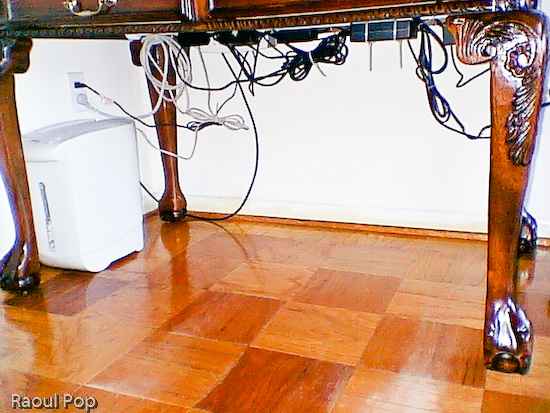
Ligia and I have recently downsized our living room desk. We used to have a big, bulky desk, and now we’ve got a secretary desk. It’s very beautiful, but it also has much less space than the previous desk, and no integrated cable management whatsoever. What to do? With about $8 of stuff from Home Depot (including plastic ties), I’ve modified the desk to allow us to manage our computer cables in a practical way. The end result and the steps are described below, with photos (click on the thumbnails to enlarge). It took about 45 minutes, but it’s worth it!

This is how our desk looks after the modifications. Notice how there are no annoying cables and wires on the floor. We can move the desk if needed, and we can easily vacuum underneath. It’s a joy!

Desk with cable management in place

So, what did I need to be able to do? First, I needed to fit the following pieces of hardware on that desk:

  • iMac G5 plus keyboard/mouse
  • Two stackable backup hard drives
  • Our PVR (we love it!)
  • The mixing board for our podcasts
  • Lamp
  • Various other paperwork and things
  • Printer (I know it sits beside the desk, but I include it since the cables still have to be managed under the desk)

First, I needed to drill a hole for the iMac cable. I debated its location for a while, but decided on the left hand side, for various reasons:

  • There’s a bookshelf behind the computer
  • There are drawers which couldn’t have opened because of the wire
  • If I put it in an easily accessible location, I can use that to route other cables up, like the one for my cellphone charger.

Here is a photo of that cable hole, which I drilled using a readily available drillbit. I stained it at its inside edge so it would match the color of the desk.

Hole drilled for power cable

The next step was to cut a piece of white painted pipe (which I bought for something like $2) to the width of the desk, and mount it to the inner sides with two plastic pieces that cost me about $2 each. I used some wood screws I already had. Then I took some assorted cable ties which I’d bought in bulk, and secured the cables to the bar, as shown in the photo below. You can probably get a package that’ll suffice for a job like this for under $2.

Notice how I mounted the surge protector to the inner side of the desk. Again, I used wood screws that I left half-screwed. The surge protector had holes just for this purpose on its back, and it was a matter of measuring the space between them and putting the screws in the wood at the right length. It hooked right on.

I secured the cables to the pipe with the plastic ties after folding the cables nicely, so they wouldn’t dangle needlessly. Notice I left a bit of slack for those cables I’d need to pull. There are few things more annoying that setting everything up perfectly then discovering you need to move a piece but can’t because the cable’s too tight.

A couple of additional things: I also needed to put a paper shredder underneath the desk. I was able to accommodate it just fine. I also routed the coaxial cable along the wall, and to the PVR with the aid of a little cable tie that I screwed into the wall with a drywall screw.

Here’s the end result. Notice that none of those cables are trailing on the floor. I can’t stress the convenience of such a setup enough. It’s a real pleasure to work at that desk now, and it’s also very easy to keep the floor clean.

Underneath the desk with cable management in place

Standard
Thoughts

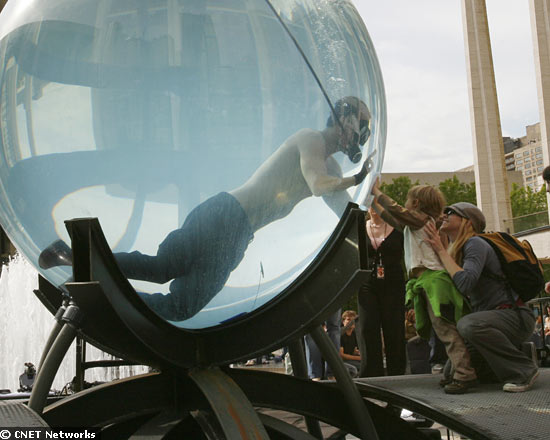
David Blaine, the human fishbowl

Just found out about this, and I gotta wonder, what’s wrong with this fellow? He’s clearly obsessed with what he’s doing, but to a sane person, the stuff he gets into is odd at best.

Now he’s in an eight-foot acrylic sphere at New York’s Lincoln Center, and he wants to stay fully submerged in the water for up to a week. He’s planning to break out on Monday, after beating the world record on holding one’s breath underwater, all while tied up with 150 lbs. of chains and handcuffs. One might say he’s asking for trouble. He’s also reported having problems with his skin because of the continued submersion.

You can’t help rooting for the guy, though. With so much stacked against him, he’s an underdog, and everyone loves an underdog, yours truly included. CNET has more photos and details. Photo courtesy of CNET. Hope he gets out alive!

Standard
Thoughts

Is it me or do these logos look similar?

Just had a look at a new handheld phone review from Engadget Mobile called the Helio Kickflip, and the logo looked very similar to something I’d seen before… Could it be? Well, here they are, side by side, for comparison purposes.

The logo on the left belongs to the phone, and the one on the right is the FeedBurner logo. I’ve been using – and loving the functionality of – FeedBurner for several months now. Photo of Helio Kickflip packaging courtesy of Engadget, and FeedBurner logo courtesy of FeedBurner.

What do you think?

Standard