Reviews

A look at noise cancelling headphones

I’ve recently had the chance to try out three noise-canceling headphones:

I looked at these criteria as I used the headphones:

  • Effectiveness of noise-canceling technology
  • Quality of sound
  • Fit and comfort
  • Price

What may or may not surprise you is that all noise-canceling headphones block only low sounds, like the rumble of jet airplane engines. They do not block all sounds. They also rely on passive noise reduction, due to their around-ear design with thick cushions. In other words, don’t expect them to block all sounds, or you’ll be disappointed.

I only looked at around-ear designs, because I cannot stand on-ear designs. They make my ears numb after a half hour or so of wearing them. I need something that fits around my ears and doesn’t press down on them in order to get the comfort I need for prolonged wear.

One thing to keep in mind with around-ear headphones is that some will make your ears hot after a while. If care isn’t taken with the materials used in their construction, the heat that emanates from your ears will build up inside the headphone chamber and raise the temperature, making you uncomfortable. Heat and lack of air circulation are two things that will caused increased bacterial growth in your ears. Yes, this isn’t appetizing, but keep it in mind as you look at headphones and your own headphone-wearing habits.

All three of these headphones come with carrying cases, adaptors (2-pin and 6.3mm) and cables, so don’t let that be a differentiating factor. While I’m on this subject, keep in mind the Bose and Philips headphones only use one AAA battery while the Creative headphones use two AAA batteries. That is a differentiating factor.

Bose Quiet Comfort 2

The Bose Quiet Comfort 2 is priced at $299 and is the pricier of the three. There are more expensive noise-canceling headphones on the market (Sennheiser has a couple of more expensive models), but the Bose headphones are the most well-known of them all.

Its noise canceling capability was decent, but for the market leader, nothing special. It reduced the sound of jet aircraft, but all voices around me remained clearly audible, though just a little muted. I suppose I could describe the technology as elegant, since it allows one to carry on a conversation with someone while wearing the headphones, but I’m sorry, at $300 you ought to be able to adjust the level of noise-canceling in order to block as much or as little of the ambient noise as you want. They didn’t have that capability and disappointed me.

The quality of the sound was tinny. The noise-canceling technology did a number on the lower sounds coming out of the headphones as well, so everything sounded a bit like a tin-can telephone.

I could find nothing wrong with the fit. It was great. It didn’t press down on my ears, it didn’t press down on the top of my head, and the cushioning was just right.
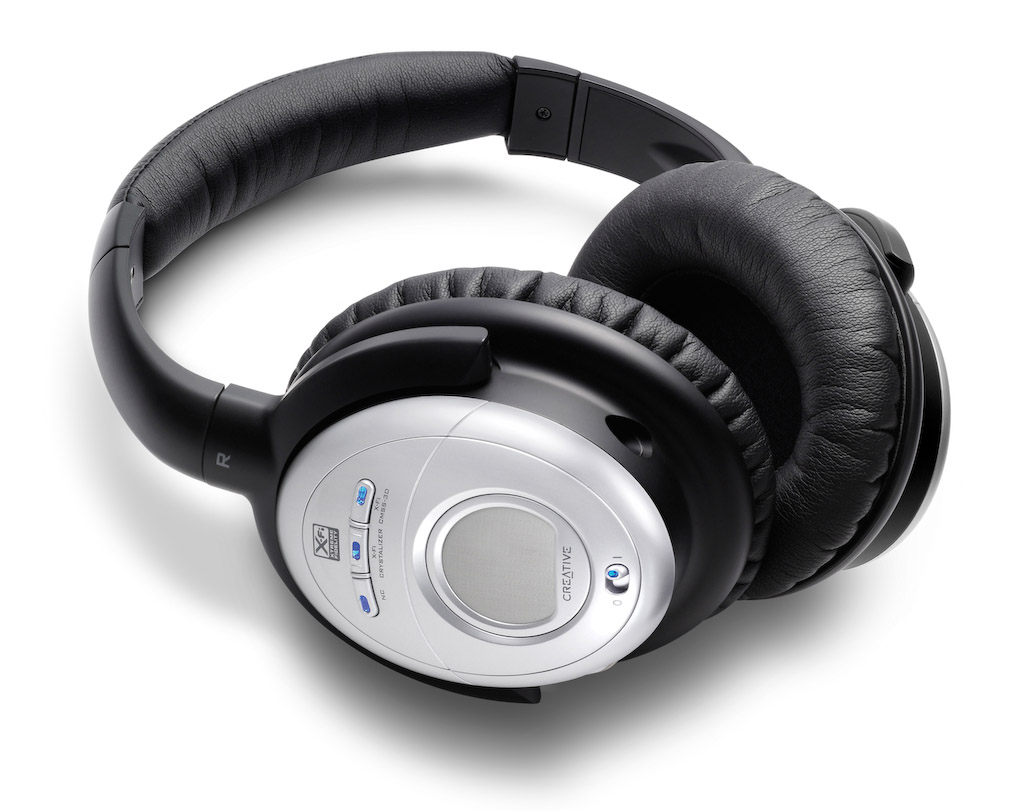
Creative Aurvana X-Fi

These headphones retail at $249 currently, but beware, they’re still listed at $299 at Apple Stores. I have to say I was doubtful of Creative’s ability to offer great headphones, and also suspicious of their price point (frankly, they haven’t earned the right to charge $300 for headphones), and I was proven right on both counts.

The noise-canceling technology was very similar to the Bose QC2 headphones. Same comments apply, and the quality of the sound was just as annoying. I found that the noise-canceling button distorted the sounds significantly, much more so than the Bose headphones.

Creative added two buttons to the headphones, one called X-Fi Crystalizer, which is supposed to give detail and vibrancy, and X-Fi CMSS-3D, which adds spatial characteristics to the sounds. I sat at home for an entire evening, playing with the buttons, turning them on and off, trying to see what and how much the affected the sounds that the headphones produced. I found them to be gimmicky. They did nothing for me. Oh sure, they changed sounds slightly, but not enough to warrant their fancy names and the price of the headphones.

What really annoyed me was their fit and comfort. They pressed slightly on my ears, but their real crime was the quality of the materials used in their build. Within 5 minutes of wear, my ears got hot. Didn’t Creative do any real testing before releasing these? Who did they test them on? Any real person would have noticed that their ears got hot while wearing them, and would have said something.

Philips SHN9500

These headphones offer an equivalent level of noise-canceling technology. Having already explained how I feel about it, there’s no need to go over it again. I found the quality of the sound to be better than with the other two headphones. Quite acceptable, as a matter of fact, and it wasn’t severely affected when noise-canceling was turned on.

What I also liked was the presence of a Mute button on the headphones, which will turn off any sound coming through them, and also turn off noise-canceling. This allows you to hear someone better while you have the headphones on, without needing to remove them. You might say, well, why not just turn off noise-canceling? Because that’s a slider button, while the Mute button is a push-button with a very light action. Quite thoughtful on their part.

The fit and comfort of the headphones was another surprise. They fit nicely, and they’re made of quality materials. My ears do not get hot while wearing these, even for extended periods of time.

The biggest revelation for me was the price: $70 at Costco when I got them less than a couple of weeks ago. Now I see they’re $90 — they must be popular.

All in all, the Philips SHN9500 headphones have the right combination of features, comfort and price to make me happy. These are the headphones I would recommend to you.

More information

Photos used courtesy of Bose, Creative and Philips companies.

Standard
Reviews

A glimpse at the new Snow Leopard from Apple

Snow Leopard, the new version of Mac OS X, was announced at the 2008 WWDC in San Francisco. It’s an important release for the following reasons:

  • Builds upon existing technologies and perfects them. It introduces few new features, but will allow Apple to really focus on delivering a very good OS by developing further the technologies introduced with Leopard. I for one am glad to see Apple slow down their frantic development cycle. That sort of rhythm can’t be sustained and leads to burned-out employees.
  • Optimized for multi-core processors. Truth is, most applications and operating systems aren’t optimized for multi-core processors. They’re not even multi-core aware. So while multi-core technology is here to stay and has already made it into all processor makes and models, applications are still hobbling along, relying on built-in chip technology for a sort of multi-core experience, not the real thing. I’m glad to see Apple pursue this seriously and make it easy for developers to build their apps for multi-core systems.
  • OpenCL programming. You know about OpenGL, right? Well, OpenCL will let developers take advantage of the amazing processing power of graphics cards (measured in gigaflops) to do computations previously reserved only for graphics applications. To get an idea of how powerful graphic card processing has become, have a look at FASTRA, a supercomputer built with 8 GPUs.
  • RAM limit raised to 16TB. I did a double take when I read that. I first thought they were talking of 16GB, which would have been impressive, but also a misprint. The Mac Pro can do up to 32GB right now if I’m not mistaken. But 16TB, wow! That’s amazingly high for RAM. Most machines don’t even have that much hard disk space, much less memory. That’s going to be very useful when building supercomputers with Macs. Keep in mind that 32-bit Windows operating systems (the prevalent ones on the market) STILL have a 4GB limit on RAM. Microsoft’s 64-bit OS versions (XP and Vista) are not usable yet, because there are plenty of compatibility issues with drivers and applications. For a clarification of this point, make sure to read my comment below.
  • Quicktime X. Apple’s venerable Quicktime will get an overhaul which will make it much more efficient, and will allow it to support more audio and video formats. Perhaps now we can look forward to Quicktime movie exports taking less than 24 hours? 🙂 Joking aside, I like Quicktime, and I hope it sticks around for a long time.
  • Faster Safari. It will use a new webkit that will make it 53% faster. Nice! I should mention that all the JavaScript used on AJAX-heavy pages like Google’s Gmail or Apple’s new MobileMe is what’s slowing down our browsers. The new Safari webkit is supposed to be able to render JavaScript a whole lot faster.
  • Native support for Microsoft Exchange. In spite of grumblings from various Apple fans, this is a biggie, and it will finally ensure that Macs play nice in Microsoft Shops. In addition to being able to network properly on Windows domains, which they could already do, now they’ll do exactly what Outlook is able to do on PCs, without having to bother with the kludgey Entourage. Mail, Address Book and iCal will communicate directly with Exchange, making it a whole lot easier for corporations to use Macs instead of PCs.
  • Faster OS, smaller footprint. Apple promises the new OS will work faster overall, and will also take up less space on our hard drives. Amen to that. OS bloat is not a welcome thing (just look at Vista), and a faster OS is always a good thing.
  • No support for PowerPC processors (source). According to documentation handed out to developers at WWDC, Apple will indeed break with the PowerPC line on this Leopard upgrade, as rumored. That means my iMac G5 won’t be able to use it. By that time, it’ll be outside its projected 3-year lifespan, but still, it would have been nice…

Image used courtesy of Apple, Inc. More information about Snow Leopard can be found in Apple’s original press release, and on the Snow Leopard website.

Standard
Reviews

Hardware review: Super*Talent 8GB USB flash drive

The 8GB Super*Talent USB flash drive I ordered from Brando arrived last night, and it was a very pleasant surprise to see how tiny it really is. It’s smaller than a simple USB connector, in both width and thickness. I am amazed by how small it is — and the thought that 8GB of data somehow fit onto this minuscule piece of steel and silicone boggles my mind.

I put together a short video review to show you the drive’s size and also to do a quick speed test. I copied a 1GB movie onto it, and the copy operation took about 3 minutes. That means it’s about half as slow as a Drobo in terms of transfer speeds.

The photos of this flash drive do not do it justice. It’s much smaller than it looks in the online stores. I hope that the video itself will do a better job of demonstrating its size (to scale), and its beautiful and simple design.

Download Super*Talent video review (640×480, MP4, 41.2MB)

This USB flash drive’s size and design leave me thrilled to no end. If you’re in the market for a spacious yet tiny flash drive, the Super*Talent fits the bill perfectly. The only thing left for it to prove is its long-term durability. It is rated PICO-C, which means it’s rugged and water resistant. I am very interested to see how long it lasts — if I don’t lose it first.

Updated 10/30/08: Still works just fine after 5 months of use. I have it attached to my keychain, and I carry it around in my pocket all the time. It’s got a few scratches, but it works as advertised. Still happy with it.

Standard
Reviews

Updates to my Drobo review

Updated 1/14/19: I have revised my opinion of Drobo devices. After experiencing multiple, serious data loss events on multiple Drobo models, even recent ones, I no longer consider them safe for my data.

Updated 3/19/08: My review of the new Firewire Drobo is now published. I’m also glad to say that the issues outlined in my original Drobo review (and mentioned below) were resolved through firmware updates, as expected.

I’ve re-organized my Drobo review and also added two brand new updates to it, in the “Transfer speeds” and “How it sounds” sections. They’re marked with today’s date. If you’re interested in the Drobo or you already own one, you’ll want to look into this.

While my updates aren’t exactly flattering, I still think the Drobo is the best archival solution for my videos and photographs. Fortunately, the two things I pointed out can be resolved (to an extent) with firmware updates, and Data Robotics isn’t stingy with those, so relief may be coming in the near future.

Standard
Reviews

Vista SP1 addresses some of my previous frustrations

I’ve had Vista SP1 installed on my machine for a week or so, and I’m pleased (surprised as well) to see that Microsoft addressed some of the issues that have frustrated me in the past. I guess when your expectations are low, any step toward something better is noticeable.

If I sound somewhat bitter, it’s because the SP1 install was problematic. I detailed that ordeal previously (you’re welcome to read it if you’d like). Basically, it had to do with language pack installs, which caused the prep time for the SP1 install to take several days instead of 15-30 minutes.

Once the extra language packs were out of the way, the actual SP1 install itself posed no issues for me. I’ve heard plenty of horror stories, but for me, the experience was normal, if somewhat protracted. Once the computer finished the three install steps (2 pre-reboot, 1 post-reboot), my machine was up and running with SP1.

As I began to use it, the first thing I noticed was the correct calculation of the RAM present in my machine (see screenshot above). That was a nice little surprise. I found it frustrating (pre-SP1) when the BIOS said I had 4 GB of RAM, yet Windows could only see 3,069 MB of RAM. It didn’t make sense. Now that’s fixed, although, as Ben Watt points out in this comment, Vista will still not use all of it due to 32-bit limitations.

Boot-up times also seem to have improved. I haven’t done any stopwatch testing, but I don’t find myself sitting around twiddling my thumbs as much when I need to reboot. That’s nice.

More importantly, I am now able to do something which I couldn’t do pre-SP1, even though it was an advertised feature of Vista: back up my machine (see screenshots above). That’s right, before SP1, a full PC backup was impossible. There was a bug that didn’t allow you to go through with that operation in Vista Ultimate. Now that’s no longer the case, and I’m happy to say I completed my first full PC backup this afternoon.

I also understand that Microsoft is now making Vista SP1 available in more languages, which will help reduce the language uninstall times for those people who were unfortunate enough to install the optional (or in my case, required) language packs.

Furthermore, they’re offering free, unlimited SP1 install and compatibility support, which is laudable — but given the fact that one has to jump through hoops to install SP1 — also needed. In my case, I doubt they could have helped. After all, what I needed to do was to uninstall the language packs, and Microsoft made the uninstall process so freakishly long that all I could do was to either stare at the screen, fuming, or take a walk, then come back to find it still going on…

What I do not approve though, is the way they’re trying to get the word out about Vista and SP1. They’re doing it through an internal (leaked?) video that makes me want to pull my eyes out. It’s as if they’ve learned nothing from the Bank of America video debacle. Worse, it’s as if they took that video and did their best to outdo it. They succeeded all right, in a very sad way.

Standard