Reviews

Motorola's new, cheap cellphone

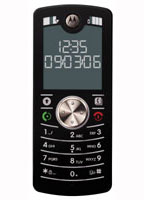
Motorola's new MotofoneMotorola’s just come up with a very nice and thin cellphone that’s just that: a cellphone. It’s called the Motofone, and has no other features — no music player, no digital camera, no fancy gadgets, games, etc. It’s just a cellphone, and it looks really cool!

It’s getting billed as the “dumb phone” by folks in the media, but I think it’s a really smart choice on the part of Motorola. I for one have been asking for just such a device for over a year. They’re targeting this phone for developing countries, but I say bring it to the States, too! I’ve been waiting for it for some time, get it over here! And make it even smaller and “dumber” if possible. I’m sick of bulky devices. I just want a phone, credit-card thin if possible. That would make me very happy!

Standard
Reviews

Zoom Search Engine: a powerful and inexpensive search engine for your website

Zoom Search EngineI’ve been using the Zoom Search Engine for over a year, and I’ve been very happy with it. But today I realized I hadn’t told many people about it, so I had to fix that.

So what’s the Zoom Search Engine? It’s a beautiful piece of software written by WrenSoft, an Australian web software company. Here’s what I think is amazing about it:

  • It’s inexpensive: the Standard edition is $49, and the Professional edition is $99. (I have the Pro edition.) There’s also a free edition for smaller sites. A side-by-side comparison of the different editions is available on the WrenSoft website.
  • It’s small in size, but feature-packed. The executable is 1.65 MB. Bloatware this is NOT. It is small and it packs a powerful punch. If you don’t believe me, install it, then run through the various options. There are a LOT of them!
  • It does the job — no crashing, no malfunctions. In over a year of serious use, with it running daily to index a lot of files for most of that time, it didn’t crash once. It just did its job.
  • Tech support is great, and included in the price of the software. I needed to contact them twice to ask them about some advanced configs for the app, and they responded within 12 hours. What’s more, they actually solved my problem. There were no excuses and no passing the buck.
  • It’s a scalable piece of software. Not only will it index small, simple sites, but its indexing engine can use ASP, PHP, JavaScript or CGI. The CGI engine can be used for enterprise sites – we’re talking hundreds of thousands of pages here! Not only will it index sites hosted on web servers, but it will also let you put a search engine on a site that runs off a CD or DVD.
  • It spiders and indexes most document file types with the aid of free plugins that work with the paid editions of the software. They’ve got plugins for Word, WordPerfect, Excel, PowerPoint, PDF, Flash and FlashPaper, and Rich Text formats. Having used all of these plugins over the last year, I can tell you they work a treat. They certainly do the job, and there’s no false advertising involved.
  • It’s a customizable and flexible piece of software. You possess the search index. You have access to the actual files used by the search engine, and you can tweak the engine and the index as you please. You can adjust everything. I can’t think of any other solution on the market that will let you do that. When it comes to this, it beats Atom and Google and any other solution, hands-down. Google’s search appliances are a black box. You can play with the options, but you don’t have access to the search technology. You can’t pop the hood and have a look at what makes their searches tick.

So how exactly have I been using the Zoom Search Engine? It’s been powering the site searches on Exprimare and the Road Management Catalog, among a few others. While Exprimare is a fairly small site (it’s my consulting/portfolio site), the Road Management Catalog is a big site in terms of the content, file types and number of pages. It belongs to the World Bank, and vendors of various road construction, measuring and testing equipment have accounts where they submit company information and upload brochures in various file formats. The Zoom Search Engine’s job on that site is to index all of the uploaded files, all of the various companies’ info, the regular site pages, and to make them all available in the search index. It’s been doing a wonderful job over the past year, and I love it. I’ve scheduled it to run every day, and to index all of the files. When it’s time for it to start, it does so automatically. It spiders the site, builds the index, uploads it to the site through FTP, then closes automatically. I don’t have to do anything other than adjust search parameters here and there as the need arises.

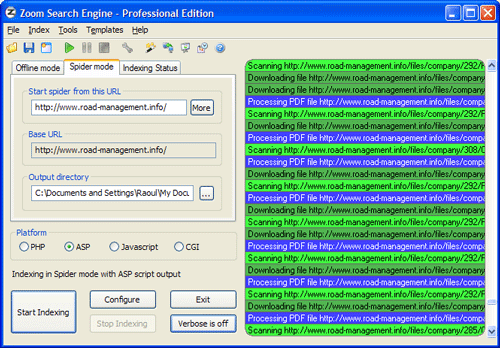
Here is a screenshot of the main app window, just as it’s indexing the Road Management Catalog. Once it’s configured, it spiders the site (you can set it to start multiple threads so the indexing goes faster) and then it goes about its business.

Zoom Search Engine

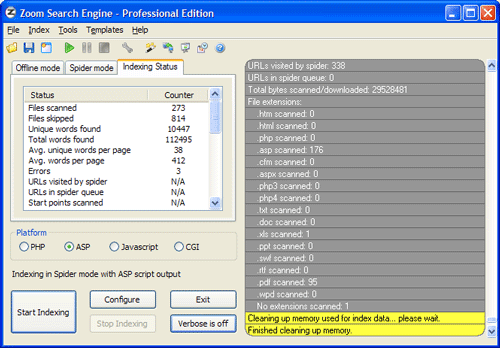
When it’s done, it gives you an index status report, to let you know what it found. It also outlines in red any indexing errors, such as files or pages it couldn’t download or index.

Zoom Search Engine

If I had to talk about the many configuration tabs, I’d have to reproduce their user manual. Instead, let me just show you a screenshot of one of them, the Indexing options. How cool is this! I get to decide what gets indexed, what gets boosted, and how words get joined. And this is just a small sample of what the app can do.

Zoom Search Engine

A lot more screenshots are available on the WrenSoft site. Their support section is extensive, a forum is also available, and their tech support is only an email away.

The Zoom Search Engine is an amazing product, and well worth its price. As a matter of fact, I’d call it underpriced. It’s a tremendous value given its functionality. So if you own a site and have been looking around for a suitable search engine, don’t settle for something that’s overpriced or inflexible. Get something that’s been tried and tested, something that’ll work, something you can use on a daily basis and tweak until you get just what you want.

Standard
Reviews

Boot Camp 1.1 Beta just released by Apple

Apple Boot Camp 1.1 BetaI complained in a previous post about how I wanted to buy a Mac laptop that I’d use for both work on pleasure, but couldn’t, because I was shackled to Windows OS for most of my development work, and there were certain things that just didn’t work on the Mac, with either Boot Camp or with virtualization software.

Well, I can’t have been the only one with gripes, because Apple just released Boot Camp 1.1, addressing some of the very concerns I voiced, both here and at BlogCritics. Here’s what the new version includes:

  • Support for “the latest Intel-based Macs”: this means the Core 2 Duo chips, code-named Merom, coming out at the end of this month. It could also be referring to the new Quad Xeon chips installed in the Power Macs, but I have a feeling 1.1 covers the Merom line as well.
  • Easier partitioning: version 1.0 was somewhat limited (let’s say minimalistic and be nice about it) in the choice of partition sizes.
  • Ability to install Windows XP on any internal disk. It still stinks that we can’t install it on a USB/Firewire drive, but I assume that’s coming down the line.
  • Support for built-in iSight cameras: this was one of my biggest gripes. Trying to use the iSight camera would give the dreaded BSOD.
  • Suppor for built-in microphones: about time! This was a pretty basic requirement.
  • Right-click when pressing the right hand Apple key on Apple keyboards. Interesting, although I’ll probably still use Ctrl + Click.
  • Improved Apple keyboard support: again, about time! Keys like Delete, PrintScreen and NumLock are used by most users on a regular basis.

So what still doesn’t work? The Apple Remote doesn’t. And neither do the Bluetooth Wireless Apple Keyboard and Mouse. Now, while it’d be nice for me to control iTunes while in Windows with the Apple Remote, I can live without that, but why wouldn’t the keyboard and mouse work? So okay, they don’t – fine. But what bothers me is that the sudden motion sensor and the ambient light sensor don’t work either. Those are not only cool, they’re very practical technologies. The sudden motion sensor in particular should be a must have feature.

I can just imagine Apple Tech Support when an unfortunate fellow calls them (hopefully not me):

  • User: “My laptop was resting on its laptop stand, and when I picked it up, it slipped out of my hand and dropped on the table. Now it won’t boot up!”
  • Support: “How high was the drop?”
  • User: “Only 4-6 inches! What’s going on?”
  • Support: “Were you using Windows at the time?”
  • User: “Uh, yes?!”
  • Support: “Well, you’re out of luck. If you were using Mac OS, the sudden motion sensor would have protected the hard drive, but since you used Windows, that hard drive is kaput. Plus, we don’t support Windows. You’ll need to get a new hard drive.”

In a related note, most of the new Lithium Ion batteries are subject to meltdowns and explosions when shaken, overheated or dropped. Something to think about as you hold that laptop in your lap…

Standard
Thoughts

Why you shouldn't "let go of difficult clients"

I recently read an article entitled “Letting Go of Difficult Clients“, written by Amy Berger and featured in the August 2006 issue of The Costco Connection. I do not agree with the views she expresses there.

While there are times when a relationship with a client has to be severed, none of the conditions presented by Ms. Berger in her article are truly qualified. What’s more, they encourage a sort of irresponsible attitude, where consultants who don’t comprehend the meaning of the client-consultant relationship and the level of trust that’s involved with it, fire clients on a whim, severely endangering the projects with which they’re involved.

Let me go through her article and explain what I mean:

  • “The client seems ambivalent.” This is perfectly normal. I don’t know of many people that can afford to spend thousands of dollars without carefully considering the options. I also don’t know of many people whose schedule allows them to do the things they’ve planned all the time. Unexpected circumstances always come up and delay things. If you fire a client based on a delay that couldn’t be helped, you’ll end up looking like a heel. If you hang in there, you not only get the contract, but also gain a deeper level of trust with the client.
  • “You can’t tell who’s boss.” Exactly how can you help someone’s immediate and unexpected transfer? Sure, if you want to lose your contract, go in there and blow off steam about how “disorganized” they are. But if you want to keep the contract, you go and meet with the new principals, and agree on how to move forward.
  • “Your communication styles don’t mesh.” Since when have two people’s communication styles meshed completely? Let’s get serious! There are husbands and wives who don’t manage their communication well, and they live together day in and day out. It’s your responsibility as a consultant to be flexible, and work with the client to ensure proper communication.
  • “The client is overinvolved.” Most people take some time to get sold on a new idea. The more different this new idea is from what they’re used to, the more time it takes for them to understand it, and it takes yet more time for them to trust it. If the client doesn’t get back to you immediately with feedback on what you present him or her with, wait, and occupy yourself with other projects in the meantime. Give them gentle reminders from time to time, and express your availability to discuss the project further if needed. Eventually, they’ll come around, or they’ll move on. But let that decision be theirs, not yours. Exactly what do you lose, as a consultant, if you spend a minute or two a week crafting a short message to remind the client of the project? You only stand to gain a contract, and your gentle persistence will help soothe the client’s fears.

Let me give an example to illustrate this last point. Two years ago, I started working on moving a client’s offline, paper-based business, to an online website that would automate the tasks she did by hand, saving her countless hours of drudgery. She was used to the paper process, understood it well, and knew it worked. But she also knew she needed to make a change, because managing it on paper took up too much of her time. When I put forward the idea of a website that could do all she did on paper and more, she was reluctant, but I gently persisted, and with the aid of mutual friends, she was finally persuaded to go forward with the project.

Within a year, she started to see the benefits, and got excited. But it took two years for her to realize the full potential of moving her business online, and now she finally admitted that I’ve changed the way she does business. She told me she now realizes how easy it is to run her business this way, and has started to look for a house in a different area, because she no longer has a need for a physical presence in the area that her business serves.

What’s the moral of this story? If you expect a client to change their views based on one presentation or a meeting, you’re kidding yourself. It takes time, months and even years, for people to make sense of something that’s completely new to them.

Now here are the circumstances when you can start thinking about firing the client:

  • He or she doesn’t pay the bills. I’m not talking about delays of weeks. That’s normal, and with big businesses, that’s even expected. Something tragic may have even happened that has severely limited their finances. But when they keep saying the check’s in the mail, and it never arrives, that’s when it’s time to get serious. Verifiable lying is always a good indicator of a client that needs to be fired. Besides, the problem of non-payment is easily solved by always asking for a percentage of the project upfront. That way you’re guaranteed at least a part of the payment, and if need be, you can get the other part with the aid of a mediator or a lawyer, although I’ve always tried to avoid those routes. Our society is litigious enough as it is.
  • He or she abuses your time. By this I mean several calls a day for weeks on end, that you know are unnecessary, and that review the same objectives, time and time again. There’s nothing wrong with checking on your progress, in particular if the deadline is looming or the project’s critical, but when you start to screen your phone calls because you fear he or she might be calling and they’re going to waste your time once again, that’s when it’s time to re-evaluate your relationship with the client. I’m not saying you should fire them right away, but you should try to set boundaries. They can be as simple as limiting the contact to 1-2 phone calls or emails a day, or more complicated, depending on your relationship. Only when that doesn’t work is it time to think about severing the relationship.
  • The language or behavior gets abusive. It’s normal for a client to get upset, or feel frustration. People have different temperaments, and some get upset more easily. Change is usually one of the most common reasons, because it prompts fear. People fear the unknown, and when they’re afraid, they get upset more easily. Technology is another frustration-inducer. It’s hard for an older individual to catch up with the younger folks who’ve grown up with technology and can speak its language. Don’t misjudge a client’s frustration for truly abusive behavior. Instead, look for a pattern. If the behavior is always angry and abusive, then this client’s not for you, and I daresay, not for anyone.

But if you messed up, and the client calls you, and he or she is angry or frustrated, whose fault do you think it is? Theirs or yours? Don’t try to escape providing good customer service by blaming the client! That’s my fear when I read Amy Berger’s article. On one level, she’s encouraging consultants to provide half-hearted service by bailing out when they feel like it, and that’s just not right. It pays to always examine thoroughly what’s going on before jumping the gun and firing the client. You’ll find your relationships with your clients get much more rewarding that way.

Oh, and if Amy or any of you still feel like firing your clients willy-nilly, send them my way. Tell them to go to Exprimare and to contact me. I’ll see if I can help them.

Standard
Reviews

Camera preview: Sony Alpha DSLR-A100 DSLR

I’ve been reading reviews about the Sony Alpha DSLR-A100, and I’m impressed. It looks like the successor to Minolta’s D-SLR line is a worthy one, and the features it packs for its price point are powerful. This camera has a 10.2-megapixel image sensor, improved 40-segment metering, a 2.5-inch Clear Photo LCD Plus, and Anti Dust technology. It will have 19 high-quality Sony lenses and a wide range of accessories, not to mention that it will be compatible with Minolta’s line of lenses. The lithium-ion battery will let you get up to 750 shots per charge.

I would love to get my hands on it for an up-close review, but until I do, I’ll leave you with links to some good reviews:

Some detailed specs are also in order:

  • Lightweight and durable magnesium alloy body: frame is 545g and frame+lens is 630g
  • Sony a Alpha/Minolta-A bayonet lens mount
  • 10.2-megapixel Sony CCD sensor with 10M/5M/2.5M image sizes
  • Recording choice of JPEG, RAW, or RAW plus Fine JPEG
  • Super SteadyShot anti-shake system with viewfinder indicators
  • Anti-dust system automatically shakes dust off the imager
  • Large 2.5-inch TFT color Clear Photo LCD Plus
  • Pentaprism viewfinder with 95% coverage and Eye Start AF
  • 9-point AF with Wide, Spot and Focus Area Selection
  • Image adjustments: Contrast, Saturation, Sharpness (5 levels)
  • Shooting modes: Full-auto, Programmed AE with program shift, Aperture priority, Shutter priority, Manual and Scenes
  • Dynamic Range Optimizer using the Bionz image processor
  • TTL metering: 40-segment honeycomb-pattern, Center-weighted or Spot
  • White Balance: Auto, six presets and Manual color temperature
  • Unlimited Continuous 3fps shooting Large/Fine JPEG images, up to 6 RAW
  • Shutter speeds: 30 to 1/4,000 seconds, 1/160 sec. flash sync
  • ISO Range: 100, 200, 400, 800, 1600 (with lo80 and hi200)
  • Built-in TTL popup flash with red-eye reduction.
  • Hot shoe for Sony/Minolta Program Flash units
  • CompactFlash I/II card slot, Microdrive and FAT32 compatible
  • Video Out with selectable NTSC or PAL timing
  • High capacity lithium-ion battery pack and charger included
  • Exif Print, PRINT Image Matching II, PictBridge compatible
Standard