

A few years ago, there were two companies which had some interesting opportunities ahead of them: Sigma with its revolutionary Foveon sensor and lens-making know-how, and FujiFilm with its remarkable Super CCD SR sensor and long-term experience with professional lens-making.
They didn’t stay on course. Sigma’s continued development of the sensor has been much too slow to keep up with the market, and FujiFilm seems to have dropped out of the DSLR game altogether.

Back in January of 2007, I wrote about the Sigma SD14, a camera I thought was revolutionary because of its capability of capturing every color (Red, Green or Blue) at every pixel, due to its layered Foveon sensor. This was something no other camera on the market had.
The megapixel game isn’t everything and I was willing to believe so in the case of the SD14. Its advertised resolution was 14 megapixels, but its true resolution was about 5 megapixels. That’s because each layer of its Foveon sensor (there are three layers, one for each color) only captured 5 megapixels. When you looked up the photos resolution in the EXIF data, it came out to 5 megapixels. When you zoomed in at 1:1, the photo still only covered a 5 megapixel area. People pointed out that you could safely increase the resolution of processed images to 12 or 14 megapixels and they would still have the quality you need but in my book, 5 megapixels is still 5 megapixels even if you can multiply it by 3 and get 14 megapixels.
Regardless of my disappointment with the camera’s real resolution, I still thought Sigma had a gorgeous sensor on their hands. The ability to capture color accurately at every pixel is something other sensor manufacturers only dream about. Their sensors don’t do that. Instead, they spread Red, Green and Blue pixels around the entire sensor area using a mathematical algorithm called Bayer interpolation, then they do some very serious calculations to de-mosaic the resulting image, make out the right colors, and give you as accurate a color reproduction as they can give you. The Foveon sensor didn’t have to do all that complicated stuff. Supposedly, it already knew which color belonged at each pixel, because it captured said color from the get-go. Wasn’t that an amazing capability?
Look what’s happened in the 3½ years since I wrote about the SD14… Sigma launched the SD15 only a few months ago, and guess what its resolution is? It’s the same 14 megapixels if you play their multiplication game or 5 megapixels if you go by the book. Sure, they upped the ISO sensitivity to 1600 from 800 (3200 in extended mode), which is okay, but the AF is slow and the max shutter speed is still only 1/4000 sec when other cameras in the same category offer 1/8000 sec. And there’s no video, HD or otherwise.

In case you aren’t already thinking it, let me sum it up for you: Sigma’s product offerings have fallen behind the times by at least a couple of years, if not more. Some might say they came out with the DP1 and the DP2, and those cameras are interesting in their niches of the market, but they still offer subpar performance in low light and they still don’t record video (unless you count tiny 320×240 video as real video).
I’d like to ask the folks at Sigma this question: What have you been doing these last few years? You had an amazing sensor in your hands, but you didn’t develop it while others took their Bayer pattern sensors to incredible heights of performance. Your Foveon sensor ought to develop 14 or 16 real megapixels now, on each of its three layers. It should go to 6400 ISO or 12800 ISO natively. Then it’d be competitive in today’s marketplace. Instead, it’s the same sensor I saw more than three years ago, installed in a new camera body.

In early 2007, FujiFilm also launched a new DSLR. That camera was pretty amazing in its own right, like the SD14, except the FujiFilm FinePix S5 Pro actually met the demands of the marketplace of its time.
It had a wonderful resolution of 12.34 megapixels, an 11-point, 7-area AF system, a 14-bit A/D converter (most DSLRs at the time were still at 12-bit), ISO sensitivity that went all the way up to 3200 ISO natively, and 1/8000 sec max shutter speed.
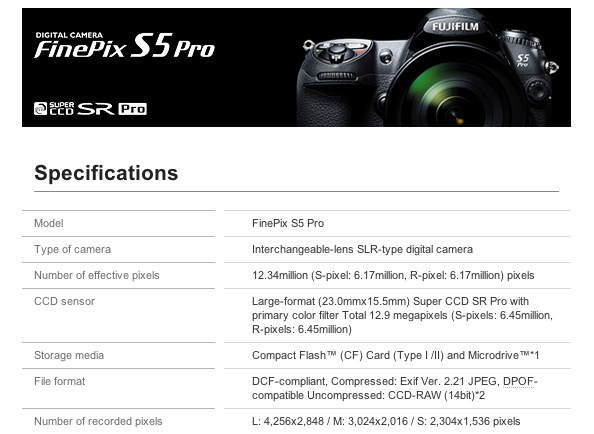
Most of all, it had a revolutionary sensor developed in-house by FujiFilm. Here’s what they said about it in the S5 Pro press release:
“Fujifilm’s Super CCD SR II will be updated to the new Super CCD SR Pro. Using a unique layout of twelve million paired photodiodes (6.17 million larger ‘S’ photodiodes for main image information, combined with 6.17 million smaller ‘R’ photodiodes for bright area information), the S5 Pro will deliver improvements in noise, dynamic range, colour and tonality. Further improving the capability of the sensor, a new, improved low-pass filter will ensure that moiré and noise are kept to an absolute minimum. Fujifilm believes improvements in these key areas will be of more true value to professional photographers – the challenge is quality of information, not quantity of information.”
In layman’s terms, it had both large and small photodiodes, clustered together in a beautiful geometric pattern, to capture as much image information as a single-layer sensor could capture, and a powerful engine to analyze that information and turn it into beautiful photographs.
People who used the S5 Pro loved its image quality. And even now (in 2010) when you look on Flickr you see that people are using it and the quality of the images they post very good.
So what has happened since 2007? It looks like FujiFilm dropped out of the DSLR market altogether. The S5 Pro is listed as discontinued on their website and there’s no other model to take its place. None. Instead, FujiFilm is focusing on regular digicams, and seems to be leaning toward cameras that exploit the higher end of the focal range (15-30x zooms).That’s a losing battle as far as I’m concerned. High zooms suffer by default of aberration and other artifacts as one gets above 15x. And in order to get the proper magnification in a smaller camera body, the sensor needs to be made really small — so small that you run into significant noise issues and photo quality suffers even at low ISO and at close range.
What FujiFilm did makes no sense to me. They have incredible know-how in the production of professional, high quality lenses. Their Fujinon lenses are used in satellites, in high end telescopes and in broadcast-quality TV cameras and camcorders. They have the know-how to design really nice camera bodies. I used the FinePix S9100 and I loved its body design. And you only need to look at their current digicam models (S200EXR or HS10), at they way the controls are positioned and the grips are designed, to realize that Fuji knows a lot about camera body design.
When it came to digicam design, they also had what was a big plus over other camera manufacturers. Most of their zoom cameras had manual zoom and focus, and the ability to use regular AA batteries. A manual zoom is just nicer than a servo zoom. It’s more responsive, more controllable, doesn’t eat into the battery life, and it’s more reliable over time. And isn’t it nice when you’re in the field and your camera runs out of juice, that you can just pop in a couple of AA batteries and keep on going? That’s such a practical design aspect, but people tend to forget it when they focus purely on battery life.
Now you look at their line-up, and only two cameras still offer manual zoom: the S200EXR which B&H Photo says was discontinued by the manufacturer even though it’s still listed as an active camera on the FujiFilm website, and the HS10. The rest all offer electronic zooms, which I don’t like.
Keep in mind all the good things I told you about FujiFilm’s know-how, and let’s look at the S5 Pro again. The sensor and the engine was clearly Fuji’s. But the body design was similar to Nikon’s body design. The camera was made to work with Nikon’s lenses. It’s as if FujiFilm didn’t want to own the very camera it made, the camera which contained its revolutionary sensor. This makes no sense to me. They knew how to make fantastic lenses, but didn’t make them for their own flagship DSLR. They knew how to make fantastic camera bodies, but didn’t make one for their own flagship DSLR. Does that make sense to you?
I wrote to FujiFilm PR in January and March of 2007, asking for a review unit. They were willing to send me one, but they didn’t have any lenses to loan me. I needed to supply my own Nikon lenses for the camera, and since all my equipment was Canon, that was no good. I gave up on reviewing the camera. And I bet you I wasn’t the only reviewer who would have liked to write about the S5 Pro but was turned off by the lens issue.
I’m really sorry to see that today, FujiFilm isn’t even developing their revolutionary sensor any more. Sure, they’re using a variant of it in some of their point-and-shoots, but that’s like saying your lawnmower has a Lamborghini engine inside. You can’t get the performance of a true Lamborghini engine from a tiny, cramped 2-cycle engine made to cut grass, and in much the same way, one can’t expect to get the true performance of the large sensor found in the S5 Pro from a tiny 1/1.6-inch sensor.
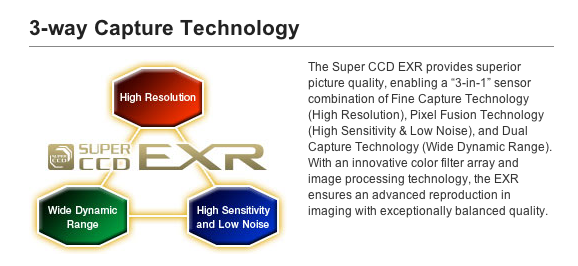
Don’t tell me CCD sensors are inferior to CMOS. They each have their pluses and minuses. CMOS sensors were thought to be inferior to CCD just a few years ago, but there was a real R&D push to make them better, and look at them today — they’re incredibly good. Don’t tell me you can’t get great video from CCD sensors. Professional camcorders use either CMOS or CCD sensors to record full HD video, depending on the model and brand, so I know that’s possible.
I know that with continued R&D effort, both the Super CCD SR Pro sensor and the Foveon X3 sensor could have been improved greatly, making them competitive and even dominant by today’s standards.
I feel bad for FujiFilm and for Sigma. Perhaps FujiFilm feels the market is already too competitive and has enough business from its other sectors. And it could be that Sigma is focused on its lenses and is satisfied with only a niche of the DSLR market. I don’t know, but I would like to find out more. If anyone has any additional information, please chime in.



 Raoul Pop