Lists

Condensed knowledge for 2007-09-19

A bit of a health theme to this edition of condensed knowledge:

  • A new CPR technique was discovered. It’s called OAC-CPR (Only rhythmic Abdominal Compression). As its name implies, you only press on the abdomen, eliminating the risk of broken ribs, mouth-to-mouth, and fatigue from pushing so hard. Definitely worth looking into this!
  • Prozac found in the drinking water in the UK. Apparently so many people are on the anti-depressant in England, that it can now be found, diluted, in the water supply, after having passed through their bodies, into the sewers, through the water treatment plants, etc. Although the “experts” are saying there’s no risk, I doubt it. I mean, this is a drug, found active, in the water supply!
  • WD40 turns out to be a great help for bad joints. Despite the precautions written on the cans, rubbing it into the skin was of tremendous help to a man suffering from joint pain. Not sure that I’d recommend this.
  • Aspartame is the behind the spike in suicides for teen and pre-teen girls. Apparently, it’s a powerful mood-changer — it causes depression. Something to think about the next time you buy your children something with Nutrasweet or Aspartame as the sweetener.
  • Exercising in traffic is bad for your heart. Now that’s something I’ve known was wrong for some time. It just didn’t make sense to me when I saw people running on the sidewalk, next to heavy traffic, breathing in all those noxious fumes. When I run, I want to breathe fresh, healthy air, not someone’s nasty car exhaust. I just couldn’t get why they’d put themselves through something that unhealthy. It turns out the particulates from vehicle emissions decrease our blood’s ability to clot, and restrict the amount of blood that reaches the heart immediately upon exposure.
  • Mobile phones are as dangerous as smoking. So reads a recent headline… People have gone back and forth on the safety of mobile phones for years. Now the EU has finally decided to pick a side and take action. The article’s in Romanian, but what it says is that governments are starting to take mitigating action, first by warning people of the risks, and then by looking at ways to minimize exposure to WiFi radiation. They’re recommending that people go back to using wired Internet connections instead of wireless ones.

Now for some funny stuff:

And some economic discussion:

  • Greenspan on Iraq war, oil link. He confirms what I’ve thought and said for some time. In his talk with Matt Lauer, he touches on the housing bubble and the fiscal irresponsibility of the current administration, but he has no compliments for the Democrats, either. Last, but no least, he says the dollar may be replaced by the euro as the reserve currency of choice.
  • Transparent Investing: what your broker doesn’t want you to know. Here’s a site that offers a purportedly frank discussion of index investing. Definitely worth a look.
Standard
Reviews

The value of microblogging services (part two)

This is Part Two of a mini-series on microblogging services such as Twitter, Jaiku and Pownce. You can read Part One here.

I promised you yesterday that I’d continue to discuss microblogging services in today’s post, and in particular, to show you how I use them to promote my own content and that of other bloggers.

First, let me tell you how I’m not doing it: I’m not typing my updates manually at both Twitter and Jaiku. That would be much too much work. It would almost be a full time job. Instead, what I do is to let the functionality of Web 2.0 do the work for me. I harness the power of feeds to do the foot work, while I go on about my regular day.

When it comes to my own content, I have my blog feed, my photos feed, and my videos feed. And when it comes to promoting the content I find on other blogs or websites, I use my Google Reader Share Items feed, and my del.icio.us feed. If it’s a blog post or a website that offers a feed, I’ll share it from Google Reader, and if it’s another website or web resources, I’ll tag it with del.icio.us. Between all of my feeds, I pretty much capture all of the interesting content that I or or other people create (well, at least the stuff I find interesting), and get to share it easily with others.

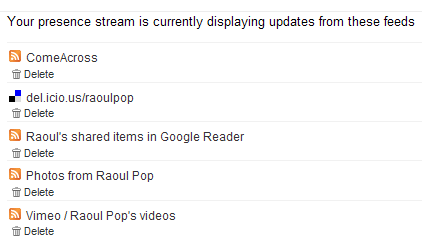
Jaiku itself offers a nice feed aggregation service, where I can point it to the feeds I want, and it’ll display the feed items on my Jaiku page. There’s no limit (to my knowledge) on the number of feeds displayed. I like the fact that this service is part of Jaiku’s feature set. There are some things I don’t like about it, and I’ll get to that in a bit. Here’s what my Jaiku feeds page looks like:

My Jaiku feeds

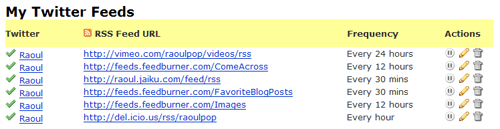
When it comes to Twitter, it has no feed aggregation service. As a matter of fact, the only way to get things in there is to type them in manually, but that’s not a lot of fun if you want to share a lot of stuff. (Remember to put that statement in the context of the differences between content creators and content consumers.) But what Twitter does have is a very nice and open API, and that means other people can build great functionality on top of the standard feature set. Wouldn’t you know it, someone went and did just that? I discovered a great service called Twitterfeed, which lets me aggregate my feeds just like Jaiku. Here’s a screenshot from my Twitterfeed page:

My Twitter feeds

As you can see, I’ve set up all of my relevant feeds to feed into my Twitter page, where they get posted very nicely every time my feeds get polled. If you look at my Jaiku and Twitter feeds closely, you’ll see that I have one more feed set up for Twitter — it’s my Jaiku feed. It’s because I use Jaiku primarily these days, and when I do type in a manual update, I don’t want to type it twice, at both Jaiku and Twitter. I publish it once at Jaiku and let Twitter pick it up through Twitterfeed. Works great!

I mentioned a bit back that there are some things I don’t like about Jaiku’s feed aggregation. Here’s the rub: I have no control over how often my feeds get polled, and my feed items get summarized in a single Jaiku instead of being displayed properly as individual items. This means a lot of the content gets lost, because there’s no way to click on each individual items. You can only click on the last item polled from a particular feed. Have a look at the following screenshot from Jaiku to see what I mean:

Jaiku items

As you can see from the screenshot, there were 19 new items in my Google Reader Share Items feed, yet only one got displayed. Where did the other 19 items go? They’re somewhere in virtual feed land, but they sure aren’t on my Jaiku page… It’s the same with my del.icio.us bookmarks feed. There were two new items, yet only one got displayed. Twitterfeed’s a lot better in this regard, because I can choose how often my feeds get polled, and because it converts each individual feed item into an individual Twitter. But it’s also got its limitations, because it can only display the last 5 items from a particular feed. So if I have more than 5 items, like I usually do in my Google Reader feed or my Images feed, they don’t all get displayed.

You might think that doesn’t happen very often, but I can read and share a lot of articles in the span of a half hour. Those 19 feed items you see in the screenshot above were shared in the span of 10 minutes, after reading through about 40 blog posts and articles. Plus, when I publish photos, I usually have more than 5. Yet the extra ones don’t show up on either Jaiku or Twitter. So yeah, this happens quite often for me.

At any rate, I can’t complain too much. The functionality offered by Jaiku, Twitter and Twitterfeed is fantastic for my needs. I can keep my various web presences up to date with my activities quite easily, and I can share a lot of interesting content in the process. Whether it’s mine or that of others, doesn’t matter that much to me. The important thing is that useful content gets promoted much faster and easier through feed syndication and the power of microblogging services like Jaiku and Twitter.

I hope you found this useful!

Standard
Reviews

The value of microblogging services (part one)

Twitter Jaiku

When Twitter came on the scene, no one knew quite what to make of it. “What’s the point?” was the most frequently asked question. When Jaiku got started about the same time, people again asked that same question. When Pownce got started recently, I was the one asking that question. As a matter of fact, I still am, and I’m not going to join Pownce until I can see what value it’ll bring me in addition to Twitter or Jaiku.

The thing is, that very pertinent question still hasn’t been answered. People are still trying to figure out what to do with them. Here are their current uses, from my observations:

  1. Publish simple activity updates
  2. Chat with friends asynchronously
  3. Self-promotion: point your contacts to something you’ve written or you’re working on
  4. Link sharing: point out interesting articles, videos or sites
  5. Marketing: fake/generic profiles are set up to talk up various products or events, and thousands of people get added as “friends” to that profile in the hope that some buzz gets created

I’ve been using both Twitter and Jaiku to do the first four activities listed above. After a while, #1 gets fairly old. Unless something highly unusual is happening, I’m simply not likely to visit the site and type in an update. I’ve got more important things to do. Plus, if I’ve got something interesting to say, I’d rather hold on to it and craft it into a nice blog post on my own blog than to share it on someone else’s website, where it brings me no added value.

Sure, others might say it’s fun to receive updates on your phone and participate through SMS. I say phooey to that. First, data plans for SMS are more expensive. Plus, I like my phone quiet. I don’t want it to buzz every minute with an update from a contact. And I’m not going to sit there thumbing on that keypad just so I too, can join the legions that say “I’m eating lunch” or “About to drop off my clothes at the cleaners.” Yes, this might be fun if I decided to get a fancy phone with a keypad, either a Windows Mobile device or an iPhone. But I think Windows Mobile devices are ugly, the iPhone is still a build or two away from the featureset I want, and both are too expensive. I don’t see the value in a fancier phone, even if I can surf the web on it, or do email. If I want to surf the web, I’ll grab my laptop and see it on a nice, big screen. So I have both Twitter and Jaiku set to web-only updates. I check both sites a few times a day, and that’s how I keep up with the various conversations.

Numbers 2, 3 and 4 is where the action is. If you are a content creator (refer to this post of mine for the details on that term) self-promotion can be valuable. If done in a non-sleazy way, it can make your contacts aware of something interesting that you’ve either just published or are about to publish, and can potentially extend the reach of your work. I publish links to my blog posts, my photos and my videos on both Twitter and Jaiku.

Link sharing is a very valuable feature of the microblogging services. I use it a lot to point others to various web resources or articles that I find interesting. For example, I read a lot of articles and blogs every day. I share all of the ones I find interesting on both Twitter and Jaiku. I’ll write in more detail tomorrow about just how I do that, and how I promote my own content.

As an aside, the only added benefit I see in using Pownce is for the file sharing feature. But where it could prove to be a value-added service for its founders, Kevin Rose being one of them, is in tight integration with Digg on link sharing. If a particular link is getting passed around between Powncers, that would be a pretty good indication that it could be Dugg as well, so having a section on Digg for popular Pownce links/articles would be a great way to capitalize on that, and to allow Digg users to do their thing with those articles, videos or whatever that link may be.

Last but not least, asynchronous chatting is an efficient way to conduct a conversation if you’re pressed for time or if your contacts are in different time zones. Instead of dedicating a slot of your schedule to a particular conversation, you simply tune in between your more important activities and share your thoughts. Your contacts do the same. Although it takes longer to get answers, I find it very useful for non-urgent matters. Jaiku is a lot better at this particular task than Twitter, because it has threaded conversations, while Twitter doesn’t.

The value of microblogging services lies in the fact that they’re another web presence for you. They’re another way to relate to your contacts and friends. Somehow, it’s easier for someone to Twitter or Jaiku me than to write a comment on my blog. Not sure why, because they get through both ways and I answer them just the same, but the immediacy of these services makes it easier to relate to me, and I assume, to others.

To sum up, these web presences can be used for asynchronous chats and for sharing your own content and other valuable articles, posts and resources with your contacts. I should point out that, just like a blog, if you’ll approach microblogging services with an entirely self-serving attitude, to engage in either shameless self-promotion or sleazy PR techniques, your little experiment’s going to fail. It’s important to maintain authenticity, and to have a good mix of interesting content, otherwise you push away people.

This is why I don’t add contacts left and right on either service, like some people do… I don’t see the point of adding complete strangers just for the sake of bloating my profile with fake friends, or just so I can shamelessly self-promote to a bigger audience. If I know someone, I’ll add them, or if someone adds me and I see from their update history that they have interesting things to say, I’ll add them.

Come back tomorrow because I’ll show you just how I use both Twitter and Jaiku for uses 3 and 4 from the list above.

One more thing. Here are the links to my profiles at Jaiku and Twitter:

[Updated 7/25/07: Part Two of this mini-series is now available. Read it here!]

Standard
Places

Construction, people and traffic jams

For the past month, there’s been construction going on at the American Legion Memorial Bridge. I use it everyday to get to and from work. They’ve closed a lane on the right side, and that’s a huge inconvenience. So much traffic goes over that bridge every day, particularly during rush hour, that the single lane closure backs traffic up for several miles, all the way to Route 66.

Since no notice was given of the nature of the work, I thought they might be building an additional lane. But no, all they’re doing is cleaning and painting the bridge. It turns out that one lane’s going to be closed for 6-12 months, causing huge traffic delays for everyone. I have to file this one under really poor planning. For a road that important, they should have built a platform underneath the bridge and put the machines over there instead of inconveniencing everyone above with their work.

Things wouldn’t be so bad except for the rubbernecking delays. Everyone wants to look at the loud machines and the construction workers. They’re a sight to be sure, the machines noisy, big and smelly, and the workers sunburnt and stained all over with muck and grime — but that doesn’t excuse the traffic delays.

If some sort of wall were put in place to separate the construction work from the passing cars, people wouldn’t have anything to look at, and traffic would go much faster. But that wouldn’t be in character with the poor planning shown by blocking the full lane in the first place, would it? So my commute time (and that of tens of thousands of other people) is doubled, and there’s absolutely nothing we can do about it, since there is no other route we can take.

Standard
Reviews

The new and improved Google Analytics

I’ve just been playing with the new Google Analytics interface, and wow, that’s a seriously cool improvement over the old one! Google announced this a few days ago, and I waited to see when the change would take place in my account.

I logged in a few minutes ago and was given a choice between using the old interface and the new one, which is still in Beta. Chose the new one, of course, and was blown away by the overhaul! My gosh, it’s clean, crisp, much easier to use, and it lets you dig down as much as you want to, but doesn’t overwhelm you if you just want to get the bird’s eye view.

What I also like is that they’ve buried the AdWords campaign tracking stuff down toward the bottom, and it’s even less visible than before. That’s great for me, since I’m not currently running any AdWords campaigns for ComeAcross, and wasn’t tracking the conversion anyway. My traffic’s pretty much organic, and it’s been steadily growing since I launched my blog last year.

You’ve got to have a look when you get a chance. Log in, and definitely play around with the new interface if you’re given the option. You will not regret it! I criticized Google Analytics for their hard-to-use interface in a previous post, but that was before this gorgeous new overhaul.

Now if they’d only fix their persistent login issue… Just about every other Google property knows I’m logged into my account and lets me right in, but Google Analytics always asks for my password, and that’s a bit annoying.

Standard