Places

Fake explosion at Key Bridge over Potomac on Wednesday

This Wednesday, March 23, a fake explosion will take place at or near the Key Bridge over the Potomac River, in Washington, DC, between 9:30 am and noon. A new TV show called “Washington Field” is being filmed there. One of the scenes in the pilot involves a sculling boat that blows up.

Key Bridge over Potomac

The explosion will yield a 20-30 foot fireball which should injure no one if everything goes according to plan. The Potomac Boat Club, founded in 1869, is right at the foot of the bridge, so I think it’s in the plot as well.

A short video of mine, filmed in the spring of 2007, and titled Washington DC Panoramic, features the Key Bridge.

Washington DC Panoramic from Raoul Pop on Vimeo.

[via Reuters]

Standard
Reviews

A look at the Samsung T260HD HDTV widescreen monitor

I tried, unsuccessfully, to use an HDTV as my main computer display in the past. Although the specs of that Sony HDTV were superb, its brightness and contrast levels were made for a TV, not a computer display, and it gave me headaches when I stood close to it, as I would when I’d work at my computer. Things have a way of working out though. One of the commenters on my HDTV post, Adam Juntunen, pointed me to something that might just work for my needs.

Samsung has come up with a product that is made to work as both a display and an HDTV. It’s the first such product that I’ve heard of: the T260HD, a 26″ widescreen computer display and HDTV. The T260HD is part of a line-up of four monitors which includes the T200HD (20″), T220HD (22″) and the T240HD (24″).

What sets the T260HD apart for me is the fact that it was made to fulfill both functions from the factory. Although I haven’t used it (yet), my hope is that the Samsung engineers accounted for the difference in display characteristics that is needed when one uses it as a computer display vs. a TV. What is heartening for me is that it’s listed among the computer displays, not the HDTVs, on the Samsung website, which means it’s really more of a computer display than an HDTV, which is just what I need.

The design makes this display stand out. The enclosure is made of glossy black plastic, and it looks as if there’s a clear panel of glass set over the front of the display, which should make it easy to clean. A hint of maroon color marks the bottom of the enclosure, right below the logo, giving it a distinctive look. I do hope though that the glossy black plastic doesn’t scuff easily. Other Samsung TVs do scuff over time, which means that as you dust them, small hair-width scratches appear on the plastic, marring its glow.

Promotional: Don’t spend too much on flat screen TVs; there are flat panel TV deals you can take advantage of. LCD TV deals are available for consumers to buy at discounted prices.

The specs listed on the Samsung website are thin on the details, and I can’t make out whether its color depth is 8-bit, 10-bit or 12-bit. My guess, given its price, is that it’s 8-bit or 10-bit — probably the former, not the latter. Color depth in a display is a very important specification, because if you work with photos, like I do, and your DSLR captures 12-bit or 14-bit color images, you won’t be able to edit them competently on a display whose color depth capabilities are much lower. A 6-bit display, for example, like many laptops have, would be fairly useless to you, because it just won’t reproduce the color tones faithfully.

Let’s have a look at some of the salient features of this display:

  • Full HDTV monitor: that’s good, and also to be expected since it’s a computer display as well, and its resolution is 1900 x 1200 pixels.
  • Dolby Digital Surround sound: it has invisible speakers built in, and they’re rated at 3 W each; I’ve heard these types of speakers on other Samsung products, and they’re pretty good — certainly a lot better than most monitor speakers.
  • Dual HDMI, DVI and VGA inputs: that’s impressive for a 26″ display. I see that Samsung didn’t skimp and even included a SCART connector for the European countries. I love that.
  • Low power consumption: one spec says it uses 0.3W in Standby mode, yet another says it uses < 2W in that same mode. At any rate, it only uses 70 W max, and that’s great for a 26″ display.
  • 10,000:1 dynamic contrast ratio: I think this spec is trumped up, as I see it on a lot of other, cheaper displays and TVs. I have no idea what it means. Supposedly, the increased contrast between light and dark helps you see things better. I’ll be the judge of that when I try it in person. I see that the Apple Cinema Displays are listed at a 700:1 contrast ratio, which I think is a much more reasonable figure.
  • 5 ms response time: this is a little sluggish given that most displays in that size are at 3 ms. Still, it’s better than the Apple Cinema Displays, which are still listed at 14 ms. I think 5 ms is sufficient for most movies and video games, but then I’m not into the violent, fast-paced video games.
  • 300 cd/m² brightness: this isn’t as bright as other displays in the same sizes, which are at 400-700 cd/m², but you know what, I’d rather not have headaches caused by too much brightness, so this should be fine for me.

What I’ve seen so far of this monitor has certainly whet my appetite, and I’d love to try it out for myself. If and when I do, I’ll let you know how it works out.

The Samsung T260HD is available from Amazon and B&H Photo.

Photos used courtesy of Samsung.

Standard
Reviews

WD TV is better than Apple TV

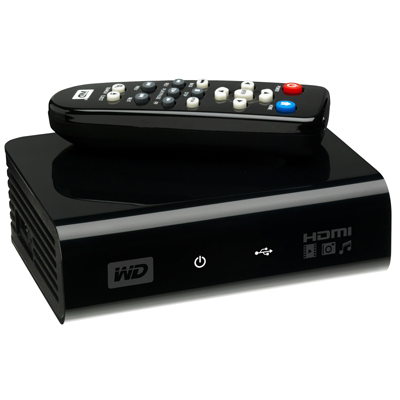
WD has put a new device on the market, and it’s called the WD TV HD Media Player. It’s a small box that can connect to a TV via HDMI or Composite output cables, and can take most USB external hard drives as input (it should even read USB flash drives as long as they’re formatted in FAT32). Once a device is connected, the WD TV will read the media from that drive (movies, photos, music) and let you browse through them and play them on your TV. What sets this device apart for me is that it has gone beyond other similar devices like the LaCinema Premier, or Apple TV. I’ll explain below.

The LaCie product, for example, doesn’t play as many formats as WD TV, and can only support NTFS and FAT32 file systems.

You’re limited in the amount of content you can play with LaCinema Premier, since the drive is integrated within the device itself, and because not as many video formats are supported (see the specs on the LaCie website). That means you have to lug the whole thing from your home office to your living room, re-connect it at each place, and copy files onto it when you want to refresh its inventory. The remote also leaves something to be desired (too many buttons).

I know and like Apple TV myself, having bought one and configured it for my parents, but frankly, I find it overpriced and under-featured. The more you use Apple TV, the more limitations you find:

  • It has an internal hard drive that syncs with content over a wireless network, which means you have to wait forever to get a movie onto it. The drive can also fill up quickly, depending on which size you pick. (Yes, you can also connect it via a Gigabit network, if you’ve pre-wired your living room and home office with Gigabit wires already — but most people have not.)
  • You can stream to it, but then you always have to keep iTunes open, and it’s a hassle to remember that, especially when you’ve just sat down on the living room couch and turned on the TV.
  • You also need to be able to troubleshoot WiFi issues in case you’re not getting enough bandwidth and Apple TV playback stutters.
  • You have to add every single video clip you want to play on Apple TV to the iTunes library, and I don’t care for that sort of thing. I just want to store my stuff in folders and browse it from a device (like WD TV).
  • Apple TV has a USB port on the back, but you can’t use it for anything but “diagnostics” unless you hack the device. This is stupid. I can’t use the port to connect Apple TV to my computer and copy content onto it, I can’t use it to connect an external hard drive to it and have it read the content from it (like WD TV), and it just sits there, unused, unless I pay for a hacking device like aTV Flash.
  • It overheats like crazy. It can burn your fingers if you’re not careful.

I love the design of Apple TV and its diminutive remote. I love the fact that I can swap remotes between it and my laptop if I want to. I think the on-screen menus are well done. I also like the fact that it can stream Flickr photos and YouTube videos, but these extra functions are just that: extra-neous. It simply cannot do its basic job well, and that is to play my media conveniently.

I’m not alone in being frustrated with it. Thomas Hawk has written repeatedly against Apple TV, and for the very same reasons I describe in this post. Steve Jobs recently said he’s not sure what to do with Apple TV. He’s treating it like an unwanted step child. It’s not listed in the Mac product lineup on Apple’s website. It sits off to the side in a section of its own, and you have to do a search for “Apple TV” in order to find it. Corrected 11/11/08: It’s listed in the iTunes and More line-up along with the iPods.

For one thing, Mr. Jobs, you can stop being so greedy in your approach to the device and let people use the USB port on the back. Or how about letting people stream Netflix videos with it, so they don’t have to buy a separate device? I’m a Mac user and have a Netflix account. Until Netflix release Roku and opened up its streaming program to Mac users, I was in the dark. You probably don’t want to do these things because it’ll cut into your video rentals and purchases, and you like that extra revenue stream, but the fact remains that sales of the device will always remain low if you insist on hamstringing it.

The WD TV Player, on the other hand, is made to suit most people. It has a USB port where you can connect most external hard drives. It will read NTFS, FAT32, and HFS file systems too. (I found that out from WD Support, because the info isn’t listed among the specs. They pointed me to KB article #2726.) There seems to be an issue with HFS+ file systems, but they’ll still work, only differently. I’ll have to look into that later.

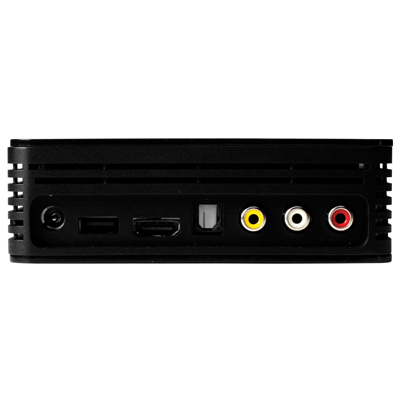
Also not listed among the specs is an Optical Audio port, but when I look at the back of the device, it seems to me I can see one there.

To me, WD TV is the long-awaited answer to my media player needs. At around $99 (street price), this is one device that will make its way to my Christmas stocking pretty soon, because I’ve got a Drobo full of content I’d like to play my way, not to mention that I also have two WD Passport drives.

I may even get one for my parents, to replace their Apple TV. They’ve had to keep their Drobo connected to their iMac in the home office, with iTunes open, all this time, just so they could watch a movie or two from the Drobo. That’s not right. Once I get the WD TV, I can take their Drobo, put it in the living room, and hook it up right there, without worrying about WiFi, streaming, iTunes, and a whole bunch of nonsense. Apple dropped the ball with Apple TV, and WD picked it up and started running with it.

The WD TV supports the following file formats:

  • Music: MP3, WMA, OGG, WAV/PCM/LPCM, AAC, FLAC, Dolby Digital, AIF/AIFF, MKA
  • Photo: JPEG, GIF, TIF/TIFF, BMP, PNG
  • Video: MPEG1/2/4, WMV9, AVI (MPEG4, Xvid, AVC), H.264, MKV, MOV (MPEG4, H.264). It will play MPEG2/4, H.264, and WMV9 videos up to 1920x1080p 24fps, 1920x1080i 30fps, 1280x720p 60fps resolution. That’s awesome.
  • Playlist: PLS, M3U, WPL
  • Subtitle: SRT (UTF-8)

I plan to get one soon, and I’ll let you know in this post if it lives up to its specs and my expectations. If you’d like to get one too, Amazon lists them. See below.

You can buy the WD TV Player from:

Standard
Reviews

Use an HDTV as my computer monitor?

A couple of months ago, I had a crazy idea, which I thought might just work: get a 1080p HDTV, a really nice one, and use it as my computer monitor. The advantage: cheaper and bigger than 30″ LCD monitors. I also found a model that I thought couldn’t be beat — one that displayed 10-bit color. If you’re unfamiliar with monitor color depth, you might want to have a look at the following:

Basically, you should have a monitor capable of displaying 8-bit color or better. Why? Because DSLRs capture 12-bit, 14-bit and 16-bit color, and you’re going to miss out on a lot if you can’t see all those colors when you’re editing the photos.

Laptops display only 6-bit color and use dithering to make up for the difference between 6-bit and 8-bit. Normal displays, including Apple Cinema Displays, have 8-bit color. The more expensive computer displays out there have 10-bit, 12-bit and even 14-bit color. LaCie and Eizo seem to be the only companies that build these sorts of high-end monitors.

The prices start around $1,000 for a 21″ or 24″ monitor at 10-bit color, and go up from there, to $2,000 or even $3,000. So you can imagine my delight at finding an HDTV at 40″ that could display 10-bit color and cost only $1,300. Granted, the resolution was only 1920×1080, and at that size, a computer monitor would have been at 2560×1920 or more, but you can’t have everything, right?

The particular HDTV I found is made by Sony and is from their Bravia series. It’s no longer being made — Sony keeps changing models every couple of months. Apparently HDTVs evolve so fast these days there’s a need to do that. I’d give you the model number, but it doesn’t matter any more. The specs were great though:

  • Full 1080p
  • 24p True Cinema
  • 10-bit color processing and 10-bit color display
  • Full digital video processor
  • Advanced contrast enhancer
  • An assortment of ports (HDMI, PC, S-Video, component and composite)

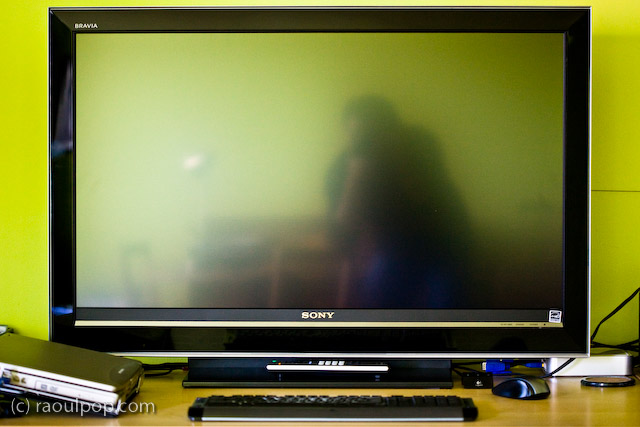
That’s how it looked on my desk. Did it do everything promised in the specs? Yes. Was the quality of the display as I expected? Yes. Editing photos on it was a stunning experience. I was able to see colors like I couldn’t see them before. Believe me, you don’t know what you’re missing until you see your DLSR photos on a high quality display.

So why am I speaking in the past tense about it?! For a single reason: it was much too bright for my eyes. Therein lies the main difference between TVs and monitors. TVs are built to be much brighter, since they’re meant to be viewed from a distance. Monitors are built with a much subtler level of brightness and contrast, since they’re meant to be viewed up close. This didn’t become apparent to me until I had the TV on my desk, about 2 feet from my eyes. I didn’t have a problem with the size of the screen (although it was bigger than expected), but the brightness killed me. Within a half hour, my eyes started to burn and I got a headache. I tried to tune down the brightness and contrast, but I couldn’t get it where it needed to be; I don’t think the TV could go down that low.

After much arguing with myself, and trying all sorts of things, including stepping back from it as much as possible, I had to come to grips with the fact that it wasn’t the fit I needed. Stepping back to an appropriate distance would have defeated the purpose of using it as a monitor, because at that point, it would have become a TV displaying my laptop’s DVI feed. Although it had the display quality I needed — and not a single bad pixel, it was a perfect display — I couldn’t use it.

If you’re in the market for an HDTV, definitely check out the Sonia Bravia line. They’ve got stunning color. They’re amazing TVs. Just don’t try to use them as computer monitors. It won’t work. To their credit, they’re not intended to be monitors. They’re TVs — really good TVs.

Standard
Events

Want to see Ligia and I on TV?

A few months ago, both Ligia and I got taped for a new show on HGTV called “I Want That! Tech Toys“, the kid brother, so to speak, of “I Want That!”, which is a wildly popular show. By the look of it, this new show is going to make it big as well.

At any rate, Ligia got invited to demo a portable keyboard called the Yamano Hand-Roll Piano (a bit of a misnomer, since it’s not a piano, it’s a keyboard). At any rate, what makes it an interesting product is that it’s truly portable: it rolls up into a tight little package, which you can carry virtually anywhere. It’s also powered by batteries. The keys are made of rubber with touch sensors underneath, so if you spill something on it, you don’t have to worry. It’s even got a MIDI-out port, in case you’re interested in that sort of a thing. The only thing that’s missing is the tactile feel of a real keyboard, which, I have to say, is a fairly important thing for the more serious piano or keyboard players. But this keyboard is great for beginners. So… to make a long story short, Ligia and one of her students, Peter, got taped for the show, and the episode just aired on HGTV. I uploaded the particular segment of the show where Ligia is featured to YouTube, and you can view it below.

http://www.youtube.com/watch?v=avjAXuFU55E

What about me? Well, I got invited to demo a cool product called the Nabaztag Smart Bunny for the show a month after Ligia got taped. I demoed it, and also wrote a nice lengthy review here at ComeAcross for your enjoyment. The show in which I appeared aired after Ligia, and it’s still on the air, as a matter of fact. The segment where I talk about the bunny is also uploaded to YouTube, and you can view it below.

Hope you enjoy them! I know we enjoyed getting taped, it was a fun little experience, and we are grateful for the opportunity! You wouldn’t believe it, but just to get that 1:25 minutes of live TV, it took over three hours for each of us. It’s the setups for the different shots and the re-takes that take so long. You’ve got to make sure the lighting’s just right, that the angles are correct, that stray objects aren’t in the shot, so on and so forth. Hey, and did you know that one of those Beta video cameras they use to film you for TV costs over $60,000? Better not drop them!

Standard