Please watch “The Energy Non-Crisis“. You can find it on Google Video, and probably on YouTube as well. Draw your own conclusions after you’ve seen it.
Regardless of who is really in control of oil, what’s clearly evident here is that our economy is suffering. If there really are such huge oil reserves in Alaska, we should start drawing upon them.
On a related note, I live near Washington, DC and have visited the World Bank. I’ve seen their headquarters, I know people who work for them, and I’m not so sure they’re the ones in control of oil prices, like he says. But that’s not as important as making sure our economy stays healthy, and right now, cheaper oil would help a lot.
Also, there’s the benefit (painful as it may be) of higher prices that can and will be seen in the future through more fuel-efficient cars and better housing. I’ve railed against the shoddy construction practices in the DC area (and seemingly throughout most of the US) for some time. Houses are built like matchboxes, with very little insulation or thought for long-term existence or impact on the environment. As utility prices rise and stay up, people will begin to see the advantage of solid, time-tested building techniques, with proper insulation and solar panels and the like. So I can’t say that higher oil prices are entirely bad.
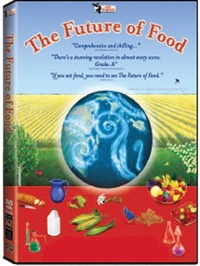
If you have not yet heard of a documentary called “The Future of Food” (2004), or haven’t yet watched it, please take the time to do so. It is vital that you know what’s going into the food that you eat, and it’s vital that you know it now, before it’s too late.
What’s been happening over the past 20 years here in the States is that our food supply has been slowly taken over by biotech companies who are interested only in their bottom line. They have used tactics akin to racketeering practices in order to get farmers to use their seeds and only their seeds. They have placed their executives in key government positions, in order to ensure that their policies go through. They have done and are doing everything in their power to get us to eat their genetically modified foods, without regard for safety, common sense, decency or ethics. I’m not saying this by myself. The documentary itself will prove it to you.
All that is bad enough, but what’s really appalling is that they are patenting genes. They have patented plant genes, and now they want to patent animal genes and even human genes. They are trying to get the market in their tight snare, so they can squeeze profits out of everywhere and ensure they control our food supply completely. They have even patented one of the genes involved in breast cancer, then sued researchers who had been doing working on it, to force them to pay exorbitant licensing fees. Needless to say, research on that gene has been significantly curtailed, directly due to their malefic influence. That’s the sort of “work” they engage in.
When I call them racketeers, I have a great frame of reference in mind. It’s a short crime drama made in 1936, entitled “The Public Pays“, which won an Oscar. It depicted a protection racket that preyed on the local milk distribution in one American city, and the people’s successful fight against them. The biotech goons may not beat up people and physically destroy their milk trucks and containers, but they have legal “procedures” which wield the same sort of power and yield the same horrible results. This time, they’re working hand in hand with specially-placed government officials who make sure the biotech rules get enforced and the little guys get screwed royally — not to mention that the consumers, and the marketplace in general, are manipulated to no end as well.
Don’t believe me? Watch the documentary. And if you can find “The Public Pays”, watch that as well and compare the two to see the striking similarities. What’s more, if someone can assure me that “The Public Pays” is now in the public domain, I’ll gladly post it online, either at Google Video or somewhere else.
As you get to the end of the “Future of Food” documentary, you’ll get heartened by the organic farming efforts, which are great, but keep in mind that Whole Foods now sells mostly non-organic fruits and vegetables, and also imports supposedly organic foods from China, whose food supply is so laden with pesticides it’s not even funny. Yet Whole Foods still dares to hold the same high prices on their stuff, which means they’ve cut costs and are pocketing the difference. Lesson learned: don’t shop at Whole Foods. Go to Trader Joe’s or MOM’s, if you have them in your neighborhoods.
Seek REAL organic foods, and make sure to vote with your wallets. Where you buy your food, and what sort of food you buy, determines our food supply’s future. Write to your congressmen and demand that the proposed law (introduced by Dennis Kucinich) to label genetic foods as such be finally approved.
My wife just chimed in with some great advice. It turns that while we wait for foods to be properly labeled as GM or not, there’s an easy way to tell already. Fruits and vegetables all have little stickers on them, with numeric codes (4 or 5-digit numbers). It seems that if those numbers start with 4, they’re conventionally-grown, but not genetically modified. If they start with 8, they’re GM — stay away from them! And if they start with 9, they’re organically grown and are safe to eat. Not sure if this is officially true, but she says that’s usually been the case, at least for the organic foods that she buys.
Here’s what happens. When the Drobo is connected to a computer and the Drobo Dashboard software isn’t running, the Drobo’s capacity meter will overestimate the used space, potentially triggering a low space alert. When the Drobo Dashboard software is started, it does its own used space calculations and corrects the capacity meter, literally turning off one to two or even three of the blue LEDs that indicate how much space is used.
There are 10 blue LEDs, one for each 10% of space used on the Drobo. When I connect one of my Drobos to my computer, the capacity meter lights up 9 of the LEDs, indicating 90% disk space used. When I start up the Drobo Dashboard software, two of the lights are turned off, leaving 7 on, or 70% disk space used. Also, although low space warnings are triggered when the Drobo Dashboard is started, after it calculates the space used, the warning go away, and the Dashboard screen goes from yellow to green.
I made a video which shows this quite clearly. I apologize for its poor quality, but I made it without any prior setup, just to show you that I’m not making this up. This also happens for my other Drobo, where the capacity meter shows 50% disk space used when I connect it, but drops to 30% disk space used when I start up the Drobo Dashboard. If you have a Drobo yourself, try it out and see.
I notified Drobo Support of this issue a couple of days ago, but I have not yet received a reply from them. I will be glad to include any feedback/clarification from them right here, and will update this post with further information as I receive it.
I should also point out that there’s still no fix for the other two issues I outlined in my original Drobo review recently, where I pointed out that:
The transfer speed slows down significantly (and somewhat inversely proportional) to the amount of disk space remaining on the Drobo after the 70% mark is reached. In other words, the less space there is (in terms of the percentage, not GB remaining), the slower it’s going to be to access and transfer data to the Drobo.
The Drobo becomes excessively noisy when the fourth hard drive is inserted, and the fan will go into high gear when the Drobo isn’t even used. It seems this is loosely tied to the ambient room temperature, and once it goes over 75 degrees Fahrenheit, the fan kicks on and stays on for a long time. But again, you’ll only see this issue when the 4th hard drive is inserted. Given that the Drobo is a consumer device which is meant to operate at room temperatures, not in a climate-controlled server room, this is not appropriate behavior and should be corrected.
The 8GB Super*Talent USB flash drive I ordered from Brando arrived last night, and it was a very pleasant surprise to see how tiny it really is. It’s smaller than a simple USB connector, in both width and thickness. I am amazed by how small it is — and the thought that 8GB of data somehow fit onto this minuscule piece of steel and silicone boggles my mind.
I put together a short video review to show you the drive’s size and also to do a quick speed test. I copied a 1GB movie onto it, and the copy operation took about 3 minutes. That means it’s about half as slow as a Drobo in terms of transfer speeds.
The photos of this flash drive do not do it justice. It’s much smaller than it looks in the online stores. I hope that the video itself will do a better job of demonstrating its size (to scale), and its beautiful and simple design.
This USB flash drive’s size and design leave me thrilled to no end. If you’re in the market for a spacious yet tiny flash drive, the Super*Talent fits the bill perfectly. The only thing left for it to prove is its long-term durability. It is rated PICO-C, which means it’s rugged and water resistant. I am very interested to see how long it lasts — if I don’t lose it first.
➡ Updated 10/30/08: Still works just fine after 5 months of use. I have it attached to my keychain, and I carry it around in my pocket all the time. It’s got a few scratches, but it works as advertised. Still happy with it.
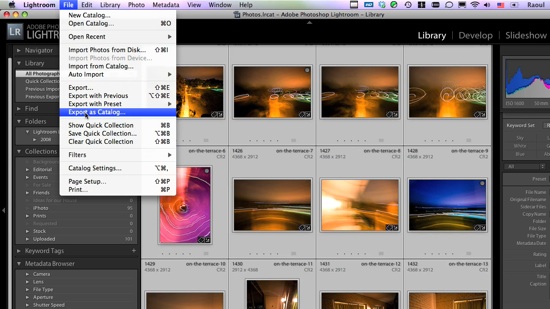
This screencast will show you how to transfer photos between different Lightroom catalogs, and it will go beyond that by also demonstrating how the whole process could be made a LOT easier if Adobe wanted to.
In the screencast, I refer to an article I wrote a while back, entitled “The next stage for Lightroom“, where I put forth a proposal for improving the way Lightroom stores photos, with an eye on catalog portability (laptops, for example). If you have the time, please read through that article after you see the video.
The video is about 10 1/2 minutes long, file size is 78MB, and it’s 720p HD, MOV. You can view it online by clicking on the screenshot below, or download it.