Events

The Atlantic Cable – Eighth Wonder of the World

In July 1866, after the successful completion of the project which undertook to lay a single undersea cable through the North Atlantic, from Newfoundland to Ireland, this following commemorative print was created:
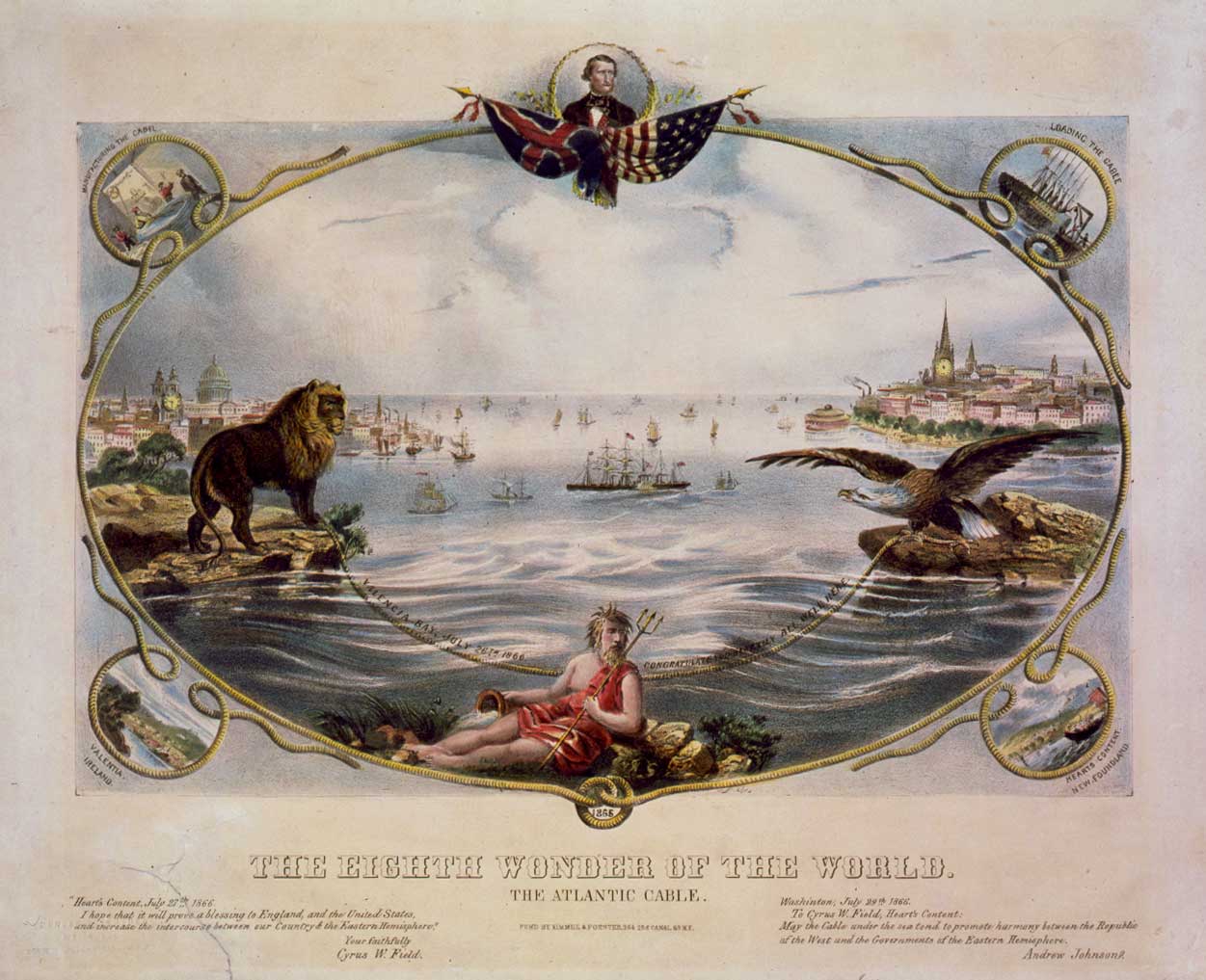
The Eighth Wonder of the World

The Atlantic Cable was the idea of the New York merchant and financier Cirus W. Field, who wanted to communicate with Europe in hours, not weeks, and in 1854, conducted the first trial of laying a 2,000 mile cable between the US and Europe. The first three attempts were not successful, but in 1866, his persistence paid off, and his cable worked. Needless to say, he was showered with due praise and honors for his efforts — one of them being this print.

When you look at Cirus W. Field, the man, he wasn’t that imposing. He seems to have been of average height and thinner build, and yet, this is the man that laid the foundation of long-distance communication. Isn’t it wonderful what one person can achieve if they set their mind to it?
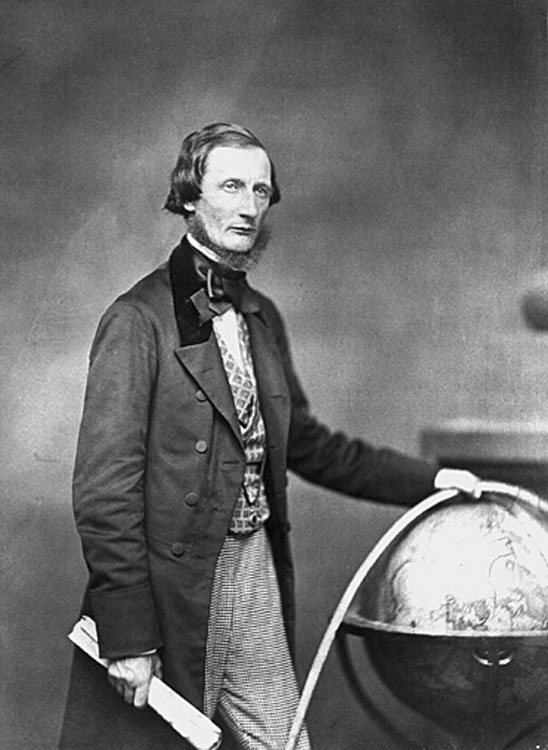
Cyrus W. Field, as photographed by Mathew Brady in 1958

Just how did those trans-Atlantic telegraph cables look? You can see longitudinal and transverse sections of each size in this print:
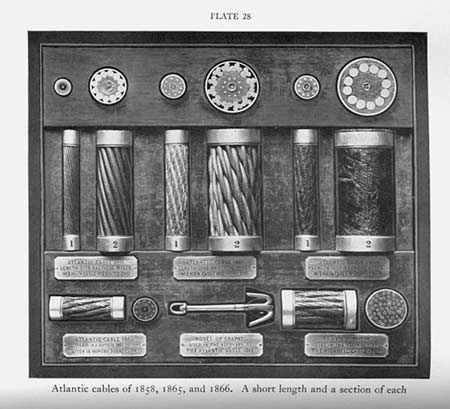
Samples of the Atlantic cables used in the 1800s

The cables are quite complex, as you can see above. When you think that 2,000 miles of these cables had to be made, from scratch, in the mid 1800s, it’s no wonder they were at the time called the Eighth Wonder of the World.

The failures to lay working cables before 1866 attracted controversy. You see, Cyrus Field didn’t finance the matter himself. He’d have been bankrupted many times over. He used other people’s money by selling shares in the venture. Here’s one such stock certificate, sold to Lady Anne Isabella Noel Byron, Lord Byron’s widow. This certificate lost most of its value after the failure of the 1858 cable, then became worthless until the formation of the companies which handled the laying of the 1865 and 1866 cables.
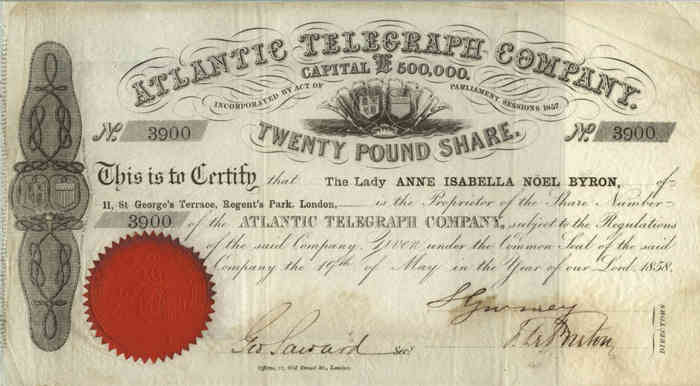
Atlantic Cable Stock Certificate

The route of the 1858 cable can be seen in the map included here:
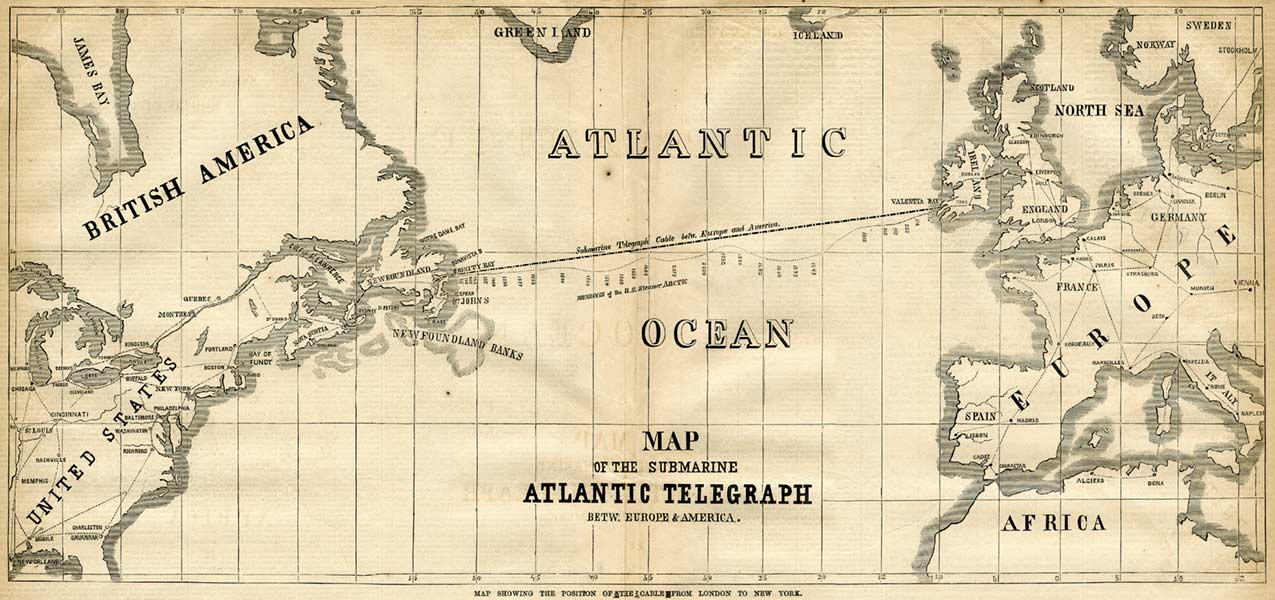
1858 Telegraph Cable Map

The routes of the cables available in 1870 can be seen on this map:
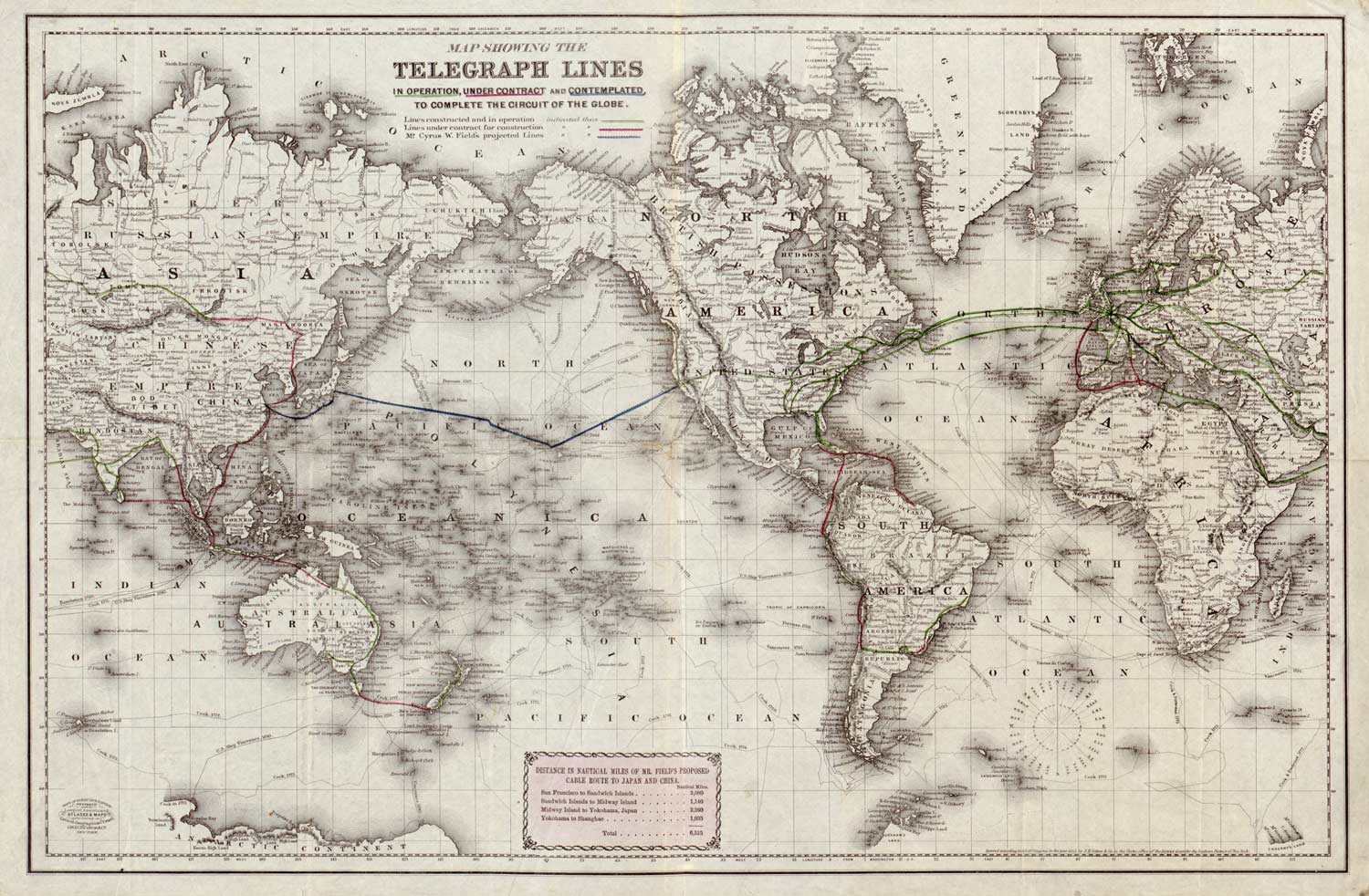
1870 Telegraph Cable Map

Pause here for a bit and think about this: in the late 1800s, these were all of the communication routes available in the entire world. That was it. There was no internet, no telephone, no TV, no radio, only written letters and telegraph. Oh yes, they also had Indian smoke signals, but they weren’t as widely used, and those communication lines aren’t marked on these maps as each transfer hub was assembled and disassembled on the fly.

It’s easy to complain about how much faster and more reliable our Internet access could be, but the fact of the matter is that we’ve made amazing strides in communication over the past century and a half. As I write this, I’m sitting at a desk in a village in rural Dobrogea, Romania, and am storing these letters or bits or whatever you want to call them on my server back in the United States, instantly, each and every time I press the “Save Draft” button in my WordPress Editor. That’s amazing, in and of itself.

Let’s fast forward and see how fast things progressed from that single cable laid in 1866. By 1880, there were four cables already.
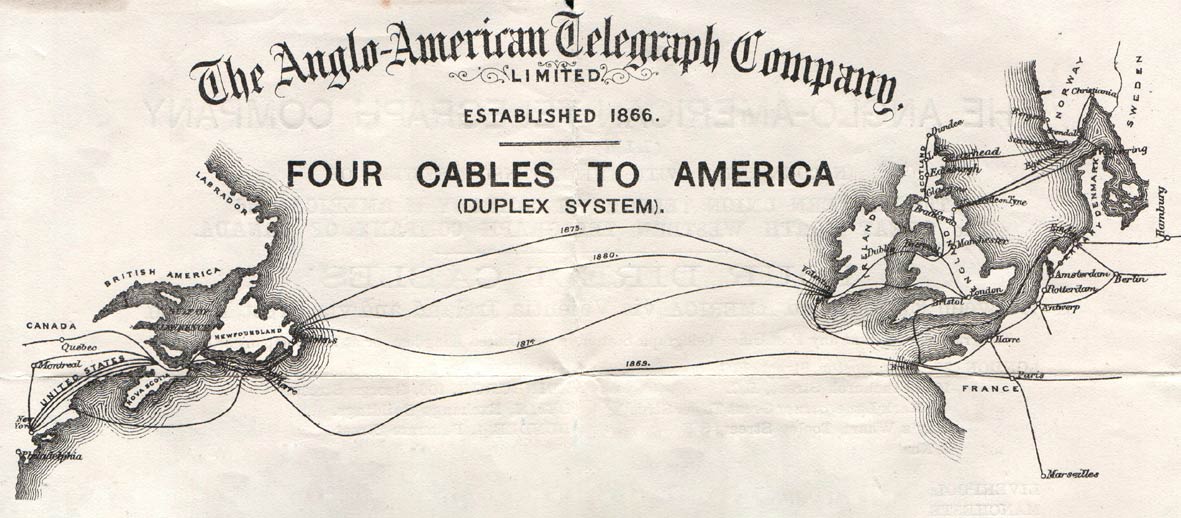
1880 Telegraph Cable Map

By 1901, there were 14 cables. That’s right, fourteen, from four just 20 years earlier.
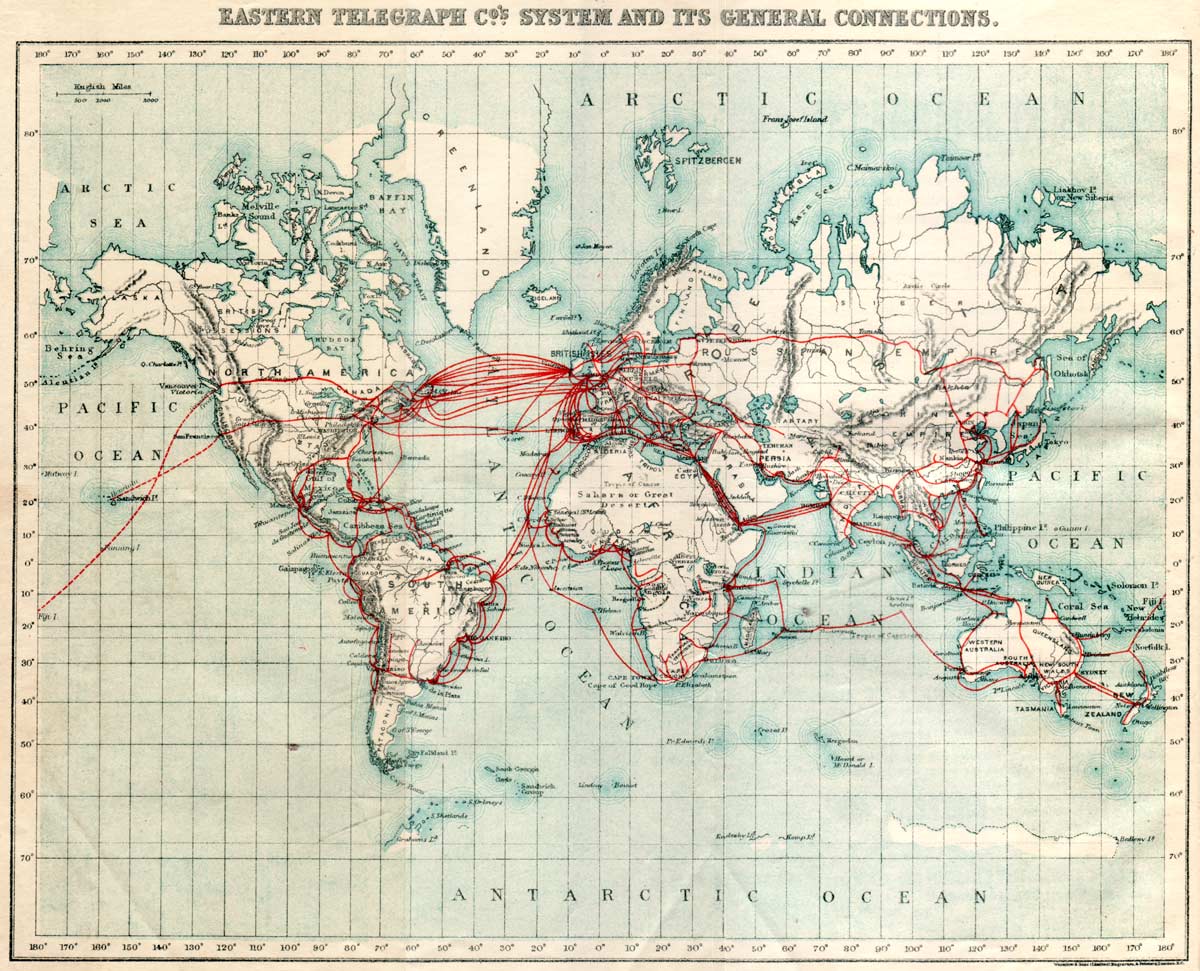
1901 Telegraph Cable Map

Although trans-Atlantic telegraph communications progressed quite fast, the first trans-atlantic telephone call did not occur until 1927. It was made from Columbia, Missouri, to London, lasted six minutes and cost $162, which was quite a large sum for that time.
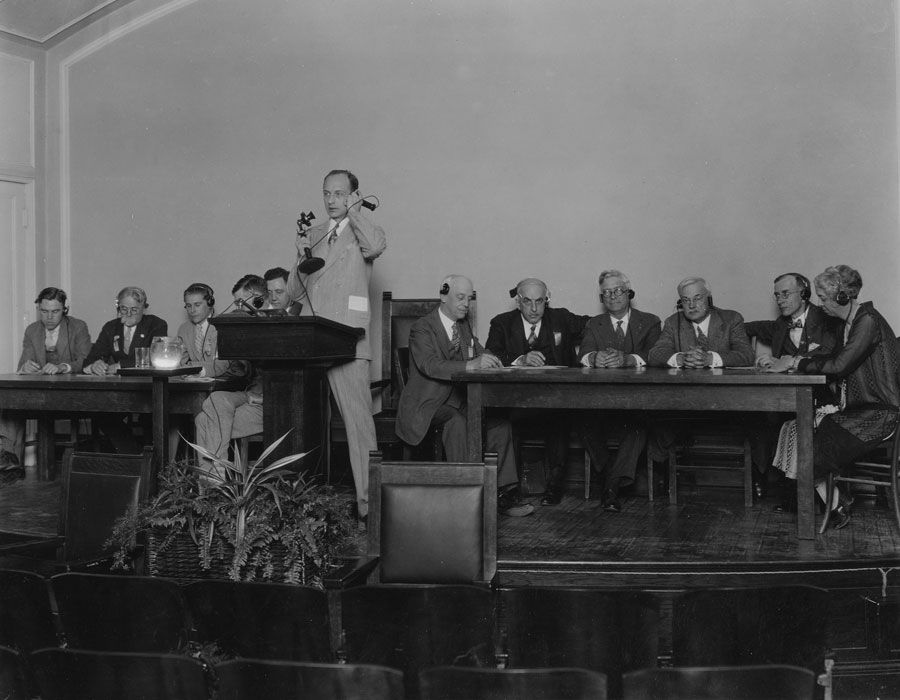
The first trans-Atlantic telephone call, in 1927

Just think, now we can talk anywhere in the world for pennies a minute, or do audio or video chats with applications like Skype or iChat for free. We sure have come a long way!

Sources

Images used courtesy of the History of the Atlantic Cable & Undersea Communications and Missouri School of Journalism Archives.

Standard
Places

Fall foliage on I-495

This past autumn, I recorded this short video of fall foliage as I drove home on a sunny afternoon. It’s on I-495, Washington’s beltway. I was near Bethesda, MD at the time.

Download Fall Foliage on I-495 (also on Vimeo)

Standard
Exercise

This is how you can look at 72

Meet Jim Morris, a 72-year old California man, who has been working out every day for most of his life and has won many bodybuilding competitions. He does it because he loves it. There’s a video of him working out on YouTube, originally broadcast one one of the local TV stations where he lives. The photo you see below is him at age 71, about a year ago.

Jim Morris 1

You can read more about his life and dedication to the sport of bodybuilding on his website. He is a personal trainer, and has helped many people get fit over the years, starting in the early 1950s. His diet is also something special. He only eats nuts, fruits, beans and vegetables.

Can it be done by anyone? I think so. You just need the inspiration, which Jim Morris has just provided, and the drive, which you must work up yourself. I think it’s worth it. Do you?

Images used courtesy of Jim Morris.

Standard
Reviews

PictureSurf, a new gallery plugin for WordPress

PictureSurf Plugin

PictureSurf is a new WordPress plugin that launches today (February 10, 2009). It aims to make it easier for bloggers to upload galleries to their WordPress sites.

I spoke with PictureSurf’s founder, Alan Rutledge, via chat this morning, and I wanted to find out what makes his plugin different from the standard WordPress functionality. You may or may not be aware of the fact that WordPress offers an Image Gallery feature that’s built into the core WP install.

From Alan’s perspective, the PictureSurf plugin differentiates itself by offering:

  1. An enhanced user interface, because it lets you drag and drop photos to rearrange them, label multiple photos at once and,
  2. A little more SEO juice, because of better permalinks and conditional nofollow tags on the thumbnail links. The nofollow tags are activated when there’s too little content on the photo page — for example, your description of the photo is too short, etc.

As I told Alan, I don’t see enough of a difference between this plugin and what WordPress already offers to convince me to use it myself. The PictureSurf website claims that it’s faster to build a gallery with their plugin than with WP, but I ran into a glitch when I tried to use it. I couldn’t upload any photos. The upload engine froze and even though I hit Cancel and tried to re-upload the photos a few more times, I wasn’t able to do it. Still, that’s not too important. I’m sure that if I had more time, I could have gotten it working properly.

The thing is, I built a WordPress Image Gallery for this review in under 30 seconds. Each thumbnail links to its own photo page, very much like PictureSurf does it. I was able to choose how many images I wanted in each row. And I was also able to drag and drop the images to change the order in which they appear in the gallery. You can see the gallery below.

Another claim made by the PictureSurf plugin is that you can monetize your blog much better when an image sits on its own page instead of displaying on a blank page. I’ll agree with that, but I’ll also add that WordPress lets you do the very same thing. In WP’s Image Gallery options page, you get to choose where the thumbnail links go: they can go to the images themselves, or to something called attachment pages, which are pages that WP generates dynamically for each photo, using your blog’s own theme. So I ask again, what is it that differentiates PictureSurf from WP’s built-in functionality?

As much as I love WordPress plugins, I’m a big believer in built-in functionality. I don’t want to be stuck in a situation where I need to stop using a plugin, for whatever reason, and have my post archives become unusable because the plugin is no longer there. I ran into that issue with a video plugin I used in the past. It stopped being supported, and then I had to modify all of my old posts where I embedded videos, in order to make them playable again. If the long-term survival of your content is not a concern for you, then don’t worry about it. It is a concern for me though.

Last, but not least, I found PictureSurf’s design somewhat rough. It just doesn’t integrate as well as it should into the WordPress Editor. Furthemore, if it aims to take over the image gallery role, then it should fully take over that role. If I install PictureSurf, once I click on the Image Upload button in the WordPress Editor toolbar, it’s the PictureSurf AJAX window that should open up, not the WordPress Image Uploader. And when I access an old post that uses an image gallery, written before I installed PictureSurf, it should automatically take over that gallery and display the images using the PictureSurf gallery settings. But none of this happens. Old posts remain the same. I’d have to modify each and every one, manually, in order to get PictureSurf working there. As a publisher and writer, that’s a labor I’m not willing to undergo.

For me, the PictureSurf plugin does not differentiate itself enough from the standard WordPress functionality and does not offer enough added value in order to make it to my roster of active plugins. I find the WordPress Image Gallery feature quite adequate and necessary, and therefore, using the PictureSurf plugin becomes a matter of preference, not need. I myself do not need it, therefore I won’t use it. Your situation may differ. Feel free to try it out and see what you think.

Standard
Thoughts

New site design is live

This past week, I spent a feverish few days working on this new site design. I have been working on several different layouts during these past few months, but liked none of them except the one you see now. I built it from scratch, since that’s the way I like to do things.

New site design

One of the decisions I pondered was whether I should go with a three-column or a two-column design. The three-column layout would have allowed me to reserve one of the columns for ads. In the end, I thought good taste should trump ad space, unlike what’s happening on so many other sites.

If you find my articles useful and you’d like to support my site, please use the sponsors listed in the sidebar. Buy the stuff you need from them. I’ll get a small percentage of each sale.

Site sponsors

I’m also looking for a main site sponsor, whose logo and link will be featured in the top right corner of my site. I’d like the arrangement to be simple: a flat monthly fee over a certain period of time; the fee and period can be negotiated. See the Advertising page for more details.

Main sponsor placement

Standard