Reviews

Perpetuum Jazzile

My wife pointed me to a video on YouTube — a performance of Toto’s “Africa”, by a Slovenian jazz choir called Perpetuum Jazzile.


“Africa” by Perpetuum Jazzile

I hadn’t heard of them before, and it’s likely that you didn’t either. You probably also didn’t know they’ve been performing for 25 years. Originally founded in 1983 by Marko Tiran, they are now headed by artistic director Tomaž Kozlevčar (I have no idea how to pronounce that name), and they perform jazz and pop selections, mostly a capella.

So far, the group has released three CDs: When You Come to Bled (2000), Forget You’re In A Hurry (2003), and Strange Night (2006). This year, they’re working on a new album, due to be released in the autumn. Unfortunately their music isn’t on iTunes or Amazon yet (don’t know why), so you have to use their website to buy a CD.

The video blew me away. It’s so nicely done, and the way they simulate the falling rain with their hands is so cool. It made me want to find out more about them, and to listen to more of their music. I’ll leave you with more videos and photos from their performances.


“Mas Que Nada” by Perpetuum Jazzile


“Strange Night” by Perpetuum Jazzile


“As” by Perpetuum Jazzile

There’s more info on their English-version website, and they even have a free MP3 available for download. Their CDs are available through their online shop. According to their posted concert schedule, they’re giving a couple of public performances this September in Slovenia. Definitely worth checking out.

Standard
Reviews

Warehouse 13

Did you hear about Warehouse 13, the new series that premiered on the Sci-Fi channel recently? I caught the pilot episode on iTunes (it’s free btw, so grab it while you can) and would like to see more. I’ll let the official website and trailer for the show do the explaining. All I’m going to say is that I love Artie’s steampunk keyboard. Nice touch.

warehouse-13-cast

warehouse-13-steampunk-keyboard


Official Trailer for Warehouse 13


Warehouse 13 Sneak Peek

Standard
Reviews

Create tiltshift photographs on Mac, Windows and Linux, for free

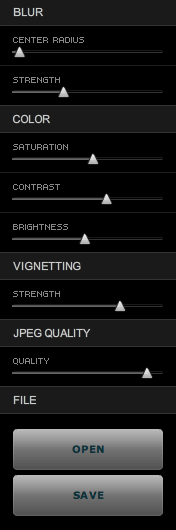
Takayuki Fukatsu has created a free Adobe AIR app called TiltShift, which runs on any OS that supports AIR (namely Mac, Windows and Linux). It will allow you to easily apply tilt-shift effects to any photograph. Best of all, the price is right: it’s free. Even if this app cost $10 or $20, I’d still rather buy it than some Photoshop plugins that cost hundreds of dollars and do pretty much the same thing.

In less than a couple of minutes, I was able to open a photograph of my wife and niece, walking on the streets of Medias, Romania, and add tilt-shift effects to it. Here’s what it looks like now.

Ligia and Laura

Sure, the tiltshift effect isn’t what you’d get with a LensBaby or with a real tilt-shift lens like the Canon TS-E 24mm f/3.5L (or any of the other professional tilt-shift lenses made by camera manufacturers), but still, it’s better than no effect at all, and it’s free. TiltShift’s controls are really slider-based and really easy to use. You’ll be making tiltshift photos in no time flat. Give it a go and see how you like it.

tiltshift-controls

I mentioned TiltShift initially in one of my Condensed Knowledge posts, back in May.

[Download TiltShift]

Standard
Reviews

Hardware review: CableJive's iStubz cable for iPod and iPhone

In May, I mentioned CableJive’s new iStubz sync cable in my review of their SoundDock cable, which I’d purchased last year, and I was contacted by Zack, one of the folks at CableJive, who offered to send me an iStubz cable for review. In the interest of full disclosure, please know that the cable I received was a review sample that I got to keep.

Would I have bought one otherwise? Yes. I think that at $7.95 for the 7cm size or at $8.95 for the 20cm size, these cables are a great deal. They fulfill a real need for those of us with iPods and iPhones — namely the need the declutter our desks. They’re much shorter than the standard sync cable that ships from Apple, they work just as well, they’re made from the same materials — thus, they’re perfect for quickly connecting our Apple peripherals to our laptops.

I got my cable in late May, and have been using it ever since. I opted for the 20cm size. I packed my old sync cable and put it away from the very first day after that. It’s useless to me now. The iStubz cable is much more convenient to use, and in terms of design, it comes closer to Apple’s design philosophy than Apple’s own cable.

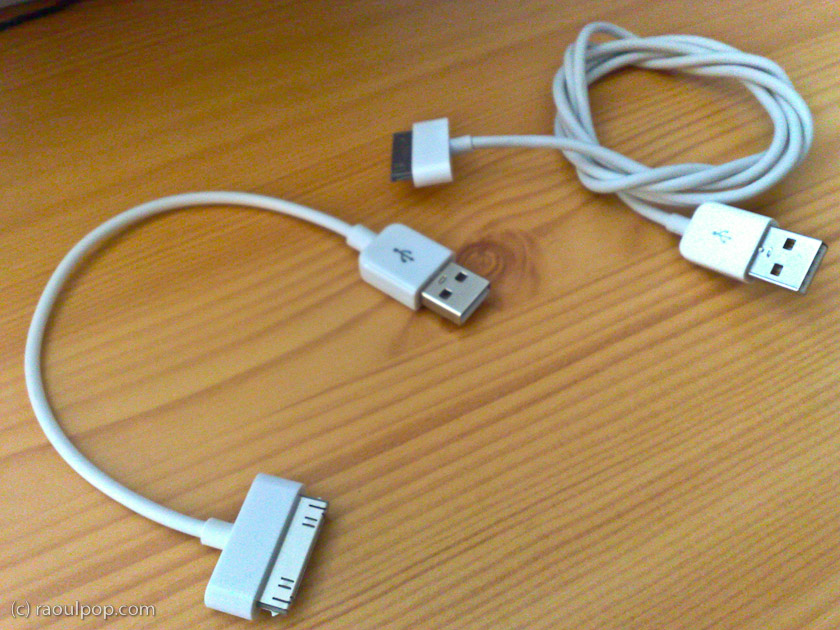
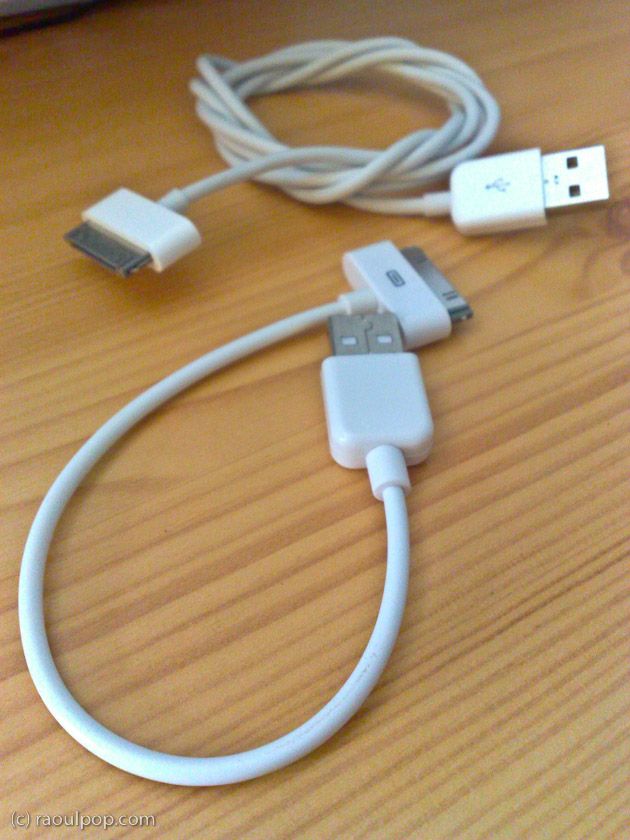
The cable I have can be seen the right side of the picture shown above, or in the two photos shown below. The longer cable, the one used to connect the iPhone to the laptop, is the 20cm one, and the shorter cable, the one used to connect the iPod to the laptop, is the 7cm one.

I had some issues with the sturdiness of my 1st gen SoundDock cable, as you can see if you read my review of it, but these iStubz cables are nothing like it. These are mass produced and very likely made to the same quality standards as the Apple sync cables. I wouldn’t be surprised if they’re made by the same manufacturer.

I took a couple of photos of my own to show you the difference between the iStubz cables and Apple’s standard sync cable. While I’ll agree that sometimes it’s better to use the standard sync cable, such as when you have a desktop computer with USB ports on the back, in most situations, the iStubz cable is all you need to connect your iPod or iPhone to your laptop.

CableJive's iStubz cable

CableJive's iStubz cable

If you want to buy the iStubz cable, you can get it directly from CableJive.

Standard
Reviews

Using Contenture to handle micropayments

Back in April, I wrote about micropayments, and why I thought they were an equitable way to reward web publishers for their time and effort. I shared my thoughts on ad revenues, which, for most people, are minimal and not enough to live on, unless you are one of the relatively few websites that gets massive amounts of traffic.

In that same article, I also talked about how I thought micropayments should work, via a standard, instant way to charge readers a few cents per article, through protocols that were integrated into each browser. Instead of charging fees for each transaction, which would be impractical for such small amounts, micropayment processing centers would charge for bundles of transactions which exceed a set limit.

Fast forward a few months, and ZDNet publishes an interview with Barry Diller, one of the early Internet millionaires, where he talks about the very same thing: the need to go beyond falling ad revenues by charging small amounts for useful information. That article was hotly debated on FriendFeed, which is where I found out about it. Among the comments, I found one pointing me to Contenture, a newly launched micropayment system (it saw the light of day on 5/26).

contenture

Contenture’s method of handling micropayments is different from what I envisioned, in that it involves a monthly subscription. Here’s how they say it works:

“… a fully automated system that requires no user interaction. Users simply pay a set fee to Contenture on a monthly basis, and that money is automatically distributed to the sites they visit. How much each site gets from each user is determined by how often that user visits that web site, relative to all of the other Contenture sites they visit. Users get their seamless experience, and the site actually makes money. Everybody wins.”

So what’s involved on my end? I installed Contenture’s WordPress plugin and pasted in an extra line of code to customize the ad hiding behavior. Others might need to paste a Javascript snippet in their footer, which is basically what the plugin does for you.

On your end (the reader), the code will check to see if you’re a Contenture user, and will automatically distribute your subscription fee to the websites that you visit, based on how often you visit each site. As an immediate benefit, all ads on my site are hidden from you. They’ll load as the page loads, but they blink out of view and the ad space collapses unto itself as soon as the page finishes loading. It’s pretty cool.

Other benefits I might be able to offer you in the future are the ability to view exclusive content, or perhaps to even close off the archives to those who aren’t Contenture users, although I’m not too keen on that, since Google won’t be able to index me properly any more if I do it. At any rate, the ability to offer more benefits is built in, and that’s nice.

Contenture’s model is opt-in (also called freemium) and so it has some limitations, in that I don’t get paid for everyone that accesses my content. My micropayment model, the one I envisioned and the one Barry Diller and others are talking about, is standardized across platforms and browsers and works for everyone, all the time. Eventually, I think we’ll get there, but Contenture has made a good start of it, and they did it now, which is why I signed up with them.

To let site visitors know they can support my site, I placed a small link in the header, as you can see below. I also have a link in the footer, also shown below.


header-screenshot

footer-screenshot

I look forward to seeing Contenture’s user base grow, so I can tell whether I’ve made the right choice. I want to keep writing and publishing online for a long time to come, but the only feasible way for me to do that is if I get rewarded properly for my efforts. I believe micropayments are the way to do it. It’s affordable for the readers, and it scales up nicely for me, the web publisher. Time will tell exactly which micropayment method will work best, and you can be sure I’ll continue to monitor the options available out there.

Standard