Thoughts

Kudos to Apple for a great customer service experience

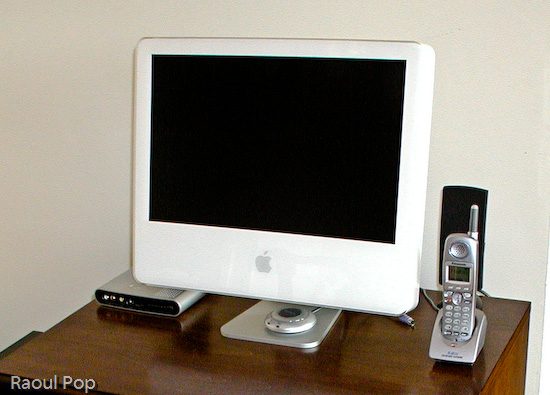
I’d like to congratulate Apple Customer Service for the way they handled the most recent issue with our iMac G5.

If you’re a regular reader, you may know we’ve had problems with our iMac right from the start. Virtually as soon as we brought it home from the Apple Store, we had issues with it. These things got worse with time, and although we took the iMac in for repairs, repeatedly, the problems persisted. I detailed that first set of issues in this post. Several months later, we took it in for service at our local Apple Store, where we had a terrible experience. A few months after that, we took it in for service again, and then, a month or so before Apple Care ran out in late 2008, we took it in for what we hoped would be its last service call.

Unfortunately, it stopped booting up a month after Apple Care ran out. We were packing for what would turn out to be a long trip abroad, and didn’t have time to take it in for service during the 90-day warranty window offered for that last repair. I kept it boxed up, hoping I’d get to it at some point and who knows, perhaps it would auto-magically boot up. I was soured up with the whole affair, and said as much in this post. In three years of using the iMac, we’d had problem after problem, and I felt as if we never got our money’s worth from that machine. I liked it, Ligia liked it, but it just couldn’t be relied upon, and it was a shame.

By the time I got to have a look at it, it was late 2009, about a year later… I followed the steps outlined in this Support Note from Apple, and according to those instructions, the motherboard was at fault, again. I called Apple Support to explain the situation, hoping someone would be kind enough to understand and sympathize. I was very pleasantly surprised when the tech who answered the call wanted to help. He got a hold of one of the senior support engineers, whose name was Christopher, and he was also willing to help. I mention his name because I hope he’ll get some sort of recognition at work for the nice thing he did for me.

Christopher authorized an out-of-warranty repair for our iMac. We were still abroad, but when we got back to the States, I took it in for service, and the folks at the Genius Bar of the Aventura, FL, Apple Store couldn’t have been nicer, too. They did some testing and discovered, to my surprise, that it was only the power supply, and, even better than that, repaired it within hours. I dropped it at the store at 11 am, and got it back by 7 pm, in working order! I was able to boot up our iMac after more than a year and access our documents, photos, emails and more. It was like reuniting with a long-lost friend.

Now that’s my kind of Apple repair experience! I don’t know if my past repair experiences were flukes, or if something changed at Apple since then, but all I can say is that I’m very pleased to see our iMac working again, and I want to congratulate everyone involved in the resolution of this support ticket for being so understanding and so willing to help us. Great job! Thank you!

Standard
Events

Site migration complete

Last night, I completed what could be called an unusual site migration. I went from a self-hosted WP install to WP.com. That’s right, my full site is now hosted at my WP.com account. People usually migrate from WP.com to WP self-installs after their site gets big and they decide they want more options, like the ability to run all sorts of ads and fiddle with the code, etc. With me, it was the opposite. I wanted to stop worrying about my web server and focus on publishing my content.

As I mentioned here, things got worse after upgrading to WP 2.9. My server kept going down for no reason, and often, too. It’d go down several times a day. I’d have to keep watching it all the time, and that got old real quick, especially when I traveled and had no internet access. I’d often get home to find out my site was down and had been down for several hours, if not more. Since I hadn’t mucked about with my server to make things worse, and had already fiddled with optimized my Apache, MySQL and PHP settings to last me a lifetime, I decided to have WP have a go at hosting my site and let them worry about keeping it going. Judging by the initial results, it looks like they had a bit of trouble with it too (see this, this, this and this), but at least it’s not my headache anymore.

During the migration process, I learned three things:

  1. I hadn’t been getting full XML transcripts of my site in the past, when I used WP’s WXR Export feature. See this for more, and make sure you’re not in the same boat.
  2. The WordPress Import wizard still needs a TON of work to iron out the bugs. You’ll see why below.
  3. WordPress.com Support can be terribly unresponsive. I waited over 20 days for a resolution to my ticket about the site migration, and in the end, I had to work things out myself. When I told them as much — and I tried to be as nice as possible about it — it would have been nice to get a small apology, but I didn’t even get that.

Granted, my site migration does not represent the usual WP user’s migration path, nor was it a typical migration. By current count, I have 1,552 posts, 4,129 comments and 3,090 media files. That’s quite a bit more than your average blogger, and I think that’s what served to point out the bugs in the Import Wizard.

What exactly were the bugs?

  • Failure to import all posts, comments and media files
  • Post and media file duplication
  • Failure to properly change all paths to media files (either image source or image link or both)

Here’s where I need to acknowledge the help I did receive from WP Support. My WXR file was over 20 MB. The WXR upload limit at WP.com is 15 MB. WP Support modified the upload limit to allow me to go through with the WXR upload, and they also adjusted the timeout limit, because the migrations timed out prematurely as well. So I thank them for that help.

The big problem turned out to be the third issue mentioned above. The Import Wizard didn’t change all the paths to the image files. It turned out to be a very hit-or-miss operation. Given the scale of the operation, I might even call it a disaster. Some posts were fine, some weren’t at all, and some were a hodge-podge of images that were okay, and images whose paths were wrong, or whose links were wrong, or both. You might imagine that checking and fixing the image paths for over 3,000 media files can turn out to be a very big job, and it was.

I was also under pressure to finish the job quickly, since the site was live. Imagine how you’d feel as a reader if you visited a website and none of the image files showed up — you’d probably think the site was dead or dying, right? Well, I certainly didn’t want people to think my site was on its last legs, so I had to act quickly.

Thankfully, only (sic) about 40% of my posts had their image files messed up. The rest were fine, but then I also had plenty of posts with no images. If all my posts contained images, I might have had 90% of my posts to worry about… Still, I had to check every post, and as you might know if you’re a regular reader, I post lots of images per post, and where a post was messed up, brother, I had to do a bunch of work to get it fixed up. Just as an example, some posts have anywhere from 20-50 images…

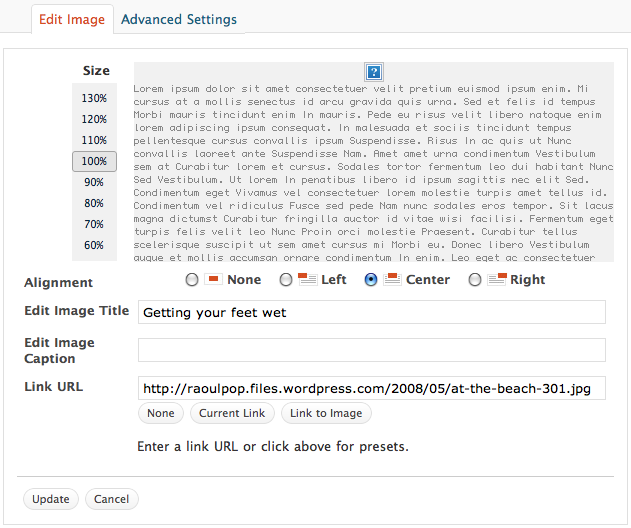
Here are a couple of screenshots that show you how things stood. Here, the image link was okay, which meant I didn’t have to modify it. This was a happy scenario. However, the image path was still wrong, as you’ll see below.

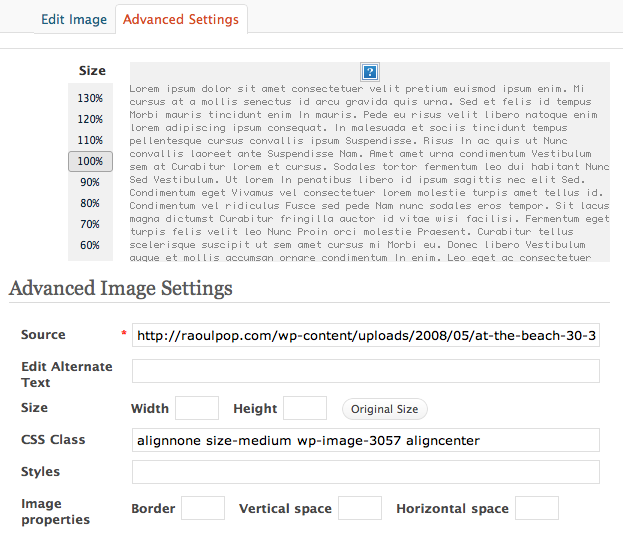
The image source, or path, didn’t change during the import process, which meant I had to change it manually, or browse for the image by title or file name in the media library and re-insert it.

The image size was also lost, which meant that if I changed the image path manually, I had to also enter the width of the image.

What made things more cumbersome was the lack of an image insert button in the Gallery dialog box. That’s one of the differences between a WP self-install and WP.com. This meant that even though I’d uploaded a certain image for a certain post, and it showed on the Gallery tab, I couldn’t go there and re-insert it into a post. I had to go to the Media Library tab, search for it, then re-insert it, which takes precious time and clicks, particularly when you’re dealing with thousands of images.

In spite of all the extra work which I had to do, and which took about 1½ weeks of my time, I got done last night. My site is now fully functional, thank goodness!

As for my experience with WP Support, there are no hard feelings. I like the WordPress platform and it’s done good by me so far. I wasn’t a VIP customer and they didn’t have any financial incentives (besides the small fees for a space upgrade and a domain mapping) to get their hands dirty with my code. They offered minimal support, and to a certain degree, that’s to be expected when most of your customers are non-paying customers, as is the case with the large majority of WP bloggers.

Still, I would encourage them to consider doing the following:

  • Improve their Import Wizard so that it will not terminate until it checks and doublechecks to make sure it has imported all the posts, comments, pages, tags, categories and media files, and all the paths to the media files are correct. They’ve still got one of my WXR files, and they can use it as case study to help improve the accuracy of the import wizard.
  • Include an image insert button on the Gallery tab of the “Add an Image” dialog box, like the one that already exists on WP self-installs.
  • Offer the functionality of the Search & Replace WP plugin for WP.com blogs. This would have been a huge help to me as I fixed the image paths. I could have run a couple of queries on my blog’s content to change most of the image paths, and it would have halved my workload.

If you were one of the folks who kept seeing no images during this transition period, sorry for the inconvenience, and I’m glad you’re still around. If you’re still seeing no images, definitely get in touch with me, I might have missed a few — after all, I’m only human.

Standard
Events

Would you like to give life to someone?

My wife’s cousin (her name is Estera, or Esther in English), has suffered from the effects of Hepatitis C, and is in Stage III-IV of the disease, which means her liver is pretty much shot to pieces. Doctors say she’s got to get a liver transplant this month or next month, or it’ll be too late to do an operation. You can see her and her two daughters in this photo. Estera is the third from the left, on the couch, next to her husband, Adrian.

Estera has already placed herself on a liver transplant list long ago, and has waited patiently, but time is running out. Her blood type is also rare (O1), and that makes it doubly hard to find a donor.

As you may know, the liver regenerates itself, so whatever bit you give will grow back. The bit the doctors transplant into her will, in time, and if everything goes according to plan, grow into a full-size liver. You’ll end up with an incision above your liver and the priceless knowledge that you helped a mother see her daughters grow up.

If you or someone you know is interested in doing this, please get in touch with Adrian, Estera’s husband, at adydrobota@yahoo.com. Since Estera lives in Romania, we’re looking for someone who lives in Romania or at least in Europe, so it’ll be easier for them to travel to her, but we’re not going to turn away any willing donor.

If you’re Romanian, make sure to read this post on my wife’s blog as well.

Thank you.

Standard
Thoughts

Top Gear in Romania

The Top Gear team visited Romania for a bout of grand touring. They started in resort towns along the Black Sea, like Constanta and Mamaia, then found their way to the famed Transfagarasan mountain highway, by way of Bucharest, the People’s Palace and a bunch of villages inbetween. It was fun to see them drive through the same places and on the same roads I’ve driven on so many times in the past. I’m not sure when they did this show, but it must have been before the appearance of many potholes on the A2 highway — potholes which I struggled to avoid during my recent winter road trip.

I am peeved with their depiction of Romania though. It looks like the Top Gear team sought out a gypsy village on purpose to add some color to the show, but I, and the overwhelming majority of Romanians would say that was a rather distasteful decision. Color and drama could have been added in many other ways. But I digress…

The show ends with a climactic drive on the Transfagarasan highway, during which all three (Jeremy, Richard and James) agree that it’s the best road in the world. Nice.

Top Gear in Romania – Part 1

Top Gear in Romania – Part 2

Top Gear in Romania – Part 3

Top Gear in Romania – Part 4

Standard
Reviews

Hardware preview: Apple iPad

Today, Apple launched the iPad, their long-awaited version of the tablet computer. In spite of the failures of their predecessors, I think Apple will pull this off. I think the iPad will be very successful. In case you haven’t gotten your iPad fix yet, grab a cup of tea and sit down, this post is loaded with photos of the iPad and its accessories.

As I mentioned yesterday, I wrote a post in September of last year, where I unwittingly described the functionality of the iPad. I was actually focusing on the need for what I called a portable Apple TV, a device that bridged the gap between an iPod and a laptop, and that’s exactly what the iPad is. Let me quote myself:

Clearly, Apple has the technological know-how to put together a really nice Apple TV that’s not yet another box tethered to a TV in the living room, but a display with integrated speakers and the circuitry that allows it to get on my network and access media from various drives, or to play the media I sync to it through iTunes, or to download media from the Internet.

Just think, with a nice LED screen of about 13-17 inches, a touch screen, plenty of onboard storage, a good battery, WiFi, Bluetooth, and speakers, they could have an amazing device that I could take with me wherever I decide to sit in the house or in the yard. I could take it in bed and watch movies without draining my already tired laptop battery, I could take it outside on the patio at night to watch stuff there, etc.

Apple already has all of this technology. Why don’t they put it together?

Wouldn’t you know it, someone at Apple must have seen my post… I’m kidding, naturally — the iPad has likely been in development for at least a year, so it’s not like I had much to do with the iPad’s invention — but it’s nice to see that my hunch, or at least my perception of a need in the marketplace for a product like the iPad, was right.

What does the iPad do? It can:

  • Browse the web
  • Read and send email
  • Enjoy photos
  • Watch video
  • Listen to music
  • Play games
  • Read e-books
  • Basically, anything but any real work 🙂

I may be wrong about that last capability though. Here’s what Apple says:

“Apple also introduced a new version of iWork® for iPad, the first desktop-class productivity suite designed specifically for Multi-Touch. With Pages®, Keynote® and Numbers® you can create beautifully formatted documents, stunning presentations with animations and transitions, and spreadsheets with charts, functions and formulas. The three apps will be available separately through the App Store for $9.99 each.”

So who knows, we may be able to get some work done on the iPad after all, if we’re not too tempted to watch movies or read books on it.

Before we get too awestruck with all of the awesome things the iPad can do, it’s important to note two of its capabilities. I’ll let Apple explain:

“iPad is powered by A4, Apple’s next-generation system-on-a-chip. Designed by Apple, the new A4 chip provides exceptional processor and graphics performance along with long battery life of up to 10 hours. Apple’s advanced chemistry and Adaptive Charging technology deliver up to 1,000 charge cycles without a significant decrease in battery capacity over a typical five year lifespan.”

Apple has not only developed new battery technology which is already in use on its laptops and now, on the iPad, but, and I think this is huge, they’ve now developed a new chip, called the A4. Since when do they have the technology to develop computer chips? I thought they always outsourced that function, to Intel, and before that, to PowerPC. Now they’re making chips? Wow. And since this new chip is called the A4, are we to assume there’s an A3, or A2, or A1, or more importantly, an A5, or an A6, or A7? Where were they used, and where will they be used?

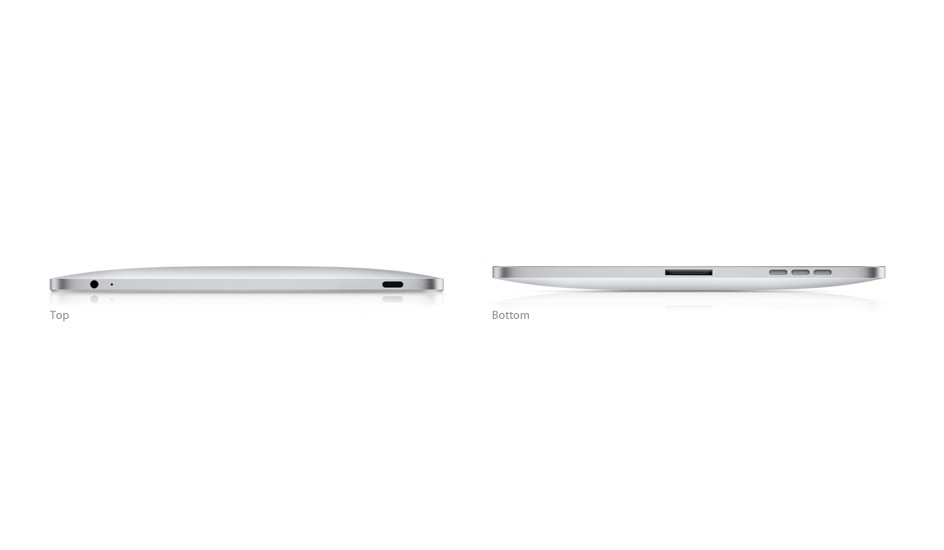
Let’s look at the iPad’s exterior. It is a gorgeous device, incredibly thin, made of aluminum and glass.
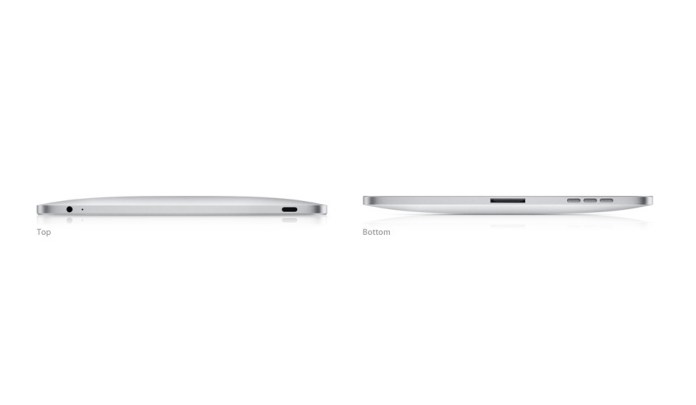
It comes in two models: Wifi-only, and WiFi + 3G. The only difference (on the exterior) between the two models is a bit of extra weight for the 3G model (1.6 lbs. vs 1.5 lbs.), and the presence of the 3G antenna, which looks like a black strip at the top.

Height: 9.56 inches (242.8 mm)
Width: 7.47 inches (189.7 mm)
Depth: 0.5 inch (13.4 mm)
Weight: 1.5 pounds (.68 kg) Wi-Fi model; 1.6 pounds (.73 kg) Wi-Fi + 3G model

One thing I’m not clear on is whether the 3G version of the iPad will require the AT&T network, or whether it will be “unlocked” for use on any 3G network. I’m certainly not keen to use AT&T’s network, for reasons with stem directly out of my personal experiences and my parents’ personal experiences with their horrible customer service.

Let’s move on and look at the display. I was hoping to see a larger-size device, but as things stand, the screen is 9.7″ across, at 1024 x 768 resolution. What does compensate for the somewhat smaller screen is the ppi (pixels per inch) spec, which is 132 — almost double the 72 ppi of standard displays. The display uses a technology called IPS (in-plane switching) which allows for a wide, 178° viewing angle.

When I look at the TV and Video specs, I’m glad to see that it will also output 1024 x 768 to an external display with the aid of a dock to VGA adapter, and that it will output SD and better-than-SD video (480i/480p and 576i/576p) to a TV with an Apple Composite A/V cable. More than that, it can play 720p (HD) video, which was expected and was the right thing to do.

“H.264 video up to 720p, 30 frames per second, Main Profile level 3.1 with AAC-LC audio up to 160 Kbps, 48kHz, stereo audio in .m4v, .mp4, and .mov file formats; MPEG-4 video, up to 2.5 Mbps, 640 by 480 pixels, 30 frames per second, Simple Profile with AAC-LC audio up to 160 Kbps, 48kHz, stereo audio in .m4v, .mp4, and .mov file formats. “

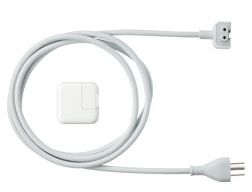
The iPad’s power adapter is rated at 10W according to the specs, which is great in my book. It means it’s a very efficient device. Think about it, what you basically get with the iPad is an HD TV which you can take to bed with you, and which only consumes 10W when plugged in. Have you even looked at your HDTV’s power usage lately? Even the most efficient LCD displays consume more than 100W, and if you look at how much plasma displays consume, you’ll want to run away.
The iPad can open most of the usual file formats, as is expected since it will have its own version of iWork, but does that mean we’ll get a Finder, with a Home folder for our account? After all, if we’re going to work with documents, we’ll need a place to save them and access them.

“Viewable document types: .jpg, .tiff, .gif (images); .doc and .docx (Microsoft Word); .htm and .html (web pages); .key (Keynote); .numbers (Numbers); .pages (Pages); .pdf (Preview and Adobe Acrobat); .ppt and .pptx (Microsoft PowerPoint); .txt (text); .rtf (rich text format); .vcf (contact information); .xls and .xlsx (Microsoft Excel).”

This becomes an even more important question if we consider the iPad accessories, among which we find the Keyboard Dock, which clearly allows one to use the iPad as a lightweight computer. If it’s going to be used as such, we’ll definitely need a Home folder, with a Documents folder and other such usual amenities to keep our stuff. And will these documents get synced with the documents on our home machine? Furthermore, if we’ll download our emails onto it, will they automatically get synced with Mail on our laptops and desktops?


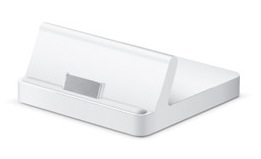
There’s also a regular dock, which lets the iPad charge and holds it upright, so you can watch movies unhindered.
I like the camera connection kit, which lets you download photos from your digital camera either through a USB cable, or with an SD card reader. That’s a smart and elegant solution.

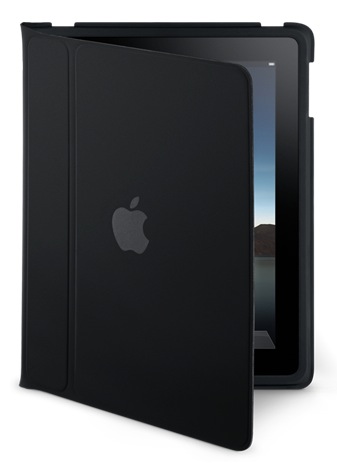
The iPad case is great, too. It’s wonderful for carrying the iPad about, and for travel, as it turns into a stand that lets you watch movies without needing to hold the iPad in your hand.

All of this exterior beauty wouldn’t be much without interior smarts and looks that match it to a tee. Here’s where Apple’s advantage really comes into play. Since they make both the hardware and the software, they can marry the two so well that they act as one. There’s never any doubt that a button you press on an Apple machine doesn’t do what it’s supposed to do, because it was made specifically for that reason and there’s a part of the code on the machine written specifically for it. On the iPad, I can see that significant thought and effort was put forth to design the software UI around the look of the hardware, to make the two act as one, and it’s a success. Have a look at how well each of the iPad’s purposed uses is represented by the software written for those uses.

Photos on the iPad:

Maps on the iPad. Can you believe how gorgeous those maps look on the iPad, and how cool it is to manipulate them (zoom, pan, annotate) on that large multi-touch display?

iBooks on the iPad. The Kindle’s battery may last longer, but can you argue with color?

iCal on the iPad. It’s just gorgeous, much more than its counterpart in OS X. Why doesn’t it look this good on my MBP?

Contacts on the iPad. Very cool.

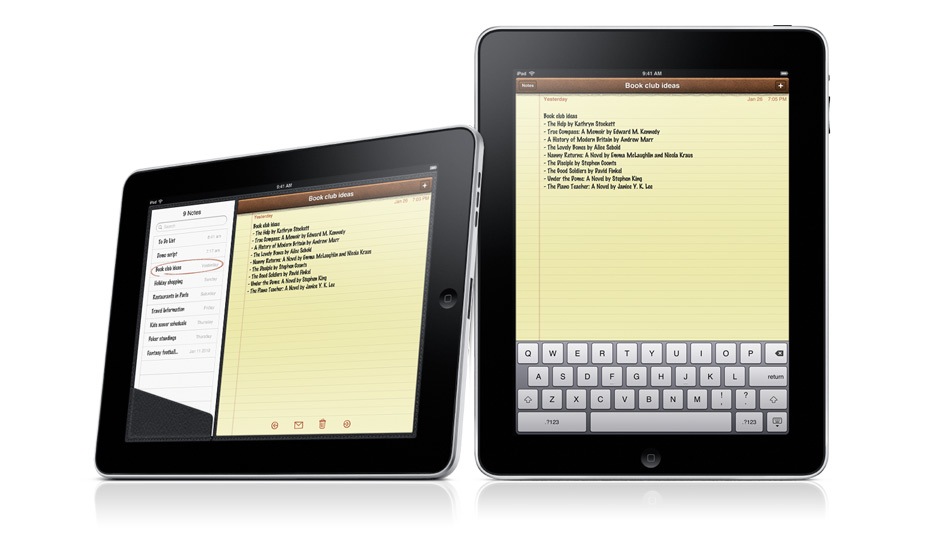
Notes on the iPad. I’m going to love taking notes now, even more so than on my iPod Touch.

There is one disappointment. I expected an iSight video camera on the iPad, and there isn’t one. I’m not sure why. Possibly for the same reason the iPod Nano got a video camera last year instead of getting it one or two years prior to that. It’s very likely the next gen iPad will have a video camera, and it will have iChat as well.

Still, the iPad is a fantastic device, and it exceeded my expectations in many ways. I’d love to know what you think of it.

iPad will be available in late March, worldwide, for a suggested retail price of $499 (US) for the 16GB model, $599 (US) for the 32GB model, and $699 (US) for the 64GB model. The Wi-Fi + 3G models of iPad will be available in April in the US and selected countries for a suggested retail price of $629 (US) for the 16GB model, $729 (US) for the 32GB model and $829 (US) for the 64GB model. International pricing and worldwide availability will be announced at a later date.

The video from the Keynote iPad launch is available here, and the iPad overview video is available here.

Photos used courtesy of Apple.

Standard