How To

How to display recent photos from your SmugMug feeds

I was asked by a reader (Andrew M.) how I display the most recent photos from my SmugMug galleries on my home page. He was aware that I use the SimplePie plugin for WordPress, but wasn’t sure how to get the same look when starting from scratch.

Before you read any further, keep in mind this is a very specific tutorial about WordPress, SimplePie and SmugMug. It has other applications, like for other image feeds and with some code tweaking, for other blogging platforms, but if you want to do those things, then Google is your friend.

recent-photos-screenshot

The thing that makes things a little complicated in my situation (as opposed to other image feeds) is the somewhat non-standard structure of the SmugMug feeds. For one thing, they don’t provide a URL for the image thumbnail where you’d expect it to be, and for another, they provide the image description instead of the image title. (To check this, mouse over a SmugMug thumbnail, and you’ll see the description pop up over the image.) But as long as you’re willing to dig into the feed code and find the names for the fields you need, then you can plug that info into SimplePie and go from there. Thankfully, I’ll do it for for you below. Lucky you.

Just a quick general disclaimer before I start though: I don’t do handholding. I’ll provide the instructions for how I did it. But in the unlikely event that things still don’t make sense to you, do me a big favor and read the SimplePie Manual, before you ask me questions. I did it and it helped me work things out. It should do the same for you if you use a little elbow grease. Thanks.

Okay, onto step 1: find the SmugMug feed URI. SmugMug provides several feeds for each user account. Go to the bottom of your gallery page and click on the Available Feeds link to see all of them. We’re going to use the Recent Photos Atom feed. In my case, it is:

http://www.raoulpopphotography.com/hack/feed.mg?Type=nicknameRecentPhotos&Data=raoulpop&format=atom10

smugmug-available-feeds

Step 2 is creating an Images Only template for SimplePie. If you’re not sure what this is, you need to read through the SimplePie documentation. The location where you need to place the new template is:

[WP Install]/wp-content/plugins/simplepie-plugin-for-wordpress/templates/

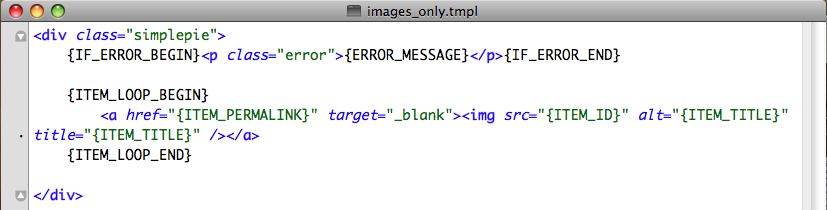
This is not arcane info, btw. It’s provided in right on the SimplePie general settings page, which is what I’ll talk about in Step 3 below. Now let’s talk about what you’ll put in the template file. This is where the digging through the feed code part comes in. I kept things simple, and this is what my images_only.tmpl file looks like.

simple-pie-template-files

images-template-code

As you can see, the code is minimal, which is the way I like things. I am specifying a simplepie class in the code, but as you can see from my CSS file, I’m not styling the div in any way. I’m letting the rest of the CSS code and the other divs handle the way the images flow within this particular section.

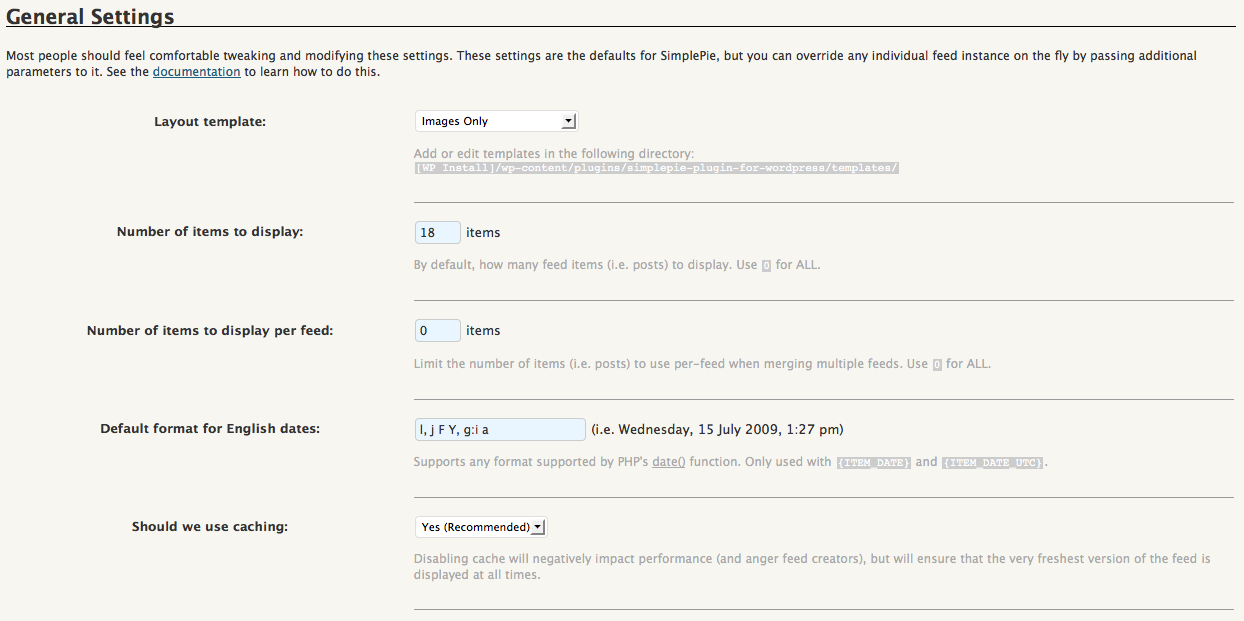
Step 3 is adjusting the general settings for SimplePie. Now that we’ve created an Images Only template, we need to let SimplePie know that it should use it. Go to the WP Admin Panel and locate the SimplePie settings. Match my settings as you see them below.
simple-pie-rss-general-settings

I’m telling it to pull the latest 18 photos. You may find you need to pull less or more. It’s really up to you. Use the caching option, it’s faster, but know that you’ll need to create a cache directory where SimplePie can store the images. It’ll walk you through it when you say Yes, and you may need to adjust privileges on the server side. Check out this chmod tutorial from WordPress if you’re not sure how to do that.

Step 4 is placing a code snippet on the home page. Now that you’ve gone through all that fun, you’ve got to wrap things up. Go to your home page template in WordPress, and where you want the images to appear, place the following code snippet — it’s what triggers SimplePie to pull your SmugMug photos feed and display the feed items how you want them, in accordance with the code in your Images Only template.
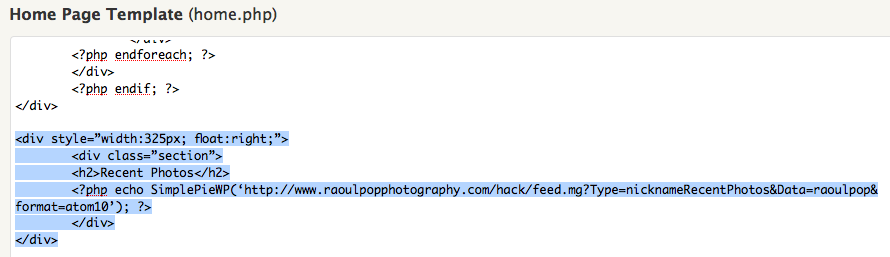
home-page-simple-pie-codeSee the highlighted text, but you only need to worry about the php code line. The rest is my own code that specifies the div and section styles. Use your judgment about how to style the thumbnails, and how you want them to display. It may take a bit of trial and error until you get it right, but if you persist, it’ll look good in the end.

Hope this helps!
Standard
Reviews

Inventor portraits by David Friedman

David Friedman, a photographer from NYC, is putting together short video documentaries of inventors. The first three are already up on Vimeo. A very cool idea. Wish I’d thought of it first. Kudos to Dave.

Inventor Portrait: Clint Fruitman from David Friedman on Vimeo.

Inventor Portrait: Jerry Ford from David Friedman on Vimeo.

Inventor Portrait: Tom Roering from David Friedman on Vimeo.

There are more details about each inventor on Dave’s blog, along with more non-video profiles of interesting inventors. Check it out.

Standard
Thoughts

Ce Soir by Monogrenade

Stop-motion music video from a Montreal band called Monogrenade, for a song called “Ce Soir”, from the EP entitled “Le saveur de fruits”.

Monogrenade – Ce Soir (HD) from Monogrenade on Vimeo.

Standard
Reviews

United Airlines breaks guitars

In addition to stranding people in foreign cities, lying to them, and making them pay for their own stay, thereby breaking the rules of the Star Alliance, United Airlines now also breaks guitars.

In March 2008, musician Dave Carroll flew with United Airlines through Chicago, where a fellow passenger witnessed his $3,500 Taylor guitar being thrown into the hold of the aircraft by one of the UA employees. Upon arrival, Dave filed a complain with UA, asking them to reimburse him for the repair to his guitar, which came to the hefty sum of $1,500. For over a year, letters and emails and phone calls went back and forth, until UA, true to their lying form, denied responsibility for the damage and refused to pay for the repair. In return, Dave promised to release three music videos, to shame them publicly. The first, entitled “United Breaks Guitars“, is already out.

Kudos to Dave Carroll! I hope tons of people see this video and decide to do their flying with other, more customer-friendly airlines. UA deserves all that’s coming to it for the way it treats people.

[via Gulliver]

Standard
How To

Luigi Cornaro and the simple life

Luigi Cornaro

A Venetian nobleman on the brink of death discovered a way to stay healthy and alert to the ripe old age of 102. He lived in the 15 century, and his name was Luigi Cornaro (1464-1566).

At that time, Venice was a thriving commercial port — one of the main shipping hubs in Europe — and a life of abundance with little thought for health was the norm for all wealthy people there. What also factors into the equation is the average life expectancy during that time, which was somewhere around 40 years. Yet Luigi Cornaro was a nobleman who chose to live a balanced life, eat a healthy diet, and lived to 102 years. That is truly remarkable.

How did he do it?! It’s really no mystery. At the age of 83, he wrote a treatise on the subject, entitled “Tratatto de la vita sobria”, followed by three more treatises on the same subject, published at the ages of 86, 91 and 95, respectively. In his treatises, he described in detail just how he lived his life and what he ate, hoping that others would follow his advice and reap the same benefits.

He believed in consuming the best quality and most easily digestible foods in small amounts. He reduced his food intake, cutting it down to twelve ounces a day of solid foods, divided into two meals with fourteen ounces of light wine, also divided into two servings. He sometimes ate a little beef, but mostly he would eat one egg yolk, vegetable soup, coarse, unrefined bread, salads, small quantities of locally grown fresh seasonal fruits and vegetables, and he’d drink slightly fermented wine. His stomach didn’t agree with fish or chicken, so he avoided them.

The amazing part is that all his faculties stayed intact and even better, improved with age, right up to the day of his death. He had no memory loss, his eyesight and hearing grew keener with the years, and he was able to stay active, physically and mentally, in his advanced age. In his nineties, he even studied singing and horseback riding.

His writings are now part of the public domain and thus freely available for download. If you want to live a healthy life, do yourself a favor and read through them. Google Books, has an 1833 English translation of his writings, entitled “Discourses on a Sober and Temperate Life“, translated and edited by Sylvester Graham. You can download the entire book as a PDF there, or here on my site (see 1st PDF below). You can also download an abridged version of Cornaro’s writings as a 6-page PDF (see 2nd link below). It was sent to me via email, and am not sure who its translator is, but would be glad to give credit if someone will contact me.

If you’re interested in modern advice on the subject, US News recently published an article entitled “10 Healthy Habits that Will Help You Live to 100“. They didn’t mention Cornaro, but their advice is easy to follow, if you’ve got the willpower.

Download Luigi Cornaro’s writings:

Standard