Lists

Condensed Knowledge – January 12, 2009

Shared from among my feed subscriptions:

Standard
Thoughts

Storage drops below 9 cents per gigabyte

I see that Newegg.com lists the Seagate 1.5TB SATA hard drive for $129.99 with free shipping. Sure, it’s an OEM drive, which means it’s not boxed, but who cares? Do you realize what this means? It means you’re paying $0.086 per terabyte gigabyte. Storage has become even cheaper — unthinkably cheap. The previous relevant price point was $100 for a 1TB drive, which meant $0.100 per gigabyte (a dime).

Seagate 1.5TB SATA Drive

A gigabyte is now cheaper than a dime! I just didn’t think it would happen this fast. I remember when a dime would get you 100MB, and I thought that was a lot. Okay, let me not kid myself: I remember when a dime would get you 1MB or less. Now you get 1GB, which is 1,000 times the storage capacity, for less than the same tiny dime. Amazing!

If you’re looking for extra storage capacity, now would be a good time. If I hadn’t already filled up my main Drobo with 1TB drives, I’d jump all over these, because they’re definitely at the right price point, especially now that they’ve been cleared for use with the Drobo once more.

Seagate FreeAgent Xtreme 1.5TB

While I’m on the subject of good deals, let me remind you of my guide to getting good deals on hard drives. I mention it because Micro Center happens to be selling the Seagate FreeAgent Xtreme 1.5TB (a triple interface external hard drive) for $149.99. This means that you’re paying $20 for the enclosure over the price of the hard drive alone.

Remember, this is a triple interface drive (USB 2.0/FW400/eSATA), and that means the enclosure is very inexpensive. Instead of buying one of those DIY enclosures that may or may not work (I’ve been there), you’ll get something that’s guaranteed to work, or you can return it.

Standard
Reviews

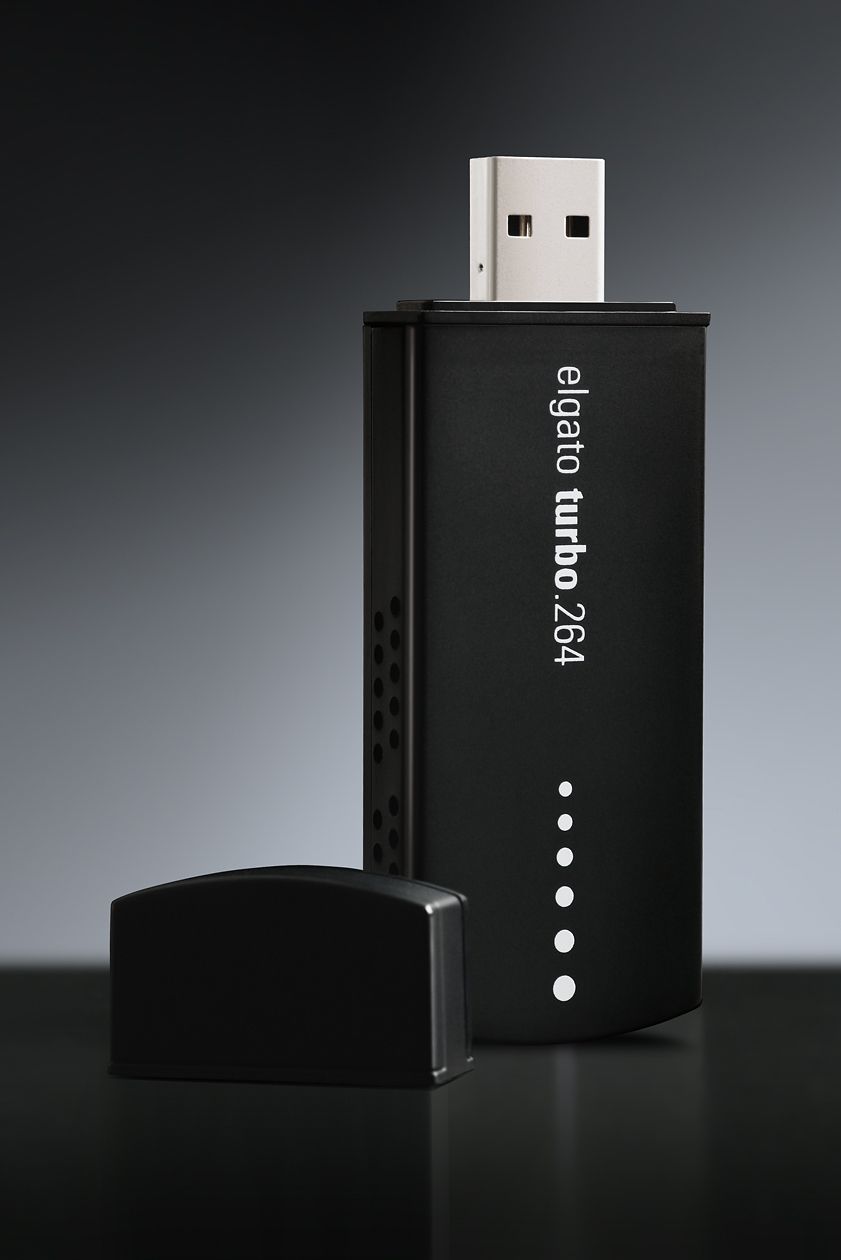
Hardware review: Elgato Turbo.264

I’ve been using the Elgato Turbo.264 hardware encoder since February of 2008 (see item 5 here) and am happy with it. When I first saw it on the Elgato website, I thought it was a gimmick. After all, what could a little USB stick do that my iMac’s or my MacBook Pro’s CPU and GPU couldn’t do? I was in for a pleasant surprise.

Elgato Turbo.264

The Turbo.264 was launched on May 16, 2007. The original press release claimed that it would not only speed up encodings to the MP4 format using its own software, but that it would also speed up exports from iMovie, Quicktime Pro and other Mac software. I haven’t been able to figure out how to do the latter, but can definitely vouch for the former. I’ve converted virtually all of my DVDs to electronic format with the Turbo.264, and yes, it has sped up that process significantly.

Encoding speeds will vary depending on what your computer is doing at that time, and on the export quality (Apple TV, iPod, etc). You can easily select the type of output for your exports from a drop-down menu when you drag a movie onto the Turbo.264 app — yes, the UI is that easy to use. The encoding speeds I’m quoting below refer to exports for Apple TV, which are the highest quality in terms of resolution and bit rate.

I should mention that while the Turbo H.264 takes most of the processing load off your CPU, it doesn’t handle all of the computing tasks by itself. From my experience, encoding movies without the Turbo.264 meant the CPU usage stayed somewhere between 90-100%. Encoding movies with the Turbo.264 meant the CPU usage stayed somewhere between 25-35%, allowing me to use my machine for other tasks such as processing photos in Lightroom or working in Dreamweaver.

Elgato Turbo.264

From my own experience, I’ve seen the Turbo.264 take a mere 2-3 hours to encode a movie on my iMac G5 (2GHz PowerPC CPU, 2GB RAM) when it would have taken me somewhere between 24-48 hours to do it with Quicktime Pro. This usually meant encoding speeds were somewhere between 20-24 fps. On my MacBook Pro (2.5GHz Intel Core 2 Duo CPU, 4GB RAM), encoding speeds approach and sometimes excel 30 fps, which means movies are encoded at normal playing speeds.

Speeds will also vary given the type of storage you’re using for the original movies and exported movies. I’ve seen slightly faster encoding speeds on Firewire 400 drives vs. USB 2.0 drives, and I’ve gotten my fastest encoding speed to date, 35-36 fps, when I used a FW 800 drive. In other words, the movie to be encoded should be stored on the FW drive, and you should also be exporting to that same FW drive. If you’re storing and exporting movies to your local drive, encoding speeds will be slower, and you’ll be slowed down even more by Time Machine, because it’ll kick in every hour and try to copy the changed files to the backup drive.

When I encoded movies, I usually had no other apps open, or if I did, it was usually only Firefox or Safari or Mail or some other lightweight app. As a matter of fact, I’m encoding a movie from a portable USB 2.0 drive (see item 4 here) as I write this, and I’m getting 31 fps, which seems to be the usual encoding speed on my MBP.

Encoding speeds were fastest when exporting for my iPod Touch (it’s the iPhone setting in the Turbo.264 app). It took as little as a half hour to encode a full movie for my iPod, which meant I could be done preparing movies for a long plane ride in about 2 hours.

Nothing’s perfect, and I do have a few complaints about the Turbo.264. While the encoding software is intuitive and easy to use, sometimes it’s too easy, and there’s no option that lets me separate chapters from titles. What happens then is for DVDs that aren’t built right — the main feature isn’t a separate title from the ads, previews and other features on the DVD — the Turbo.264 won’t know the difference and it will encode all of those things together with the main feature, which means I have to do extra work afterward cleaning up the file.

Elgato Turbo.264

For example, I’ll sometimes get those annoying and tacky copyright warnings at the start of my encoded movies. I couldn’t care less about them and I don’t want to see them. These are my movies and I’m not doing anything illegal. Or, I’ll get the second title on a DVD appended onto the end of the first title, and then I have to split the file, making me do extra work.

If you’re looking for a product that will let you speed up the encoding of HD videos (720p and 1080p), the Turbo.264 can’t help you there; it can only encode videos up to 800x600p in resolution. On the plus side, it will encode both NTSC and PAL videos, which is to be expected given that Elgato is a German company.

Sometimes, and only for some movies, the Turbo.264 won’t properly mux the audio with the video. The sound will be off by a fraction of a second (or more), which is really annoying. I discussed the muxing issue in more detail in the past. The thing to do is to always check the encoded files carefully. Sometimes you may need to re-encode some files, or use an alternative encoding app, such as Handbrake.

This leads me into a discussion of the Turbo.264 alternatives. There are two that I’ve used and liked: Handbrake, mentioned above, and ffmpegx. They are both faster than using Quicktime Pro, naturally, but both are slower than Turbo.264. Of the two, only Handbrake can encode with the H.264 codec, which is the preferred way to encode MP4 files these days, and it’s much slower than Turbo.264 at that. However, if you use the ffmpeg codec in Handbrake, it is significantly faster than Turbo.264, about 2-3 times faster when exporting for Apple TV, at a similar bit rate (cca 2500 kbps). Of course, then you can get into a discussion of the quality issues between the two codecs, and that’s beyond the scope of this review. The important thing is that the alternative is there if you want it.

Elgato Turbo.264

The question you’ve got to ask yourselves is this: is your time more precious than $100? If you find yourselves with a big library of movies that you want to encode for Apple TV or for WD TV, and you want to encode them using the H.264 codec, then the answer is yes — at least it was in my case. For a few days at least, Elgato is making that decision easier: if you’re in the US, they’re running a special MacWorld deal for this week only (until 1/10/09), and they’re selling the Turbo.264 for $69.95.

Reference: official specs for Turbo.264. Buy it from: Amazon, B&H Photo. Photos used courtesy of Elgato.


Standard
Thoughts

Using the economy as an excuse to shortchange employees

I’ve seen companies do some pretty disgusting things in my time, and the move some of them are pulling lately definitely ranks right up there with some of the biggest stinkers.

In effect, they’re using the current weak economy/recession as an excuse to lay off employees and burden the existing ones with the extra work, while keeping them mum under the fear of losing their jobs. If this isn’t corporate exploitation of its workforce, I don’t know what is.

I’m going to give you three examples, each juicier than the other, but I’m sure you can come up with more if you’re in the US and you’re employed in a full time job.

The niche business with an owner

I talked with an employee from a certain company lately, one which specializes in a niche market that has not been affected by the economic slowdown, nor does it look like it will be affected any time soon. I can’t disclose any identifying details, because the employee confided in me. What he told me was this: the president (and owner) of the company fired some employees while cutting year-end bonuses for the rest of the employees, using the recession as an excuse. The employees, the ones doing the hard work, have been handling a record amount of business for the past year, but the president cited a slump in incoming business. I was told the same president has been spending lavishly to expand his own mansion and buy extra cars and toys, during the same year when the supposed slump in business took place.

Adobe’s record profits

This example is more concrete than the previous one. In December, Adobe reported record revenues for the 4th quarter of 2008, and the sixth consecutive year of double-digit growth, yet they still laid off employees in November just the same. I’m not surprised though. I talked with a friend who is a long-time software developer, and he told me Adobe has another ugly habit: historically speaking, they have relied mostly on contractors, because it’s cheaper, and they’re easier to shed without bad press.

JPG Mag starts a bidding frenzy

Let’s look at JPG Mag. It’s the darling of many amateur photographers, because it gave them the chance to publish their work when other magazines might turn them down. I never really liked it, and I’ll tell you why: I thought they were cheap.

Here was an easy way to get print-worthy photographs without paying a dime. Turns out you could get amateur shutterbugs happy and willing to give away their work simply by dangling the illusory promise of publishing their pics in your magazine. The incentive was fame, which is as fleeting as a fart and just as troublesome, if you’ll excuse my expression. Where’s the moolah? Last I checked, bills were still payable in money, not fame.

When they announced they were going under, I thought it fitting. Good riddance to bad rubbish. First they don’t pay the photographers, then they fire the founders, now they’re going under — okay by me. Unfortunately, the buzz generated by their announcement stirred the vanities of those with bigger wallets, and a bidding war began.

But wait, there’s a nugget of bitter truth to be found among all this fake glimmer and shine. Turns out they fired all their employees, and now the CEO trumpets the company’s earning potential in messages to the bidders. PDN Pulse called them out on this, and rightfully so. Sure, now the company has earning potential since everyone’s gone. Hire a skeleton staff, make them do double or triple the work, pay no money to the photographers, and you’ve got a hand-dandy business model fit for the 21st century.

To sum things up

So you see, it’s okay to use the economy as an excuse when it befits your bottom line. Apparently, it’s okay to lay off people, it doesn’t matter that they’ve got bills to pay, that they’ve put a lot of hard work and time into your company. You shouldn’t do what you can to protect them in a weak economy when it’s harder to get jobs.

None of that matters, right? Ethics are so passé. You just use whatever excuse you can to make sure your precious bottom line gets bigger and bigger. It’s all about GREED. You can never have enough money, and people are only a means to it, right?

Well, I think that’s wrong. I don’t care if you’re afraid that the recession will affect your company. I don’t care if you really want that shiny new toy and a couple of employees and their mortgages stand in your way of getting it. I don’t care if your stockholders will bitch. If greed and money are your only motivators when you run a business, and you’d gladly step over people to balance the spreadsheets — don’t give me any of that I’m so sorry and I feel your pain crap — then you’re a spineless, slimy, pus-covered slug, and you deserve to be squashed under a steel-toe boot.

Standard
Reviews

Join MP4 files with Front End Digital Media Workshop

Want an easy way to join MP4 clips together? Front End Media Workshop, a nifty piece of Mac software published by the now defunct K-werkx, can definitely help you out. While the folks that put it together aren’t online any longer, the app is still available for download from CNET.

FE_DMW makes it really easy to join video clips

FE_DMW makes it really easy to join video clips

The app (it shows up as FE_DigitalMediaWorkshop in the Apps folder by the way) is meant to do a bunch of other things, but I found it most useful to join together several MP4 clips from my video collection.

For example, I’d purchased a DVD of “The Curious Adventures of Mr. Wonderbird“, a re-titled version of the 1952 original, La Bergère et Le Ramoneur. The film is little known, and features the dramatic escape of a pair of lovers from the claws of a despotic ruler. A curious bird helps them escape and orchestrates the toppling of the ruler’s oppressive regime, which mirrored, at the time, what was going on behind the iron curtain of Eastern Europe. Peter Ustinov voices the bird and also narrates the story.

At any rate, I’d copied the DVD to my computer only to later realize that I’d done it by chapters instead of copying the entire movie as a single file. Front End Digital Media Workshop allowed me to drag the five or six clips for each chapter onto its main window, drag and drop to arrange them in order, then, within minutes, join them together as a single file. The output was saved to the desktop in a folder (one for each join operation), where I could review, rename and archive it.

Sure, if you have Quicktime Pro, you can join video files there, or you can also import them into iMovie, but a small, single purpose app that does it faster and without a lot of fuss scores higher in my book. I may even use it later to snip clips from the beginning and end of some of my other video files, since I see that it has that feature built in as well.

Standard