Thoughts

DSLRs and video to converge

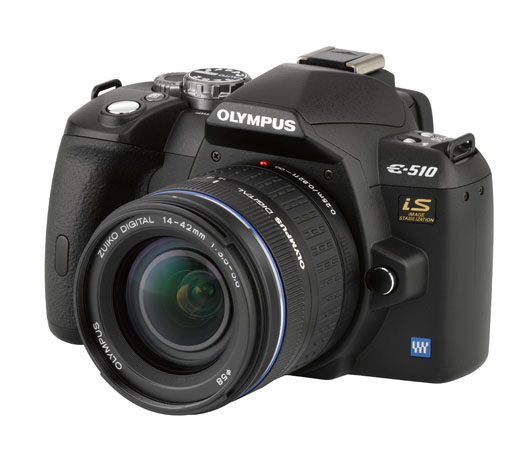
On September 24, 2007, I published my review of the Olympus E-510 DSLR, one of the first prosumer cameras on the market to feature Live View (TTL video preview, directly off the same CMOS sensor used for photographs). Unless people were to jump to conclusions, I wanted to make it clear that it won’t let you record videos — but I knew that market forces were aligning to bring some sort of video capability to DSLRs.
I myself was opposed to that idea. I thought it would bastardize a DSLR to make it record video. After all, a DSLR takes great photos, and it should only do that. I also thought that video camera manufacturers would squeeze photo-taking capabilities into video cameras, which would result in crappy photos being taken by gadgets that should have stayed video cameras. Well, I was wrong. I forgot all about how the market delivers what the consumer wants, and has a way of sometimes exceeding expectations.

Behold the Nikon D90. It is the first DSLR that takes video, and it’s not some low-res video that you can get from a point-and-shoot digicam; it’s 720p HD video. What’s more, it lets you control depth of field by manually adjusting the focus while shooting. Best of all, you’re already using a sensor that takes great photographs, and the expensive glass you already paid for. You don’t need to spend yet more money on a dedicated video camera. You get the best of both worlds: the interchangeable lenses of a DSLR, and the quality of a decent video camera.
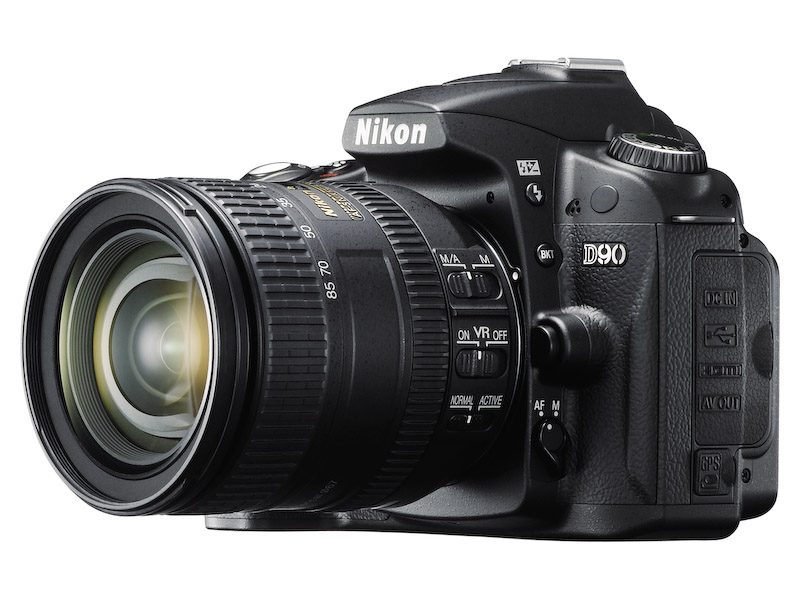
I am truly blown away by the D90’s specs. If I hadn’t already invested in the Canon 5D and Canon lenses, I would be sorely tempted to get the D90. I crave (badly) the ability to take quality photos and video with a single device, but unfortunately, up to this point, that was not possible unless I carried both a DSLR and a video camera.

As good as the D90 is though, it will soon be eclipsed. Why? Market forces. How long do you think it will be before we’ll have a DSLR that can record 1080p HD video? Or how about an even smaller and thinner DSLR than currently possible? How about a DSLR that looks and weighs about the same as a point-and-shoot, but gives you photo quality that’s equivalent to (or exceeds) today’s DSLRs? It’s all coming.

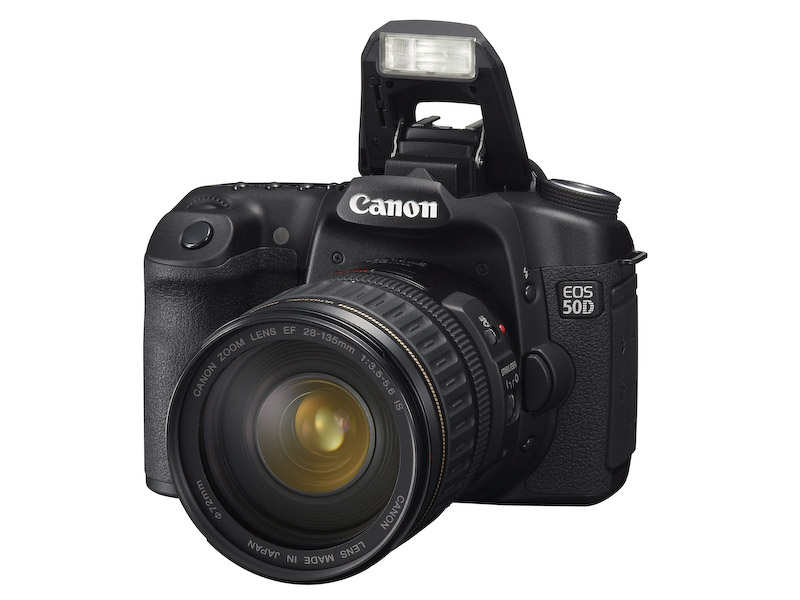
Let’s look at what’s currently available. First, we have the new Canon 50D. You may think it’s been eclipsed by the D90 or the D300, but you’d be wrong. You see, Canon took things further than I thought possible with it, by giving us 15 megapixels in a cropped (1.6x) sensor that also shoots (natively) up to 3200 ISO. I didn’t think that was possible on a cropped sensor. I thought 12 megapixels was the max at that sensor size. I was wrong.
You know where else I’ll be proven wrong? Back when I attended the Olympus E-3 launch party, I talked about the camera’s (somewhat) limited 10 megapixel resolution, and I thought they had reached the limitations of the Four Thirds 2x cropped sensor. I thought the sensor’s surface area was too small to get more resolution out of it. But now that Canon has proven you can get 16 megapixels out of a 1.6x cropped sensor, I don’t see why you can’t get 12 megapixels or more out of a 2x cropped sensor.

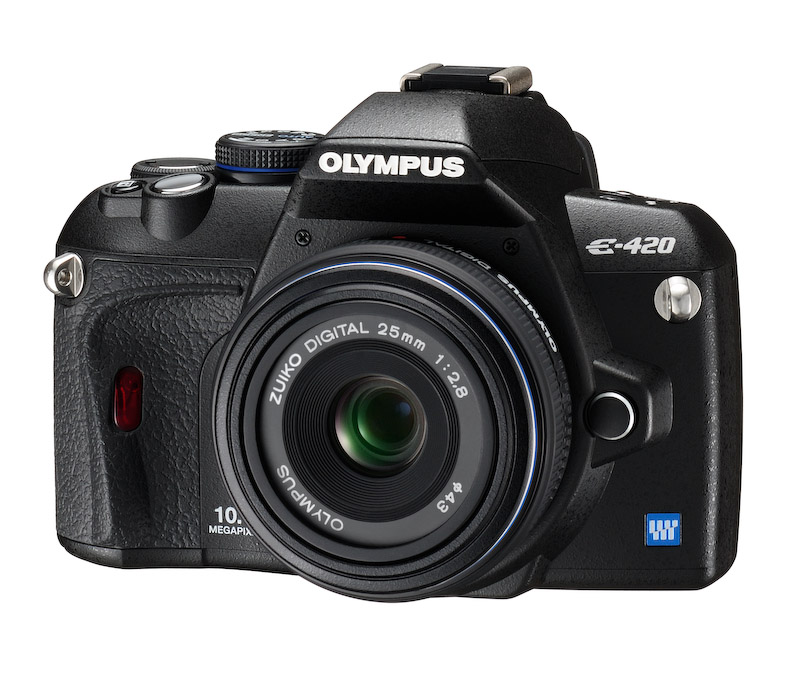
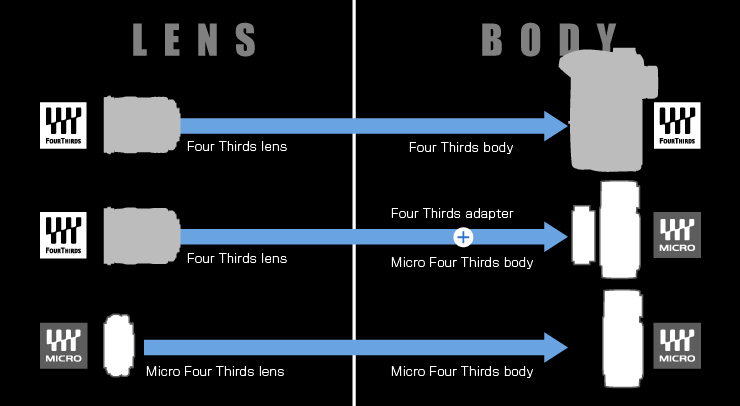
Here’s where I get to the last part, smaller and lighter DSLRs than currently thought possible. Currently, the smallest DSLR on the market is the Olympus E-420, pictured below. Do you know what the Four Thirds consortium has come up with? It’s the Micro Four Thirds standard, which allows for thinner, shorter lenses, and thinner, shorter camera bodies. A Micro Four Thirds camera will look and weigh just about the same as a point-and-shoot camera with a decent zoom lens.
Wait, it gets even better. The current aspect ratio of Four Thirds cameras is 4:3. The aspect ratio of Micro Four Thirds cameras will be 16:9. That’s the same aspect ratio used in movies. Where do you think that’s going? It means your photos and your videos will have the same aspect ratio, and the line between photography and videography will get even more blurred, and it’s quite possible that in the near future, we’ll have 1920x1080p HD video recorded by a tiny little DSLR with a tiny little lens on it.
That’s just what seems logical to me, and I’m a fairly conservative estimator. You wait and see what the market will do. We’ll have some very interesting DSLRs to play with in the next few years.

[Images used courtesy of Canon, Nikon and Olympus. ]

Standard
Thoughts

A clever bit of marketing

I was driving to work a couple of days ago, and as a MINI passed me from the opposite direction, the owner stuck his hand out the window, making the victory sign at me. I smiled, and responded by raising my hand. This sort of thing has happened countless times since I bought my MINI.

Why do MINI owners do this? Because it’s in the MINI literature. The pamphlets that come with our cars will tell you just how to salute other MINI owners. The victory sign was one of the recommended gestures.

MINI’s marketing stood out from the start. It was different, it was likable, and it was fun. The salutes were one of the things that really stood out. After all, saluting other MINI owners is a nice and friendly thing to do, and on some level, it makes one feel like they’re part of a club that’s not open to everyone — which, incidentally, is another notion taught in the MINI literature and reinforced on the MINI website, where the owner section is called the Owner Lounge.

Let’s face it though, the club isn’t that exclusive. You can get in if you have the money to buy a MINI. And this club’s membership is growing. In 2003, when I bought my MINI, there weren’t that many on the roads. Now, five years later, I see a lot more, particularly in the DC area, where I currently live. If you want to talk about an exclusive car club, take the classic MINI owners. You can’t make those cars any more, and there are very few of them here in the States.

Since there are only going to be more MINI cars on the roads, it begs the question: at what point do you stop waving at other MINI owners? I’m not asking this because it bothers me to wave back, or even to start a salute; I enjoy doing it. It’s the nice and sociable thing to do. It puts a smile on my face, and that’s always a good thing.

But I see plenty of other MINI owners that aren’t interested in it. I look at them as I pass by, hoping for some sort of little wave (after all, I’ve gotten used to this clever bit of marketing), and I see nothing. Then I wonder, did they read the pamphlets? Don’t they agree with the marketing? What could make them so uninterested in being nice to other people? How could they be glum while they’re driving a MINI?

Then I catch myself, and I chuckle. Because let’s face it, it’s the marketing that makes me think and do those things. It’s powerful stuff, because it appeals to the basic human need for company, for social interaction. It’s good stuff.

Standard
Reviews

A Dell order and return experience

On 7/31, I placed an order for a Dell S2409W 24-inch Widescreen Flat Panel LCD Monitor, a new model from Dell which has a 16:9 display ratio and runs about $350. I needed an external display for my MacBook Pro, because it’s getting cumbersome to edit photos on a 15″ screen.

On 8/21 (three weeks later), it finally arrived. After connecting it to my Mac, I discovered it just didn’t have the display quality I needed, and started thinking about returning it.

A couple of days later, after I tested it and calibrated it as much as I could, I filed a request for a Return Authorization on Dell’s website. I had to fill out a form with all of the order information and with my address (which I had to enter twice), because the website isn’t designed to pre-populate the fields based on the information already present in your account. There is a way to log in, which promises to pull that information for you, but even if you do log in, nothing gets pulled. You can’t just go to an order and click on a Return option.

I got an automated confirmation right away which assured me they are “working 24 hours a day, 7 days a week, to answer customer inquiries”, and that I could expect a response in “24 hours or less”.

Their response did not arrive within 24 hours. When it did, it said they are “unable to process a return authorization for the order,” and to “please contact Dell Consumer Customer Care at 800-624-9897.” I called them.

I was greeted by the Dell phone robot, and followed the various prompts to navigate the menus, until it was satisfied and passed me off to a real person. That’s when the fun really began.

Rep 1 (Indian): “Could I have the order number? What is your name? How can I help you?”
Me: “I’d like to return that order.”
Rep 1: Okay, let me connect you to someone that can help.”

Rep 2 (Indian): “Could I have the order number? What is your name? How can I help you?”
Me: “I’d like to return that order.”
Rep 2: “Okay, let me connect you to someone that can help.”

Rep 3 (Indian): “Could I have the order number? What is your name? How can I help you?”
Me: “I’d like to return that order.”
Rep 3: “Okay, let me connect you to someone that can help.”

Rep 4 (American): “Could I have the order number? What is your name? How can I help you?”
Me: “I’d like to return that order.”
Rep 4: “Why?”
Me: “Display quality is not satisfactory when connected to a Mac.”
Rep 4: “Have you tried to adjust it?”
Me: “Yes, but it just won’t display colors the way they need to be displayed.”
Rep 4: “Do you have a video card?”
Me: [Couldn’t believe what I’d just heard… Pause] “Of course, otherwise my computer wouldn’t work.” [Which is true — to my knowledge, you need either a graphics card or an embedded graphics chip to display video with a normal computer, and besides, they don’t ship Macs without some sort of video cards.] “Look, I just want to return the order…”
Rep 4: “Okay, I wanted to make sure, because you’ll be charged a 15% restocking fee.”
[Then she got to work on processing the Return Authorization and issued it to me.]

I spent 19:06 minutes on the phone to get the Return Authorization, and had to go through all of that stuff listed above. I’m not counting the time spent digging on the Dell website to submit the web request, which obviously didn’t come to anything.

You would think:

  • Dell would want to make it less onerous for its customers to get their business done when they deal with them over the phone.
  • It’d take less than four people to get to the right person.
  • I wouldn’t have to speak to three Indian reps at some call center in India, then get transferred to an American rep somewhere here in the States, before someone could address the reason for my call.
  • Someone who processes RMAs wouldn’t try to troubleshoot a product, especially when I’m not interested, and when they don’t know how a computer works.
  • Dell would have a way to pass the order number and customer name from rep to rep, so I wouldn’t have to say them over and over and over.

You’d be right to think all those things. Unfortunately, every time I interact with Dell, I see that they still don’t have their act together. They’re too big, disorganized, they don’t treat their customers properly, and they make it a hassle to deal with the company. As for their design philosophy, it’s practically non-existent, unless making ugly stuff counts — except for their recent Studio laptops and Studio Hybrid desktops. Is it any wonder they’re not doing so well?

And what’s up with the 15% restocking fee? I thought the industry “standard” was 14%.

Standard
Reviews

Hardware review: Dell S2409W Flat Panel Display

The Dell S2409W 24-inch Widescreen Flat Panel LCD Monitor is a new model from Dell which has a 16:9 display ratio and runs about $350. Its native resolution is 1920×1080 pixels, which means it can display full quality HD content (1080p). It has three inputs: VGA, DVI and HDMI, which means you could connect it to your computer and to a DVD player or some other video device, and switch between the inputs as needed.

I purchased this monitor on 7/31, and it arrived on 8/21. My reason for buying it was the price. It is one of the lowest prices for a 24″ display from a reputable company, and I was also drawn to the 16:9 display ratio. I had a chance to work with it over these past four days.

I like the design of the monitor. It’s fairly thin in terms of depth, the rounded bezel is interesting, and the white power light is a very nice touch. It sits on a round base that has a sort of round indentation built-in, which I found to be a handy spot for post-it notes or a small remote control.

My computer setup is described in detail here. I have a MacBook Pro, and I do a lot of photography editing. As soon as I connected the S2409W to my MBP, I could see that fonts and curves weren’t displayed properly. There was some noticeable rasterization that took place at the edges of smaller objects on screen. I’m not sure of the word to describe it, but edges weren’t smooth, they were craggy.

I set up my MBP and the monitor in dual display mode, and I dragged windows back and forth between the two displays repeatedly, in order to compare the differences. As soon as a window made it onto the Dell monitor, things just didn’t look as good and as crisp as on my MBP’s display.

Also, no matter how much I calibrated it, I couldn’t get the contrast and brightness settings right. If the contrast was too low, then colors and shadows appeared washed out, and if the contrast was too high, the light-dark difference bothered my eyes. If I turned down the brightness, there was too little light on-screen, and if I turned it up, there was too much light, which made my eyes burn.

The next day, I brought my MBP into work and connected it to my Dell W2407WFPb monitor, another 24-inch flat panel display. This particular model belongs to the UltraSharp model line, which is higher quality. Here the colors showed up properly from the start, without calibration, and there was much less rasterization around the edges of letters and other small objects. I had to admit the S2409W display isn’t made as well as the W2407WFPb, which is understandable, since the latter model retails anywhere from $600-700.

I did one more thing: I started my XP VM on the Mac while connected to the S2409W, set it to full screen, and noticed that, at least when running Windows, the display quality was acceptable.

No matter how much I tried to adjust the display while I worked on my Mac, I couldn’t get it to work in a satisfactory manner for me. Since I do most of my work on a Mac and within OS X, the Dell S2409W won’t work for me, and I will have to return it.

Updated 8/28/08: You can read about my Dell return experience if interested. I find it very encouraging that Dell is now engaging with its customers the way they’ve done it after I wrote that post.

On a more general note, I haven’t been very successful with my monitor picks so far. I already tried using an HDTV as my computer monitor, but that didn’t work out. Now using a regular monitor hasn’t worked out either. It looks like I may need to spend upwards of $700 to get a good monitor that will work well for my needs.

Keep in mind that my needs are more demanding than those of the average user, and that I may be more critical of a monitor’s display quality than you may be. You may find the S2409W does just fine for you, particularly if you do most of your work on Windows, where it seems to work better. At $350 for a 24-inch display, it fits the bill as well.

Promotional: Shopping for Dell hardware? Use Dell coupon codes on your next purchase.

Standard
How To

Get iMovie '08 to import 3GP files

I recorded a few video clips with my wife’s mobile phone today, and when I tried to import them into iMovie ’08, I found out that I couldn’t. Apparently, I’m not alone, because if you do a search for this on Google you’ll find there are plenty of other people with the same problem.

Fortunately, there are two ways to work this out, but neither is necessarily obvious. Pick one of them:

  • Open up the clips in Quicktime. I was able to open them up and play them right away. Now, export each clip as an MP4 file. You must specifically select File > Export, then select Movie to MPEG-4 from the Export drop-down menu. Don’t just Save the clip, because it’ll package it as a MOV file, which iMovie ’08 will still refuse to import. You must Export it as an MP4 file. You may also be able to export to other formats, but MP4 is what worked for me.
  • Open them clips in Turbo.264, then export them to some format (try Apple TV or iPod Standard, for example). There’s a catch here though. If the resolution of the clips is too small, Turbo.264 may not be able to convert them, and will give you an error. Best stick with Quicktime then.

Now open up iMovie ’08, and go to File > Import Movies, browse for them, and import to your heart’s content. That’s it!

Standard