Reviews

Camcorder review: JVC Everio GZ-MG21

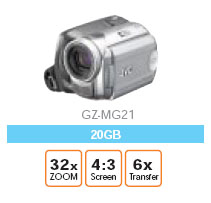
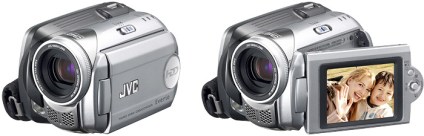
JVC Everio GZ-MG21 Camcorder

Friends of ours bought the JVC Everio GZ-MG21 camcorder a little more than a month ago, and aren’t too happy. Granted, it’s a 1st generation hard-drive based camcorder, so it’s bound to have certain downsides. So, with that in mind, here they are:

  • Start-up time is long, which means bye-bye to catching those candid moments on tape um, hard-drive.
  • Video quality is ho-hum. It’s better than VHS tape, but definitely not as good as Hi-8 or miniDV tapes.
  • Still quality is horrible, and that’s to be expected, since the max and only res for stills is 640×480.
  • No image stabilization + small camcorder = shaky video. This means the 32x optical zoom, while normally a great thing, is useless without a tripod.
  • Every time you press the record button, a new video file is created. Which means that when you do scene-by-scene shots, you end up with a whole bunch of little video files that you have to stitch together in your video app if you want to view them on a computer. My friend thought it’d be better if video kept getting appended to a single file. I can understand the logic of why JVC has a file by file approach, but I have to agree with my friend that a simpler method needs to be found. Yes, creating different movie files for each scene is an easy way to differentiate between the different scenes, and also saves battery time and minimizes lag since you don’t have to seek an existing large video file to find the end point and append to it. But, it is annoying.
  • Battery time is less than advertised.

Now for the good points:

  • Very small, easy to carry.
  • Convenient.
  • No tapes to worry about.

JVC Everio GZ-MG21It’d be interesting to compare my friends’ Everio model to the newer ones that have come out since, like the GZ-MG505, which is supposed to have 3, yes three, 4.5-inch CCD sensors, and shoot 5 megapixel stills. It also has a larger filter, and a larger LCD monitor.

But, it also consumes 75% more power and weighs 25% more. However, the video quality has to be better, and the stills would probably look stunning compared to the MG21.

I still have to assume, unless I’m presented with evidence to the contrary, that multiple video files are created, and that’s an annoyance. Plus, battery time has to be less than the MG21. And, I’d expect a little more than 30GB in drive space, especially given how cheap hard drives are these days. I mean, c’mon, an iPod has more drive space!

Here is the Everio Specs PDF.

Standard
Events

Want to see Ligia and I on TV?

A few months ago, both Ligia and I got taped for a new show on HGTV called “I Want That! Tech Toys“, the kid brother, so to speak, of “I Want That!”, which is a wildly popular show. By the look of it, this new show is going to make it big as well.

At any rate, Ligia got invited to demo a portable keyboard called the Yamano Hand-Roll Piano (a bit of a misnomer, since it’s not a piano, it’s a keyboard). At any rate, what makes it an interesting product is that it’s truly portable: it rolls up into a tight little package, which you can carry virtually anywhere. It’s also powered by batteries. The keys are made of rubber with touch sensors underneath, so if you spill something on it, you don’t have to worry. It’s even got a MIDI-out port, in case you’re interested in that sort of a thing. The only thing that’s missing is the tactile feel of a real keyboard, which, I have to say, is a fairly important thing for the more serious piano or keyboard players. But this keyboard is great for beginners. So… to make a long story short, Ligia and one of her students, Peter, got taped for the show, and the episode just aired on HGTV. I uploaded the particular segment of the show where Ligia is featured to YouTube, and you can view it below.

What about me? Well, I got invited to demo a cool product called the Nabaztag Smart Bunny for the show a month after Ligia got taped. I demoed it, and also wrote a nice lengthy review here at ComeAcross for your enjoyment. The show in which I appeared aired after Ligia, and it’s still on the air, as a matter of fact. The segment where I talk about the bunny is also uploaded to YouTube, and you can view it below.

Hope you enjoy them! I know we enjoyed getting taped, it was a fun little experience, and we are grateful for the opportunity! You wouldn’t believe it, but just to get that 1:25 minutes of live TV, it took over three hours for each of us. It’s the setups for the different shots and the re-takes that take so long. You’ve got to make sure the lighting’s just right, that the angles are correct, that stray objects aren’t in the shot, so on and so forth. Hey, and did you know that one of those Beta video cameras they use to film you for TV costs over $60,000? Better not drop them!

Standard
Reviews

Boot Camp 1.1 Beta just released by Apple

Apple Boot Camp 1.1 BetaI complained in a previous post about how I wanted to buy a Mac laptop that I’d use for both work on pleasure, but couldn’t, because I was shackled to Windows OS for most of my development work, and there were certain things that just didn’t work on the Mac, with either Boot Camp or with virtualization software.

Well, I can’t have been the only one with gripes, because Apple just released Boot Camp 1.1, addressing some of the very concerns I voiced, both here and at BlogCritics. Here’s what the new version includes:

  • Support for “the latest Intel-based Macs”: this means the Core 2 Duo chips, code-named Merom, coming out at the end of this month. It could also be referring to the new Quad Xeon chips installed in the Power Macs, but I have a feeling 1.1 covers the Merom line as well.
  • Easier partitioning: version 1.0 was somewhat limited (let’s say minimalistic and be nice about it) in the choice of partition sizes.
  • Ability to install Windows XP on any internal disk. It still stinks that we can’t install it on a USB/Firewire drive, but I assume that’s coming down the line.
  • Support for built-in iSight cameras: this was one of my biggest gripes. Trying to use the iSight camera would give the dreaded BSOD.
  • Suppor for built-in microphones: about time! This was a pretty basic requirement.
  • Right-click when pressing the right hand Apple key on Apple keyboards. Interesting, although I’ll probably still use Ctrl + Click.
  • Improved Apple keyboard support: again, about time! Keys like Delete, PrintScreen and NumLock are used by most users on a regular basis.

So what still doesn’t work? The Apple Remote doesn’t. And neither do the Bluetooth Wireless Apple Keyboard and Mouse. Now, while it’d be nice for me to control iTunes while in Windows with the Apple Remote, I can live without that, but why wouldn’t the keyboard and mouse work? So okay, they don’t – fine. But what bothers me is that the sudden motion sensor and the ambient light sensor don’t work either. Those are not only cool, they’re very practical technologies. The sudden motion sensor in particular should be a must have feature.

I can just imagine Apple Tech Support when an unfortunate fellow calls them (hopefully not me):

  • User: “My laptop was resting on its laptop stand, and when I picked it up, it slipped out of my hand and dropped on the table. Now it won’t boot up!”
  • Support: “How high was the drop?”
  • User: “Only 4-6 inches! What’s going on?”
  • Support: “Were you using Windows at the time?”
  • User: “Uh, yes?!”
  • Support: “Well, you’re out of luck. If you were using Mac OS, the sudden motion sensor would have protected the hard drive, but since you used Windows, that hard drive is kaput. Plus, we don’t support Windows. You’ll need to get a new hard drive.”

In a related note, most of the new Lithium Ion batteries are subject to meltdowns and explosions when shaken, overheated or dropped. Something to think about as you hold that laptop in your lap…

Standard
How To

How to hack Windows Desktop Search and turn it into a dictionary

If there are some of you out there using the beta version of Windows Desktop Search – you know, the one that imitates both Spotlight and Google Desktop Search – then you probably know it’s alright.

I’m amazed that Microsoft has actually turned out a usable piece of software that doesn’t crash. I like it because it starts finding documents as soon as you start typing (like Spotlight), and the search index is live, unlike the Google Desktop Search, which is time-delayed, and also contains bad entries for files you’ve moved or deleted.

When you search with WDS, you get the option to search your Desktop, or the Web. Well, there’s one huge caveat: don’t bother searching the web with the Microsoft Live Web Search, or MSN Web Search, or whatever the heck they call it these days. It’s downright pathetic, and if you’re using IE 7 Beta, it may even crash the browser. Fortunately, Google has come up with a solution. Just surf over to their main site, and within IE 7, you’ll get a JavaScript note (not window) in the top right corner of the web page, that will invite you to set your IE search engine to Google’s. Run the tool, and do that.

Now, for the fun dictionary hack. In the Windows Desktop Search bar (located in the taskbar), type the usual Google shortcut for searching definitions: “define:word”, then click on the Web button. Bingo! Now you’ve got your very own dictionary, neatly accessible right from the taskbar. Enjoy!

Standard
Reviews

A side by side comparison of the 2003 MINI Cooper S and the new 2007 MINI Cooper S

I posted a couple of days ago about the launch of the new 2007 MINI Cooper S, and I said I wasn’t too crazy about the exterior. I still hold that opinion, and to prove it, here are some photos of my very own 2003 Cooper S, alongside a couple of photos of the 2007 Cooper S.

Now, can you honestly admit the new 2007 MINI looks better? They did away with the aggressive, sexy curves on the hood! Where’s that nice, aggressive hood? They pinched it and made it thin. They also made the lights rounder and smaller, and they did away with the extra air scoop on the bumper. But in doing so, they didn’t compensate, and the MINI’s now lost its flair.

Sure, the new one is slightly more sculpted, and it looks like they did away with some of the fat, plus they added two fog lights instead of the single red one you see on the 2004-2006 MINIs, but still, I prefer the back of my 2003 MINI. It’s nicer.

Standard