How To

What’s on your Drobo?

Updated 1/14/19: I have revised my opinion of Drobo devices. After experiencing multiple, serious data loss events on multiple Drobo models, even recent ones, I no longer consider them safe for my data.

The folks at Data Robotics put together a short video that showcases Drobo owners talking about what they store on their Drobos, and asked their Twitter followers what’s on their units.

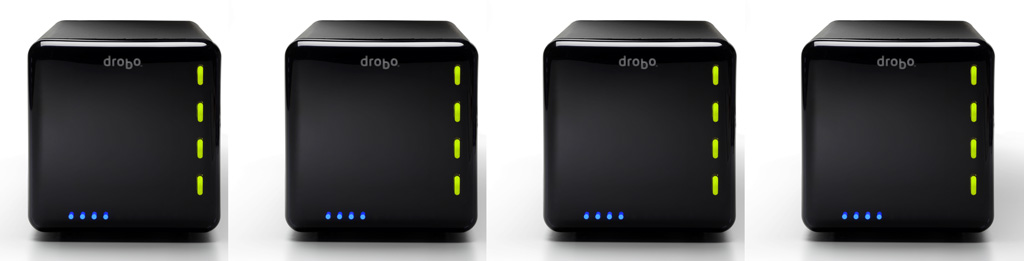
That got me thinking about what I store on my Drobos. I have four Drobos in total: three 1st Gen Drobo units (USB 2.0 only) and one 2nd Gen Drobo (Firewire 800 + USB 2.0). Perhaps that makes me a bit unusual. Most people have one or two units, not four. But there’s reason to the seeming excess.
For one thing, I have a huge photo library. (You can find the photos I edited and published here.) For another, my wife and I have a huge video library. These are movies and cartoons we had on VHS tapes, which we digitized, or on DVDs, which we archived for easy viewing, or TV shows and movies that we recorded from TV. We’re big fans of classic movies and cartoons from the 1920s, 30s and 40s, and we collect all the ones we like. We also digitized most of our old paperwork. My medical records are all digital. So are my dental records. So are a bunch of our other documents. I scanned all the stuff I could scan, and now when I need to look something up, it’s right there at my fingertips. I’ve also started shooting video more intensively this past year, in SD and HD. (You can find my published videos here or here.) All that stuff takes a fair amount of space — terabytes to be more precise. And to top off this whole list, we live our life on two continents (North America and Europe).

Here’s what I do to make sure I don’t lose my data:

  1. I keep a Drobo with my parents, at their place. On it, I store a backup of my photo library and our video library, along with their files. I back up my live photo library to it using CrashPlan, a piece of software that will let you back up your data to a friend’s machine. I’ve actually just started using it, and while I’ve been able to back up just fine with both machines on the same network, being able to do it from thousands of miles away will be a litmus test of the software’s capabilities. I’ll be sure to write about it if it proves workable. The video library gets backed up every once in a while in a pretty simple manner: I carry movies and videos to them on a hard drive and copy them onto the Drobo. Updated 4/21/10: CrashPlan does indeed work as advertised!
  2. I keep two Drobo units at our home. On one of them, I keep our video library, and an extensive, historical file archive. On another, I keep a mirror copy of my live photo library, which is currently stored on a WD Studio drive, because it’s smaller and easier to transport than a Drobo, and I do a fair bit of traveling. I mirror my photo library with an app called Synkron, which works great. I switched to the WD Studio when I started traveling extensively and realized the Drobo couldn’t always fit safely into my luggage. (Where oh where is that Drobo carrying case I wrote about last year?)
  3. I gave the fourth Drobo to my brother, who needed a solid data storage device to begin to archive his ever-growing library of ethnological videos. He’s a documentary filmmaker who travels around Romania studying and recording religious and secular customs, which are being forgotten and buried along with the old folks. He wants to preserve these things for posterity. You can learn more about what he does at his website, called ORMA.

So that’s how I use my Drobos. However, I’ll have another logistical issue to deal with in the near future. I’m running out of space on the WD Studio drive, which has 2 x 1 TB drives in it. I run it in RAID 1, and in another month or two, it’ll be completely full. I’ll need to start using one of my Drobo units as my primary photo editing/storage device again. This means I’ll shuffle all my data around once more. A possible new arrangement will see me using the 2nd Gen Drobo for the storage and editing of my photos and videos, and the other for the storage and retrieval of our video library and historical file archive, while the WD Studio drive will see some backup duty or be relegated for travel-only purposes.

The current drive distribution among the three Drobos I use actively is as follows:

  • 2 x 2 TB drives + 2 x 1 TB drives in the Drobo that stays with my parents
  • 4 x 1 TB drives and 4 x 500 GB drives, respectively, in the two Drobos that are with us
  • I can’t speak for my brother, but I believe he’s using 4 x 1 TB drives in his Drobo

I’d love to hear how you are using your Drobo. Perhaps you have some ideas for me?

http://www.youtube.com/watch?v=cCS_k3d5qwI

Image and video used courtesy of Data Robotics. The 2nd Gen Drobo is available for purchase from Amazon or B&H Photo. The 1st Gen Drobo has been discontinued as of 2009. Be sure to also check out my reviews of the Drobo S, DroboPro and DroboElite.

Standard
How To

Are you really backing up your WP blog?

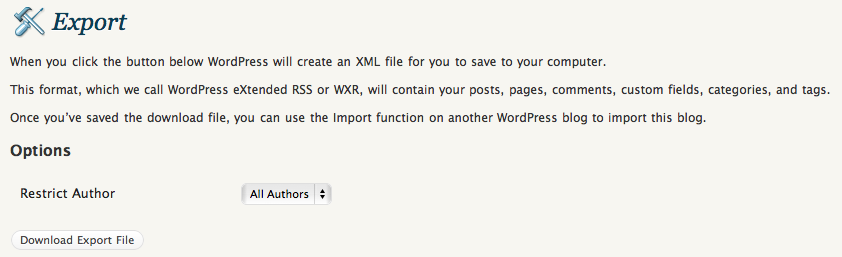
When those of us with self-hosted WordPress blogs back up our content using the built-in WXR functionality, do we ever check the downloaded XML file? Until recently, I didn’t worry about it. I’d click on the Export button, copy the WXR file to a backup folder and think my blog was safe, but I was wrong.

You see, what may be happening is the creation of the WXR file on the server side may be terminated before all the content gets written to it, and we’ll end up with a partial backup of our blogs. This is no fault of the WordPress platform, but will happen when the server settings don’t allow enough resources to the PHP script which writes out the XML file. When that’s the case, this is what the end of the WXR XML file looks like.

In the screenshot you see above, the script ran out of memory (I’d set PHP’s memory_limit at 64 MB, which was too little for my needs), but it can also run out of time, if PHP’s max_execution_time is set too low.

Depending on your scenario, you may or may not have access to the original php.ini file on your web server. If not, check with your host, you may be able to create a php.ini at the root of your hosting account to adjust these parameters (within limits). The thing to do is set the memory_limit and the max_execution_time high enough to allow PHP enough resources to generate the full WXR file. I can’t prescribe any specific limits here, because the amount of memory and time the script needs depends on how big your blog is. All I can suggest is that you experiment with the settings until they’re high enough for the WXR file to generate fully. You don’t want to set them too high, because your server will run out of memory, and that’s not fun either. This is what my setup looks like.

What happens if you use a cheap web host is that you’ll get crammed along with hundreds of other sites on a single virtual server where all the settings are tightly reined in, to make sure no one’s hogging any resources. Chances are that as your blog grows, your WXR file will get too big and will need more resources than are available to write itself, which means you’ll start getting truncated backup files. If you never check them by opening up the XML and scrolling to the end to rule out any error messages, you’re not really backing up your blog.

Keep this in mind if you want to play it safe. Always check the WXR file. A good backup should close all the tags at the end, particularly the tag, like this screenshot shows.

Standard
Reviews

Mozy advertising versus user experience

A few months ago, I was interested in offsite backup, and thought I’d give Mozy a try. Their Home Backup plan intrigued me. It was only $4.95, and was billed as unlimited. Could it actually work as advertised?

Short answer is no, not by a long shot. Sure, it only costs $4.95/month. That much is accurate. The unlimited part is where Mozy starts to stretch the truth. The problem lies with bandwidth, and I’ll give them this much: uplink speeds on US broadband connections, particularly on DSL lines, are horribly inadequate in order to perform any sort of decent backups.

But Mozy also does something I dislike, something that isn’t readily advertised on their site when users sign up: they cap the bandwidth for Home users at 1 Mbps. Even if you should be blessed with faster uplink speeds (like a fiber connection), you won’t be able to take advantage of it with Mozy. You’ll still only upload to the Mozy servers at 1 Mbps or less (usually around 600-800 kbps from my experience).

I had around 150GB of data I wanted to back up on my laptop at the time. It would have taken me several weeks (I think up to 13 weeks) to back up that data from my home DSL connection (860 kbps uplink). I had to reduce that amount to about 96GB, took my laptop into work, where the uplink pipe was much fatter, and still, it would have taken over 12 days to get that data backed up, because they were capping the uplink speed.

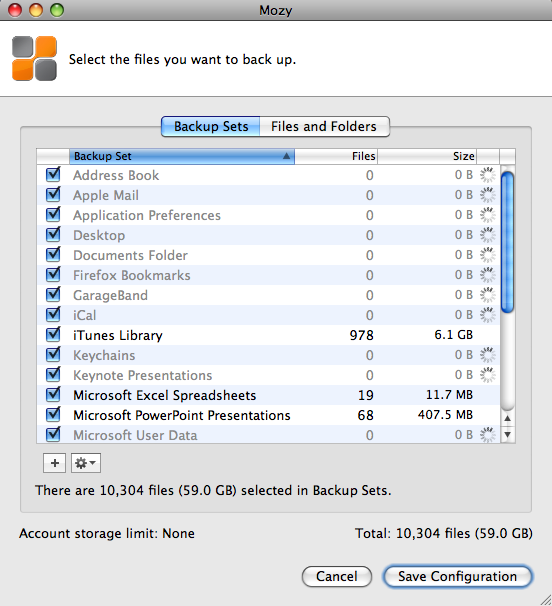
I then reduced my backup set even more, down to 59 GB (see below), hoping this would speed things up. It would have still taken a ridiculous amount of time to back up my data, and I only ended up getting frustrated with Mozy’s software in general, because of its poor design. Every time I wanted to configure the backup set, I needed to wait for the software to finish calculating the aggregate size for all file types, and that could take half an hour or more every time I opened that panel. Couldn’t they have cached this data when the operation was performed the first time?

Isn’t it ironic how they say the “Account storage limit” is “None”, yet you can never really quite test that None unless you leave your computer on and connected to the Internet for a month or more, which is clearly not feasible in the case of a laptop? Let’s not even consider the possibility that your Internet connection might go down, in which case the backup job would fail, and you’d need to start over…

In the end, in order to get any sort of progress with the Mozy backups, I reduced my backup set to 1GB. That’s right, 1GB, which allowed me to back up my Address Book, iCal, and Application Preferences, plus some documents. Then, and only then, did Mozy manage to complete the backup jobs in time.

I’m sorry, but I’m not going to pay $5/month so I can back up my contacts, calendar, and a few docs. That’s not acceptable to me. I canceled the service.

I did write to them to complain about this, and that’s how I found out about the 1 Mbps cap on uplink bandwidth. They also offered to give me a free month, but what good would that have been? I’d have only ended up more frustrated.

Some might say I should have tried the Mozy Business plan, which doesn’t cap uplink speeds and offers more options. For one thing, I don’t care for those extra options. For another, it would have cost me roughly $80/month ($3.95 for the license and $75 for the storage at $0.50 per 150GB). That’s not counting what it’d have cost me to back up my photos offline, which is what I really wanted to do. I have roughly 500 GB of photos, and according to Mozy’s pricing, that would be $250/month in addition to the $80/month I’d already be paying to back up my laptop.

Clearly, at those prices, Mozy is no longer the cheap, easy to use $4.95/month service that they advertise so widely, and instead of paying $330/month to them, I’d rather pay it to buy hard drives, copy my data, and ship them to my parents once every few months. It’d cost me a lot less.

I suppose they’re not entirely to blame. For some reason, $4.95 has become the price point for online home backup plans. Carbonite offers a similar plan for the same amount and other competitors are crowding around the same amount, although with different offerings. The thing is, you can’t really give people unlimited backup for $4.95 a month. Your costs as a business are higher. So what do you do? You fudge. You get truthy. Well, I don’t like it. I’d much rather see them offer a $15/month Home plan where they don’t cap the bandwidth but cap the amount I can back up — say, up to 75GB or something like that. I’ll let them work out the numbers, but the point is, I appreciate honesty a lot more than some cheesy pricing gimmick.

Updated 7/2/09: A reader (M.J. from Denmark) wrote to say the upload bandwidth cap at Mozy has been raised from 1 Mbps to 5 Mbps. It’s an interesting move on Mozy’s part, but I still have questions about their customer service and the ability to properly restore customers’ data, as other people have indicated in the comments below.

Standard
Reviews

Hardware review: LaCie Little Disk 500GB

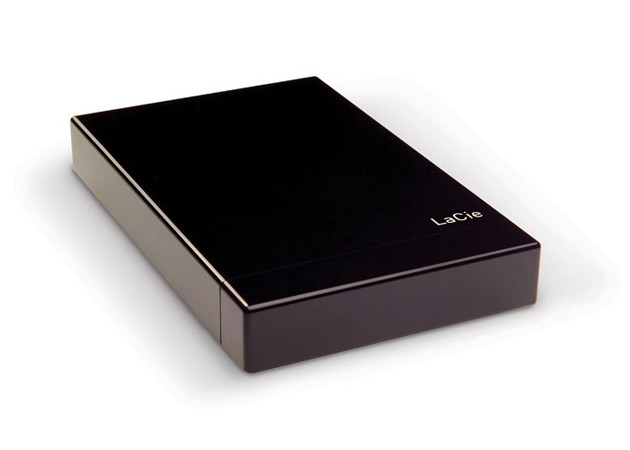
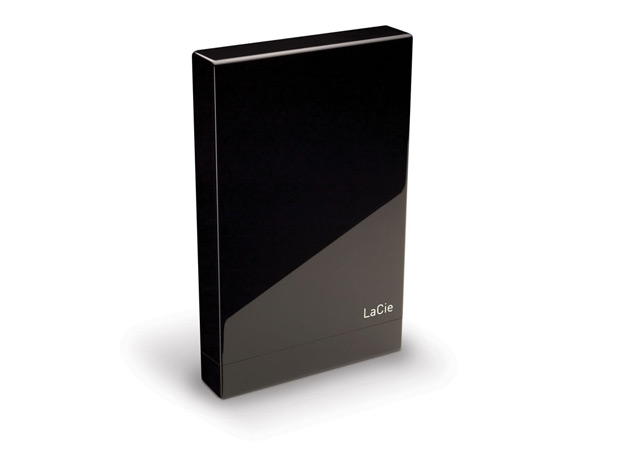
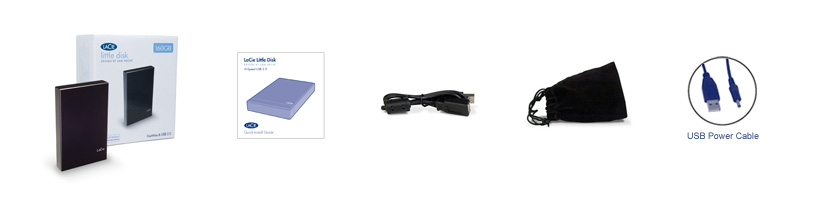
I needed a larger external drive to do my Time Machine backups, and the LaCie Little Disk 500GB was the best value for my money. It’s a portable drive (2.5″ form factor), it has 500GB of space, and it only cost me $100 at B&H. They’re pricing it at $124.95 now, so I guess I bought it at the right time (right before Christmas). (Amazon still has it for $100 if you want it.)

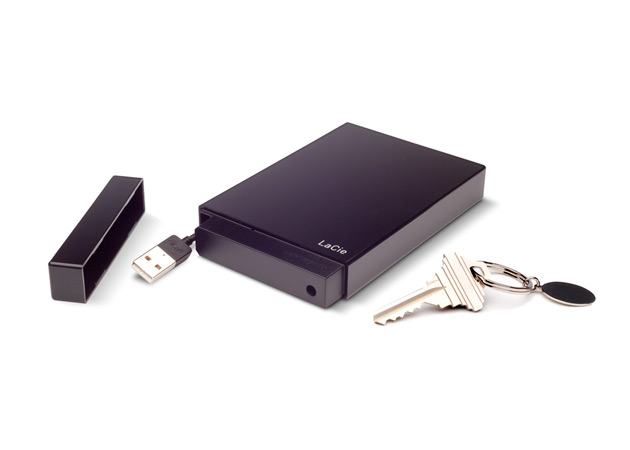
The design of the drive is distinctive, and builds upon the brick design that LaCie used to their advantage in the past. The enclosure is made of glossy black plastic, and it comes with a removable top/lid, which masks a short, retractable USB cable. I’m not crazy about that top, since it doesn’t sit tightly on the enclosure, but at least it can be removed easily.

In terms of weight, the drive is as light as other portable drives — perhaps even lighter. In terms of size, it is a little longer and thicker than my 160GB WD Passport drive, whose design, although almost three years old by now, is still one of the best I’ve ever seen.

I like my little LaCie drive though. It’s fast and roomy enough for me to back up my MBP’s 250GB hard drive as often as I need. Time Machine backups complete in minutes, and then I can simply eject the drive and put it away until I want to do another backup. I am even using the carrying pouch for now, to protect the drive as it sits in my backpack during travel.

Photos used courtesy of LaCie.

Standard
How To

The fastest way to back up with Time Machine

I wrote about backing up your Mac and PC in January of 2008, and I said Time Machine was a great way to back up your Mac. A year later, I still think so, though I have some reservations.

There are three ways to back up your Mac with Time Machine. There used to be only two, but thanks to Drobo Apps, we now have three. I’ll list them in descending order, sorted by backup speed. Here they are:

To External Hard Drive (USB, Firewire, eSATA)

This one’s easy, and it’s the fastest way. You get a dedicated external hard drive, you connect it to your Mac, and you let Time Machine do its thing. You can leave it connected all the time, or you can disconnect the hard drive and only back up when you want to. Time Machine won’t complain unless you haven’t backed up for a few days.

This is the backup strategy I’ve come to use, and believe me, it’s the one that gives me the least amount of headaches. I have a 500GB LaCie Mini hard drive that connects over USB. I plug it into my laptop, and within minutes, my backup is done.

Keep in mind that I’m a photographer, and I also shoot short videos every once in a while, so it’s pretty much a given that I’m backing up gigabytes of data every time. When the backup’s done, I eject the drive and put it away. This way I’m not bothered by hourly backups, which I don’t need.

To External Hard Drive via Time Tamer

Time Tamer

Go download Time Tamer, a very handy little app created by the folks that make the Drobo, and you can create an image file on your Drobo that is limited to twice the size of your Mac’s hard drive. This is useful because there is no other way to control the size of the Time Machine backup sets. There’s is no way to set a quota via its System Preferences panel, and so it’ll keep balooning until it fills the backup drive. Obviously, when you have a Drobo or another larger drive, that’s a problem.

I for one don’t want to fill up my Drobo with Time Machine backups — I have other more important uses for it. I did, however, want to limit the amount of external drives that sat on my desk, and thought I could eliminate one of them by using Time Tamer with my Firewire Drobo. Did that for a few months, but I can tell you it’s not optimal, at least not for me. It boils down to the amount of data one has to back up, really.

As it turns out, the throughput when writing to the image file just isn’t fast enough when you work with several hundred megabytes or more. Even though writing to the Drobo is usually a fairly fast operation, somehow writing inside the image file isn’t. From my own experience, it would sometimes take a whole hour to do an hourly backup, which meant that as soon as one backup finished, another would start.

To make things more annoying, the throughput to the Drobo itself, and my Mac’s general peppiness, were also affected negatively during backups. Everything churned at a slower pace. Getting at my photos or other files stored on the Drobo was a pain. If I happened to be playing a movie and a backup started, playback would stutter or stop for a few seconds. It just wasn’t a feasible way for me to work, so I stopped doing this and returned to doing my backups directly to a dedicated external hard drive.

To wireless or networked hard drive (such as Time Capsule)

This will usually be the slowest way to back up your Mac via Time Machine. Think about it: you’re going to be pushing your bits via WiFi, and even though your hardware may be “n” specs instead of “b” or “g”, you’re still not going to get above 50 Mbps at best. Realistically, you’re looking at speeds somewhere between 15-45 Mbps, which is less than Fast Ethernet (100 Mbps) and nowhere near Gigabit Ethernet (1000 Mbps).

For comparison purposes, I have observed transfer speeds which approached USB 2.0 speeds when using a direct, wired, Gigabit Ethernet connection between two Macs (MacBook Pro and iMac G5). If you have a wired Gigabit network at home, this might be the only way to actually get decent backup speeds with Time Machine without needing to use USB or Firewire hard drives. But if you’re using WiFi, your transfer speeds are going to be anywhere between 15-20 times slower than Gigabit speeds, which means you’ll be sitting there a long time waiting for your backups to finish, should your backup set be anything over 100-200 MB.

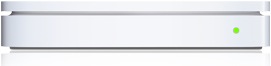
When Time Capsule came out, I was tempted to buy it, just like I bought the Apple TV, only to regret that later. I’m glad I didn’t end up spending my money on Time Capsule, because it just isn’t suitable for me, or for anyone with larger backup sets. It certainly looks good, but that’s about all it does and all it’ll do until WiFi speeds approach Gigabit speeds.

Takeaway message

When one of my friends shared an article from Louis Gray via Google Reader, where he complains about how slow it is to back up to Time Capsule, was I surprised? Given all I’ve written above, do you see why I wasn’t?

Do the smart thing: if you’re using Time Machine, get a little portable drive like I did and run your backups that way. They’ll be fast, and you’ll be the one deciding when to back up, not Time Machine. I don’t know when Apple will decide to give us more configuration options for Time Machine, but until they do, those who care about their time should back up directly to an external drive.

Standard