Reviews

Hardware review: Rolodex laptop stand

What I find interesting about this Rolodex laptop stand is its modularity. A few years or so after it launched, it’s still on the market. I’ve been using it for two of those years with my Windows laptop, and while it doesn’t look cool or feel cool, it’s sturdy, and it works just fine.
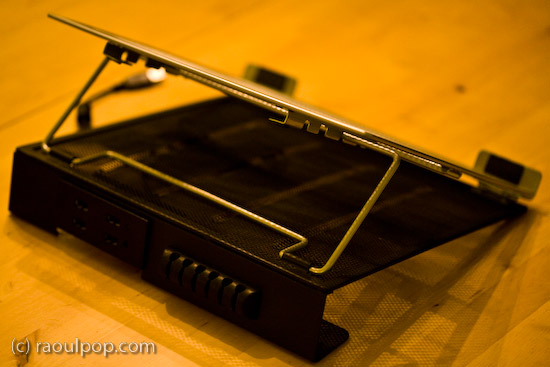
The stand is made of metal mesh and reinforced with rounded steel frames at the edges. Its tilt level can be adjusted as needed, and — here’s where the modular part comes in — it can be fitted with a wire organizer and a USB hub. The wire organizer comes with the stand and attaches as seen above, and the 4-port USB hub is sold separately. Once purchased, the hub slides into a slot on the back of the stand and is secured there by two metal arms on each side.

It’s best suited for 15-inch laptops like the one you see in my photos. Its design would make a 17-inch laptop feel oversized, and I’m not sure that it could support the weight of some of the heavier 17-inch laptops I see on the market nowadays.

The stand works best with an external keyboard and mouse. Although you can type comfortably on the laptop while it’s positioned on the stand, you’ll get tired pretty soon of the sound that the stand makes as you type on the laptop’s keyboard. Remember, it’s made of metal mesh, and it will resonate with each key click.

Once you position it at your eye level and plug in an external keyboard and mouse set, this stand will perform just fine for your needs, and at an affordable price, too.

Because it holds the laptop in place with the aid of two raised metal lips on each side, you need to make sure it doesn’t block any ports on your laptop. For example, it would definitely not work with any MacBook Pro laptops, which have the CD/DVD slot in the front. The placement of my audio line out/line in ports on my Averatec Windows laptop meant that it blocked those ports with the right support lip, as you can see below.

The USB hub that can be bought along with the stand is not self-powered (it does not have its own power supply cable), and that means it’ll draw power from the laptop’s USB port. This means you’ll likely experience power surges if you should plug in a USB drive that also does not have its own power supply. See my Logitech Alto Connect review for more details on this particular issue.

If interested, you can buy the stand and the USB hub to go along with it from Amazon. There’s even a variation on the hub which has only 2 USB ports but features a grounded, three-prong plug.

Standard
Reviews

Vista SP1 addresses some of my previous frustrations

I’ve had Vista SP1 installed on my machine for a week or so, and I’m pleased (surprised as well) to see that Microsoft addressed some of the issues that have frustrated me in the past. I guess when your expectations are low, any step toward something better is noticeable.

If I sound somewhat bitter, it’s because the SP1 install was problematic. I detailed that ordeal previously (you’re welcome to read it if you’d like). Basically, it had to do with language pack installs, which caused the prep time for the SP1 install to take several days instead of 15-30 minutes.

Once the extra language packs were out of the way, the actual SP1 install itself posed no issues for me. I’ve heard plenty of horror stories, but for me, the experience was normal, if somewhat protracted. Once the computer finished the three install steps (2 pre-reboot, 1 post-reboot), my machine was up and running with SP1.

As I began to use it, the first thing I noticed was the correct calculation of the RAM present in my machine (see screenshot above). That was a nice little surprise. I found it frustrating (pre-SP1) when the BIOS said I had 4 GB of RAM, yet Windows could only see 3,069 MB of RAM. It didn’t make sense. Now that’s fixed, although, as Ben Watt points out in this comment, Vista will still not use all of it due to 32-bit limitations.

Boot-up times also seem to have improved. I haven’t done any stopwatch testing, but I don’t find myself sitting around twiddling my thumbs as much when I need to reboot. That’s nice.

More importantly, I am now able to do something which I couldn’t do pre-SP1, even though it was an advertised feature of Vista: back up my machine (see screenshots above). That’s right, before SP1, a full PC backup was impossible. There was a bug that didn’t allow you to go through with that operation in Vista Ultimate. Now that’s no longer the case, and I’m happy to say I completed my first full PC backup this afternoon.

I also understand that Microsoft is now making Vista SP1 available in more languages, which will help reduce the language uninstall times for those people who were unfortunate enough to install the optional (or in my case, required) language packs.

Furthermore, they’re offering free, unlimited SP1 install and compatibility support, which is laudable — but given the fact that one has to jump through hoops to install SP1 — also needed. In my case, I doubt they could have helped. After all, what I needed to do was to uninstall the language packs, and Microsoft made the uninstall process so freakishly long that all I could do was to either stare at the screen, fuming, or take a walk, then come back to find it still going on…

What I do not approve though, is the way they’re trying to get the word out about Vista and SP1. They’re doing it through an internal (leaked?) video that makes me want to pull my eyes out. It’s as if they’ve learned nothing from the Bank of America video debacle. Worse, it’s as if they took that video and did their best to outdo it. They succeeded all right, in a very sad way.

Standard
Reviews

One more reason why Microsoft doesn't get it

At work, I use Windows Vista Ultimate Edition. I tried to install Vista SP1 on my computer yesterday. I created a restore point, just in case something went badly, and started the install. Here’s the error message that I got:

Vista SP1 cannot install

Apparently, Vista SP1 cannot install on my machine, because I’ve got too many language packs installed. Fine, I can understand that. But what I don’t understand is why Microsoft itself kept tagging the extra language packs as “Important Updates”, basically shoving them down my throat and forcing me to install them in the first place. Don’t believe me? Hang on, I’ll give you proof of it below.

I started to remove the language packs, and the uninstall process itself is just horrible. You cannot remove more than one language pack at a time, and it takes at least 10 minutes to do it. Try it yourselves and see. It’s a three-step process. You run the uninstaller from the Control Panel, it takes a few minutes for that, then you’re prompted to reboot, you do so, it takes a few more minutes for the second step, then reboots and runs the third step, which takes the longest. It’s insanely frustrating and a big waste of time. I’m hard-pressed to think Microsoft couldn’t have come up with a better and faster way to install/uninstall language packs.

I had about 7-8 extra languages installed (other than the standard EN/FR/IT/JP). I only did it because Windows wouldn’t quit bugging me to update it by installing the language packs in the first place, and now I find I have to waste more than an hour of my time uninstalling them after having already wasted more than an hour installing them a few months ago. Thanks, Microsoft! Increased productivity my foot…

I uninstalled a few of them yesterday, and here’s the message that I got from Windows after doing that:

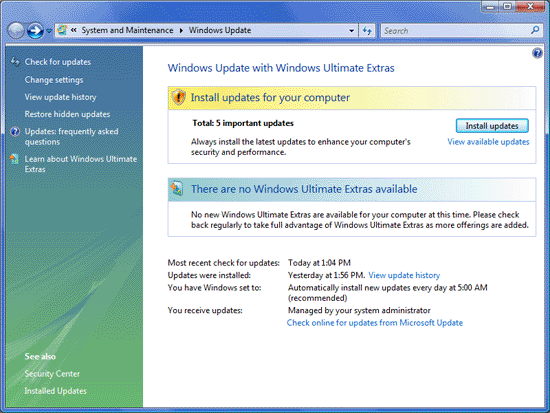
Windows Update: Available Updates

See those 5 important updates tagged with yellow, that Windows advises me to install in order to “enhance my computer’s security and performance”. That’s Microsoft-speak for “waste your time and decrease your computer’s performance”. Guess what they are?

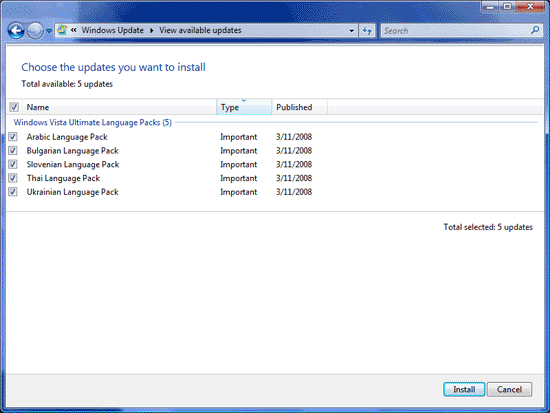
Windows Update: Available Updates

As you can see, it’s the very five language packs that I uninstalled. Windows wants me to install them right back, just so I can’t upgrade to SP1. Isn’t that grand? Don’t you just love Microsoft for their obvious programming logic?

That’s exactly the same type of message I kept getting from Windows before I installed the damned things in the first place. I only installed them so Windows would leave me alone. I guess that won’t happen any time soon, because I now see the same “Available Updates” icon in the taskbar, glaring at me, nagging me to install the stupid language packs. Do you see it below? It’s the blue icon with some sort of orange satellite flying around it.

Windows taskbar available updates icon

I only hope Vista SP1 will fix this annoying behavior, but somehow I doubt it. I have a feeling I’m going to have to revert to an earlier system restore point, which would be a real shame, but then again, it would be just what I’d expect from Microsoft.

Standard
Lists

Condensed knowledge for 2008-03-24

Standard
Lists

Condensed knowledge for 2008-03-23

Standard