Reviews

Hardware review: Super*Talent 8GB USB flash drive

The 8GB Super*Talent USB flash drive I ordered from Brando arrived last night, and it was a very pleasant surprise to see how tiny it really is. It’s smaller than a simple USB connector, in both width and thickness. I am amazed by how small it is — and the thought that 8GB of data somehow fit onto this minuscule piece of steel and silicone boggles my mind.

I put together a short video review to show you the drive’s size and also to do a quick speed test. I copied a 1GB movie onto it, and the copy operation took about 3 minutes. That means it’s about half as slow as a Drobo in terms of transfer speeds.

The photos of this flash drive do not do it justice. It’s much smaller than it looks in the online stores. I hope that the video itself will do a better job of demonstrating its size (to scale), and its beautiful and simple design.

Download Super*Talent video review (640×480, MP4, 41.2MB)

This USB flash drive’s size and design leave me thrilled to no end. If you’re in the market for a spacious yet tiny flash drive, the Super*Talent fits the bill perfectly. The only thing left for it to prove is its long-term durability. It is rated PICO-C, which means it’s rugged and water resistant. I am very interested to see how long it lasts — if I don’t lose it first.

Updated 10/30/08: Still works just fine after 5 months of use. I have it attached to my keychain, and I carry it around in my pocket all the time. It’s got a few scratches, but it works as advertised. Still happy with it.

Standard
Reviews

Hardware review: mStand by Rain

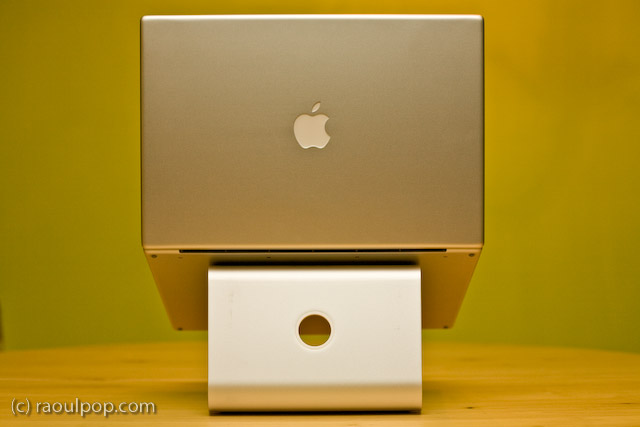
The mStand is quite possibly the best stand for the MacBook Pro line of laptops. It raises the laptop to an appropriate height, it does not block any of the MBP ports or buttons, its design is truly distinctive, its cast aluminum build matches the MBP line to a tee, and it is reasonably priced at $50.

I’ve tried out quite a few notebook stands in my time, and I’ve looked at even more of them in detail. I am happiest with the mStand. It suits my needs perfectly. However, it is not without faults, as you’ll see shortly. Its Apple-like design and look isn’t executed to the Apple standards.

First, the good:

  • Functional, simplistic and very elegant design
  • Although it is built of a single piece of aluminum, it will not scratch your laptop because it has little rubber contact points where your laptop rests on it
  • All aluminum build means it will dissipate your laptop’s heat fast.
  • The empty space underneath the stand aids with ventilation and also serves as a great place to store the external keyboard when not in use
  • The wire routing hole at the back of the stand looks very similar to the one on iMacs and Apple Cinema Displays and complements their design nicely
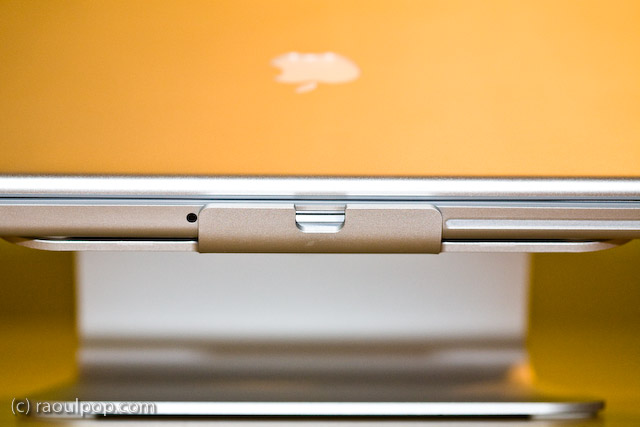
  • It blocks NONE of the MBP ports or buttons, such as the IR remote port, the latch for the top lid, or the SuperDrive slot. Of course, it does not block any of the side ports either, as you can see from the photos.

Now, the bad:

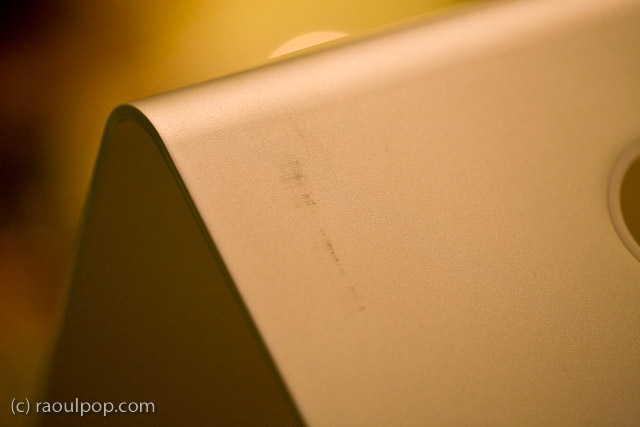
  • The paper (recycled?) packaging leaves terrible scuff marks on the stand, which mar its otherwise beautiful design and matte finish
  • The stand itself was covered in a thick white dust when I unboxed it, which caused significant sneezing. I hope it wasn’t harmful to my health, not sure what it was, and it sure didn’t look like regular dust.
  • The edges of the stand are not properly filed, which means they can be literally sharp enough to tear through one’s skin if you’re not paying attention. I had to use a metal file to finish the job they should have done at the factory.

Still, I think this is the best stand for my needs. As you may know, I already tried out the Logitech Alto and the Rolodex Stand, and had already tried other stands through the years, including the original Griffin Curve. I looked at vertical stands as well, like the Docking Stand from Power Support. But none of the stands offered unfettered access to all of the buttons and ports on the MBP, were as stable, and looked as good as the mStand.

While I loved the idea of the Docking Stand, it blocked access to the IR port, the latch button and the SuperDrive altogether, because the laptop sits top edge down in it. Putting the laptop in that stand the other way would cause some serious overheating to occur, since the venting grille is on the lid hinge side.

At any rate, I’m very happy with my mStand. In spite of its faults, which can be easily fixed through better quality control, it looks great and works great.

Standard
Reviews

Problems with meta-data entry in Lightroom

I’ve been having problems with meta-data entry in Lightroom, particularly the location meta-data. It’s not my computer that’s to blame. The problems exist on both the PC and Mac versions of Lightroom, although they’re more apparent on the Mac version.

When I first mentioned this on Twitter and Friendfeed (see here, here and here) I promised I’d put together a video if I found a good screencasting application. Ken Verburg pointed me to iShowU, which I used to make a short screencast demonstrating the problems. Thanks Ken!

I uploaded the video to my Vimeo account last night, but don’t try to view it there. The compression is terrible and you won’t be able to see what I’m doing. Instead, go there and scroll down till you see the download link. Click on that and view it locally on your computer (you’ll need Quicktime or iTunes). Another option is to download the video directly from my site. The original video has no loss in quality and you’ll be able to see everything properly.

The video will do a good job of conveying my frustration with the user interface in Lightroom. I really do hope the final version of Lightroom 2 will address these issues, because entering location metadata in Lightroom right now is terribly frustrating.

Standard
A Guide To A Good Life

My favorite pair of casual shoes

–> Updated: these shoes turned out to be terribly put together. The sole came apart from the shoe less than a year after I got them. I asked LL Bean to replace them, which they did. They sent me a new version of the shoes whose soles also came apart from the shoes about a year after I got that pair. So while they were comfortable to wear, their durability was terrible. Caveat emptor. 

I’ve been wearing a new pair of Keen shoes for the past few weeks, and I love them. If they haven’t got the showroom look in my photos, it’s because they haven’t been sitting in the closet.

I spotted them at L.L.Bean and couldn’t resist the design. They looked so comfortable and cool, up there on the shelf, that I had to try them on and get them. Indeed they are comfortable, even for extended walks, and they’re a lot of fun to wear.

One thing I should mention, if you care about that sort of thing: this particular design will make your feet seem smaller. I took a photo of one of my formal shoes next to one of my Keen shoes, just to show you the difference. Believe it or not, the formal shoes are slightly tight on my toes (length-wise, not width-wise). The Keen shoe looks smaller, yet my feet have no problems fitting in there.

While women may love having their feet look smaller, I understand that some men may not go for that sort of thing… Apparently foot size is associated with a certain other size in our vernacular. Personally, I’ve gotten over that, because I like these shoes a lot. Just thought I’d put that out there in case any of the women reading this are thinking about getting them for their significant others.

Standard
Reviews

Hardware review: Rolodex laptop stand

What I find interesting about this Rolodex laptop stand is its modularity. A few years or so after it launched, it’s still on the market. I’ve been using it for two of those years with my Windows laptop, and while it doesn’t look cool or feel cool, it’s sturdy, and it works just fine.

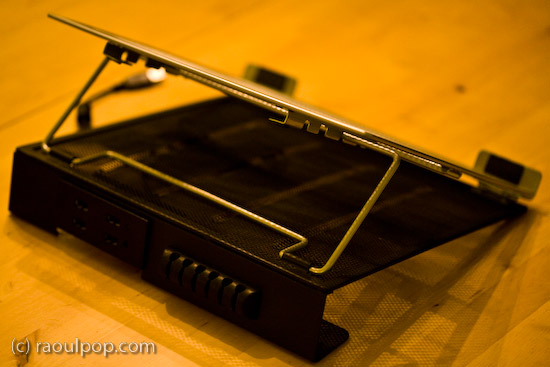
The stand is made of metal mesh and reinforced with rounded steel frames at the edges. Its tilt level can be adjusted as needed, and — here’s where the modular part comes in — it can be fitted with a wire organizer and a USB hub. The wire organizer comes with the stand and attaches as seen above, and the 4-port USB hub is sold separately. Once purchased, the hub slides into a slot on the back of the stand and is secured there by two metal arms on each side.

It’s best suited for 15-inch laptops like the one you see in my photos. Its design would make a 17-inch laptop feel oversized, and I’m not sure that it could support the weight of some of the heavier 17-inch laptops I see on the market nowadays.

The stand works best with an external keyboard and mouse. Although you can type comfortably on the laptop while it’s positioned on the stand, you’ll get tired pretty soon of the sound that the stand makes as you type on the laptop’s keyboard. Remember, it’s made of metal mesh, and it will resonate with each key click.

Once you position it at your eye level and plug in an external keyboard and mouse set, this stand will perform just fine for your needs, and at an affordable price, too.

Because it holds the laptop in place with the aid of two raised metal lips on each side, you need to make sure it doesn’t block any ports on your laptop. For example, it would definitely not work with any MacBook Pro laptops, which have the CD/DVD slot in the front. The placement of my audio line out/line in ports on my Averatec Windows laptop meant that it blocked those ports with the right support lip, as you can see below.

The USB hub that can be bought along with the stand is not self-powered (it does not have its own power supply cable), and that means it’ll draw power from the laptop’s USB port. This means you’ll likely experience power surges if you should plug in a USB drive that also does not have its own power supply. See my Logitech Alto Connect review for more details on this particular issue.

If interested, you can buy the stand and the USB hub to go along with it from Amazon. There’s even a variation on the hub which has only 2 USB ports but features a grounded, three-prong plug.

Standard