Thoughts

Micropayments: the only equitable way to reward web publishers

The more time I spend writing and publishing articles on the internet, the more I realize that trying to get paid for my efforts through advertising is not a sustainable way to make a living. I get decent web traffic, but that’s not enough. Have you seen the going CPM rates these days? I’d need to get ridiculous amounts of traffic in order to see any sort of worthwhile profits, and even then, I’m not so sure the costs of running my website wouldn’t trump my revenues or at least take a big bite out of them.

The current system is messed up. Most web publishers don’t get tons of traffic, which also means they don’t make money. They’re lucky if they break even with things like Google AdSense or affiliate programs or other some other ad programs. They, like me, don’t want to load up their websites with ads, left and right, top and bottom, inbetween the lines and everywhere else. They just want to worry about writing and publishing informative articles. They don’t want to spend Âľ of their time (or more) advertising their site and getting their buddies to vote up their posts on Digg or StumbleUpon or who knows where else. They’d much prefer to not have that headache at all, and to only write and publish. But they can’t, because the system is faulty. It only rewards the very few who get the most traffic.

Do you want to know why newspapers aren’t making money these days? Why they’re going under? Sure, blame shoddy journalism, blame whatever else, but the truth is they relied mostly (or solely) on advertising for their revenues, and look where they are now. Subscription fees were kept artificially low, and as circulation numbers started to go down, they couldn’t charge their regular rates for ads, and revenues went down fast, in a vicious spiral that fed itself.

Had a decent micropayment system been in place, the web would be a flourishing, profitable, preferred way to make a living nowadays, instead of the insane, overloaded, “buy, buy, buy, look at me, no look at me, no, I’m better, wait, my titles are more interesting, I get more traffic, I make more money, I know how to increase your traffic, I have more free stuff” nuthouse that it has become. Everyone’s desperate to publish more articles, to make the titles and text more titillating, to grab an extra click from you here and there, to make you vote or like or bookmark their stuff so they can supposedly get more clicks and votes and likes and bookmarks and more and more and more meaningless crap that leads nowhere and contributes to nothing.

Unfortunately for the world and the web, micropayments were talked to death, even in the early days of the internet, and all the fancy initiatives went nowhere. A lot of people were wronged because no one bothered to get things going. Just think, all this time, web publishers of all sizes could have been making an honest living! Fortunately, this nasty situation can still be set right.

Here’s my micropayment initiative. I think it’s workable, and more than that, it would allow a lot of people to make a decent living by doing what they love: writing, not hustling and wasting their time pushing their site on people.

First, we need all the browsers and feed readers to work with the companies or organizations that would process micropayments. Whether the functionality is built in or added through plugins is up to the browser makers and feed reader makers to decide. Users would enter their account information directly in their browser’s or feed reader’s preferences, and their micropayment accounts would be automatically charged every time they access a micropayment-enabled article, on the web or via a feed. There’d be no logging in every time, like with PayPal, which is a hassle when all you want to do is read an article.

Second, search engines and websites would display the price of the article next to its title, just like they’d display the site or the date the article was written. The browser itself would display an extra icon when such a web page is accessed, just like it displays a lock when HTTPS websites are accessed. Perhaps a dollar sign or some other currency sign would show up next to the website’s address. If the user would move their mouse over the button, the price would be displayed, similarly to the behavior of the alt or title tags.

Third, and this would happen behind the scenes, the browser itself would read the price tag of the article the user is reading, and would send that information along to the micropayment service along with the user’s account information. Notice this means the user could use their micropayment service of choice — so there wouldn’t have to be just one — and the browser or the website wouldn’t care. The micropayment service would then transfer the price of the article from the user’s account to the web publisher’s account. The transaction fees would best be charged in bulk, per 50 or 100 transactions or so, and would be deducted from the web publisher’s balance.

That’s it! It’s so simple I just don’t know why it hasn’t yet been implemented.

As for the price of the articles, each web publisher could set their own price. I propose 5 cents per view. When candy and soda costs 75 cents to $1 or more, I think no one would balk at paying 5 cents to read a good article. But let’s have a look at some proposed traffic figures just to give you an idea how 5 cents can add up.

Say you get 5,000 views per month. That’s a modest amount of traffic, but at 5 cents per view, you’d still make $250 at the end of the month. That’s nothing to scoff at. Tell me if you wouldn’t be happy with that money in your bank account!

How about someone who gets 25,000 views per month? That’s a fairly decent amount of traffic. At 5 cents per view, they’d make $1,250 per month. That’s already a line of income. That’s money in the bank you could be using to pay your bills, but you’re not seeing it because micropayments don’t exist yet. Isn’t that infuriating?

How about someone who gets 50,000 views per month? That’s a nice amount of traffic. At 5 cents per view, they’d make $2,500 per month. That’s practically a decent salary right there. If you keep your expenses low, you might even be able to live off that in the US. If you lived in another country where living expenses are less, you could live nicely on that money.

The best part is this: it isn’t free money, and it isn’t money that could be yanked away if your advertisers get pissed off with something you wrote. This is money each and every web publisher has rightfully earned through their work, and yet there is no micropayment system out there to make this possible. This means all the web publishers out there are currently being cheated out of money they could be earning. Isn’t it ridiculous and completely unfair? Think of newspapers, where dedicated journalists work, day in and day out, and who have to close when they could focus their efforts on web publishing and turn a very nice profit with their traffic!

What about developing countries? I suppose the price for reading an article could differ based on your country of origin. The micropayment processor would automatically charge those countries less per article, say 30 to 40 to 70% less, depending on their general economic status.

What about subscriptions? They’re nice but not sufficient. They’re nice because you can predict your income more reliably when you know you’ll have so many subscriptions coming in every month, but not sufficient because users don’t pay per usage. If they end up spending less time on your site, then they’ll feel like they’ve wasted their money on the subscription. Also, just in case you haven’t noticed, subscription numbers are down everywhere these days. When money gets tight, subscriptions are among the first things to go.

What about goodwill, and doing stuff for free? That’s nice, and I already do plenty of stuff for free, but the problem with goodwill is that this world still functions with money. When was the last time you paid your mortgage with goodwill? When you buy your groceries, do you pay with a smile and a hug?

Micropayments are the best way to go forward. I wish people would stop talking about them already and someone would get going with the idea. It goes without saying — but I’ll say it anyway — that I for one would be glad to work with any legitimate company that wants to start processing micropayments.

Standard
Thoughts

You can always count on pride

On DC’s beltway, you can easily spot trucks carrying concealed military equipment. All you have to do is to go about your business, and you will pass one or two semi trucks every day, each carrying some big payload wrapped in canvas. While the trucks are generic, the canvas isn’t. You will almost certainly find some logo or initials on it.

If you’re diligent, you can trace that logo back to the company, then find out what contract they were awarded, by whom, and finally, what concealed equipment you might have seen. It’s not hard to do this if you have a somewhat basic knowledge of how government/military contracts work.

I’m not saying this because I want to divulge any government secrets or put anyone at risk. I simply want to point out that most people can’t keep their mouth shut when it comes to bragging about their work, particularly when they’re proud of what they’re doing.

Remember Napster back in its golden days (circa 1997)? You could log on and download music all day long. College students everywhere were doing it. I did it too, for a while, until I realized it was wrong to rob artists of their hard work like that. Later, I even deleted most of the music I’d downloaded, and since then, I’ve been buying my music.

I’m not sure how online music sharing works today, but back then, most hardcore music sharers would mark their files by putting some sort of identifier (such as a nickname) inside the meta data. Some even put site URLs in the meta data. I’m sure that as music labels clamped down on file sharers, these nicknames and site URLs made it easier for them to find the culprits.

These file sharers and the military contractors are just two examples of how one can always count on pride to get at some information. Like most things in this world, this is nothing new, but it’s something to keep in mind if you’re working on something you’d like to keep under wraps.

Standard
Places

The C&O Canal

I suppose I should call this “Trip to the C&O Canal – Part Three”, since it’s the third time I write about the C&O Canal (Chesapeake and Ohio Canal) on my site. Here is Part 1 and Part 2. But it’s certainly not our third trip, because we’ve been there numerous times, during various times of the year.

This last time, we did it by bike, starting at Lock 7, which can be accessed from the Southbound Clara Barton Parkway. We traveled past the last gatehouse, which I think was was Lock 12, and past the Carderock Wall, to some section of the canal beyond it.

It’s a lot of fun to bike on the C&O Canal. For one thing, the path that accompanies the canal used to be the old towpath for the mules that pulled the barges, so you know you’re stepping on a piece of history. For another, the canal towpath was built to have no steep grades. Other than little hills that correspond to the drops in altitude at lock gates, the towpath is mostly level, so you won’t get long-winded trying to walk, run or bike up long hills.

As you’ll see in the photos above, some parts of the canal were completely dry. I’m not sure what caused this. Perhaps it was the summer heat, or as you’ll see in a couple of the photos, a sinkhole that opened upstream and possibly swallowed all of the water from those sections of the canal.

The idea for the C&O Canal originated with George Washington, though in another form. Having worked as a land surveyor in his youth, he dreamed of the possibility of making the Potomac River navigable. He thought the only way to do it would be to build skirting canals around its falls. While he was still young, he could not convince the State of Maryland to do this, but after the Revolutionary War, let’s just say it was easier for him to get people to do things.

The Patowmack Company was formed in 1784, and construction began on the skirting canals. Washington himself supervised the construction personally. Beside the canals, channels in the river itself were deepened and boulders were removed. There was a great deal of work to be done, and the work wasn’t finished until 1802, three years after Washington’s death.

Although the canals were useful, the route didn’t generate as much traffic as it should have. For one thing, it was only truly usable up to two months out of the year, due to low water levels. Plus, it was very difficult to get the boats back up the river, because of the current. People ended up dissembling the boats downstream, walking back upstream, and building another boat. This was not efficient nor productive.

George Washington’s idea was interesting, and people kept thinking of a way to capitalize on it. A way to use the Potomac River needed to be found. That’s where the construction of a canal came in. It wasn’t new technology, as that sort of construction was already used in Europe, and even dates back to antiquity.

On November 5, 1823, a convention was held Washington, which led to the chartering of the company that would build the canal on January 27, 1824, and finally, to the start of construction of July 4, 1828.

The construction of the C&O Canal ended in October of 1850 at Cumberland, Maryland. The original plan to extend the canal to the Ohio River had to be modified, because of the extremely hard nature of the work, its slow progression, and financial troubles with the parent company.

Parts of the Canal were opened as they became available, and it worked as a water route until 1924. Frequent flooding closed it for months, and sometimes, for entire seasons, and in 1889, the parent company went bankrupt. It was then taken over by the canal’s rival, the B&O Railroad. In 1902, they even took over the boats. Whereas they had belonged to the people themselves — to the families that toiled night and day to carry goods down the canal — from that year forward, they belonged to the Railroad company…

The B&O Railroad did as little maintenance as possible on the canal, and in 1924, when another flood destroyed parts of it, they closed it down altogether. The canal slowly deteriorated afterwards, until it was taken over by the National Park Service in 1971. They restored the towpath and re-watered parts of the canal.

Here’s an interesting fact [source]:

“Transporting goods and people by canal dates back to antiquity. The lock gates used on the C&O Canal were an adaptation of a design by Leonardo DaVinci in the late 1400’s. Until the advent of the railroad, water travel was far superior to land travel.”

If you’d like more information about the C&O Canal, I recommend the official C&O Canal NPS website. Make sure to use the menu on the left side of the page to navigate through the various sections. It’s a little hard to find your way around at first, but it pays off if you keep digging — there’s a lot of information posted there.

Standard
Reviews

A look at noise cancelling headphones

I’ve recently had the chance to try out three noise-canceling headphones:

I looked at these criteria as I used the headphones:

  • Effectiveness of noise-canceling technology
  • Quality of sound
  • Fit and comfort
  • Price

What may or may not surprise you is that all noise-canceling headphones block only low sounds, like the rumble of jet airplane engines. They do not block all sounds. They also rely on passive noise reduction, due to their around-ear design with thick cushions. In other words, don’t expect them to block all sounds, or you’ll be disappointed.

I only looked at around-ear designs, because I cannot stand on-ear designs. They make my ears numb after a half hour or so of wearing them. I need something that fits around my ears and doesn’t press down on them in order to get the comfort I need for prolonged wear.

One thing to keep in mind with around-ear headphones is that some will make your ears hot after a while. If care isn’t taken with the materials used in their construction, the heat that emanates from your ears will build up inside the headphone chamber and raise the temperature, making you uncomfortable. Heat and lack of air circulation are two things that will caused increased bacterial growth in your ears. Yes, this isn’t appetizing, but keep it in mind as you look at headphones and your own headphone-wearing habits.

All three of these headphones come with carrying cases, adaptors (2-pin and 6.3mm) and cables, so don’t let that be a differentiating factor. While I’m on this subject, keep in mind the Bose and Philips headphones only use one AAA battery while the Creative headphones use two AAA batteries. That is a differentiating factor.

Bose Quiet Comfort 2

The Bose Quiet Comfort 2 is priced at $299 and is the pricier of the three. There are more expensive noise-canceling headphones on the market (Sennheiser has a couple of more expensive models), but the Bose headphones are the most well-known of them all.

Its noise canceling capability was decent, but for the market leader, nothing special. It reduced the sound of jet aircraft, but all voices around me remained clearly audible, though just a little muted. I suppose I could describe the technology as elegant, since it allows one to carry on a conversation with someone while wearing the headphones, but I’m sorry, at $300 you ought to be able to adjust the level of noise-canceling in order to block as much or as little of the ambient noise as you want. They didn’t have that capability and disappointed me.

The quality of the sound was tinny. The noise-canceling technology did a number on the lower sounds coming out of the headphones as well, so everything sounded a bit like a tin-can telephone.

I could find nothing wrong with the fit. It was great. It didn’t press down on my ears, it didn’t press down on the top of my head, and the cushioning was just right.

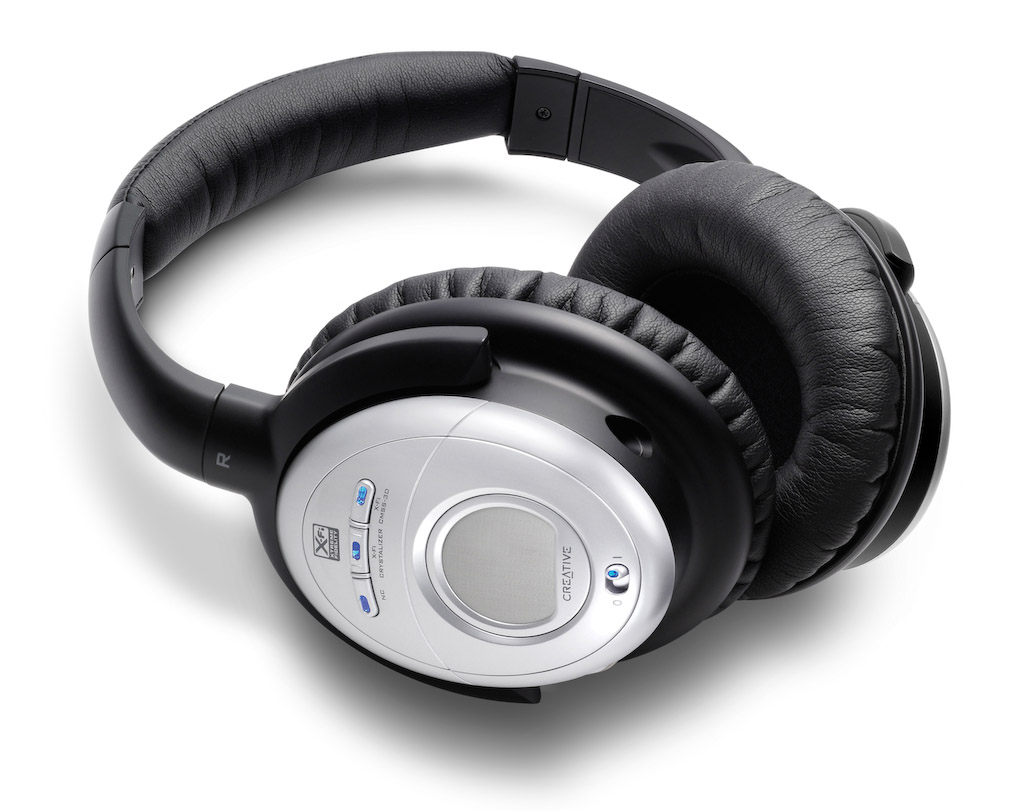
Creative Aurvana X-Fi

These headphones retail at $249 currently, but beware, they’re still listed at $299 at Apple Stores. I have to say I was doubtful of Creative’s ability to offer great headphones, and also suspicious of their price point (frankly, they haven’t earned the right to charge $300 for headphones), and I was proven right on both counts.

The noise-canceling technology was very similar to the Bose QC2 headphones. Same comments apply, and the quality of the sound was just as annoying. I found that the noise-canceling button distorted the sounds significantly, much more so than the Bose headphones.

Creative added two buttons to the headphones, one called X-Fi Crystalizer, which is supposed to give detail and vibrancy, and X-Fi CMSS-3D, which adds spatial characteristics to the sounds. I sat at home for an entire evening, playing with the buttons, turning them on and off, trying to see what and how much the affected the sounds that the headphones produced. I found them to be gimmicky. They did nothing for me. Oh sure, they changed sounds slightly, but not enough to warrant their fancy names and the price of the headphones.

What really annoyed me was their fit and comfort. They pressed slightly on my ears, but their real crime was the quality of the materials used in their build. Within 5 minutes of wear, my ears got hot. Didn’t Creative do any real testing before releasing these? Who did they test them on? Any real person would have noticed that their ears got hot while wearing them, and would have said something.

Philips SHN9500

These headphones offer an equivalent level of noise-canceling technology. Having already explained how I feel about it, there’s no need to go over it again. I found the quality of the sound to be better than with the other two headphones. Quite acceptable, as a matter of fact, and it wasn’t severely affected when noise-canceling was turned on.

What I also liked was the presence of a Mute button on the headphones, which will turn off any sound coming through them, and also turn off noise-canceling. This allows you to hear someone better while you have the headphones on, without needing to remove them. You might say, well, why not just turn off noise-canceling? Because that’s a slider button, while the Mute button is a push-button with a very light action. Quite thoughtful on their part.

The fit and comfort of the headphones was another surprise. They fit nicely, and they’re made of quality materials. My ears do not get hot while wearing these, even for extended periods of time.

The biggest revelation for me was the price: $70 at Costco when I got them less than a couple of weeks ago. Now I see they’re $90 — they must be popular.

All in all, the Philips SHN9500 headphones have the right combination of features, comfort and price to make me happy. These are the headphones I would recommend to you.

More information

Photos used courtesy of Bose, Creative and Philips companies.

Standard
Reviews

A glimpse at the new Snow Leopard from Apple

Snow Leopard, the new version of Mac OS X, was announced at the 2008 WWDC in San Francisco. It’s an important release for the following reasons:

  • Builds upon existing technologies and perfects them. It introduces few new features, but will allow Apple to really focus on delivering a very good OS by developing further the technologies introduced with Leopard. I for one am glad to see Apple slow down their frantic development cycle. That sort of rhythm can’t be sustained and leads to burned-out employees.
  • Optimized for multi-core processors. Truth is, most applications and operating systems aren’t optimized for multi-core processors. They’re not even multi-core aware. So while multi-core technology is here to stay and has already made it into all processor makes and models, applications are still hobbling along, relying on built-in chip technology for a sort of multi-core experience, not the real thing. I’m glad to see Apple pursue this seriously and make it easy for developers to build their apps for multi-core systems.
  • OpenCL programming. You know about OpenGL, right? Well, OpenCL will let developers take advantage of the amazing processing power of graphics cards (measured in gigaflops) to do computations previously reserved only for graphics applications. To get an idea of how powerful graphic card processing has become, have a look at FASTRA, a supercomputer built with 8 GPUs.
  • RAM limit raised to 16TB. I did a double take when I read that. I first thought they were talking of 16GB, which would have been impressive, but also a misprint. The Mac Pro can do up to 32GB right now if I’m not mistaken. But 16TB, wow! That’s amazingly high for RAM. Most machines don’t even have that much hard disk space, much less memory. That’s going to be very useful when building supercomputers with Macs. Keep in mind that 32-bit Windows operating systems (the prevalent ones on the market) STILL have a 4GB limit on RAM. Microsoft’s 64-bit OS versions (XP and Vista) are not usable yet, because there are plenty of compatibility issues with drivers and applications. For a clarification of this point, make sure to read my comment below.
  • Quicktime X. Apple’s venerable Quicktime will get an overhaul which will make it much more efficient, and will allow it to support more audio and video formats. Perhaps now we can look forward to Quicktime movie exports taking less than 24 hours? 🙂 Joking aside, I like Quicktime, and I hope it sticks around for a long time.
  • Faster Safari. It will use a new webkit that will make it 53% faster. Nice! I should mention that all the JavaScript used on AJAX-heavy pages like Google’s Gmail or Apple’s new MobileMe is what’s slowing down our browsers. The new Safari webkit is supposed to be able to render JavaScript a whole lot faster.
  • Native support for Microsoft Exchange. In spite of grumblings from various Apple fans, this is a biggie, and it will finally ensure that Macs play nice in Microsoft Shops. In addition to being able to network properly on Windows domains, which they could already do, now they’ll do exactly what Outlook is able to do on PCs, without having to bother with the kludgey Entourage. Mail, Address Book and iCal will communicate directly with Exchange, making it a whole lot easier for corporations to use Macs instead of PCs.
  • Faster OS, smaller footprint. Apple promises the new OS will work faster overall, and will also take up less space on our hard drives. Amen to that. OS bloat is not a welcome thing (just look at Vista), and a faster OS is always a good thing.
  • No support for PowerPC processors (source). According to documentation handed out to developers at WWDC, Apple will indeed break with the PowerPC line on this Leopard upgrade, as rumored. That means my iMac G5 won’t be able to use it. By that time, it’ll be outside its projected 3-year lifespan, but still, it would have been nice…

Image used courtesy of Apple, Inc. More information about Snow Leopard can be found in Apple’s original press release, and on the Snow Leopard website.

Standard