Places

The Crystal Trio in Venice

The Crystal Trio are a Russian group from Siberia who play on special instruments made of glass: the verrophone, the glass harp, and the glass flute. The glass harp is the key instrument used in their performances, and it consists of a series of glasses arranged in rows; they vary in size and in the amount of distilled water present in each glass.

The members of the group are Igor Sklyarov, Vladimir Perminov and Vladimir Popras. We saw them in Venice, Italy, during one of their street performances in the weekend of the annual Venice Carnival. They perform classical pieces, which sound amazing when played on their glass instruments. I recorded a short segment from their street performance, which can be seen here. At the end of the clip, you can see my wife walk toward them. She bought one of their DVDs.

http://www.youtube.com/watch?v=TMaD0qnlNz4

See this video on blip.tvVimeo or YouTube

Standard
Thoughts

Our economy: a very distinctive photoplay

I found this photo of a truck advertising the Rialto Theatre on Shorpy. What perked my interest was the juxtaposition of the truck in front of the US Treasury Building. Although the photo was taken in 1925, it’s somehow applicable to our times.

Rialto Theatre truck in front of US Treasury, 1925

Doesn’t it seem strangely non-coincidental that a photoplay/movie truck would find itself in front of the Treasury building, particularly when you consider what economic times we’re living in? I for one have been feeling like we’re watching a theater performance every time I turned on my TV in recent months. Politicians and government employees and suits from the Federal Reserve (which is separate from the US government) and CEOs have all paraded in front of the cameras and wept for the state of our economy when they themselves were at fault for its state. They’ve been crying crocodile tears and promising to make it all better, and we sat there mesmerized, hoping for a savior.

We had the drama of the economic downturn, then the drama of the election. The first act is over. Now we await the second act, which includes a bonus appearance from a fantastic pork-barrel stimulus plan guaranteed to make all the Washington hogs cry out for joy. I don’t want to spoil the plot, so I won’t tell you what I think of it, but it’ll involve a lot of work from the US Treasury building in the photo above. They’ll need to print a lot of Monopoly money to finance it all.

At any rate, this is what I think of the economic crisis. And this is what I think of the way companies are treating their employees nowadays. Finally, this is what I think of the problems car companies are having. Call me the guy from the nosebleed seats who thinks the show sucks and keeps throwing peanuts at the performers. Maybe I’ll get booted from the theatre, but at least I’ve spoken my piece.

Just remember, there will be a third act…

Photo used courtesy of Shorpy.

Standard
Reviews

Hardware review: WD My Book Studio Edition II

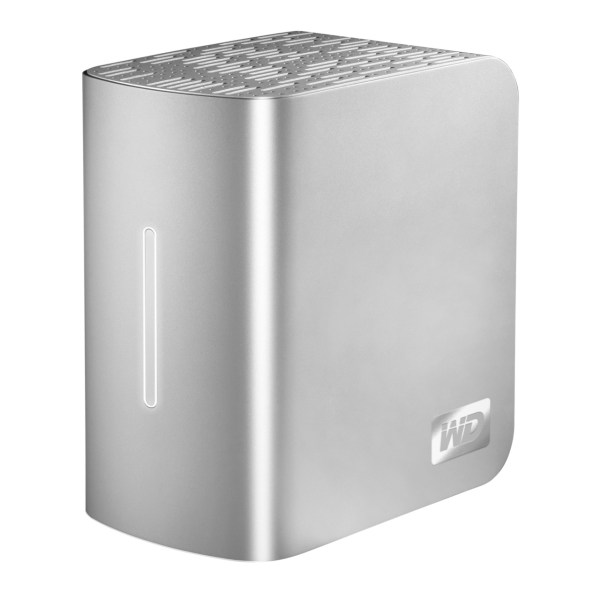
WD MyBook Studio Edition II - 02

I have been working daily with a WD My Book Studio Edition II drive for the past eight months (since April ’08). I mentioned it back in July in my popular “What’s on my desk” post. It is a quad interface (USB 2.0, FW400, FW800, eSATA) 2TB drive that can run in RAID 0 (2TB total space) or RAID 1 (1TB total space). My review can be summed up in these three words: it works great.

I should say here, just as I said in my other two reviews of the My Book Pro Edition drive (see paragraph below for links), that this drive was given to me by WDC as a replacement for my faulty My Book Pro drive. I didn’t purchase it, but at the same time, I am under no obligation to anyone to praise it needlessly. I do so because it has really worked for me.

After all these months of heavy use, I have nothing bad to say about this drive. I have put it through its paces, transferring terabytes of data back and forth from it to my laptop and to my other drives, I have used it daily, I have put it through sustained data writes of several hundred gigabytes at a time, and it has not failed me yet. In stark contrast to my experience with the WD My Book Pro Edition II drive, this drive has outshined all of my other external storage devices, including my Drobo.

True, while nothing beats the Drobo when it comes to sheer storage space and flexibility in terms of its building blocks (the drives themselves), the My Book Studio Edition II drive has been faster than the Drobo when it came to working with my photos in Lightroom, in both RAID 0 and RAID 1 modes, and it has also been faster when it comes to data transfers (writing to the drive itself).
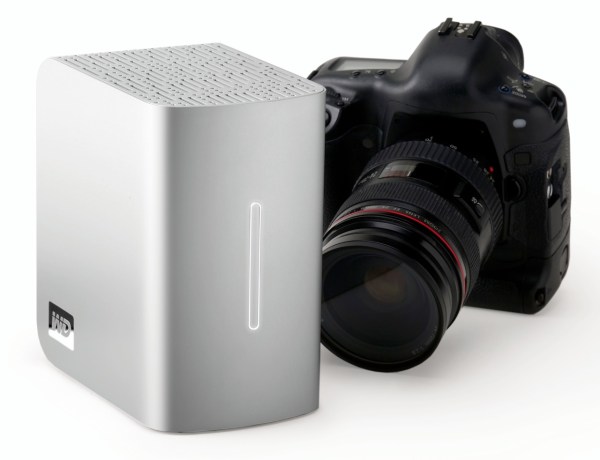
WD MyBook Studio Edition II - 07

I did not have a chance to use the drive through the eSATA interface. I used it mostly through the FW800 interface, and, briefly, through the FW400 and USB interfaces. Given that it can transfer data at up to 3GB/s through eSATA, I might just buy an adaptor for my MacBook Pro in the future. I was pretty happy with the FW800 speeds though (up to 800 Mb/s).

My feelings about this drive are somewhat harder to understand for those of you that have not had to deal with a My Book Pro Edition drive. If you did not have to put up with constant overheating, data loss, fan noises, disconnects and computer resets while using that drive, then you can’t possibly appreciate how WDC managed to get things so right with the My Book Studio Edition drive.

Somehow, they have, and for me, it’s a pleasure to use this drive. It suffers from none of the problems of its predecessor. It works reliably, each and every time. It’s fast. It’s quiet. It doesn’t overheat. It doesn’t cause my computer to crash. It doesn’t lose any of my data. The enclosure looks even better. The white LED on its front is much less annoying than the blue LED on the My Book Pro. It has greater capacity. It has more interfaces. It has a 5-year warranty, which amazes me when I consider that most tech products have a 3-year projected lifespan. The list goes on and on, and I have only good things to say about it.

The drive uses the new GreenPower drives from WD, which use 30% less energy and do not get as hot as older hard drives. This means the new enclosure doesn’t need a fan. Another cool thing is that it’s much easier to replace the hard drives, since you won’t need a screwdriver. The enclosure opens easily, and the hard drives pull out with the aid of tabs. Having needed to open the enclosure for the My Book Pro Edition drive, I can tell you it was a lot more convoluted than this.
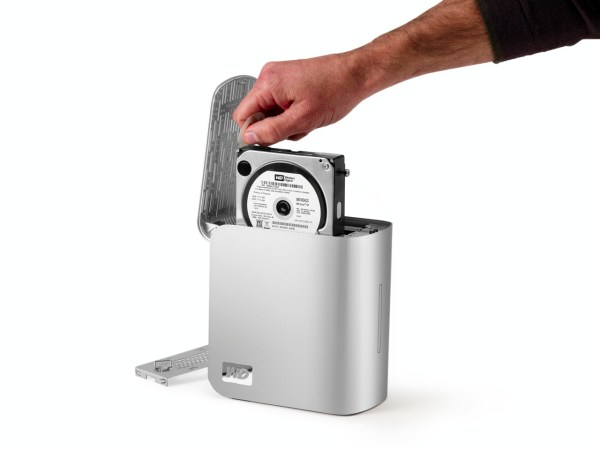
WD MyBook Studio Edition II - 08

The wonderful thing about this drive is that it’s such a great deal right now. As I pointed out in a previous how to article entitled “A look at hard drives: finding the best deals“, it’s always a good idea to compare the price of the hard drives themselves to the price of the enclosure plus the hard drives, to see how much you’re paying for the packaged, branded product, and whether it’s worth it. Well, 1TB hard drives are anywhere from $100-140 at the moment (there are two of them in the My Book Studio Edition II), and the product itself costs about $280-290 right now. That means, if you factor in the best price scenario for the hard drives, that you’re getting a quad-interface enclosure which is quiet and it actually works on most computers (which isn’t something I can say about other off-the-shelf DIY enclosures) for about $80-90. That’s a great deal in my book.

Detailed specs for the My Book Studio Edition II drive are available from the WDC website. You can buy it from Amazon or from B&H Photo.

Photos used courtesy of Western Digital Corporation.

Standard
Thoughts

Cigna increases premiums while CEO gets more pay

Our medical insurance policy is with Cigna. We’re on the Open Access Plus plan. After I renewed my Cigna policy recently, I got our new insurance cards, and noticed that the premiums and copays increased as follows:

  • PCP Visit ($20 vs $15)
  • Specialist ($40 vs $30)
  • Hospital ER ($100 vs $50)
  • Urgent Care ($50 vs $25)
  • Rx ($10/25/50 vs $10/20/45)

Those are some pretty hefty increases, particular for items 2-4 above, so I thought I’d have a look at Cigna’s executive compensation packages, to see if they’re tightening the belt there as well.

Their CEO is H. Edward Hanway. Here’s what he makes [source]:

  • Current annual compensation: $30.16 million
  • 5-year compensation: $120.51 million
  • His performance vs. pay rank is 162/175, which means he’s the equivalent of a D/F student

In 2006, two years ago, here’s what he was making [source]:

  • Annual compensation: $28.82 million
  • 5-year compensation: $78.31 million
  • Performance vs. pay rank: 166/189, which was slightly better than what he’s averaging now

So what we’ve got here is an overpaid CEO that isn’t pulling his weight, but still paying himself gobs of money off our backs. God knows how much the other executive officers are making, all while we, the customers, get charged more for our premiums and copays. Talk about a rotten deal.

I don’t think that’s fair at all.

Standard
Reviews

One more reason why Microsoft doesn't get it

At work, I use Windows Vista Ultimate Edition. I tried to install Vista SP1 on my computer yesterday. I created a restore point, just in case something went badly, and started the install. Here’s the error message that I got:

Vista SP1 cannot install

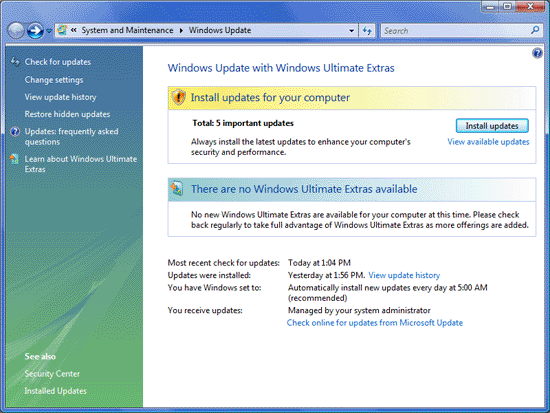
Apparently, Vista SP1 cannot install on my machine, because I’ve got too many language packs installed. Fine, I can understand that. But what I don’t understand is why Microsoft itself kept tagging the extra language packs as “Important Updates”, basically shoving them down my throat and forcing me to install them in the first place. Don’t believe me? Hang on, I’ll give you proof of it below.

I started to remove the language packs, and the uninstall process itself is just horrible. You cannot remove more than one language pack at a time, and it takes at least 10 minutes to do it. Try it yourselves and see. It’s a three-step process. You run the uninstaller from the Control Panel, it takes a few minutes for that, then you’re prompted to reboot, you do so, it takes a few more minutes for the second step, then reboots and runs the third step, which takes the longest. It’s insanely frustrating and a big waste of time. I’m hard-pressed to think Microsoft couldn’t have come up with a better and faster way to install/uninstall language packs.

I had about 7-8 extra languages installed (other than the standard EN/FR/IT/JP). I only did it because Windows wouldn’t quit bugging me to update it by installing the language packs in the first place, and now I find I have to waste more than an hour of my time uninstalling them after having already wasted more than an hour installing them a few months ago. Thanks, Microsoft! Increased productivity my foot…

I uninstalled a few of them yesterday, and here’s the message that I got from Windows after doing that:

Windows Update: Available Updates

See those 5 important updates tagged with yellow, that Windows advises me to install in order to “enhance my computer’s security and performance”. That’s Microsoft-speak for “waste your time and decrease your computer’s performance”. Guess what they are?

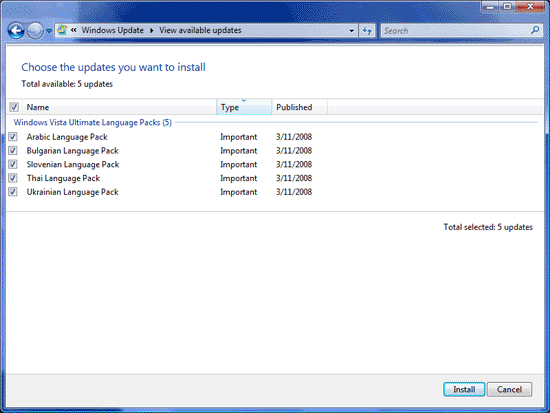
Windows Update: Available Updates

As you can see, it’s the very five language packs that I uninstalled. Windows wants me to install them right back, just so I can’t upgrade to SP1. Isn’t that grand? Don’t you just love Microsoft for their obvious programming logic?

That’s exactly the same type of message I kept getting from Windows before I installed the damned things in the first place. I only installed them so Windows would leave me alone. I guess that won’t happen any time soon, because I now see the same “Available Updates” icon in the taskbar, glaring at me, nagging me to install the stupid language packs. Do you see it below? It’s the blue icon with some sort of orange satellite flying around it.

Windows taskbar available updates icon

I only hope Vista SP1 will fix this annoying behavior, but somehow I doubt it. I have a feeling I’m going to have to revert to an earlier system restore point, which would be a real shame, but then again, it would be just what I’d expect from Microsoft.

Standard