Events

It's Valentine's Day

Look what my sweetheart gave me for Valentine’s Day. It’s a gingerbread heart with the words “I love you” written on it, in Romanian.

Te iubesc

This means more to me than any expensive gift. I like practicality. I like that I can eat this gift, and in the act of consuming it, I’m showing her that I love her gift. On the plus side, it also won’t sit around afterward on a shelf, gathering dust, fulfilling no practical purpose than that of decorum.

I think that’s what Valentine’s Day ought to be about. Not necessarily about gifts one can eat, because we should all watch our waistlines, but about gifts that show the other person that they’re loved — small gestures that mean a great deal.

Interestingly enough, those sorts of gifts never really cost much. As a matter of fact, showing your loved one that you still care can be a simple as holding her hand, or hugging her more often, or kissing her. How about treating her nicely, all the time? That doesn’t cost any money, but it does cost you some pride if you need to swallow some harsh words instead of speaking them.

Here’s a photo of us in Predeal, a winter destination for Romanians. It’s nestled in the Carpathian Mountains, and it’s the easy access to skiing and other winter sports that draws people there. We visited it recently. We are at the top of one of the peaks, at the end of the telechair ride, when we took this photo. I sat the camera on a ledge, which is still visible in the lower left corner, and put it in self-timer mode, then stepped back to join my wife.

Us

Standard
Exercise

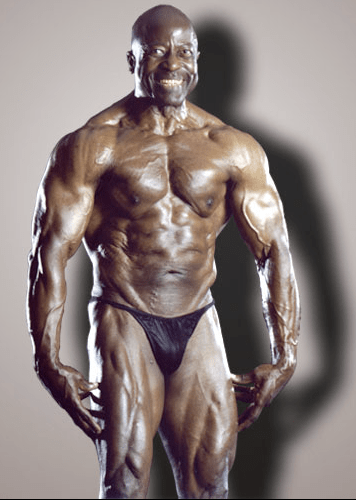
This is how you can look at 72

Meet Jim Morris, a 72-year old California man, who has been working out every day for most of his life and has won many bodybuilding competitions. He does it because he loves it. There’s a video of him working out on YouTube, originally broadcast one one of the local TV stations where he lives. The photo you see below is him at age 71, about a year ago.

Jim Morris 1

You can read more about his life and dedication to the sport of bodybuilding on his website. He is a personal trainer, and has helped many people get fit over the years, starting in the early 1950s. His diet is also something special. He only eats nuts, fruits, beans and vegetables.

Can it be done by anyone? I think so. You just need the inspiration, which Jim Morris has just provided, and the drive, which you must work up yourself. I think it’s worth it. Do you?

Images used courtesy of Jim Morris.

Standard
Reviews

PictureSurf, a new gallery plugin for WordPress

PictureSurf Plugin

PictureSurf is a new WordPress plugin that launches today (February 10, 2009). It aims to make it easier for bloggers to upload galleries to their WordPress sites.

I spoke with PictureSurf’s founder, Alan Rutledge, via chat this morning, and I wanted to find out what makes his plugin different from the standard WordPress functionality. You may or may not be aware of the fact that WordPress offers an Image Gallery feature that’s built into the core WP install.

From Alan’s perspective, the PictureSurf plugin differentiates itself by offering:

  1. An enhanced user interface, because it lets you drag and drop photos to rearrange them, label multiple photos at once and,
  2. A little more SEO juice, because of better permalinks and conditional nofollow tags on the thumbnail links. The nofollow tags are activated when there’s too little content on the photo page — for example, your description of the photo is too short, etc.

As I told Alan, I don’t see enough of a difference between this plugin and what WordPress already offers to convince me to use it myself. The PictureSurf website claims that it’s faster to build a gallery with their plugin than with WP, but I ran into a glitch when I tried to use it. I couldn’t upload any photos. The upload engine froze and even though I hit Cancel and tried to re-upload the photos a few more times, I wasn’t able to do it. Still, that’s not too important. I’m sure that if I had more time, I could have gotten it working properly.

The thing is, I built a WordPress Image Gallery for this review in under 30 seconds. Each thumbnail links to its own photo page, very much like PictureSurf does it. I was able to choose how many images I wanted in each row. And I was also able to drag and drop the images to change the order in which they appear in the gallery. You can see the gallery below.

Another claim made by the PictureSurf plugin is that you can monetize your blog much better when an image sits on its own page instead of displaying on a blank page. I’ll agree with that, but I’ll also add that WordPress lets you do the very same thing. In WP’s Image Gallery options page, you get to choose where the thumbnail links go: they can go to the images themselves, or to something called attachment pages, which are pages that WP generates dynamically for each photo, using your blog’s own theme. So I ask again, what is it that differentiates PictureSurf from WP’s built-in functionality?

As much as I love WordPress plugins, I’m a big believer in built-in functionality. I don’t want to be stuck in a situation where I need to stop using a plugin, for whatever reason, and have my post archives become unusable because the plugin is no longer there. I ran into that issue with a video plugin I used in the past. It stopped being supported, and then I had to modify all of my old posts where I embedded videos, in order to make them playable again. If the long-term survival of your content is not a concern for you, then don’t worry about it. It is a concern for me though.

Last, but not least, I found PictureSurf’s design somewhat rough. It just doesn’t integrate as well as it should into the WordPress Editor. Furthemore, if it aims to take over the image gallery role, then it should fully take over that role. If I install PictureSurf, once I click on the Image Upload button in the WordPress Editor toolbar, it’s the PictureSurf AJAX window that should open up, not the WordPress Image Uploader. And when I access an old post that uses an image gallery, written before I installed PictureSurf, it should automatically take over that gallery and display the images using the PictureSurf gallery settings. But none of this happens. Old posts remain the same. I’d have to modify each and every one, manually, in order to get PictureSurf working there. As a publisher and writer, that’s a labor I’m not willing to undergo.

For me, the PictureSurf plugin does not differentiate itself enough from the standard WordPress functionality and does not offer enough added value in order to make it to my roster of active plugins. I find the WordPress Image Gallery feature quite adequate and necessary, and therefore, using the PictureSurf plugin becomes a matter of preference, not need. I myself do not need it, therefore I won’t use it. Your situation may differ. Feel free to try it out and see what you think.


Standard
Thoughts

Speak softly and… what's that?

I guess when Theodore Roosevelt uttered his now famous phrase, “Speak softly and carry a big stick; you will go far,” he might have been thinking about something like this:

Punt Gun -- Washington, DC

It’s a punt gun. It would not have been used like pictured in the photo above, because the recoil action was too strong. It would have knocked both men on their backs and possibly dislocated the shooter’s shoulder.

There’s a demo video of one of these monster guns in action on YouTube. I recommend you see it to get an idea of the damage it can inflict. It was apparently used for shooting flocks (that’s right, entire flocks) of birds while mounted to the bow of a boat.

[via Shorpy]

Standard
Thoughts

FriendFeed now supports RSS enclosures

See this post on FriendFeed, from 1/26/09, where Benjamin Golub from FriendFeed discusses the difference between media RSS and RSS enclosures. He mentions that they’re working on a way to accommodate RSS enclosures in addition to media RSS tags. A day or so later, they pushed the upgrade to the live site, as he states in this post.

While this is great news for the feeds from my photography catalog, it’s also great news for everyone else who uses RSS enclosure tags in their feeds. It means their photos and potentially other media, such as audio and video files, will be readily displayed on FriendFeed, making for a more interesting feed browsing experience. More specifically, it means that people who use the RSS module for Gallery 2 in conjunction with FriendFeed, like I do, will be able to readily display thumbnails of their photos in their FF streams.

The thing that makes me happy is that I didn’t even have to lobby for this. I didn’t have to bug them. Ben jumped in to help me just because he’s a nice guy. Did I mention that Ben is also the one who pointed me to SliceHost when I had problems with my other web hosts? What can I say but to offer him a big thank you for all his wonderful help!

By the way, FriendFeed now also has a way for users to test their feeds before adding them to their accounts. It was back on 12/12/08, a month and a half ago, that Ben mentioned they were working on that feature at FF in an email to me. I’m really glad to see it has become available.

Standard