Lists

Gadget Monday – May 4, 2009

Here is this week’s list of seven cool gadgets. Sorry I couldn’t publish a Gadget Monday edition last week; my schedule was too hectic to accommodate the several hours of research and preparation that are required for each one of these posts. 

Sea-Doo Seascooter Explorer

Made for scuba divers, the Seascooter Explorer will pull you through the water at speeds up to 3.3 mph. It has a three-stage speed control, it can dive up to 160 feet, and it’s powered by a rechargeable electric battery that lasts up to two hours. It looks like it’d be fun and easy to use. See the demo video. You can get one for $640

seascooter-explorer-1

seascooter-explorer-2

seascooter-explorer-3

Lunocet

As long as I’m talking about scuba gear, here’s another cool gadget, the Lunocet. It’s a dolphin-inspired fin for divers that will supposedly allow you to swim at speeds of up to 8 mph underwater. That’s a pretty hefty claim. There’s a demo video on YouTube. I don’t know, with a fin that big, it looks to me like it’d be pretty easy to get muscle cramps if you’re not well trained, and with both feet stuck together onto the fin, you’d be hard-pressed to surface quickly. But, if you know what you’re doing, it should be a pretty cool toy, albeit at the substantial price of $975

lunocet

http://www.youtube.com/watch?v=VfzDep6wpkE%5D

[via LikeCool and Lunocet]

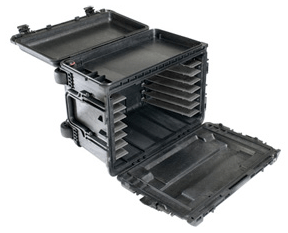
Pelican 0450 Mobile Tool Chest

I love tools, and this mobile tool chest from Pelican has me drooling. It’s tough, stackable, can hold up to 150 lbs. of tools, has all sorts of fancy features like pressure equalization valves and the ability to keep tools in place even when it’s turned over, and more. It is somewhat expensive though, at $500. 

pelican-0450-mobile-tool-chest-1

pelican-0450-mobile-tool-chest-2

pelican-0450-mobile-tool-chest-3

[via LikeCool]

Rainxchange Rain Barrel by Aquascape

This decorative rain barrel looks great and has a built-in planter on top as well as a spout on its side. It’s an easy way to save money on your water bills and keep your garden irrigated. 

rainxchange-rain-barrel-1

rainxchange-rain-barrel-2

[via The Design Blog and Aquascape]

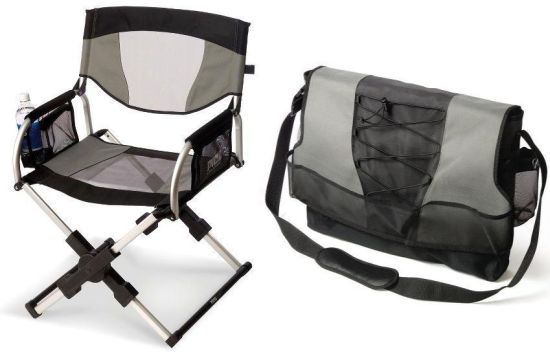
Foldable Director’s Chair

This director’s chair folds up into a messenger bag. It’s available from Hammacher Schlemmer for $130. 

messenger-bag-directors-chair

[via The Design Blog]

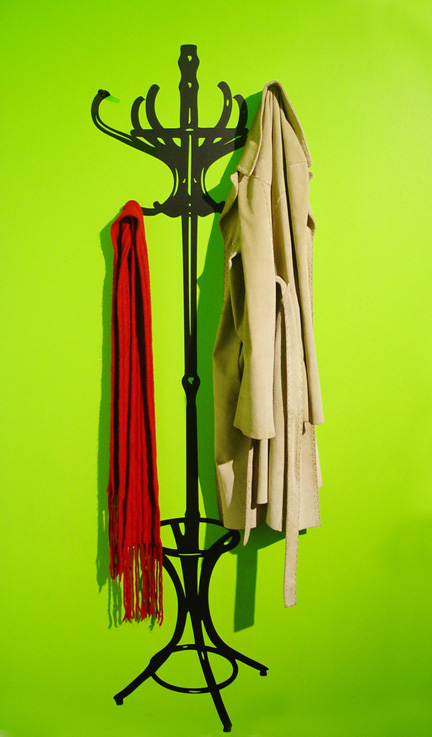
2D to 3D Coat Tree by Andie Olive

This 2D coat tree is essentially a sticker you place on your wall. It comes with a few hooks that you can install into the wall at specific points where they’re masked by the design, essentially turning the sticker into a usable coat tree. It’s a neat idea, but the price is well-peppered at $109. I guess you’re paying for the design, not the hardware, which is minimal indeed. 

2d-to-3d-coat-tree

[via LikeCool]

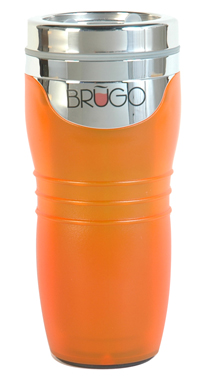
Brugo Travel Mug

This special mug has a separate top compartment that fills up when you tip the mug, allowing you to cool a small portion of the liquid inside the mug before you drink it. It’s a neat idea. You tilt it, then sip it. There’s a demo video that shows you how this works. It sells for $20. 

brugo-mug

[via TrustyPony]

Standard
Thoughts

Glad to see Nabaztag is still around

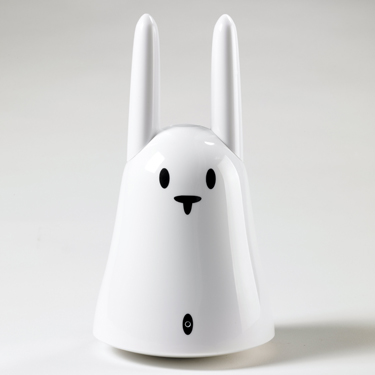
It’s coming up on three years since my original review of the Nabaztag. In 2006, it was just getting introduced to the US market. It was a new product from France, and the editors of the “I Want That! Tech Toys” show on HGTV approached me to see if I wanted to review it. I said yes, because the concept intrigued me, and I wasn’t disappointed. I thought it was a pretty cool gadget, in spite of the learning curve involved in setting it up.

nabaztag-1

nabaztag-2

A few months after being taped, the segment featuring the Nabaztag aired on HGTV. The rabbit did just fine, but I was way too serious. Note to self for the next TV interview: lighten up!

In December of that year, Violet (the makers of the Nabaztag) launched the new Nabaztag:tag, which could read RFID tags, had a built-in motion sensor, and could do a bunch more things. Since then, they’ve been busy improving the Nabaztag experience and introducing new things, like the Mir:ror, an inexpensive RFID reader ($50) that works in conjunction with RFID stamps (they call them ztamp:s) to do all kinds of neat things, like tell you the weather, update your Facebook status automatically, read books to your children, etc.

I have to say the new Nabaztag:tag looks a lot better than my original 1st gen Nabaztag. It has a shiny white finish and a better user interface. It’s probably easier to configure, too. I had some issues getting mine to go on the Internet back when I did the original review, which were thankfully sorted out.

All in all, I’m glad to see a product I reviewed and found cool is still around. Kudos to Violet!

Standard
Lists

Gadget Monday – April 20, 2009

Here are this week’s seven cool gadgets.

LG Viewty Smart Mobile Phone

The LG Viewty Smart (LG-GC900) smartphone comes with a touchscreen, 8-megapixel camera, and all the other goodies you’d expect from a late-generation mobile phone, such as a 3-inch WVGA screen with 800×480 pixels of crystal-clear resolution, 7.2 Mbps HSDPA and WiFi, 1½GB of internal memory and up to 32GB of expandable memory, and it is only 12.4mm thick. That’s thinner than a standard sheet of drywall, for those of you familiar with construction. It’s less than ¾ the width of my Nokia N95 smartphone. No pricing information is available yet. LG says the phone will first be available in European markets first.

LG Viewty Smart (LG-GC900) Smartphone - 3

LG Viewty Smart (LG-GC900) Smartphone - 1

LG Viewty Smart (LG-GC900) Smartphone - 2

http://www.youtube.com/watch?v= j3odfmQze_4

[via LikeCool and LG]

Video camera pen from Hammacher Schlemmer

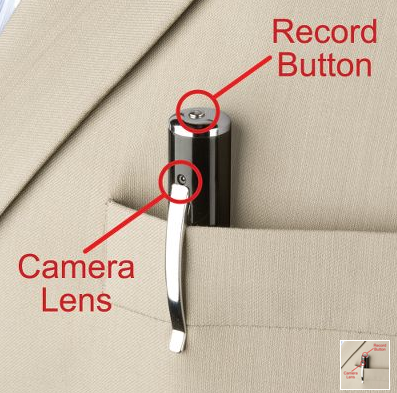
Available for $130 from Hammacher Schlemmer, this nifty pen records up to 2½ hours of color video at a resolution of 352×288 pixels. It stores the video (AVI format) on its 4GB internal memory, and it interfaces with a computer through its built-in USB connector, which can also be used to recharge its lithium battery by plugging it into an outlet via the included adapter. Best of all, it also writes, and the ink sticks are refillable.

video-camera-pen-2

[via TrustyPony and Hammacher Schlemmer]

Acrylic Cowboy open computer case

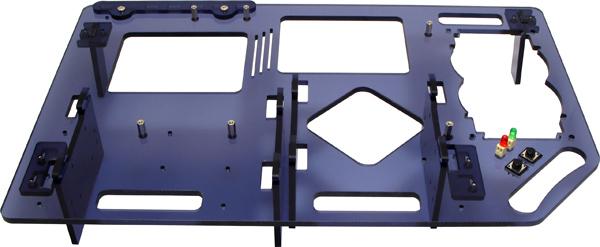
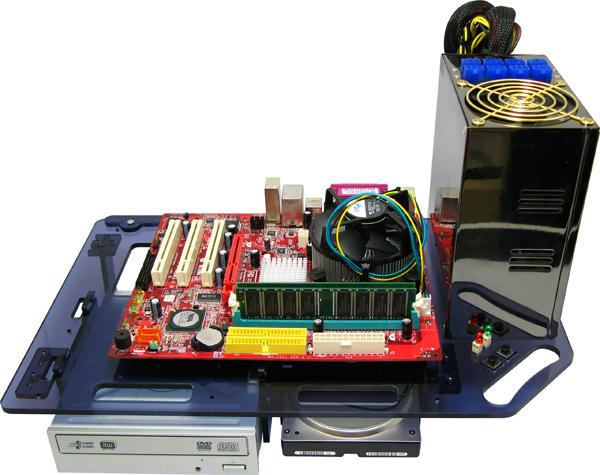
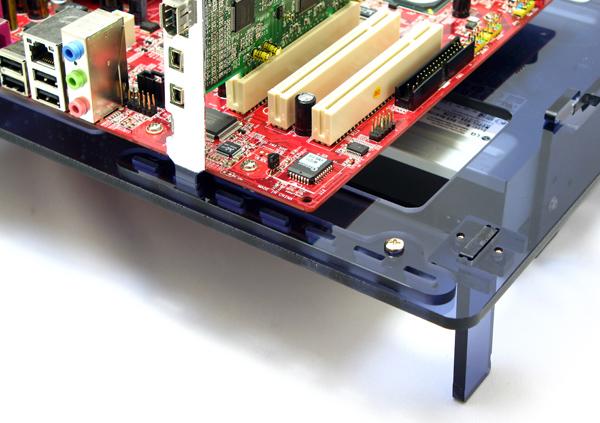
This is a precision-drilled acrylic board, onto which you can install the usual components that go inside a computer, such as a motherboard, video card, power supply, CD-ROM and hard drive. The kick is that everything’s out in the open so it can be easily serviced. Nice concept, but somewhat pricy at $76 bucks, no?

acrylic-cowboy-1

acrylic-cowboy-2

acrylic-cowboy-3

[via LikeCool and Geek Stuff 4 U]

Braille E-Book Reader

This is only a concept, but if it gets made, it’ll let blind people read books via the device’s special surface, which can change to reproduce Braille letters through electromagnetic impulses. Very cool.

braille-e-book

[via The Design Blog]

Bird Dispenser by Curro Claret

A very clever design for an automatic bird dispenser! The cutting board has pre-drilled holes through which crumbs from your sliced bread fall and collect into a dispenser for your pet bird. Love it!

bird-dispenser

[via LikeCool]

Battery Snaps

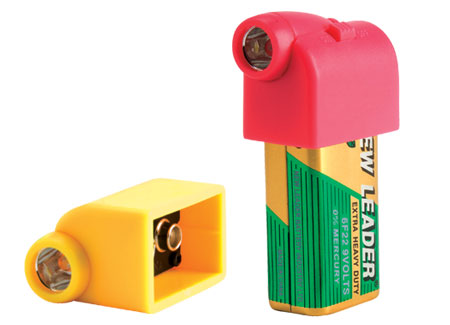
For $5, you get a cool little top that snaps onto a regular 9-volt battery to give you an instant flashlight. It has an on/off switch and comes with its own 9-volt battery, ready to go.

battery-snaps

[via LikeCool and Perpetual Kid]

DrinKlip Cup Holder

A sturdy clip that attaches to the edge of your desk and holds your cup. Very nice!

drinklip-cup-holder

[via LikeCool]

Standard
Lists

Gadget Monday – April 13, 2009

Here are this week’s seven cool gadgets.

Lenovo IdeaCentre A600 All-in-One Desktop

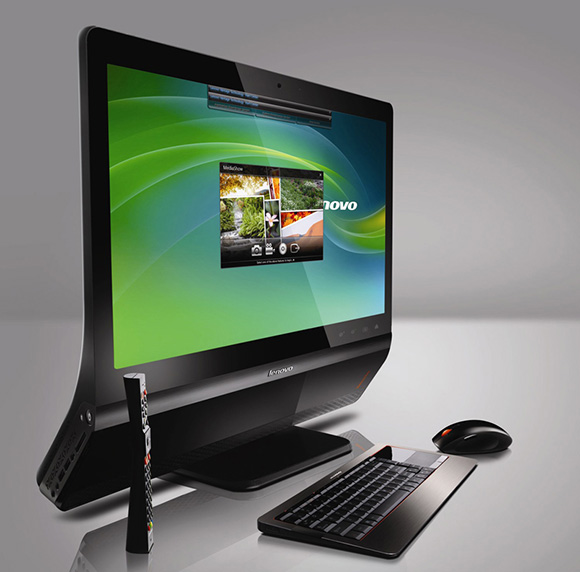
I wrote about the Dell Studio One in last week’s Gadget Monday. Now I see that Lenovo is coming out with their own version of the iMac — I say this because the design is similar. Unlike the Dell Studio One, they’ve left the hardware underneath the display, just like the iMac, but they bent the lower lip back to give it a different look.

The starting price hovers at $700, same as the Dell Studio One, but be forewarned, the hardware specs include an integrated video card. And since the machine runs Vista Home Premium, which is a real clunker of an OS, an integrated video card will slow everything down. To get a decent video card, you need to get the model that costs $1,000. And at that price, you really gotta wonder, should I pay $1,000 to run Vista, or just put down $200 more and get an iMac, which runs a much better OS?

Still, if I had to run Windows, I’d rather run it on a nice-looking machine like this one.

lenovo-ideacentre-a600-all-in-one-desktop

[via LikeCool and Lenovo]

White Leica M8

Design-wise, this camera is wonderful. I’m not convinced the specs and the quality of the photos you can get with it live up to its astronomic $10,000 and above price.

leica-m8-white

[via Gizmodo]

Modular CT adjustable bike seat by Selle Bassano

The distance between the two halves of this bike seat can be readily adjusted to fit the needs of every rider. Great idea!

modular-ct-1

modular-ct-2

modular-ct-3

[via The Design Blog and Selle Bassano]

Land Sailor

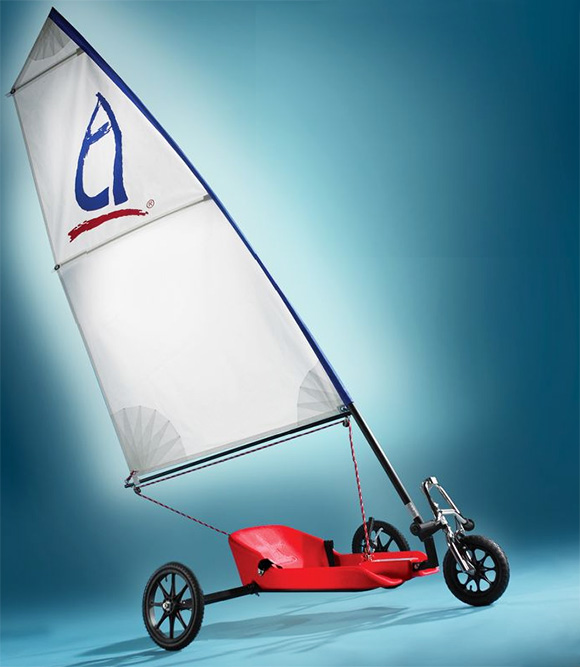
A portable wind-powered craft that can go up to 25mph on flat ground. It’s no Greenbird, but it’ll do for the weekend enthusiast. It disassembles easily to fit into the trunk of a car. It has a seat, handbrake, seat belt, and steers with your feet while your hands operate the sail. The back wheels are cambered for stability. Available from Hammacher-Schlemmer for just under $1,000.

land-sailor

[via LikeCool and Hammacher-Schlemmer]

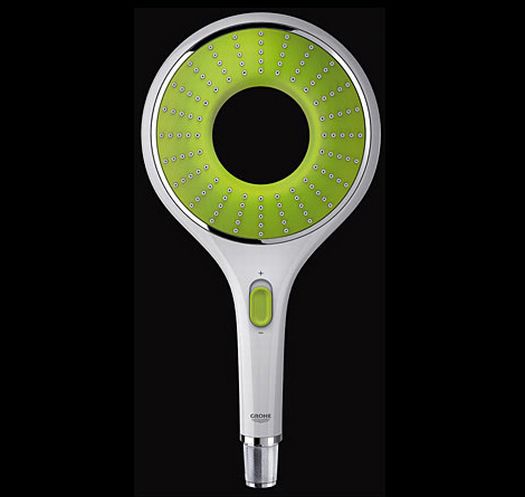
Icon showerhead by Grohe

A very cool-looking showerhead that uses less water thanks to its nozzle design.

icon-showerhead-1

icon-showerhead-2

[via The Design Blog]

Haiku Satori ceiling fan

A ceiling fan that combines great design and sculpted bamboo blades with a revolutionary microprocessor-controlled motor that consumes 60-80% less electricity than a typical fan motor.

haiku-satori-ceiling-fan-1

haiku-satori-ceiling-fan-2

[via The Design Blog and Haiku]

Sony Ericsson MS500 Bluetooth speaker

Those of us with Sony Ericsson cellphones can entertain ourselves on the go with this handy Bluetooth speaker. It plays music directly from the phone, and as a bonus, the volume of the speaker is controlled by the phone as well. It operates on two AA batteries for up to 5 hours.

sony-ericsson-ms500-bluetooth-speaker-2

sony-ericsson-ms500-bluetooth-speaker-1

[via LikeCool]

Standard
Reviews

Hardware preview: DroboPro

Updated 1/14/19: I have revised my opinion of Drobo devices. After experiencing multiple, serious data loss events on multiple Drobo models, even recent ones, I no longer consider them safe for my data.

Updated 11/23/09: The new DroboElite is now available. It differs from the DroboPro because it offers two Gigabit Ethernet ports instead of one, multi-host support, and up to 255 Smart Volumes.

Today, April 7, 2009, Data Robotics launches a new product aimed at professionals and SMBs: the DroboPro. I got a preview of it yesterday. Let me share what I learned with you.

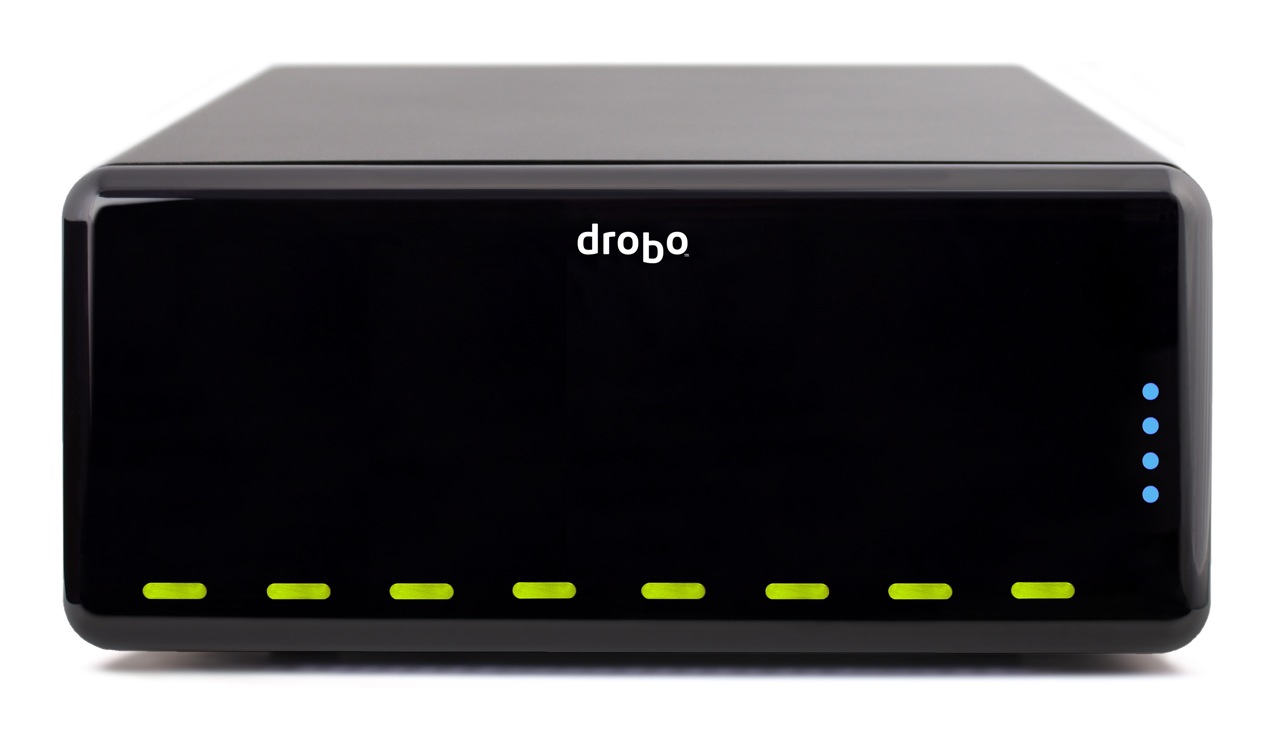
Drobo Pro top

The DroboPro has some really cool features, some of which I, along with others, anticipated and looked forward to seeing. As I wrote in my review of the Firewire Drobo, Data Robotics was looking at making an 8-drive Drobo, possibly rack-mounted. I also thought they might introduce the capability to safeguard against two drive failures. And, as I wrote in this comment on that same review, in response to a reader’s wishlist for the Drobo, I thought they might at some point build networking capabilities right inside the Drobo.

Well, the new DroboPro does all those things and more!

  • 8 (eight) drives
  • 2 form factors: desktop and rackmount
  • Dual drive redundancy
  • Gigabit ethernet
  • iSCSI
  • Smart volumes: create up to 16 different virtual volumes, each of which can grow to 16TB
  • Price is $1,299 for entry level DroboPro or $3,999 for a loaded model with eight 2TB drives
  • Instant $200 rebate with customer loyalty program

Let’s dive into those new features a bit. Keep in mind my knowledge is as yet limited, since I haven’t seen the full specs; I only had a phone briefing.

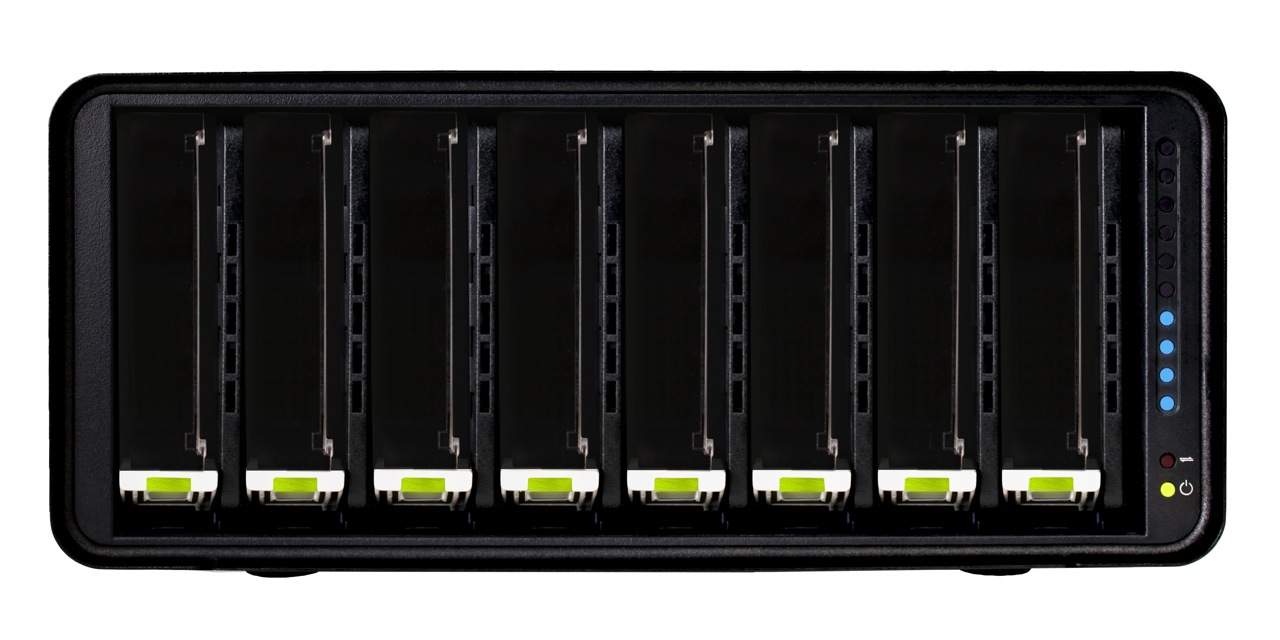
8 drives

You know how the drives are arranged horizontally in the regular Drobo? They’re arranged vertically in the new DroboPro, which is about the same height, and a little less than twice the width of the original.

Drobo Pro cover off

Two form factors

The DroboPro comes in a desktop form factor which is 12.17″ wide, 5.46″ high and 14.1″ long. The length is about 3″ more than that of the original Drobo. I think the extra space houses the additional circuitry for the network, power supply and other features.

The other form factor is a rackmount with a 3U height. If I understood correctly, the rackmount kit can be attached and detached as needed, so you can interconvert between the two form factors if you like.

DroboPro dimensions

Drobo Pro rackmount kit

Built-in power supply

One thing that’s easy to miss if you look at the back of the DroboPro is that it no longer has a DC adaptor port, but a regular 120-240V connector. Have a look and see. This means the power brick which converts 120-240V AC to 12V DC has been eliminated. You’ll also notice a power switch on the back. That’s new too.

Drobo Pro back

Dual drive redundancy

As it was explained to me, the DroboPro comes standard with single drive redundancy, and the dual drive redundancy is an option that can be turned on at any time. In case you’re not familiar with the concept, this means two of the drives inside the Drobo can fail, and your data will still be safe.

Gigabit ethernet

Business-class networking is now built right into the DroboPro, along with enterprise-class features, like iSCSI with automatic configuration. The ethernet port on the DroboPro does not replicate the functionality of the DroboShare, as I initially thought. It only works through the iSCSI protocol, which means it needs to be mapped directly to a host, like a server or workstation, which can then share it among multiple servers or workstations. In that sense the DroboPro is not a NAS (Network Attached Storage), but a SAN (Storage Area Network).

iSCSI

If you’ve set up iSCSI volumes in the past, then you know how much of a headache they can be, and how bad the performance can be if it’s not set up correctly or if the hardware isn’t working as it should. I know firsthand about this. With the new DroboPro, the iSCSI setup is automatic. It’s as easy as plugging it into the network. The Drobo Dashboard software then finds it and mounts it as a volume on your machine via iSCSI. The work is done behind the scenes so you don’t have to worry.

For Windows, the DroboPro uses the Microsoft iSCSI initiator, and for the Mac, the folks at Data Robotics wrote their own iSCSI initiator. Those of you who work with Xserve and Xsan use Fibre Channel technology to connect to the network volumes, and you may wonder why Data Robotics went with iSCSI. It’s because iSCSI is more utilitarian. It doesn’t require special network hardware to work; it can use the existing ethernet network infrastructure, so there’s a lower cost of entry and maintenance.

I was assured that iSCSI throughput on the DroboPro is very fast. I guess it’s up to us to do some testing once the DroboPro starts to ship, so we can see just how fast it is. See the iSCSI guide on Drobo’s website for more details.

Smart Volumes

With the DroboPro, you can create up to 16 different virtual volumes, each of which can grow to 16TB. This is very important for the enterprise market, where companies want to be able to separate the data onto separate volumes and assign separate access privileges to each. Those of you who are network admins can readily appreciate how useful this is. Those of you who are creatives can also appreciate being able to assign a volume for Time Machine backups, one for videos, one for photos, and so on. Furthermore, each volume can be resized as needed, which is a huge leap forward compared to the difficulty of resizing LUNs set up over RAID volumes.

Price

The entry level DroboPro (enclosure-only) costs $1,299. The high end DroboPro, which includes the rackmount kit, two drive redundancy and is pre-loaded with eight 2TB hard drives for a total of 16TB of space, costs $3,999. There’s also a handy customer loyalty program which will give you an instant $200 rebate if you’ve purchased a Drobo in the past.

Those of you who might balk at the price should compare the features and ease of use of the DroboPro with other comparable products on the market. I’m going to walk you through a different kind of comparison, one that looks at the cost of the original Drobo and the cost of the new DroboPro.

Think of the DroboPro as two regular Drobos in one. The original Drobo is $499 for the enclosure, so that brings the price to $998. The difference between $998 and $1,299 is made up by the additional networking features and the complexity of the circuitry and auto-management algorithms of an 8-drive array. Keep in mind the DroboPro has enterprise-class features like dual drive redundancy, iSCSI and smart virtual volumes. Those features alone warrant charging several hundred dollars to thousands more for it, as other companies who make similar products have already been doing.

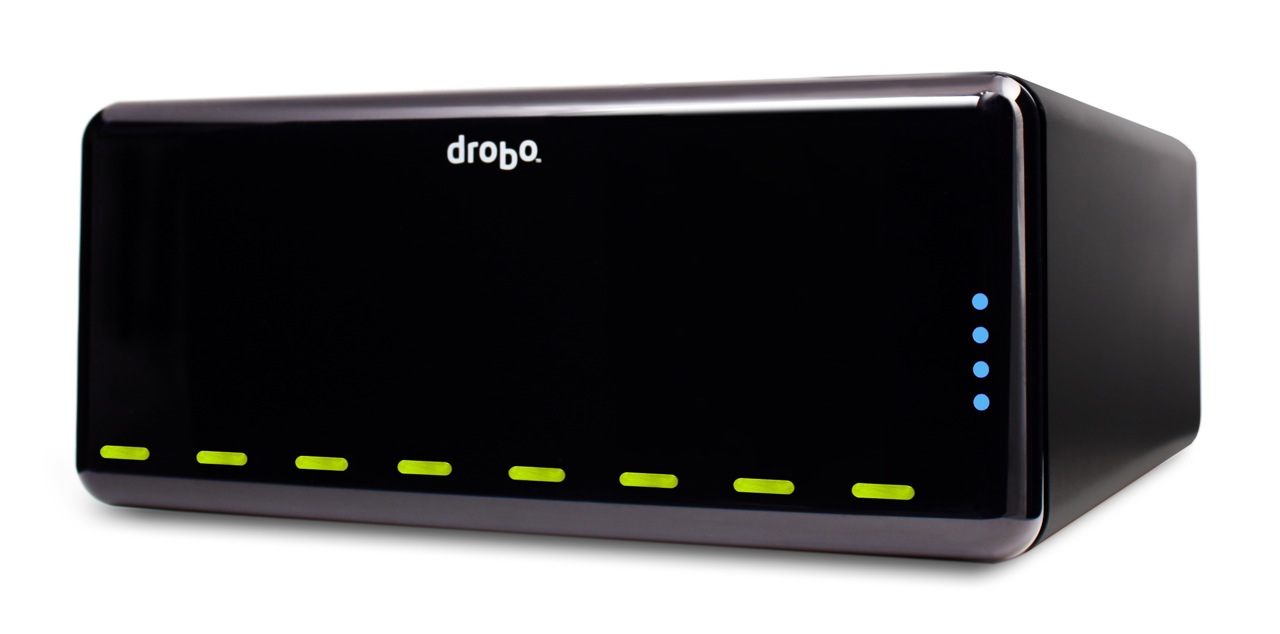
Drobo Pro side

Summary

The DroboPro is a fantastic addition to the Drobo line. Its enterprise-class features, its incredible ease of use, and its unmatched storage flexibility make it the perfect external storage solution for busy professionals with serious storage needs or business server rooms. Users will appreciate all of the space it makes available for their work, and system admins will appreciate how easy it is to set up and maintain. From a design point of view, it’s a drool-worthy beauty. Having been a Drobo user for almost 1½ years, I can tell you it is my storage solution of choice, and I look forward to upgrading to a DroboPro some day.

Images used courtesy of Data Robotics.

Standard