Thoughts

What's on my desk?

The idea for this post has been sitting among my drafts for a long time. I always thought it’d be a good idea to share how I work and what equipment I use, for the benefit of those of you that want to put together a similar setup. Let me make it clear that I’m not doing this to brag. I realize my equipment is fairly expensive and out of reach for some. Believe me, I’m keenly aware of its cost, and have made certain sacrifices in order to acquire it.

The hardware I have now is the best hardware I’ve had so far, and it allows me to easily develop for my clients, write for my sites, process my photographs and edit my videos and movies. See the photo enclosed below. Each important piece of equipment is marked with a number, and each number is explained in detail.
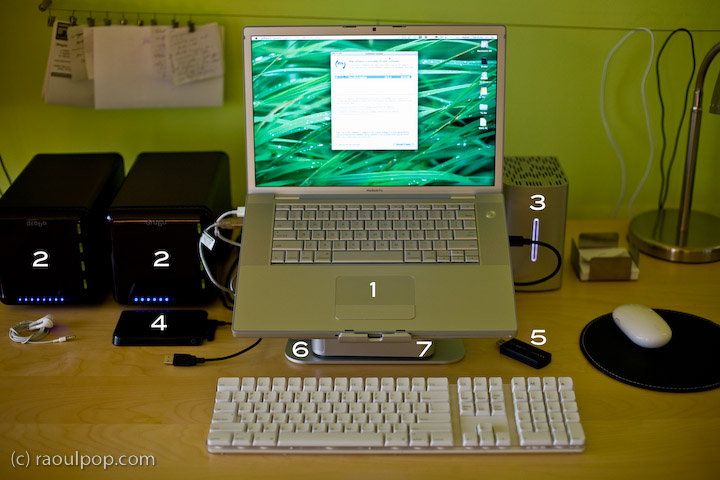
Here’s what you see above:

  1. 15″ Apple MacBook Pro: I love its dedicated 512 MB video card, and its design and speed. It allows me to focus on my work, not twiddle my thumbs while the computer plays catchup to my commands.
  2. Drobo: I have two of them. I store backups of my photos on one, and my videos on the other. Both of them are shared over my home network, so that my other Mac, a 20″ iMac G5, can access the videos and play them in Front Row.
  3. 2TB WD My Book Studio Edition II drive, running in RAID 0 (striped) mode: WD was kind enough to give me this drive as a gift of sorts, considering the significant problems I had with my 1TB WD MyBook Pro Edition II drive. I think they got tired of my complaining, and sent it to me to shut me up. Well, it worked. This drive has done great so far, and I have no complaints. I plan to write a review for it soon. I’ve been putting it through its paces so far, and it’s held up nicely. I connect it to my MBP through the Firewire 800 port, and I love the transfer speeds.
  4. 250GB WD Passport drive: I bought this last year, and it has been very useful. It’s small, stylish, and it’s powered solely by the USB port. I use it a LOT to transfer big files between computers.
  5. Turbo.264: a nifty little gadget built by the folks at Elgato, it speeds up H.264 conversions significantly. I’ve been putting this through its paces as well, and plan to write a review soon.
  6. mStand laptop stand: I love this stand, and reviewed it recently. It’s the best-designed stand for the MBP.
  7. newerTech miniStack v1: This is the first version of the popular miniStack drive enclosure. It uses PATA drives, and it has built-in FireWire and USB hubs (3 ports each). I use it as a USB hub, and it sits underneath my laptop stand — that’s why it’s not clearly visible in the photo. Both my Drobos are connected into it, and I have a spare USB port that I can use for my CF card reader, etc. If you want to have a better look at this enclosure, you can see it better in my Drobo review, where it appears in both the photos and the video.

As you can see, I aimed for simplicity in my setup. I wanted the most amount of processing power and hard disk space, in the smallest amount of physical space. You’re looking at about 5TB of storage in the photo.

Most of the heavy lifting (in terms of data crunching) happens on the WD Studio drive. I use it as a staging area for video processing, and transfer the finished, edited ones to one of the Drobos. I also use it to store and work with my Lightroom photo libraries. Working with photos in Lightroom from a Drobo is too slow for me, and the WD Studio Drive offers a visible advantage as I process each photo. I then back up my laptop and the WD Studio Drive to the Drobo through Time Machine.

You may recall I initially moved my photo libraries to one of the Drobos because I kept experiencing Lightroom library corruption and thought the WD Studio drive was at fault. As it turns out, Lightroom itself is to blame. Once your photo library reaches tens of thousands of photos (I have over 40,000 photos in one of my libraries), Lightroom will experience library corruption on a fairly regular basis. It’s just an unstable piece of software, and I hope that the next version will be better.

Just a quick note for those of you that noticed it. There’s a wire that runs behind the laptop, along the wall. The photo isn’t crooked, the wire is. I use it to hang small wires or notes to myself on it, and being loaded down with a few toward the center (which is only partially shown in the photo), it appears slanted. Sorry about that. It bothered me, but I wasn’t going to spend an hour or so in Photoshop cloning it out.

Hope this helped give you some ideas! If you have any questions, let me know.
Standard
Reviews

Meet the replacement for .Mac: MobileMe

I mentioned in yesterday’s iPhone 3G announcement that Apple had secretly purchased the domain me.com for an undisclosed sum of money (in the neighborhood of 11 million). It came as no surprise to Apple fans when we found out that MobileMe was the replacement for .Mac. Users had griped for years about .Mac’s lackluster performance and puny space available (1GB for $99/year last I used it).

So, other than the new domain name (personally, I liked the .Mac domain), how’s the new service different?

  • More space: 20GB for the same price ($99/year for individuals and $149/year for a family pack). Additional space is $49/year for another 20GB or $99/year for another 40GB.
  • Push… everything: Apple has upgraded their .Mac email service and calendar and contact syncing to “push” technology. I don’t really see what’s different here when I compare it to .Mac, except the syncing is seamless and faster. And oh, now it works with PCs/Exchange as well.
  • Great web interface: Apple outdid itself here. .Mac had a web interface as well, but it was slow and kludgy. The new web interface behaves like desktop applications and looks really, really nice. Not sure how fast it loads on regular broadband connections, but we’ll find out soon, won’t we?

That’s about it, really. The bulk of the effort went into the better, cross-platform syncing and the innovative, beautifully-designed web interface. The additional space was long overdue.

Existing .Mac members will be upgraded automatically to MobileMe, and their existing subscriptions will be transferred over to the new service when it becomes available on July 11.

What’s the draw to MobileMe? For me, it’s the Back to My Mac service, which was introduced alongside iChat Screen Sharing in Leopard. It wasn’t enough to get me back when .Mac was overpriced and underfeatured, but it may be enough now that MobileMe has more space and is better designed. For iPhone users, it’s the obvious integration and contact/calendar syncing between the phone and the computer(s).

In terms of web storage space, the 20GB isn’t really that big of a deal for me. There are PLENTY of companies out there that offer more space. ADrive, for example, offers 50GB for free, and they’ve worked reliably for the past several months that I’ve used them. Dropbox, although it offers less space for free, has incredibly nice integration between Macs and PCs, and lets me share files seamlessly from computer to computer, or with my friends.

What I have to wonder about is Gmail. Given the partnership between Apple and Google, I’d have hoped that Google products would be better integrated into MobileMe somehow. It seems they’ve still been left by the wayside. They work, but not quite. I still can’t sync my calendar appointments properly from Gmail to iCal, and still can’t sync my contacts properly from Addressbook to Gmail (unless I have an iPhone or iPod Touch). Even Gmail’s IMAP interface in Mail leaves a lot to be desired. After using it for a few months, I switched back to POP3.

That’s annoying. I suppose it may have had something to do with Apple’s desire to keep building on their existing products and to develop an Apple-designed web interface (which is quite different from the spartan design of Google’s products).

Images used courtesy of Apple, Inc. More information about MobileMe can be found in Apple’s original press release, or on the MobileMe website.

Standard
Reviews

Drobo overestimates used space

Here’s what happens. When the Drobo is connected to a computer and the Drobo Dashboard software isn’t running, the Drobo’s capacity meter will overestimate the used space, potentially triggering a low space alert. When the Drobo Dashboard software is started, it does its own used space calculations and corrects the capacity meter, literally turning off one to two or even three of the blue LEDs that indicate how much space is used.

There are 10 blue LEDs, one for each 10% of space used on the Drobo. When I connect one of my Drobos to my computer, the capacity meter lights up 9 of the LEDs, indicating 90% disk space used. When I start up the Drobo Dashboard software, two of the lights are turned off, leaving 7 on, or 70% disk space used. Also, although low space warnings are triggered when the Drobo Dashboard is started, after it calculates the space used, the warning go away, and the Dashboard screen goes from yellow to green.

I made a video which shows this quite clearly. I apologize for its poor quality, but I made it without any prior setup, just to show you that I’m not making this up. This also happens for my other Drobo, where the capacity meter shows 50% disk space used when I connect it, but drops to 30% disk space used when I start up the Drobo Dashboard. If you have a Drobo yourself, try it out and see.

Download Drobo overestimates used space (640×480, MP4, 35MB)

I notified Drobo Support of this issue a couple of days ago, but I have not yet received a reply from them. I will be glad to include any feedback/clarification from them right here, and will update this post with further information as I receive it.

I should also point out that there’s still no fix for the other two issues I outlined in my original Drobo review recently, where I pointed out that:

  • The transfer speed slows down significantly (and somewhat inversely proportional) to the amount of disk space remaining on the Drobo after the 70% mark is reached. In other words, the less space there is (in terms of the percentage, not GB remaining), the slower it’s going to be to access and transfer data to the Drobo.
  • The Drobo becomes excessively noisy when the fourth hard drive is inserted, and the fan will go into high gear when the Drobo isn’t even used. It seems this is loosely tied to the ambient room temperature, and once it goes over 75 degrees Fahrenheit, the fan kicks on and stays on for a long time. But again, you’ll only see this issue when the 4th hard drive is inserted. Given that the Drobo is a consumer device which is meant to operate at room temperatures, not in a climate-controlled server room, this is not appropriate behavior and should be corrected.
Standard
Reviews

Hardware review: Super*Talent 8GB USB flash drive

The 8GB Super*Talent USB flash drive I ordered from Brando arrived last night, and it was a very pleasant surprise to see how tiny it really is. It’s smaller than a simple USB connector, in both width and thickness. I am amazed by how small it is — and the thought that 8GB of data somehow fit onto this minuscule piece of steel and silicone boggles my mind.

I put together a short video review to show you the drive’s size and also to do a quick speed test. I copied a 1GB movie onto it, and the copy operation took about 3 minutes. That means it’s about half as slow as a Drobo in terms of transfer speeds.

The photos of this flash drive do not do it justice. It’s much smaller than it looks in the online stores. I hope that the video itself will do a better job of demonstrating its size (to scale), and its beautiful and simple design.

Download Super*Talent video review (640×480, MP4, 41.2MB)

This USB flash drive’s size and design leave me thrilled to no end. If you’re in the market for a spacious yet tiny flash drive, the Super*Talent fits the bill perfectly. The only thing left for it to prove is its long-term durability. It is rated PICO-C, which means it’s rugged and water resistant. I am very interested to see how long it lasts — if I don’t lose it first.

Updated 10/30/08: Still works just fine after 5 months of use. I have it attached to my keychain, and I carry it around in my pocket all the time. It’s got a few scratches, but it works as advertised. Still happy with it.

Standard
Reviews

Updates to my Drobo review

Updated 1/14/19: I have revised my opinion of Drobo devices. After experiencing multiple, serious data loss events on multiple Drobo models, even recent ones, I no longer consider them safe for my data.

Updated 3/19/08: My review of the new Firewire Drobo is now published. I’m also glad to say that the issues outlined in my original Drobo review (and mentioned below) were resolved through firmware updates, as expected.

I’ve re-organized my Drobo review and also added two brand new updates to it, in the “Transfer speeds” and “How it sounds” sections. They’re marked with today’s date. If you’re interested in the Drobo or you already own one, you’ll want to look into this.

While my updates aren’t exactly flattering, I still think the Drobo is the best archival solution for my videos and photographs. Fortunately, the two things I pointed out can be resolved (to an extent) with firmware updates, and Data Robotics isn’t stingy with those, so relief may be coming in the near future.

Standard