Thoughts

Are you subscribed to the right feed for my site?

A lot of my readers are still subscribed to the standard site feed, at

http://www.raoulpop.com/feed/rss2/

but that may become inactive, as I’m making some changes on the server side, so please make sure you’re subscribed to

http://feeds.feedburner.com/Raoul

which will continue to stay the same for the foreseeable future. Check your feed readers and make the change so you can continue to receive updates from me.

By the way, I’d like to apologize for the frequent and recent server outages. I’m looking into what’s causing them. They started happening as soon as I upgraded to WordPress 2.9. I’d hoped they’d go away with 2.9.1, but they’re still here… I made no other changes on the server side before or immediately after the upgrade, so the only thing I can think of is that 2.9.x has some issues. I disabled all but three essential plugins: Akismet, FeedBurner FeedSmith and WordPress.com Stats, and while my server crashes less frequently now, it still does.

It’s the strangest thing though. The server doesn’t run out of memory, my other sites stay up, Apache stays up, mySQL stays up, and yet raoulpop.com goes down. I’ve tried tweaking and re-tweaking Apache2 and PHP5 and mySQL settings to no avail. The only thing I need to do to bring my site up is to reload Apache2, but it is a very annoying thing indeed. If I had to deal with this thing long-term I’d schedule a cron job to restart Apache every once in a while, but I’ve got something in the works that should eliminate the need for that.

If anyone is having this problem and you’ve got it solved, I’d love to hear how you did it.

Standard
Thoughts

A tally of my post ratings

On July 28, 2008, I installed the WP-PostRatings plugin on my blog, and since then, watching what and when people rate has been an interesting experience. If you haven’t yet enabled ratings on your website, it might be a worthwhile effort to do so, because you’ll get another sort of feedback about your content beside the usual reader comments. I think many people who are too shy to comment, or those who haven’t got the time to do so, would still like to give me an idea of what they think about my articles by a quick click on some stars, and that’s very helpful to me.

By now, I’ve gotten 1,339 post ratings. Considering I’ve had the plugin installed for 533 days, that works out to 2.51 ratings per day. Since 7/28/08, I’ve had 374,756 unique visitors, 415,857 visits and 595,078 page views on my website. That means 0.23% of my page views yielded a rating.

Let’s compare that to my comments for a bit. Since that same date, I’ve had 1,754 comments posted to my site, or 3.29 comments per day. That means 0.29% of my page views yielded a comment. It’s slightly better, but not by much, though I should specify that, by and large, the folks who commented didn’t leave ratings, so that means I got feedback from two different sets of readers.

Still, if I combine the two types of feedback together, it means I got 0.52% of my readers to give me some sort of feedback. I’m interested to find out how these percentages stack against established benchmarks, so if any of you can point me to the benchmarks, please do so.

Even if my feedback stats may or may not be something to brag about, I can be happy about the quality of my ratings. My rating score is 6,370, which means my average article rating is 4.76 out of 5. I like that.

I thought I’d tally up some of my highly rated and most rated articles below, for historical reference.

These are my top ten highest rated posts:

  1. Hardware review: Drobo (5.00 out of 5)
  2. The underrated Betta fish (5.00 out of 5)
  3. Matrei im Osttirol (5.00 out of 5)
  4. Hardware review: WD My Book Studio Edition II (5.00 out of 5)
  5. Hardware review: Elgato Turbo.264 (5.00 out of 5)
  6. Automatic redirect from HTTP to HTTPS (5.00 out of 5)
  7. A Dell order and return experience (5.00 out of 5)
  8. American habits (5.00 out of 5)
  9. Hardware review: Logitech Alto Connect Notebook Stand (5.00 out of 5)
  10. A few words on the economic crisis at hand (5.00 out of 5)

These are my top ten most rated posts:

  1. Hardware review: Dell S2409W Flat Panel Display – 61 votes
  2. Stranded in Frankfurt thanks to United Airlines – 21 votes
  3. How I got cheated on eBay – 14 votes
  4. USPS Priority Mail is anything but that – 13 votes
  5. Hardware review: Second-Generation Drobo – 12 votes
  6. Hardware review: Drobo – 11 votes
  7. Big problems with the WD My Book Pro Edition II – 11 votes
  8. The underrated Betta fish – 10 votes
  9. WD TV is better than Apple TV – 10 votes
  10. Using the economy as an excuse to shortchange employees – 10 votes

These are my top ten posts with the highest scores. The list is a combination of the highest rated and most rated lists. It’s the posts that have gotten the highest and most ratings.

  1. Hardware review: Dell S2409W Flat Panel Display – 61 votes
  2. Stranded in Frankfurt thanks to United Airlines – 21 votes
  3. USPS Priority Mail is anything but that – 13 votes
  4. How I got cheated on eBay – 14 votes
  5. Hardware review: Second-Generation Drobo – 12 votes
  6. Hardware review: Drobo – 11 votes
  7. The underrated Betta fish – 10 votes
  8. WD TV is better than Apple TV – 10 votes
  9. Using the economy as an excuse to shortchange employees – 10 votes
  10. Big problems with the WD My Book Pro Edition II – 11 votes

These are my ten lowest rated posts:

  1. When it comes to home computers, k.i.s.s. and forget it! (1.00 out of 5)
  2. Pet snakes in the Everglades(1.00 out of 5)
  3. Elie Wiesel: biography of a Holocaust survivor (2.00 out of 5)
  4. How many of my photos were stolen? (3.00 out of 5)
  5. Why I turned off comments at Flickr (3.00 out of 5)
  6. The Exakta EXA Ia analog camera (3.00 out of 5)
  7. A lesson in civics and citizenship (3.00 out of 5)
  8. Romania’s orphanages still a bad place for children (3.00 out of 5)
  9. More about Cartoon Network (3.00 out of 5)
  10. Fat clothes for fat people (3.29 out of 5)

It’s enlightening to see that some articles I care about happen to be on this last list, and it goes to show that no matter how attached I as an author can get to something I’ve written, it doesn’t necessarily mean it will resonate pleasantly with my readers.

It’s been an interesting experiment so far, and I plan to continue it.

Standard
Thoughts

So long, Contenture

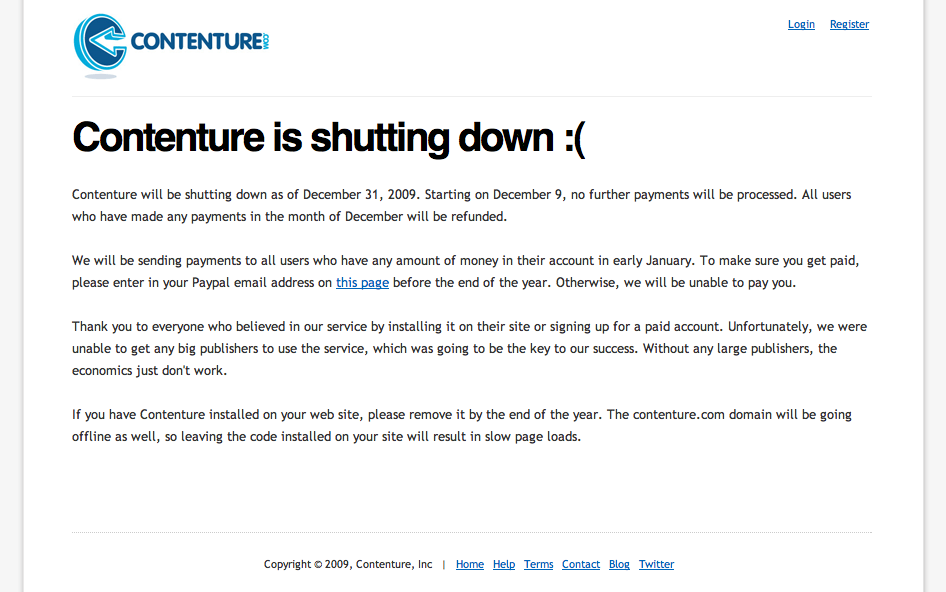
According to their website and blog, Contenture is going out of business. That’s unfortunate. I signed up with them back in June of 2008, endorsed their services here on my site, and while I didn’t make a lot of money with them, I knew the idea of micropayments for web content was something that would eventually catch on, if only given enough time to take root. It’s sad to see them go, and I’m sorry they couldn’t hang on until they saw some profits.

I only know of one other company that offers similar monetization services, and it’s called CancelAds. Here’s hoping they stay in business, and the idea of micropayments/subscriptions for web content continues to gain momentum.

Standard
How To

How to display recent photos from your SmugMug feeds

I was asked by a reader (Andrew M.) how I display the most recent photos from my SmugMug galleries on my home page. He was aware that I use the SimplePie plugin for WordPress, but wasn’t sure how to get the same look when starting from scratch.

Before you read any further, keep in mind this is a very specific tutorial about WordPress, SimplePie and SmugMug. It has other applications, like for other image feeds and with some code tweaking, for other blogging platforms, but if you want to do those things, then Google is your friend.

recent-photos-screenshot

The thing that makes things a little complicated in my situation (as opposed to other image feeds) is the somewhat non-standard structure of the SmugMug feeds. For one thing, they don’t provide a URL for the image thumbnail where you’d expect it to be, and for another, they provide the image description instead of the image title. (To check this, mouse over a SmugMug thumbnail, and you’ll see the description pop up over the image.) But as long as you’re willing to dig into the feed code and find the names for the fields you need, then you can plug that info into SimplePie and go from there. Thankfully, I’ll do it for for you below. Lucky you.

Just a quick general disclaimer before I start though: I don’t do handholding. I’ll provide the instructions for how I did it. But in the unlikely event that things still don’t make sense to you, do me a big favor and read the SimplePie Manual, before you ask me questions. I did it and it helped me work things out. It should do the same for you if you use a little elbow grease. Thanks.

Okay, onto step 1: find the SmugMug feed URI. SmugMug provides several feeds for each user account. Go to the bottom of your gallery page and click on the Available Feeds link to see all of them. We’re going to use the Recent Photos Atom feed. In my case, it is:

http://www.raoulpopphotography.com/hack/feed.mg?Type=nicknameRecentPhotos&Data=raoulpop&format=atom10

smugmug-available-feeds

Step 2 is creating an Images Only template for SimplePie. If you’re not sure what this is, you need to read through the SimplePie documentation. The location where you need to place the new template is:

[WP Install]/wp-content/plugins/simplepie-plugin-for-wordpress/templates/

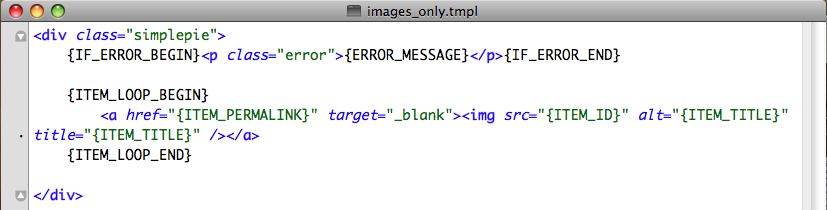
This is not arcane info, btw. It’s provided in right on the SimplePie general settings page, which is what I’ll talk about in Step 3 below. Now let’s talk about what you’ll put in the template file. This is where the digging through the feed code part comes in. I kept things simple, and this is what my images_only.tmpl file looks like.
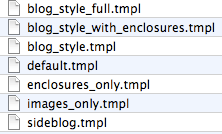
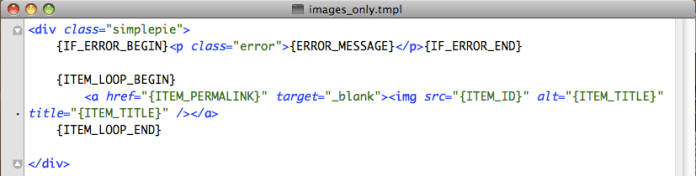
simple-pie-template-files

images-template-code

As you can see, the code is minimal, which is the way I like things. I am specifying a simplepie class in the code, but as you can see from my CSS file, I’m not styling the div in any way. I’m letting the rest of the CSS code and the other divs handle the way the images flow within this particular section.

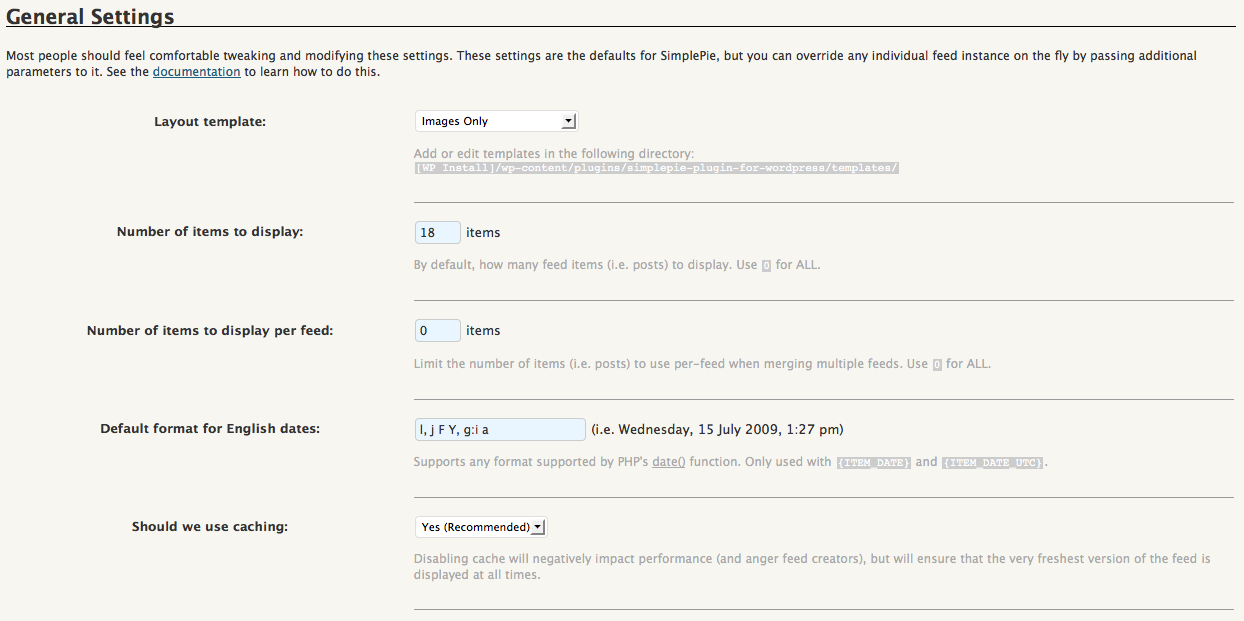
Step 3 is adjusting the general settings for SimplePie. Now that we’ve created an Images Only template, we need to let SimplePie know that it should use it. Go to the WP Admin Panel and locate the SimplePie settings. Match my settings as you see them below.
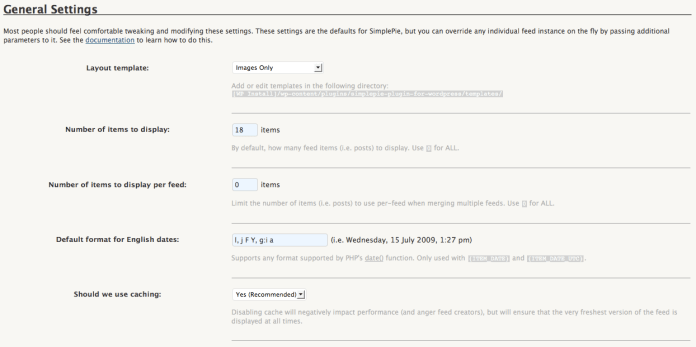
simple-pie-rss-general-settings

I’m telling it to pull the latest 18 photos. You may find you need to pull less or more. It’s really up to you. Use the caching option, it’s faster, but know that you’ll need to create a cache directory where SimplePie can store the images. It’ll walk you through it when you say Yes, and you may need to adjust privileges on the server side. Check out this chmod tutorial from WordPress if you’re not sure how to do that.

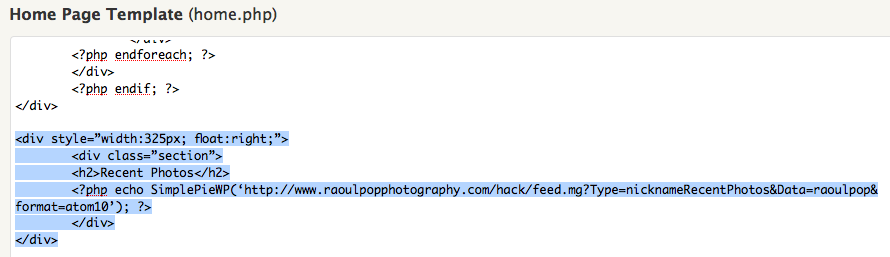
Step 4 is placing a code snippet on the home page. Now that you’ve gone through all that fun, you’ve got to wrap things up. Go to your home page template in WordPress, and where you want the images to appear, place the following code snippet — it’s what triggers SimplePie to pull your SmugMug photos feed and display the feed items how you want them, in accordance with the code in your Images Only template.
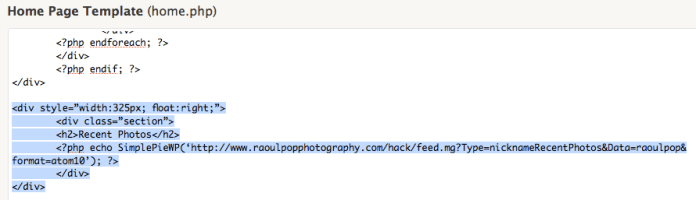
home-page-simple-pie-codeSee the highlighted text, but you only need to worry about the php code line. The rest is my own code that specifies the div and section styles. Use your judgment about how to style the thumbnails, and how you want them to display. It may take a bit of trial and error until you get it right, but if you persist, it’ll look good in the end.

Hope this helps!

Standard
Reviews

Using Contenture to handle micropayments

Back in April, I wrote about micropayments, and why I thought they were an equitable way to reward web publishers for their time and effort. I shared my thoughts on ad revenues, which, for most people, are minimal and not enough to live on, unless you are one of the relatively few websites that gets massive amounts of traffic.

In that same article, I also talked about how I thought micropayments should work, via a standard, instant way to charge readers a few cents per article, through protocols that were integrated into each browser. Instead of charging fees for each transaction, which would be impractical for such small amounts, micropayment processing centers would charge for bundles of transactions which exceed a set limit.

Fast forward a few months, and ZDNet publishes an interview with Barry Diller, one of the early Internet millionaires, where he talks about the very same thing: the need to go beyond falling ad revenues by charging small amounts for useful information. That article was hotly debated on FriendFeed, which is where I found out about it. Among the comments, I found one pointing me to Contenture, a newly launched micropayment system (it saw the light of day on 5/26).

contenture

Contenture’s method of handling micropayments is different from what I envisioned, in that it involves a monthly subscription. Here’s how they say it works:

“… a fully automated system that requires no user interaction. Users simply pay a set fee to Contenture on a monthly basis, and that money is automatically distributed to the sites they visit. How much each site gets from each user is determined by how often that user visits that web site, relative to all of the other Contenture sites they visit. Users get their seamless experience, and the site actually makes money. Everybody wins.”

So what’s involved on my end? I installed Contenture’s WordPress plugin and pasted in an extra line of code to customize the ad hiding behavior. Others might need to paste a Javascript snippet in their footer, which is basically what the plugin does for you.

On your end (the reader), the code will check to see if you’re a Contenture user, and will automatically distribute your subscription fee to the websites that you visit, based on how often you visit each site. As an immediate benefit, all ads on my site are hidden from you. They’ll load as the page loads, but they blink out of view and the ad space collapses unto itself as soon as the page finishes loading. It’s pretty cool.

Other benefits I might be able to offer you in the future are the ability to view exclusive content, or perhaps to even close off the archives to those who aren’t Contenture users, although I’m not too keen on that, since Google won’t be able to index me properly any more if I do it. At any rate, the ability to offer more benefits is built in, and that’s nice.

Contenture’s model is opt-in (also called freemium) and so it has some limitations, in that I don’t get paid for everyone that accesses my content. My micropayment model, the one I envisioned and the one Barry Diller and others are talking about, is standardized across platforms and browsers and works for everyone, all the time. Eventually, I think we’ll get there, but Contenture has made a good start of it, and they did it now, which is why I signed up with them.

To let site visitors know they can support my site, I placed a small link in the header, as you can see below. I also have a link in the footer, also shown below.

header-screenshot

footer-screenshot

I look forward to seeing Contenture’s user base grow, so I can tell whether I’ve made the right choice. I want to keep writing and publishing online for a long time to come, but the only feasible way for me to do that is if I get rewarded properly for my efforts. I believe micropayments are the way to do it. It’s affordable for the readers, and it scales up nicely for me, the web publisher. Time will tell exactly which micropayment method will work best, and you can be sure I’ll continue to monitor the options available out there.

Standard