How To

On keeping one’s computer tidy…

I recently had to take my iMac apart in order to look at the hardware closely, and after 5 years of intense use in my home office, I got a chance to re-convince myself of the importance of keeping one’s computer tidy inside, not just outside.

Apple doesn’t make it easy for us to service our computers, do they? Gone are the days of the big Power PC or Mac Pro enclosures that could be easily opened for a bit of vacuuming and dusting or the upgrade/replacement of a piece of hardware. Or how about those unique and colorful 1st gen iMac enclosures that were transparent, so you could see at a glance if they needed a bit of inside cleaning? The enclosure of my iMac G5, though impressively thin for its time, with components tightly packed inside, was still fairly easy to open. Even the predecessor of my current iMac, a 2011 model, was easy enough to open, because the display was affixed to the enclosure with magnets. These days, the enclosures of our Macs are sealed with adhesives that make it difficult to get inside…

The IT part of me gets it somewhat: if they’re too easy to open, most people will only get inside and mess something up. Plus, an accidental spill of liquid on the screen, or an overly judicious application of cleaning solution, might get inside and affect the circuits.

It’s easy and natural to assume that if a computer is sealed shut, it’s clean inside, but the truth of the matter is that computers need to be cleaned and serviced regularly. As long as a computer has active cooling (a fan that pulls air in), dust will get inside and settle everywhere. Even passive cooling involves some sort of air current that moves through the machine and dust will follow that current and accumulate inside over time.

Here’s what the inside of my iMac looked like when I opened it up for the first time.

It may not look too dirty at first glance, but let’s have a closer look, shall we?

I took every single piece apart, and every piece was full of thick dust like this, dust that would have clogged up the air vents completely and caused an overheat or even a shortcircuit. It was very fine dust that kept getting into my nose and making me sneeze. I couldn’t believe how much of it had gathered inside. This iMac’s always been on my desk, in my office, a room which I vacuumed regularly, but as you can see, five years of moderate to intensive use for 8 or more hours per day, will definitely show up on the inside, even though the outside is shiny and clean. This is why I believe every Mac owner ought to either learn how to clean their computer or take it into a repair shop every few years to have it properly and thoroughly cleaned. We have plenty of resources these days. I used the thorough guide for taking apart my iMac posted on iFixit.com, a resource I definitely recommend.

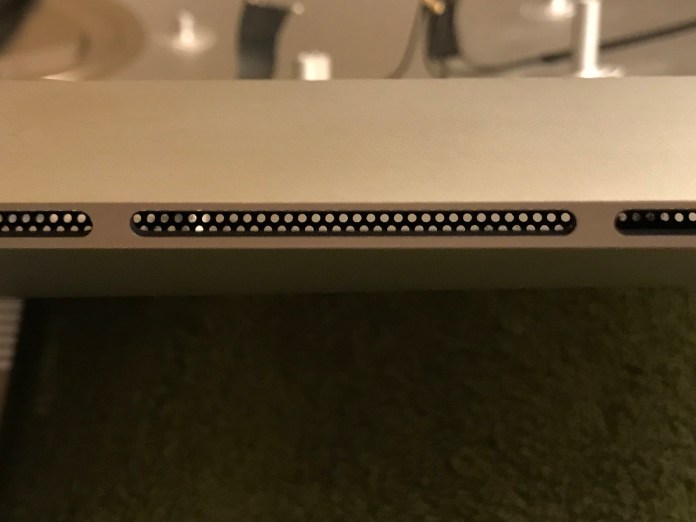
If and when you take your iMac apart, you should definitely check the air intake vents (located on the bottom bezel of the enclosure) and the air output vents (located behind the flex mount of the iMac’s foot, above the RAM bay). That’s where dust will accumulate the most.

Here’s how my computer looked after being properly cleaned.

Please be careful as you handle the various parts, will you? One wrong move with the screwdriver and you could damage a circuit or worse, if you’re handling the power supply, you could cause a short that could give you a real shock and damage it for good. Unless you work in IT and have handled computer innards before, your best bet is to find a reputable repair shop, hopefully an Apple-authorized one, and have them clean it thoroughly. Just so you don’t have any issues with your Apple warranty and perhaps void it by mistake, do this operation after the warranty runs out (that’s 3 years for Apple Care).

Hope this helps!

Standard
A Guide To A Good Life, How To

How to choose a camera that’s right for you

In this video, I’m going to walk you through a process that will help you choose the right camera for your needs; it’s the same process I use myself as I choose new photo and video gear. Here are the decision-making steps I talk about in the video:

  1. Love what you already have
  2. Learn to use your equipment properly
  3. Don’t stress out about resolution (megapixels)
  4. Don’t get on a tech merry-go-round
  5. You don’t need UHD (4k video) just yet
  6. Be wary of “filler resolution”
  7. Separate the “nice to have” from the “must have”
  8. Get separate photo and video gear in order to obtain the best quality images and video

I hope this helps you!

Released 17-02-2018

It may seem like what I say in this video about camera resolution and about separating the equipment you purchase for photograph and video is contradicting what I say in this post, or in this post, but it isn’t that. I’ve done a lot of research and I’ve given this topic a lot of thought, and I’ve simply become more nuanced in my understanding of many aspects of digital cameras; when I sat down and thought about what kind of advice I wanted to give in this video, the statements I made above rang truest.

Thanks for watching!

Standard
A Guide To A Good Life, How To

Dealing with anger

I’d like to help those of you who like me, are dealing with anger issues, and I also want to add a few original pieces of advice to the growing body of self-help articles and techniques for anger management. That is why I made this video.

What follows is a close transcript of what I said in the video.

First, you’ll want to ask what anger is, because the definition varies based on the kind of anger you feel.

There’s normal anger. It’s normal for everyone to get angry every once in a while. That kind of anger can even be used for good, such as to spur you on to make changes for the better in your life.

There’s also the bad kind of anger, the kind that takes over you, makes you ready to explode and hurt someone. It’s the kind where you lose control and do things you regret afterwards. It’s the kind of anger that scares others and even yourself, because you don’t know what you’ll do once it takes over. This is the bad anger. You have to take care of this anger, you have to fix yourself so you don’t get this angry anymore, before you do something that you might regret for the rest of your life.

The first step when you find yourself angry is to get on top of the anger. Realize you’re still in control. That’s why we have these large brains with a very well developed cortex. We have the power to get on top of our base instincts. It takes a lot of effort but it can be done. If you feel you can’t do it, do the next best thing: get away from the situation. Walk away, get as far away as you need in order to stop feeling the tension of that situation and begin to calm yourself down.

Once you’re calm, you may choose to have a discussion about what caused the anger. Obviously, this only works in situations where the other person or persons are available and amenable to such things. Stay objective, DO NOT BLAME the other but express what triggered your anger and what you and the other person can do to avoid that sort of trigger in the future.

You can also choose to work out your anger through physical exercise. I’ve done this myself but let me tell you, it only works when you’re not that angry. When you’re so angry you’re bordering on mad, you can work out all you want, the anger will still be there and you may also risk physical injury to yourself, because you’ll be tempted to push your body beyond its limits in order to spend that anger inside you.

Anger is disruptive at best and can be lethal at worst — lethal to you or to others. You can easily have a heart attack or a stroke when you’re angry and the effects of those incidents can be temporary or permanent. You can also easily injure or kill others when you’re in a fit of anger, because you’re not in control of yourself, you’re pumped up on fight or flight hormones and capable of greater physical strength than normal.

So it behooves you to control your anger, to find out what triggers it and to work on yourself in order to find out the underlying causes for your anger. It may be that you’re just naturally irritable, it may be that your upbringing caused you to be angry, because you were abused or mistreated or your family dealt just as terribly with anger, giving you a bad example that you’re now mirroring.

Look for a good CBT (Cognitive Behavioral Therapy) practitioner. CBT has been proven, time and time again, to work much better than medication. Something that helped me is Ferasa. It’s an ancient Arabic face reading practice. The Ferasa practitioner is trained to look at the subtle movements of the muscles in your face and to sense what you are feeling, then he will ask you questions that will cause you to eventually find your problems and face them. The thing is, you can’t hide what you’re feeling or thinking from a knowledgeable Ferasa practitioner. He will continue to ask you probing questions until you are forced to deal with your problems.

The point is not to ball up in a fetal position and cry about how much of a victim you are. That’s not productive and it won’t solve your anger. The point is to find out what’s causing your anger and acknowledge that cause to yourself, fully. You want to own that cause and you want to say to yourself, over and over, until it sticks, that what happened is in the past, that you accept it, that you forgive yourself and the others involved, and that you’re moving on. That you’re an adult now, that you have a good life, that you are a good person and that you are choosing to behave rationally and considerately, each and every day.

It will also help to have a regular physical exercise schedule, at least 2-3 times per week, and it will also help you to meditate at least 5 minutes in the morning. It’s much better to do it in the morning, because you’ll be starting your day by calming yourself down. And you may also find that you’ll want to do a 5 minute meditation at night, to close out the day, where you acknowledge the good and the bad situations that happened that day and you promise yourself to do better the next time.

Standard

We recently purchased an ornate Baroque wall clock which was working perfectly fine at the store. When we got it home and put it on the wall, we discovered that the crystalline chime it makes each half-hour had disappeared. I assumed that it was a minor issue, so I opened it up carefully, after which I discovered that the hammer which struck the bell inside the mechanism had gotten stuck during the transport. After I got it unstuck, the clock started chiming again. Not an earth-shattering discovery but we were happy. Here’s a look at the process:

After working with this setup for over a year, I wanted to share it with you, having gained full knowledge of its advantages and disadvantages. It is what works for me at this time, in my particular situation, but it may help you as well, if like me, you make your own videos and don’t have a team working behind the scenes.

This 3-4 camera setup is what I use to film my wife’s shows: Ligia’s Kitchen and De Vorbă cu Ligia. For my own videos I use a more basic 1-2 camera setup, since I have to be both in front and behind the camera.

Let me state the advantage and disadvantages first and then I’ll give you the exact list of equipment.

The advantages:

  • The big iPad displays allow for proper framing, focusing and exposure control. I always disliked those tiny screens on DSLRs and video cameras.
  • The iPads have big batteries (except for the iPod Touch) that allow for hours of filming.
  • The featherweight iPod Touch can be mounted  in all sorts of unusual spots (including overhead).
  • Live viewing and control of the video feeds (things such as focus, exposure, white balance), including instantaneous switching between the feeds, from a master iPad. One person can manage all of the cameras at once. This setup allows up to four angles at a time.
  • Lightweight, small and highly portable setup.
  • With the aid of dedicated apps, you can get very good control of the video quality and look, right in the camera, without having to resort to a lot of post-editing.

The disadvantages:

  • Video quality isn’t on par with what you can obtain from a good DSLR with a good lens or better yet, from a dedicated, professional video camera. The dynamic range isn’t there, the noise levels are fairly high, the focus isn’t crisp enough. What you’ll need to do to compensate is to make sure your lighting is as good as you can get it.
  • The battery life of the iPod Touch is terrible. Have an external power source (plug or power bank) readily available if you need to record more than 30-45 minutes of video.
  • Also, the iPod Touch has a much slower processor than the iPad, so don’t attempt to use it as a master controller or for video editing. Use it only as a slave camera and be prepared to wait for good, long times when it updates itself with new Apple software and apps.
  • The on-camera (iPad Air and iPod Touch) microphones don’t offer good sound. The iPad’s microphone is passable from a close distance when nothing else is available, but that of the iPod Touch sounds tinny, no matter the situation. Use shotgun, dedicated or lavalier microphones for better sound.
  • You’ll need good WiFi signal in the room where you’re recording video, if you’re going to want to manage the video feeds from each iPad camera on a master iPad.

The equipment list:

  • 4 iPad Air units: mine are 128 GB first-generation models, I got a great deal on them at B&H Photo about 1 ½ years ago, I think they were old stock and they were making room for the 2nd generation iPads. I went for the largest capacity available because I wanted to be able to record lots of video without needing to stop and download. It just so happened that they also had 4G LTE, which was a nice plus. It was the right decision.
  • 1 iPod Touch unit: I got this because it was small and I wanted to use it for overhead angles, where a heavy camera might fall on my head. I didn’t want to use my iPhone, just in case it ever fell from its rigging. (An iPod is cheaper to replace than an iPhone.) It was the right decision. The short battery life and slow performance were unexpected and disappointing, but it does its job when needed.
  • 5 iOgrapher cases for the iPads and iPod Touch: check out their website, they keep working on their cases and have developed new ones to fit the new gadgets from Apple. I love their cases because they work both handheld (they have two big handles on each side) or mounted on a tripod. And they have mounts for external microphones and lights, right on top where they’re needed.
  • 5-6 iOgrapher lenses: I use a mix of Telephoto and Wide Angle lenses made for the iOgrapher cases, they use a 37 mm mount. They’re not pro-level lenses and they have a bit of distortion and chromatic aberration around the edges, but they’ll do the job.
  • 2 Rode smartLav+ lavalier microphones. This is where our iPhones are useful. We put them on Airplane mode, plug these mics into them, start up the Voice Memos app and slide them in our pockets. We get to record great audio with little fuss.
  • The following iPad/iPod Touch/iPhone apps: the built-in Camera app that comes with iOS, RecoLive MultiCam and Filmic Pro.
  • 1 or more video lights. There are a ton of options here. We use this one. Its advantage is that it comes with interchangeable color filters that shift the temperature of the light.
  • 2 or more softboxes mounted on C-stands for each set.
  • 1 hair light such as this one. I mounted it on a C-stand that I extended to its maximum height and lateral length. You may need to use some sandbags to stabilize the stand.
  • We also use the room’s own lighting for effect and illumination. I tend to use cold temperatures for the studio lights (white CFLs and LEDs) and warm temperatures for the room lights. I know people say you shouldn’t mix light colors when you’re shooting video or photos, but I like it. When they’re mixed the right way, they give me a “live” white balance, an in-studio “look” for my video, which is better than doing it in post.

If you have any questions or if I’ve forgotten to mention anything, let me know in the comments. I hope this helps you!