Exercise, Reviews

The RPM System: first impressions

I had my first workout on the RPM (Results Power Movement) System last night, and I recorded my thoughts in a video clip which you can see below, or on YouTube.

As it turns out, I like the workouts. Of course, I’ve only had one workout so far, but for me, it’s an interesting change to work out without weights. As I mentioned in my previous post, I’ve always worked out with weights. I’ve never really dedicated any significant time, on a regular basis, to working out with just my body weight, doing anything else but crunches, pull-ups and push-ups. So my first workout was a revelation of sorts. I discovered I could get sore and work out all sorts of muscle groups using only my body weight, an exercise ball and an exercise band…

with one caveat: you need a couple more things, without which you can’t do the workouts properly.

You also need a door wedge — something to allow you to anchor the exercise band so you can do band presses and band rows. I didn’t get it, so I had to improvise. Make sure you find one at a sports store, and buy it along with the exercise band. Maybe you’ll get lucky and find it as a set with the exercise band.

Make sure you read through the Equipment PDF, which mentions the door wedge (the general website doesn’t), and also make sure you get an exercise ball that’s the right size for your height. Check the PDF, which has a table listing the various ball sizes for height ranges.

You also need a metronome. If you don’t have one around the house, see if you can pick up an inexpensive one from a music or sports store, or if you have an iPhone or iPod touch, get a metronome app from the App Store. I opted for the second choice, and got an app called Metron, a highly rated metronome app, which costs $1.99. I like it, and it’s got a ton more options than I need for the workouts. The important thing for your metronome is that it needs to be able to go down below 50 BPM, and, just in case you need it, go up to 200 BPM.

The metronome is important, because almost every one of your exercises on the RPM System will have a beat which will dictate how fast or how slow you need to do it. The beat may increase or decrease, depending on the exercise, making it harder to do as you advance. Without a metronome, you won’t be able to keep the proper beat, and you won’t reap the full benefits of your workout regimen.

Another thing I recommend you do before your first workout is to read through the Strength Program Description PDF, which explains how the circuit training works the RPM workouts. It’s really important you do that, or you’ll be looking at your workout schedules like a hen looks at a newspaper, which is how I looked at it the first time…

That’s pretty much it so far. I look forward to the next workout!

If you’d like to try out the RPM System, use this code (553677456) which will get you a free week’s trial.
Standard
Reviews

Hardware preview: ioSafe SSD – fireproof, waterproof, crushproof and shockproof

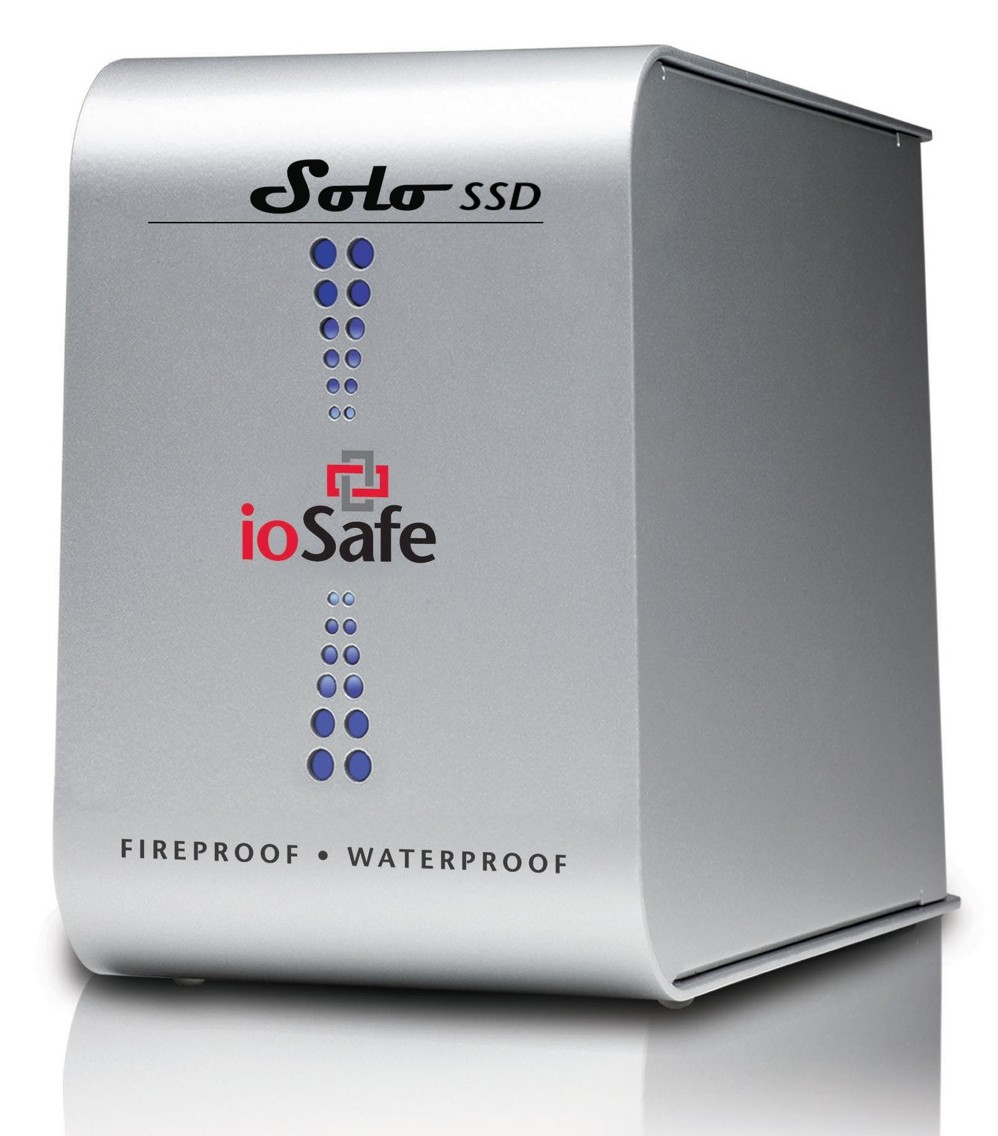
Back in September 2009, I wrote about the ioSafe Solo, a fireproof and waterproof drive. In January 2010, at CES in Las Vegas, ioSafe, the company behind these disaster-proof drives, launched a new product, the ioSafe Solo SSD.

It’s the same size as the ioSafe Solo, it looks the same outside, except for the branding, which now adds “SSD”, but inside, it’s a whole new ballgame. Instead of using a regular 3.5″ SATA drive, they’re using a 2.5″ Solid State Drive. This means they have even more spare space to play with when it comes to disaster-proofing the device — which they certainly did!

The ioSafe SSD isn’t only fireproof (same serious specs as ioSafe Solo), and waterproof (better specs than ioSafe Solo, now with full immersion up to 30 ft for 30 days with no data loss), but it’s also crushproof (5000 lbs, any axis with no data loss) and shockproof (20 ft drop into rubble, 1000g shock for 1ms with no data loss).

Here’s a video from CES where Rob Moore, the company’s CEO, burns the drive, then floods it with a firehose, then has it dropped from about 20 feet, then has it run over with a bulldozer. In the end, even though the enclosure gets destroyed, the data stored onto it remains perfectly safe.

Quoting from the press release:

“Combining ioSafe’s new proprietary ArmorPlate, a military grade steel outer casing with SSD technology, the new ioSafe Solo SSD adds unprecedented shock, drop and crush protection to the existing fire and water protection.

The ioSafe Solo SSD combined with ArmorPlate helps to protect data in a two story building collapse, 5000 lb. crush forces, 20’ drop into rubble and up to a 1000g shock. In addition the original HydroSafe™, FloSafe™ and DataCast™ work to keep the drive cool during normal operation and protect the data from fires up to 1550°F for 1/2 hour and complete water submersion of 30’ for 30 days in fresh or salt water. Like all ioSafe products, the ioSafe Solo SSD comes with ioSafe’s Data Recovery Service, a “no questions asked” policy to help customers recover from any data disaster including accidental deletion, virus or physical disaster.”

The specs say the ArmorPlate military-grade steel is 1/4″ thick. That’s mighty thick. It also makes the ioSafe SSD about 5 lbs heavier than the ioSafe Solo. It now weighs in at 20 lbs.

I wonder if the whole device could withstand bullets, because then it would make a perfect military storage device for use in conflict zones. For example, it could be placed in tanks, humvees and helicopters to store video, audio and coordinate information during patrols. And at 256GB for the largest size drive, it could store plenty of HD video, if the military should want to go in that direction.

But let’s not go into hypothetical situations. The ioSafe SSD can work for disaster recovery right now. Should your place of business burn down or fall down or be flooded, any data stored on the ioSafe SSD will be available to you immediately, as soon as you dig it out of the rubble. That’s a tangible advantage. You can simply add this drive to your server room, or put it in the CEO’s or CFO’s office, and let him or her back up important documents to it, knowing they’ll be there in case of a disaster.

The thought just occurred to me — do you know how they could make it better? If it’s meant to survive disasters and be buried in rubble, it needs a geo chip of some sort, so you can locate it with a proximity device. It could be something simple that beeps faster the closer you are to the drive, so you don’t have to dig through all the rubble to find it, should it come to that.

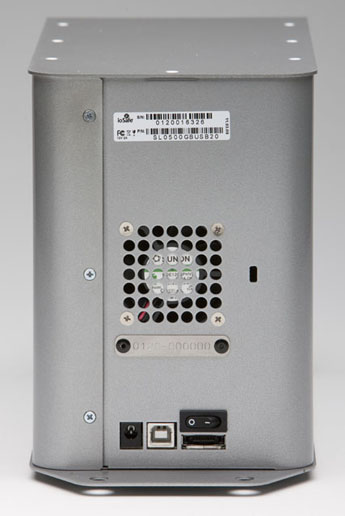
And there’s another goodie packed into the drive: an eSATA interface. This, coupled with an SSD, means you’ll get blazing fast write and read speeds. You can see the eSATA connector on the back, next to the USB and power connectors.

Pricing for the three different Solo SSD models starts at $499 for 64GB, $749 for 128GB, and $1250 for 256GB. It’s a bit steep, but then, SSDs are still expensive, and no other drive on the market (that I know of) offers this level of physical protection for your data.

Images used courtesy of ioSafe. You can see photos, videos, specs and more information about the Solo SSD on their website.

Standard
Reviews

Reduce your waste with a toothbrush? Yes.

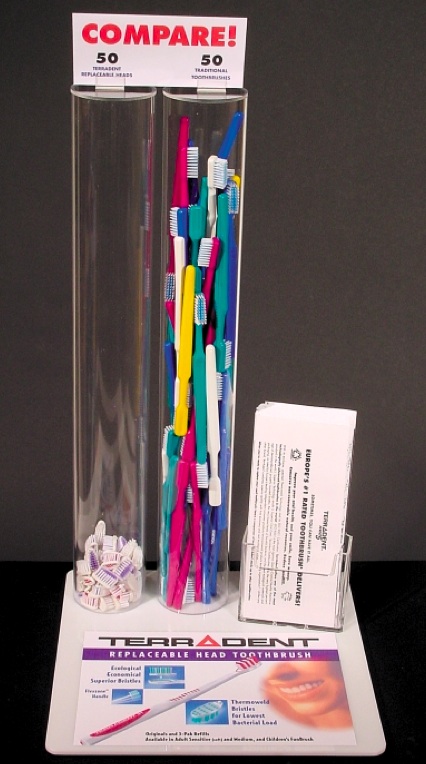
The Terradent toothbrush stands out from the pack of dental hygiene products out there not because of the complicated design of its head and the multitude of angled bristles, but due to the simplicity and thinking behind its design.

In two words, it has replaceable heads. When you need to change the brush, you don’t change the whole thing. You snap in a new head, and you keep the same handle. It’s beautifully simple and yes, it’s hygienic.

After you remove the old head, if you feel it’s needed, you can scrub the handle’s tip with a little soap and a brush, or you can pour some little hydrogen peroxide on it, to make sure it’s squeaky clean before you attach the new head, but don’t get hung up on it. As long as you replace the heads regularly, the toothbrush will be safe to use for years and years.

My wife and I have been using Terradent toothbrushes for about 4 years, and we love them. We only buy replacement heads, which is cheaper than getting the whole toothbrush and means we’re generating less waste. All that fancy rubber and injection-molded handles in today’s toothbrushes means you’re throwing away a whole bunch of plastic, every time you get rid of one. That’s a shame, particularly when the Terradent toothbrush proves it’s so easy to do the smarter thing.

I put together a short video demo of the head replacement on one of our toothbrushes, to show you how easy and simple it is. You can watch it on YouTube or above. I hope you’re going to think about buying one of them the next time you go shopping for your bathroom. They’re available at Whole Foods, Trader Joe’s, or directly from the company’s website.

Image used courtesy of Eco-Dent.

Standard
Reviews

Field video test with the Olympus PEN E-P2

Here’s a HD (720p) field video test I recently did with the PEN E-P2, the diminutive DSLR from Olympus. I shot it in South Florida, and it features tropical plants and flowers. No additional equipment beside the camera and the 14-42mm kit lens was used. The sound you hear is from the in-camera microphone. The DSLR was hand-held, and I had motion-stabilization turned off.

When I edited the video, I tweaked the colors just a little bit, but the images are pretty much right out of the camera. No software motion stabilization was used, either. You’ll see that the kit lens is quite capable of macro shots and it gives beautiful bokeh under the right conditions. There’s even a surprise shot at the end. Try to guess what it is.

You can watch the video on YouTube. And if you haven’t yet read my full review of the E-P2, you might want to check it out.

Standard
Reviews

Hardware review: the duraSync cable for iPad, iPod and iPhone

I’ve been using the duraSync charge and sync cable for the past few months, and I love it. It’s a durable, solidly-made, premium cable that replaces the stock sync cable which ships with your iPad, iPod or iPhone, and it’s made by CableJive, the same company that makes the SoundDock and iStubz cables.

The cable is really sturdy, and it’s made to last. It comes with a Lifetime Warranty, so if anything should ever go wrong with it, you can send it back to CableJive for a replacement.

It has a stiff rubber outer shell and an impact-resistant plastic core. The dock connectors will withstand crushing, banging, dropping and being stepped on, even driven over with a car. The cable itself is made of durable wire, with heavy-duty shielding and a clear coating. It will withstand pulling, jerking and being run over.

Continue reading

Standard