Thoughts

SmugMug, are you listening?

I’m disappointed with SmugMug over their continued lack of support for proper export and maintenance of photographs directly from Lightroom. Back in July, I wrote about the Flickr Publish Service in Lightroom, and wondered when SmugMug would introduce their own.

What I was really looking for (and I said this in the post) was a way for the publish service to identify what I’ve already uploaded and allow me to re-publish those photos where I’ve made changes to the metadata or to the processing. The official Flickr Publish Service didn’t offer that option.

A few of my readers (Gary, Chris, Russell, thanks!) pointed me to Jeffrey Friedl’s excellent plugins for Lightroom, and I’ve been using them ever since. As a matter of fact, I’ve switched over to them completely. I use them for all four web services where I currently publish photos (SmugMug, Flickr, Facebook and PicasaWeb). I don’t know what I’d do without them. Wait, I do know — I know for sure I’d be doing a LOT more work and spending a LOT more time uploading and maintaining my online collections.

With Jeffrey’s LR plugins, I was able to identify about 90% of the photos already uploaded to SmugMug, and about 75% of the photos already uploaded to Flickr. In the case of Flickr, I then did manual updates and re-identifies so I could get it to know 95% of the photos already uploaded. This means Lightroom now allows me to quickly identify, update and replace almost any photos I’ve got at SmugMug, Flickr, Facebook and PicasaWeb. This is huge.

There is a catch, though, and it’s a BIG one. I keep running into the same “Wrong Format ()” error with SmugMug, which means I still haven’t been able to straighten out the photos I’ve uploaded to them. Here are a couple of screenshots of the error messages I get. It starts with a “TimedOut” error, then I get the “Wrong Format ()” error, then the upload process aborts.
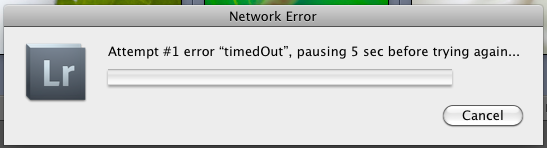
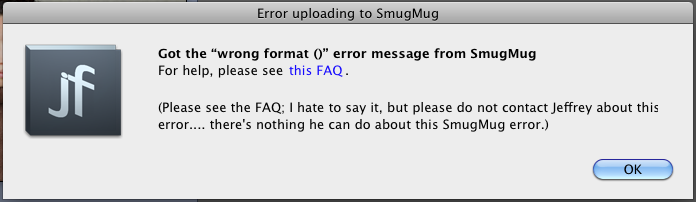
I get these errors almost every time I try to re-publish an updated photo, but I don’t get them as often when I try to upload new photos. To give you an idea of how bad things are, I’ve currently got 109 photos to update in one of my galleries at SmugMug, and last night, I had about 167 photos. I’ve had to restart the re-publish process about 30-40 times since last night. You do the math, but I think it works out to 1-2 photos per error. This sucks. I should be able to just click the Publish button and walk away, knowing all of my changes will propagate correctly.

I’ve contacted Jeffrey, and I’ve contacted SmugMug. I’ve had extensive email conversations with each. SmugMug alternates in their replies. They’ve said the following to me:

  • It’s a fault with the plugin
  • It’s something on their end but they’re working on it
  • There’s nothing they can do about it
  • I should use something else to upload photos
  • They blamed my setup, which we ruled out after some internet connectivity tests

Jeffrey says there’s nothing he can do about it, and I believe him more than I believe SmugMug. Want to know why? Because his other plugins work just fine. I’m able to re-publish updated photos to Flickr and Facebook and PicasaWeb without any problems. Only SmugMug somehow can’t handle my uploads.

I’ve tried reloading the plugin, installing it anew, removing and re-adding the publish service, upgrading the plugin, but nothing. I still get the same errors.

My question for the smug folks at SmugMug is this: how is it possible that Facebook and Flickr and PicasaWeb have worked out the re-publish issues, but you haven’t? What’s taking you so long? Why can’t you work out the same problem on your end?

I was hoping that with the release of Lightroom 3.2, and the release of the official SmugMug Publish Service for LR (hat tip to David Parry for the advance notice), that SmugMug would work out the kinks in their API, but it looks like they still haven’t done it. I tried their plugin, but of course they took the easy route, like Flickr, and haven’t introduced any functionality that would identify photos already uploaded to their service. Only Jeffrey Friedl’s plugins offer this feature.

This leaves me terribly disappointed. As a SmugMug Pro, I don’t want to bother with error messages. I don’t want to bother with posts like this. I’d rather post photographs and update my SmugMug galleries in peace, but I can’t.

If you’re having the same problems with SmugMug, please, write to them, and ask them when they’re going to get their act together. This problem’s existed for several months. How much more time will it take until they deal with it?


Standard
Thoughts


The empty page waits to be filled

Aside
Thoughts

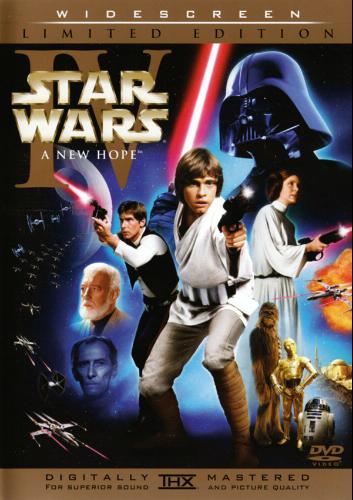
Star Wars and Kings Row theme songs are quite alike

When we watched Kings Row (1942) recently, I couldn’t help noticing a marked similarity between its theme song, written by Erich Korngold, and the main Star Wars (1977) theme song, written by John Williams.

I doubted I was the only one to hear it, and sure enough, a quick internet search revealed many others talking about the same thing. See Wikipedia, or this YouTube video comparing the two theme songs.

Sixty-eight years after the release of Kings Row, and 33 years after the release of Star Wars, this isn’t as big a deal as it probably was back then. In my opinion, Williams’ remaking of the Korngold theme is much better suited to its movie than Korngold’s was for its intended vehicle — and it is a re-making, not a plagiarized copy. Korngold’s theme sounds much too dramatic for a coming-of-age movie set in a turn of the century provincial American town, but it’s perfect for a futuristic sci-fi movie that was (and is) one of the biggest box office successes of all time.

Still, it’s an uncanny resemblance, isn’t it?

Images used courtesy of Amazon.

Standard
Thoughts

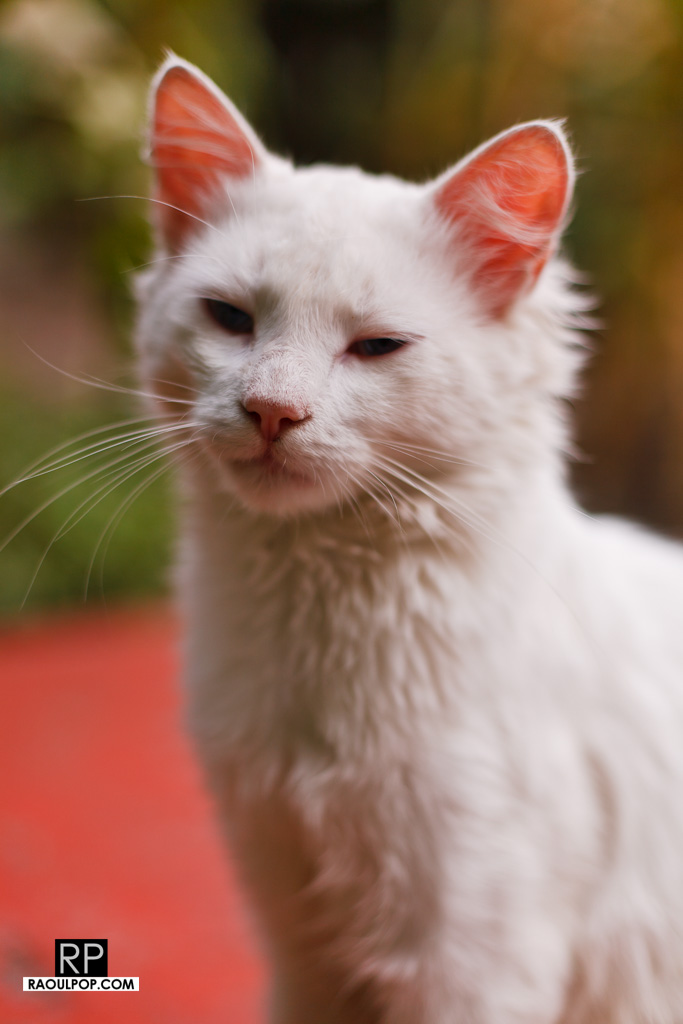
Found better photos of Felix

Remember Felix (I), the little deaf tomcat I wrote about earlier this year? In the course of winnowing my photo library, I found better photos of him, taken a few months before his untimely demise. This is how I want to think of him.

Standard
Thoughts

YouTube’s copyright claim process still needs some work

A while back, I edited and uploaded what I thought was a fairly innocuous video to YouTube, called A walk on Dania Beach. You can see it below. It shows a few clips of the beach that I took during two walks with my wife. It’s nothing special, really. The quality of the video isn’t even that good, because the camera I used at the time compressed the video too much.

Because there was a lot of wind noise from the in-camera microphone, I muted the sound on some portions of the video, and used the stock surf sound that ships with iMovie (as part of iLife).

You may or may not know (depending on whether you use a Mac) that the sounds that ship with iLife are free to use as you like in your videos, podcasts, presentations, etc. You paid for them when you purchased the software. While their creators retain copyright, in essence, by purchasing iLife, you have gained a license to use them as you see fit in your work.

And so I do use them, all the time. Many of the videos I uploaded to my YouTube channel contain either a sound or a clip from the iLife library, in order to enhance the video’s presentation. So far, so good.

Imagine my surprise when YouTube promptly informed me that this particular video contained copyrighted audio, and that I was welcome to file a copyright claim if I wanted to dispute their findings. They identified two entertainment companies, Go Digital and WMG, as the potential copyright holders. I did file a dispute, where I stated that I didn’t use their content. It took a few weeks, but their replies were finally posted.

GoDigital confirmed its claim to the sound recording, and WMG agreed with my dispute. It’s interesting to see that WMG, the far larger company, agreed with me, while GoDigital, a company I’ve never heard of, maintained their claim… to what? That’s really the question I’d like to ask them, but I can’t, because this is as far as I can go with YouTube’s claim dispute process.

If you’d like to learn how YouTube identifies potentially copyrighted material (video or audio) in the videos its users upload to the site every day, Margaret Stewart, YouTube’s head of user experience, gave a talk at TED about that very subject in June of this year.

Now that you’ve presumably watched that video and you understand how YouTube scans and identifies potential copyrighted assets, I’d still like to find out exactly what GoDigital sees in my not-so-special video that it thinks it owns. The sound of the waves I recorded with my camera? The sound of the waves from the iLife library? The seagulls I recorded? The sound of the wind, also recorded by me? What is it they think they own?

If someone at YouTube’s user experience team reads this, please, either enlighten me, or introduce an extra step in the copyright dispute process that allows the user to ask what particular piece of content was identified as copyrighted, or allows the company to specify it directly when they review the dispute and decide it’s still theirs. Then, for those special cases like mine, where I don’t see how the content is theirs, allow me to request a third-party review, by a human at YouTube, someone who could have a look at the video and see what’s going on.

Thanks.

Standard