Thoughts

Our economy: a very distinctive photoplay

I found this photo of a truck advertising the Rialto Theatre on Shorpy. What perked my interest was the juxtaposition of the truck in front of the US Treasury Building. Although the photo was taken in 1925, it’s somehow applicable to our times.

Rialto Theatre truck in front of US Treasury, 1925

Doesn’t it seem strangely non-coincidental that a photoplay/movie truck would find itself in front of the Treasury building, particularly when you consider what economic times we’re living in? I for one have been feeling like we’re watching a theater performance every time I turned on my TV in recent months. Politicians and government employees and suits from the Federal Reserve (which is separate from the US government) and CEOs have all paraded in front of the cameras and wept for the state of our economy when they themselves were at fault for its state. They’ve been crying crocodile tears and promising to make it all better, and we sat there mesmerized, hoping for a savior.

We had the drama of the economic downturn, then the drama of the election. The first act is over. Now we await the second act, which includes a bonus appearance from a fantastic pork-barrel stimulus plan guaranteed to make all the Washington hogs cry out for joy. I don’t want to spoil the plot, so I won’t tell you what I think of it, but it’ll involve a lot of work from the US Treasury building in the photo above. They’ll need to print a lot of Monopoly money to finance it all.

At any rate, this is what I think of the economic crisis. And this is what I think of the way companies are treating their employees nowadays. Finally, this is what I think of the problems car companies are having. Call me the guy from the nosebleed seats who thinks the show sucks and keeps throwing peanuts at the performers. Maybe I’ll get booted from the theatre, but at least I’ve spoken my piece.

Just remember, there will be a third act…

Photo used courtesy of Shorpy.

Standard
Thoughts

Don't use Project Wonderful unless you want to be offended

Project Wonderful is full of crap

A few days ago, I applied for inclusion as a publisher with Project Wonderful. I’ve been looking for a sponsor for my site, and I thought a boutique ad service might be just what I need.

Boy, was I wrong about them! First, they rejected my application. A nice, respectful rejection I can take. I can even handle a short, tersely written rejection. But when they basically called me a hack and a content thief, and expected to get away with it, I’m sorry, but I couldn’t help it if my blood boiled over. Have a look at what they wrote to me:

“When examining your site, we found that it appears to have one or more (not necessarily all!) of the following issues: sponsored “review” posts, posts with content taken from third parties such as other web sites or Wikipedia, posts with little original material, and so on.”

Excuse me?! I steal content from other websites and Wikipedia?! I write posts with little original material?! What?! Here I am, having typed my fingers off and eaten up my evenings and weekends for the past couple of years with my website, creating original content, writing every post myself, with my own words, and you dare call me a hack?! Now you can forget about doing business with me. And no, I also don’t write sponsored “review” posts.

It looks like — from my subjective point of view anyway — Project Wonderful isn’t so wonderful after all. I’d say a bunch more things about them right here, except my wife edited my post and cut out all the juicy stuff. Apparently I need to cool down and step away from the laptop…

Just to be clear, I did NOT steal this post from Wikipedia.

Standard
Thoughts

Energizer's new Advanced Lithium batteries

In early January, I was contacted by an ad agency on behalf of Energizer. Would I be willing to get the word out about their new Advanced Lithium batteries, as a blogger and photographer? Sure, but I’ll need to try them out first, I said. I promised I would use them in my Canon 5D’s vertical grip and in my 580EX II speedlite, and see how long they last.

Energizer Advanced Lithium Batteries

Well, I just got the batteries. I picked them up at the post office a couple of days ago, and it’s time to try them out. I’ll let you know how things turn out in a little while. Just to keep things on the level, I was not paid to write about them. All I got from the agency was the batteries, as review units.

In the meantime, if you have something to say about the batteries, feel free to do it, either here on my site, or on the forum that Energizer’s already set up.

Standard
How To

New Gmail buttons and shortcuts

Gmail's new buttons

I woke up today to find new Gmail buttons. At first I thought it was just Firefox playing tricks on me, but no, the buttons look the same in Safari. The Gmail Team announced the change on their blog yesterday, on 2/3/09. As expected, the change took a while to propagate to all of the Gmail accounts.

Along with the new buttons, they introduced two new keyboard shortcuts, “l” and “v”, which will allow you to label and label/archive messages on the fly. The “l” key opens a drop-down menu which allows you to label emails. You can navigate the drop-down menu using the arrow keys and mark a label using the Enter key. The “v” key does the same thing, and it also archives the message at the same time, removing it from the inbox.

Don’t forget that while you’re in the Gmail inbox, you can select multiple message by using the Shift key. Left-click on the first one, then Shift-Click on the last one, and all in-between will be selected. You can then use “l” or “v” to apply labels to all of them at once.

Standard
Reviews

A look at the Samsung T260HD HDTV widescreen monitor

I tried, unsuccessfully, to use an HDTV as my main computer display in the past. Although the specs of that Sony HDTV were superb, its brightness and contrast levels were made for a TV, not a computer display, and it gave me headaches when I stood close to it, as I would when I’d work at my computer. Things have a way of working out though. One of the commenters on my HDTV post, Adam Juntunen, pointed me to something that might just work for my needs.

Samsung has come up with a product that is made to work as both a display and an HDTV. It’s the first such product that I’ve heard of: the T260HD, a 26″ widescreen computer display and HDTV. The T260HD is part of a line-up of four monitors which includes the T200HD (20″), T220HD (22″) and the T240HD (24″).
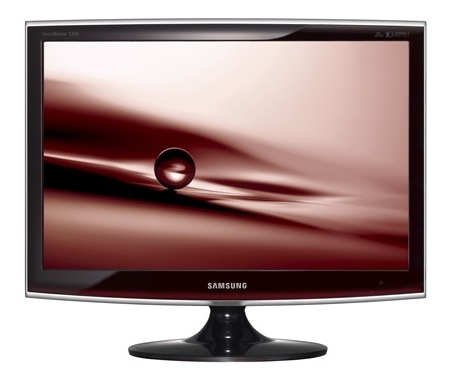
What sets the T260HD apart for me is the fact that it was made to fulfill both functions from the factory. Although I haven’t used it (yet), my hope is that the Samsung engineers accounted for the difference in display characteristics that is needed when one uses it as a computer display vs. a TV. What is heartening for me is that it’s listed among the computer displays, not the HDTVs, on the Samsung website, which means it’s really more of a computer display than an HDTV, which is just what I need.

The design makes this display stand out. The enclosure is made of glossy black plastic, and it looks as if there’s a clear panel of glass set over the front of the display, which should make it easy to clean. A hint of maroon color marks the bottom of the enclosure, right below the logo, giving it a distinctive look. I do hope though that the glossy black plastic doesn’t scuff easily. Other Samsung TVs do scuff over time, which means that as you dust them, small hair-width scratches appear on the plastic, marring its glow.

Promotional: Don’t spend too much on flat screen TVs; there are flat panel TV deals you can take advantage of. LCD TV deals are available for consumers to buy at discounted prices.

The specs listed on the Samsung website are thin on the details, and I can’t make out whether its color depth is 8-bit, 10-bit or 12-bit. My guess, given its price, is that it’s 8-bit or 10-bit — probably the former, not the latter. Color depth in a display is a very important specification, because if you work with photos, like I do, and your DSLR captures 12-bit or 14-bit color images, you won’t be able to edit them competently on a display whose color depth capabilities are much lower. A 6-bit display, for example, like many laptops have, would be fairly useless to you, because it just won’t reproduce the color tones faithfully.

Let’s have a look at some of the salient features of this display:

  • Full HDTV monitor: that’s good, and also to be expected since it’s a computer display as well, and its resolution is 1900 x 1200 pixels.
  • Dolby Digital Surround sound: it has invisible speakers built in, and they’re rated at 3 W each; I’ve heard these types of speakers on other Samsung products, and they’re pretty good — certainly a lot better than most monitor speakers.
  • Dual HDMI, DVI and VGA inputs: that’s impressive for a 26″ display. I see that Samsung didn’t skimp and even included a SCART connector for the European countries. I love that.
  • Low power consumption: one spec says it uses 0.3W in Standby mode, yet another says it uses < 2W in that same mode. At any rate, it only uses 70 W max, and that’s great for a 26″ display.
  • 10,000:1 dynamic contrast ratio: I think this spec is trumped up, as I see it on a lot of other, cheaper displays and TVs. I have no idea what it means. Supposedly, the increased contrast between light and dark helps you see things better. I’ll be the judge of that when I try it in person. I see that the Apple Cinema Displays are listed at a 700:1 contrast ratio, which I think is a much more reasonable figure.
  • 5 ms response time: this is a little sluggish given that most displays in that size are at 3 ms. Still, it’s better than the Apple Cinema Displays, which are still listed at 14 ms. I think 5 ms is sufficient for most movies and video games, but then I’m not into the violent, fast-paced video games.
  • 300 cd/m² brightness: this isn’t as bright as other displays in the same sizes, which are at 400-700 cd/m², but you know what, I’d rather not have headaches caused by too much brightness, so this should be fine for me.

What I’ve seen so far of this monitor has certainly whet my appetite, and I’d love to try it out for myself. If and when I do, I’ll let you know how it works out.

The Samsung T260HD is available from Amazon and B&H Photo.

Photos used courtesy of Samsung.

Standard