
Stumbled onto some funny clips from the show on YouTube. Enjoy!
Stumbled onto some funny clips from the show on YouTube. Enjoy!
I finally finished working on a new look for the site (version 1 wasn’t as flexible and easy to maintain as I wanted it to be) and also propagated that new look throughout the various ComeAcross sections. Yes, this means that whether you visit the main site (blog) or the podcast, or the current news section or the new mobile section, you’ll see the same look (which wasn’t the case with version 1, btw). The only section that still hasn’t got the new look is photos, but Gallery, the package I use to manage that, is definitely a monster when it comes to skins and customizations, so I don’t even want to touch that for now. In fact, I may even switch to a hosted photo service like Flickr. We’ll see…
Give the new and improved ComeAcross (version 2) a try, and surf through the different sections. Let me know how you like it, drop me a line. Working on it these past three days has been a very interesting experience, to say the least… I had this horrible bout of flu, and it was a bit hard to concentrate, since I wasn’t sure what to do first: pass out, vomit or just lie in bed and try to sleep (with “try” being the operative, though unsuccessful word.) I don’t know what kind of a virus this was, but it sure was a nasty one! When I have a cold or a flu, it lasts 1, 2 days tops. This time, it’s coming up on 3 1/2 days and I’m still not over it. Not fun, not fun… not fun. Add to that ridiculous muscle aches, bone aches, headaches and this ugly urge to keep moving my legs while in bed,and I’d hate to foist this monster on anyone, even my worst enemy.
So anyway, I managed to get a few hours’ worth of work done every day, although it was a nightmare. I hope you enjoy the end result, because this flu sure gave a new meaning to the creative birthing process… Trust me, this new look is no flu-ke! I for one don’t think the new look is flu-lish… Alright, okay, I’ll stop…
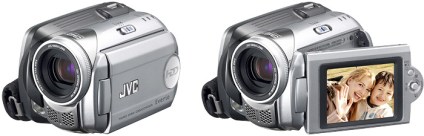
Friends of ours bought the JVC Everio GZ-MG21 camcorder a little more than a month ago, and aren’t too happy. Granted, it’s a 1st generation hard-drive based camcorder, so it’s bound to have certain downsides. So, with that in mind, here they are:
Now for the good points:
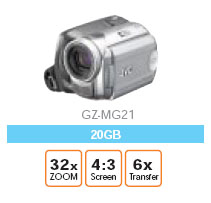 It’d be interesting to compare my friends’ Everio model to the newer ones that have come out since, like the GZ-MG505, which is supposed to have 3, yes three, 4.5-inch CCD sensors, and shoot 5 megapixel stills. It also has a larger filter, and a larger LCD monitor.
But, it also consumes 75% more power and weighs 25% more. However, the video quality has to be better, and the stills would probably look stunning compared to the MG21.
I still have to assume, unless I’m presented with evidence to the contrary, that multiple video files are created, and that’s an annoyance. Plus, battery time has to be less than the MG21. And, I’d expect a little more than 30GB in drive space, especially given how cheap hard drives are these days. I mean, c’mon, an iPod has more drive space!
Here is the Everio Specs PDF.
A few months ago, both Ligia and I got taped for a new show on HGTV called “I Want That! Tech Toys“, the kid brother, so to speak, of “I Want That!”, which is a wildly popular show. By the look of it, this new show is going to make it big as well.
At any rate, Ligia got invited to demo a portable keyboard called the Yamano Hand-Roll Piano (a bit of a misnomer, since it’s not a piano, it’s a keyboard). At any rate, what makes it an interesting product is that it’s truly portable: it rolls up into a tight little package, which you can carry virtually anywhere. It’s also powered by batteries. The keys are made of rubber with touch sensors underneath, so if you spill something on it, you don’t have to worry. It’s even got a MIDI-out port, in case you’re interested in that sort of a thing. The only thing that’s missing is the tactile feel of a real keyboard, which, I have to say, is a fairly important thing for the more serious piano or keyboard players. But this keyboard is great for beginners. So… to make a long story short, Ligia and one of her students, Peter, got taped for the show, and the episode just aired on HGTV. I uploaded the particular segment of the show where Ligia is featured to YouTube, and you can view it below.
What about me? Well, I got invited to demo a cool product called the Nabaztag Smart Bunny for the show a month after Ligia got taped. I demoed it, and also wrote a nice lengthy review here at ComeAcross for your enjoyment. The show in which I appeared aired after Ligia, and it’s still on the air, as a matter of fact. The segment where I talk about the bunny is also uploaded to YouTube, and you can view it below.
Hope you enjoy them! I know we enjoyed getting taped, it was a fun little experience, and we are grateful for the opportunity! You wouldn’t believe it, but just to get that 1:25 minutes of live TV, it took over three hours for each of us. It’s the setups for the different shots and the re-takes that take so long. You’ve got to make sure the lighting’s just right, that the angles are correct, that stray objects aren’t in the shot, so on and so forth. Hey, and did you know that one of those Beta video cameras they use to film you for TV costs over $60,000? Better not drop them!
 I complained in a previous post about how I wanted to buy a Mac laptop that I’d use for both work on pleasure, but couldn’t, because I was shackled to Windows OS for most of my development work, and there were certain things that just didn’t work on the Mac, with either Boot Camp or with virtualization software.
Well, I can’t have been the only one with gripes, because Apple just released Boot Camp 1.1, addressing some of the very concerns I voiced, both here and at BlogCritics. Here’s what the new version includes:
So what still doesn’t work? The Apple Remote doesn’t. And neither do the Bluetooth Wireless Apple Keyboard and Mouse. Now, while it’d be nice for me to control iTunes while in Windows with the Apple Remote, I can live without that, but why wouldn’t the keyboard and mouse work? So okay, they don’t – fine. But what bothers me is that the sudden motion sensor and the ambient light sensor don’t work either. Those are not only cool, they’re very practical technologies. The sudden motion sensor in particular should be a must have feature.
I can just imagine Apple Tech Support when an unfortunate fellow calls them (hopefully not me):
In a related note, most of the new Lithium Ion batteries are subject to meltdowns and explosions when shaken, overheated or dropped. Something to think about as you hold that laptop in your lap…
 Raoul Pop