Thoughts

SmugMug, are you listening?

I’m disappointed with SmugMug over their continued lack of support for proper export and maintenance of photographs directly from Lightroom. Back in July, I wrote about the Flickr Publish Service in Lightroom, and wondered when SmugMug would introduce their own.

What I was really looking for (and I said this in the post) was a way for the publish service to identify what I’ve already uploaded and allow me to re-publish those photos where I’ve made changes to the metadata or to the processing. The official Flickr Publish Service didn’t offer that option.

A few of my readers (Gary, Chris, Russell, thanks!) pointed me to Jeffrey Friedl’s excellent plugins for Lightroom, and I’ve been using them ever since. As a matter of fact, I’ve switched over to them completely. I use them for all four web services where I currently publish photos (SmugMug, Flickr, Facebook and PicasaWeb). I don’t know what I’d do without them. Wait, I do know — I know for sure I’d be doing a LOT more work and spending a LOT more time uploading and maintaining my online collections.

With Jeffrey’s LR plugins, I was able to identify about 90% of the photos already uploaded to SmugMug, and about 75% of the photos already uploaded to Flickr. In the case of Flickr, I then did manual updates and re-identifies so I could get it to know 95% of the photos already uploaded. This means Lightroom now allows me to quickly identify, update and replace almost any photos I’ve got at SmugMug, Flickr, Facebook and PicasaWeb. This is huge.

There is a catch, though, and it’s a BIG one. I keep running into the same “Wrong Format ()” error with SmugMug, which means I still haven’t been able to straighten out the photos I’ve uploaded to them. Here are a couple of screenshots of the error messages I get. It starts with a “TimedOut” error, then I get the “Wrong Format ()” error, then the upload process aborts.

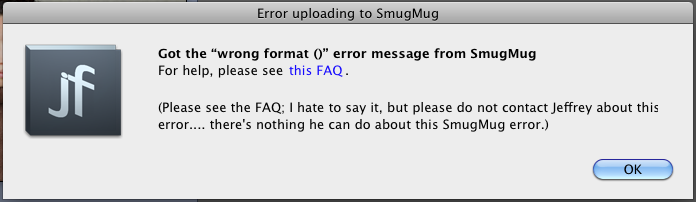
I get these errors almost every time I try to re-publish an updated photo, but I don’t get them as often when I try to upload new photos. To give you an idea of how bad things are, I’ve currently got 109 photos to update in one of my galleries at SmugMug, and last night, I had about 167 photos. I’ve had to restart the re-publish process about 30-40 times since last night. You do the math, but I think it works out to 1-2 photos per error. This sucks. I should be able to just click the Publish button and walk away, knowing all of my changes will propagate correctly.

I’ve contacted Jeffrey, and I’ve contacted SmugMug. I’ve had extensive email conversations with each. SmugMug alternates in their replies. They’ve said the following to me:

  • It’s a fault with the plugin
  • It’s something on their end but they’re working on it
  • There’s nothing they can do about it
  • I should use something else to upload photos
  • They blamed my setup, which we ruled out after some internet connectivity tests

Jeffrey says there’s nothing he can do about it, and I believe him more than I believe SmugMug. Want to know why? Because his other plugins work just fine. I’m able to re-publish updated photos to Flickr and Facebook and PicasaWeb without any problems. Only SmugMug somehow can’t handle my uploads.

I’ve tried reloading the plugin, installing it anew, removing and re-adding the publish service, upgrading the plugin, but nothing. I still get the same errors.

My question for the smug folks at SmugMug is this: how is it possible that Facebook and Flickr and PicasaWeb have worked out the re-publish issues, but you haven’t? What’s taking you so long? Why can’t you work out the same problem on your end?

I was hoping that with the release of Lightroom 3.2, and the release of the official SmugMug Publish Service for LR (hat tip to David Parry for the advance notice), that SmugMug would work out the kinks in their API, but it looks like they still haven’t done it. I tried their plugin, but of course they took the easy route, like Flickr, and haven’t introduced any functionality that would identify photos already uploaded to their service. Only Jeffrey Friedl’s plugins offer this feature.

This leaves me terribly disappointed. As a SmugMug Pro, I don’t want to bother with error messages. I don’t want to bother with posts like this. I’d rather post photographs and update my SmugMug galleries in peace, but I can’t.

If you’re having the same problems with SmugMug, please, write to them, and ask them when they’re going to get their act together. This problem’s existed for several months. How much more time will it take until they deal with it?

Standard
Reviews

BMW 325i build quality problems

I put together a short video review of the build quality problems in the 2006 BMW 235i sport sedan. These are things like:

  • Rotting or loose rubber seams on the outside
  • Easily scratched/worn door handles
  • Faulty cup holders
  • Flimsy, easily melted cigarette lighters
  • Soft plastic finishes that disintegrate and scuff right away
  • Broken window shades
  • Plasticky, snap-together feel of ceiling consoles
  • Fading radio display
  • Various cockpit noises

Watch the video on YouTube | blip.tv

As one of the commenters in a BMW forum puts it, it comes down to “BMW’s choice of low quality materials in high wear areas“. That is a wonderfully succinct explanation of the problem.

These things keep breaking down, they get replaced, then they break down again. If BMW would bother to add up all the service costs they incur for repeat repairs to the cockpit, they would realize it would be cheaper to make them better in the first place. This is my plea to them: start building better cars — a bad cockpit ruins the driver experience and takes away from the wonderful handling and performance of a BMW.

Standard
Events

Site migration complete

Last night, I completed what could be called an unusual site migration. I went from a self-hosted WP install to WP.com. That’s right, my full site is now hosted at my WP.com account. People usually migrate from WP.com to WP self-installs after their site gets big and they decide they want more options, like the ability to run all sorts of ads and fiddle with the code, etc. With me, it was the opposite. I wanted to stop worrying about my web server and focus on publishing my content.

As I mentioned here, things got worse after upgrading to WP 2.9. My server kept going down for no reason, and often, too. It’d go down several times a day. I’d have to keep watching it all the time, and that got old real quick, especially when I traveled and had no internet access. I’d often get home to find out my site was down and had been down for several hours, if not more. Since I hadn’t mucked about with my server to make things worse, and had already fiddled with optimized my Apache, MySQL and PHP settings to last me a lifetime, I decided to have WP have a go at hosting my site and let them worry about keeping it going. Judging by the initial results, it looks like they had a bit of trouble with it too (see this, this, this and this), but at least it’s not my headache anymore.

During the migration process, I learned three things:

  1. I hadn’t been getting full XML transcripts of my site in the past, when I used WP’s WXR Export feature. See this for more, and make sure you’re not in the same boat.
  2. The WordPress Import wizard still needs a TON of work to iron out the bugs. You’ll see why below.
  3. WordPress.com Support can be terribly unresponsive. I waited over 20 days for a resolution to my ticket about the site migration, and in the end, I had to work things out myself. When I told them as much — and I tried to be as nice as possible about it — it would have been nice to get a small apology, but I didn’t even get that.

Granted, my site migration does not represent the usual WP user’s migration path, nor was it a typical migration. By current count, I have 1,552 posts, 4,129 comments and 3,090 media files. That’s quite a bit more than your average blogger, and I think that’s what served to point out the bugs in the Import Wizard.

What exactly were the bugs?

  • Failure to import all posts, comments and media files
  • Post and media file duplication
  • Failure to properly change all paths to media files (either image source or image link or both)

Here’s where I need to acknowledge the help I did receive from WP Support. My WXR file was over 20 MB. The WXR upload limit at WP.com is 15 MB. WP Support modified the upload limit to allow me to go through with the WXR upload, and they also adjusted the timeout limit, because the migrations timed out prematurely as well. So I thank them for that help.

The big problem turned out to be the third issue mentioned above. The Import Wizard didn’t change all the paths to the image files. It turned out to be a very hit-or-miss operation. Given the scale of the operation, I might even call it a disaster. Some posts were fine, some weren’t at all, and some were a hodge-podge of images that were okay, and images whose paths were wrong, or whose links were wrong, or both. You might imagine that checking and fixing the image paths for over 3,000 media files can turn out to be a very big job, and it was.

I was also under pressure to finish the job quickly, since the site was live. Imagine how you’d feel as a reader if you visited a website and none of the image files showed up — you’d probably think the site was dead or dying, right? Well, I certainly didn’t want people to think my site was on its last legs, so I had to act quickly.

Thankfully, only (sic) about 40% of my posts had their image files messed up. The rest were fine, but then I also had plenty of posts with no images. If all my posts contained images, I might have had 90% of my posts to worry about… Still, I had to check every post, and as you might know if you’re a regular reader, I post lots of images per post, and where a post was messed up, brother, I had to do a bunch of work to get it fixed up. Just as an example, some posts have anywhere from 20-50 images…

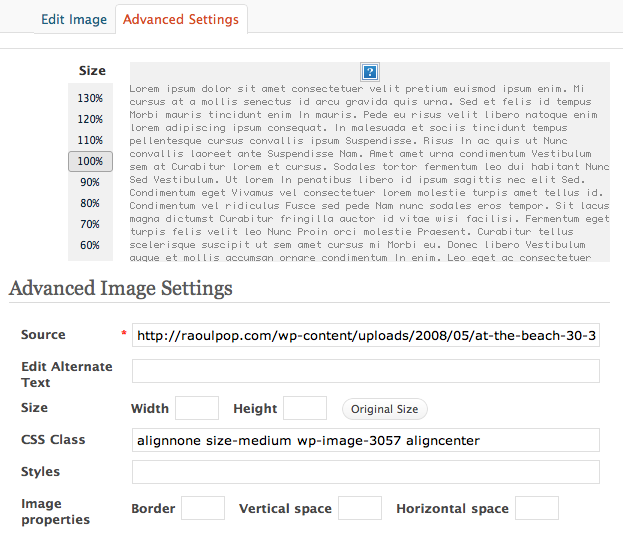
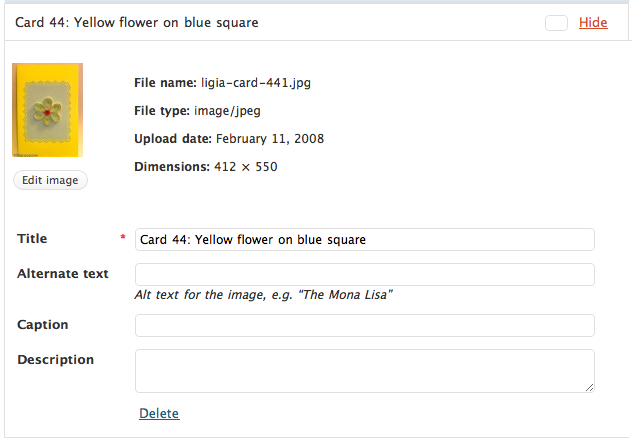
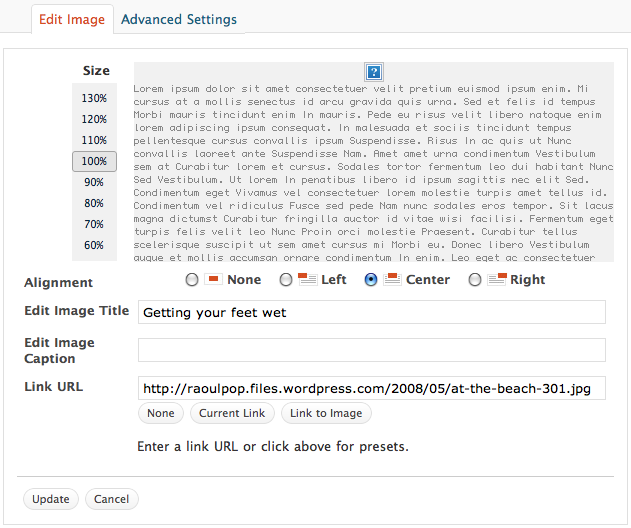
Here are a couple of screenshots that show you how things stood. Here, the image link was okay, which meant I didn’t have to modify it. This was a happy scenario. However, the image path was still wrong, as you’ll see below.

The image source, or path, didn’t change during the import process, which meant I had to change it manually, or browse for the image by title or file name in the media library and re-insert it.

The image size was also lost, which meant that if I changed the image path manually, I had to also enter the width of the image.

What made things more cumbersome was the lack of an image insert button in the Gallery dialog box. That’s one of the differences between a WP self-install and WP.com. This meant that even though I’d uploaded a certain image for a certain post, and it showed on the Gallery tab, I couldn’t go there and re-insert it into a post. I had to go to the Media Library tab, search for it, then re-insert it, which takes precious time and clicks, particularly when you’re dealing with thousands of images.

In spite of all the extra work which I had to do, and which took about 1½ weeks of my time, I got done last night. My site is now fully functional, thank goodness!

As for my experience with WP Support, there are no hard feelings. I like the WordPress platform and it’s done good by me so far. I wasn’t a VIP customer and they didn’t have any financial incentives (besides the small fees for a space upgrade and a domain mapping) to get their hands dirty with my code. They offered minimal support, and to a certain degree, that’s to be expected when most of your customers are non-paying customers, as is the case with the large majority of WP bloggers.

Still, I would encourage them to consider doing the following:

  • Improve their Import Wizard so that it will not terminate until it checks and doublechecks to make sure it has imported all the posts, comments, pages, tags, categories and media files, and all the paths to the media files are correct. They’ve still got one of my WXR files, and they can use it as case study to help improve the accuracy of the import wizard.
  • Include an image insert button on the Gallery tab of the “Add an Image” dialog box, like the one that already exists on WP self-installs.
  • Offer the functionality of the Search & Replace WP plugin for WP.com blogs. This would have been a huge help to me as I fixed the image paths. I could have run a couple of queries on my blog’s content to change most of the image paths, and it would have halved my workload.

If you were one of the folks who kept seeing no images during this transition period, sorry for the inconvenience, and I’m glad you’re still around. If you’re still seeing no images, definitely get in touch with me, I might have missed a few — after all, I’m only human.

Standard
Thoughts

It’s no surprise broadband internet sucks in the US

A recent Akamai survey, which I shared here and here, ranked US in the 33rd spot (globally) when it came to broadband internet connections above 2 Mbps. Sure, it moved up two spots compared to last year, but it’s still lagging behind countries such as Monaco, Slovakia, South Korea, and believe it or not, Romania — which is where I’m living these days.

That’s sad. It’s very sad because a country such as Romania, with fewer resources than the US, and with a LOT more corruption at every level, has managed to provide better Internet services than the US. It just goes to show you how much pork barrel legislation and ridiculous lobbying can slow down an entire country’s Internet access. Why, every time a company tried to improve the way broadband worked in the US, it was eventually bought out or dragged down and kept down for the count.

Remember Telocity? It was one of the first companies to offer DSL service in the US, ahead of Ma Bell. Even though it was paying hefty amounts of money for the right to transport Internet traffic on Ma Bell’s lines, they had enormous problems with the same Ma Bell, due to problems that would somehow just happen to crop up on the same wires or the switching equipment. Then they’d have to pay more money so Ma Bell could fix their own equipment, which they’d say Telocity broke, etc., ad nauseam, and so on and so forth.

That’s just one example. Another was the more recent push to restructure the way cable services are provided (both TV and internet). One of the efforts was the a-la-carte programming initiative, and another was the push for faster and more reliable cable Internet services. You wouldn’t believe the advertising, PR and lobbying blitz the cable industry started and kept up for several months — actually, I’m fairly sure you saw their ads on TVs and buses everywhere, particularly in the Washington, DC area.

Or what about when they got together in late 2007 and 2008 to ask for an Internet tax? Remember the tiers of traffic they wanted to create? They wanted all the big websites to pay them for the traffic, as if they weren’t already getting enough money from the customers for their slow and unreliable services. They also wanted large chunks of money from the federal government in order to upgrade their infrastructure. No matter how much money they make, they’re so greedy they always want more, more, more.

What I’d like to know is how all these other countries, including Romania, can manage to offer faster and more reliable Internet services without asking for money from their countries’ government, without charging big websites for their traffic, and also by charging less per month for better broadband? How is that possible? Could it be that these companies actually know how to run their businesses while their counterparts in the US are filled with lazy, greedy idiots?

I still vividly remember an incident which happened while I was a director of IT at a Florida hospital, several years ago. A BellSouth technician had been called in to check the phone boards, and my network and servers kept going down and coming back up. The Medical Records system kept giving errors when employees wanted to access forms to fill in patient data, not to mention that other network services, like file sharing and printing, kept going on the fritz. I checked every one of the servers and they were fine. I finally walked into the switch room, at my wits’ end, only to find the moronic BellSouth employee with his fat, lazy butt on our UPS, jiggling it back and forth as he chatted with someone back at BellSouth HQ, plugging and unplugging the power supply that fed one of the main network switches. I went ballistic, grabbed him by the collar and threw him out of my switch room. Was he that stupid that he didn’t know where he was sitting? Was he such a pig that he couldn’t feel the plugs underneath him as he sat on them? He didn’t even want to apologize for taking out an entire hospital’s network during daytime hours. That’s BellSouth for you.

I don’t know how the US can get better broadband, unless it’s legislated. An ultimatum must be given by the government, one that can’t be overridden by any lobbyists or CEOs shedding crocodile tears in front of Congress. These companies simply will not get their act together until they, too, are grabbed by their collars and shaken about. They’ve gotten used to the status quo, they like it, and they’re clinging to it with all their might.

Meanwhile, here’s a sample of the Internet plans you can get in Romania right now. For comparison purposes, 1 Euro is worth about $1.4 these days.

Romtelecom (the main phone carrier, provides ADSL services):

  • 2 Mbps, 2084 kbps/512 kbps, 4.88 Euro/month
  • 4 Mbps, 4096 kbps/512 kbps, 7.02 Euro/month
  • 6 Mbps, 6144 kbps/512 kbps, 9.40 Euro/month
  • 8 Mbps, 8192 kbps/768 kbps, 14.16 Euro/month
  • 20 Mbps, 20480 kbps/1024 kbps, 24.87 Euro/month

[source]

Birotec (provides fiber optic services, all plans include phone line with varying amount of minutes based on plan price):

  • 3 Mbps up/down, 10 Euro/month
  • 4 Mbps up/down, 15 Euro/month
  • 6 Mbps up/down, 20 Euro/month
  • 8 Mbps up/down, 29 Euro/month
  • 10 Mbps up/down, 49 Euro/month

[source]

RDS (provides fiber optic, cable, cellular modem and dial-up access — prices not readily available on website):

  • Fiber optic access up to 2.5 Gbps
  • Cable access up to 30 Mbps

[source]

The lowest internet access plan in Romania is 2 Mbps. Cellular modems are advertised at speeds up to 3 Mbps. Meanwhile, in the US, you can still find 512 Kbps plans at prices twice or three times as much as the 2 Mbps plans in Romania. That’s the price of complacency and excessive lobbyism.

Standard
Thoughts

Meet Buttons, the cutest kitteh ever

The one with the tiny nose

Sorry for the baited title. This post is really about how web users interact with written content on the Internet, and how people in general interact with the news these days. But read on anyway, you might find this useful, and there’s even another cute kitty photo at the end.

I’ve been sitting on the sidelines lately, looking at the way people interact with items on FriendFeed, and I realized it’s all part of how people in general interact with the world these days. In a word, it’s superficial. On the web, there’s barely any interaction with items that have no thumbnails. If there’s no image to be digested quickly with a news item, then it gets buried, fast. That particular news item might be truly meaningful, it could have real value, it could be worth at least a few minutes of someone’s time, but users just don’t take the time to click through and find out what’s going on if there isn’t an image to go along with it. It’s like they’re little kids and they gotta have pictures in their story books. Whatever happened to being adults?

I’m not talking about my own articles, and I’m not talking about FriendFeed per se. I’m talking about the bigger picture. You can see this on TV as well. In the US nowadays, instead of showing the person who is talking, whether that be a news presenter or a person being interviewed, the stations overlay the audio on top of looping footage of the things the person is talking about, or they run the audio on top of marginally related video, ostensibly to keep a spastic audience glued to the set. In Romania, where I’ve been staying these past few months, they divide the TV screen in half. They show the commentator in one half, and they show video footage in the other. Your eyes keep jumping from one spot on the screen to the other, to make sure they catch all the action. And they also scroll text and stock and weather alerts on the bottom of the screen. It’s nuts. You just don’t get the chance to digest what the person is saying, because your attention is continually grabbed and pulled in many different directions.

If you are reading this on FriendFeed or in a RSS reader that shows media content thumbnails, do you know why you clicked on it? Likely because I had a photo of a cute kitten to draw your attention, not because you wanted to do some actual reading. It would have been much better if I showed some woman in a bikini — many more people would be reading this article right now, or at least skimming it, hoping for more photos.

Isn’t it sad though? For a person who likes to write, and wants to communicate through writing, it’s so disappointing to see the audience drifting from adult food to baby bites, to cute or sexy photos with (preferably) one or two sentence captions, instead of real articles. Whatever happened to sitting down and reading something?

Don’t tell me it’s because you’re busy. I don’t buy it. You’re lying to yourself and you’re lying to me. People have always had lots of work to do. Sure, it wasn’t computer work a few decades ago, but it was chores or factory work, and it took just as much time and much more effort. But they knew how to relax. They could sit down with a magazine or newspaper in hand, tune out everything else, and read something they found interesting.

You still have that ability. Stop being immature and clicking on everything, and pick the stuff you want to spend your time on carefully. There’s only so much time in one day, and you can’t keep up with a thousand RSS subscriptions and still do other things. Thin out the stuff you want to see on the web every day. On a larger scale, thin out the stuff you want to do every day, because you can’t do it all. Decide on what’s important to you, and stick with that. Maybe if more people took this advice, the world would be a saner place for those who write on the web, like me. We wouldn’t have to go nuts trying to get the word out about our content, because people would take the time to find interesting stuff and stick with it.

If you’re a FriendFeed user, let me tell you it’s not cool to subscribe to tons of people just so you can watch news items stream by you in real time and feel good about keeping up with everything that’s going on in the world, because that’s not the case. In the end, you’re just as superficial as the guy who looks at a magazine cover and thinks he knows everything inside it. Instead of wasting your time doing that stuff, pick the people you find interesting, weed out the rest, and really sit down to see what they have to say.

Now, just because you read/skimmed this far, here’s another photo of kittens, this time two of them, playing together. See, I’m not such a bad person.

Games kittens play

Standard