- Joseph Lewis: “I Lost $1 Billion in Bear Stearns” http://tinyurl.com/ysl7nv #
- Magazines Behaving Badly http://tinyurl.com/2ubkfy #
- Apple Introduces New AirPort Express with 802.11n http://tinyurl.com/2knuu6 #
- Luck Is No Accident: 10 Ways to Get More out of Work and Life http://tinyurl.com/3ddrpu #
- Lightroom 1.4 Update is Pulled http://tinyurl.com/2wg9e6 #
- Useful Gadgets – The Hot and Cold USB Coaster http://tinyurl.com/2slhud #
- Time Machine: World’s Biggest Collider http://tinyurl.com/3b7qma #
- Three-wheeler handling meets 1930s racecar style: Seattle’s ACE Cycle Car http://tinyurl.com/2wdaly #
- Crazy Kart 2 for iPhone Looks Like Phenomenal Mario Kart Rip-Off http://tinyurl.com/2uaxqb #
- Water saving Water Aid Top Load Washer from Electrolux http://tinyurl.com/2q6keb #
- ‘Major retailer’ hit by data theft http://tinyurl.com/39jqvn #
- 50 Miles Per Burrito: Is the Body the Most Efficient Vehicle? http://tinyurl.com/35rl2l #
- Pain at the pump http://tinyurl.com/2tpzzj #
- EMC, Iomega Begin Merger Talks http://tinyurl.com/3y6evo #
- Security in Montana http://tinyurl.com/2msxah # Listen to the snippet with the Governor of Montana about Real ID. Gotta love that common sense! #
Tag Archives: security
Condensed knowledge for 2008-03-12
- Stocks Rocket on Fed Rescue Plan http://tinyurl.com/yvhcfb #
- The IPv6 experience: Are you experienced yet? http://tinyurl.com/38nddr #
- JPEG v. RAW – TWIP http://tinyurl.com/yvv4qq #
- Green light for Northrop Grumman Airborne Laser Mine Detection System http://tinyurl.com/2k6kdq #
- Researchers develop smell based fire alarm to aid the deaf http://tinyurl.com/2jpnzx #
- Funny Animals, Part 10 http://tinyurl.com/32rfrd #
- EXIF and Beyond: Mastering Digital Panoramic Photography http://tinyurl.com/3ytfpe #
- GE demonstrates newspaper printing-like process for OLED manufacture http://tinyurl.com/32ncey #
- The Red Truck: 1940 http://tinyurl.com/3a7ctq #
- DIY Users Set Up ‘Vista Workstation’ http://tinyurl.com/2ts2bf #
- Morning (LOL) http://tinyurl.com/33sug7 #
- Second lease of life: researchers develop online character with reasoning abilities (Waste of time imo) http://tinyurl.com/3a5zns #
- ThruVision’s T5000 security system sees through clothing http://tinyurl.com/2jr2mf #
- Largest wind power transmission project in U.S. underway http://tinyurl.com/3xhbae #
- This is a pretty cool proposal story: http://www.flickr.com/photos/jonathanm71/2328107763/ #
- Lawmaker May Use Antitrust For Net Neutrality http://tinyurl.com/3clo3o #
- Solar-Collecting Roads Heat Buildings in The Netherlands http://tinyurl.com/3x7ycw #
- After the Bath: 1909 http://tinyurl.com/2jh6kn #
- Now bigger, Google prepares to get smaller http://tinyurl.com/2xah8z #
- First Impression: Surly Big Dummy http://tinyurl.com/3y7oz2 #
- Cool Concepts – The iStick http://tinyurl.com/2klqrn #
- Cool Concepts – The Curved iMac http://tinyurl.com/2urbvz #
- How Aware Are You? http://tinyurl.com/24cmxf #
- Neighborhood Watch: Great Scot! http://tinyurl.com/2fc3pu #
- Gates Wants More Professional Visas http://tinyurl.com/39kgqd #
- Proviso Yard: 1942 http://tinyurl.com/2ycmc6 #
Catching a code injection hacker in the act
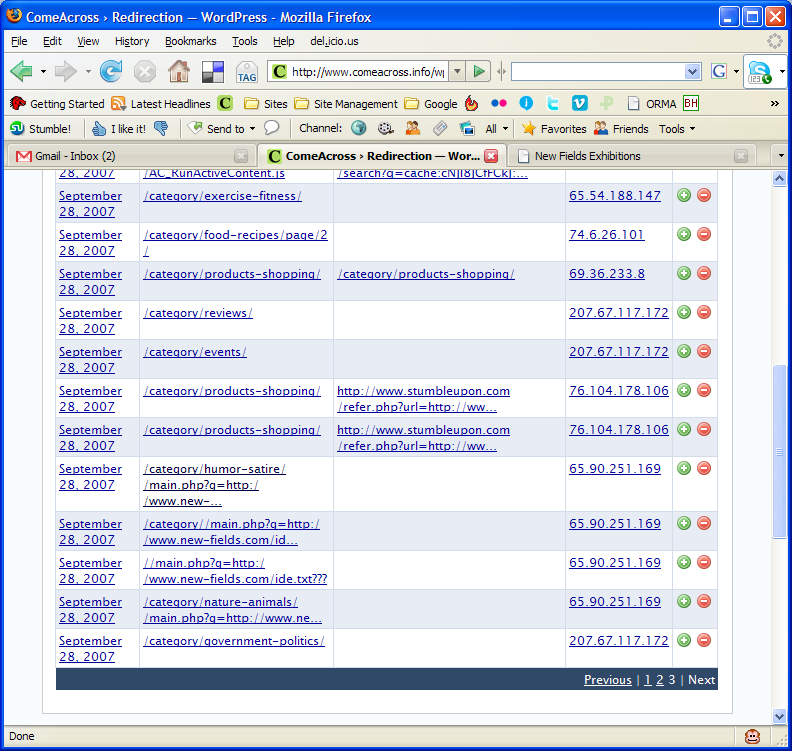
Several days ago, I installed the Redirection plugin from Urban Giraffe. It’s truly awesome, in more ways than one. John Godley, you are an amazing programmer! As I re-arranged the categories on my blog, I tracked the 404 errors through the plugin. On Saturday morning, I noticed the following bit of information in my log:


You can click on the thumbnail to view the screenshot at full size. Look at the entries for IP address 65.90.251.169. Notice something peculiar? That’s a hacker trying to inject malicious code into my pages. He was trying to call to code contained in a text file by the name ide.txt located on a possibly compromised domain.
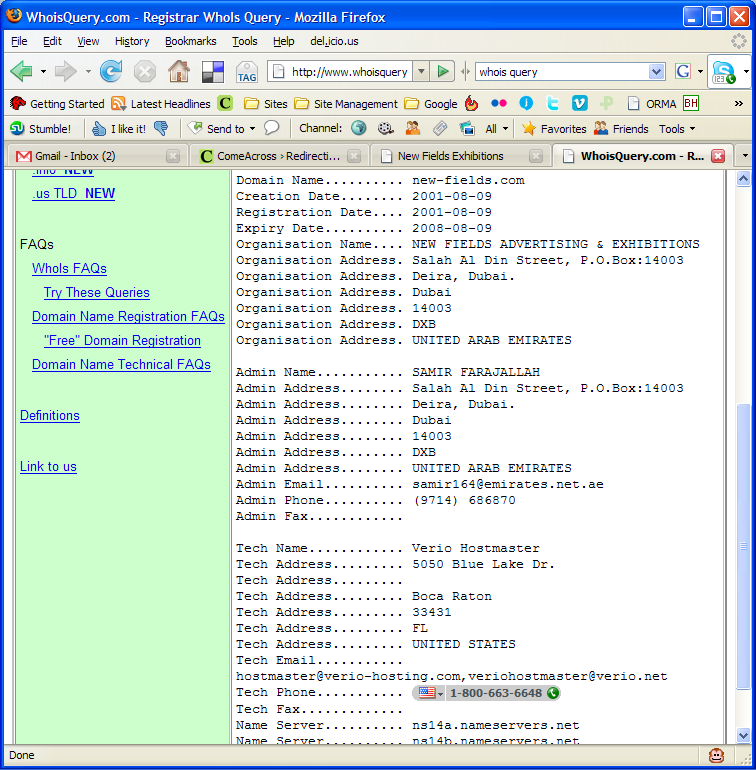
First, I checked out his domain, new-fields.com. It looked legitimate. The text file was another story altogether. Have a look at the screenshots above. I also saved the code to my computer in case it ends up disappearing from the hacker’s website.
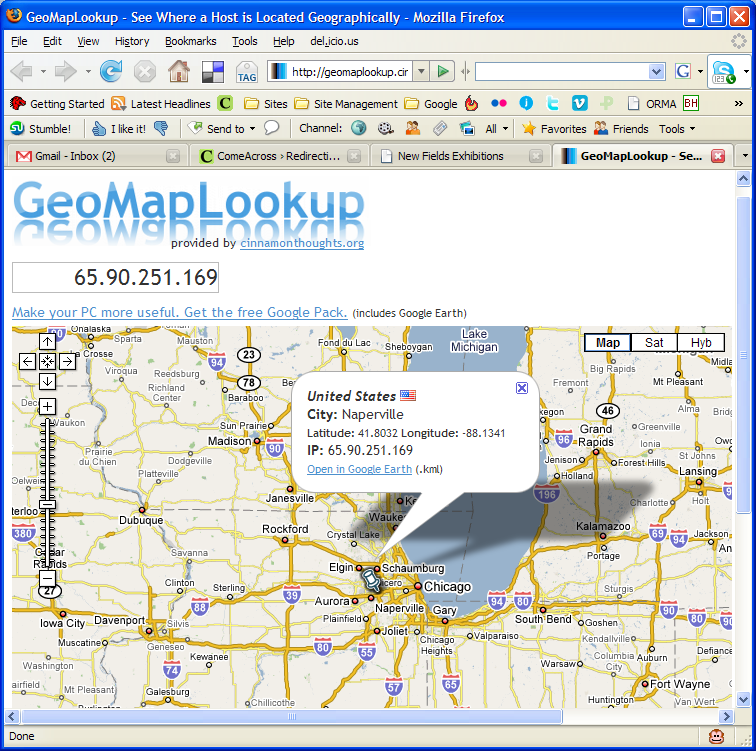
I tested the code, and it looks like some pages from the podPress plugin are targeted or affected — at least that’s what the error message given by WP referenced when I ran the code. I had that plugin enabled at the time, and I’ve disabled it since. It seems that the code tries to modify one of the header.php pages, along with checking disk space (?). So I thought, let me find out who this hacker is. Apparently, he’s from Napperville, IL, US, or at least that’s where his IP address lives.
What’s more, I thought it’d be interesting to see who owns that domain name where his text file resides. It turns out to be one Samir Farajallah from Dubai.
So what we’ve got so far is some dude in Dubai who owns the domain where the malicious code resides, and some hacker in Napperville, IL, trying to exploit my blog using that malicious code.
Wait, it gets better… On Saturday evening, I have another look at my blog’s 404 log, and I find that some other hacker from Vietnam (IP address: 203.171.31.19) is trying to hack into my blog using that exact same code, but this time the text file’s located on some domain in Argentina. That last link leads directly to the text file with the malicious code, but it’s harmless if you browse it. It only works if you run it as PHP code, like these hackers are trying to do.
So far, it looks like I’ve got two hackers, who may or may not be working together, using the same malicious code, located on two different, possibly compromised domains, and trying to modify my header files, possibly to insert code in there that will display splog content or some other stuff.
Update: It looks like three more hackers are trying their luck today, on Sunday morning, 9/30/07. Their IP addresses are 65.98.14.194, 66.79.165.19 and 66.11.231.48.
What I can tell you is that they haven’t been successful. I checked all of my files, and none of them have been touched. Everything’s fine. At this point, I’m not going to waste any more of my time trying to hunt them down. If I see that the attacks continue, I’ll notify my web hosting provider, along with the hosting providers of the other domains, and I’ll also notify the ISPs who own the IP addresses used in the attacks.
My thanks go out to John Godley for the wonderful Redirection plugin. I wouldn’t have been able to catch these hackers without it. I don’t often check my 404 log files, although I should.
I’ve been working in IT for 13 years or so. Maybe I’m naive, maybe I’m too honest for my own good, but I’ve stayed away from this hacking business, and I’ll continue to do so. It’s just not a sustainable lifestyle. I believe that the bad stuff you do in life will catch up with you sooner or later. It’s inevitable. These hackers will get what’s coming to them, and I won’t even have to lift a finger beyond what I’ve done so far.
ISPs to become IT providers for home users?
Bruce Schneier makes a solid point in his recent post entitled “Home Users: A Public Health Problem?”, where he states that computers and computer security are much too complicated for the regular home user. That’s most certainly true. No matter how much you “educate” the average user, they’re still going to mess up. Even if they’re working in IT, that’s no guarantee of know-how. There are so many things you can do in IT these days that an IT guy might not even know what a hard drive or a RAM module looks like. You really have to like working with computers to get the way they work and to be willing to put in the time to learn how to protect and operate them the right way.
But then Schneier says ISPs should become IT providers for the home user. In other words, provide real Help Desk support for software installations, router and firewall settings, anti-spyware and anti-virus software, etc. This sounds good at first until you realize there’s a very small step between that and choosing to mitigate damage to the network by controlling what software users can install and use on their computers. What’s to stop ISPs from requiring that users register their computers on their domain (or doing it automatically as users run their software CDs), then pushing down group policies that enforce their rules?
What’s the alternative? Make computers easier to use! Operating systems and the gadgets that go along with them have to become really easy to use. A certain number of security options have to be enabled by default, and those settings have to able to propagate from the OS down to the gadgets (firewalls, routers, printers, network drives, WiFi devices, etc.) automatically and where applicable. You set it once and it gets set everywhere else. I talked about this in another post of mine, entitled “It’s got to be automated“. Have a look at that as well.
The starting point should be OS X. It’s not the best OS it could be, but it’s a lot easier to use for most everyday tasks than other systems, but even it is hard to figure out for a normal user when it comes to security and special protocols like site hosting, file sharing or FTP, and privileges between users in places like the Shared folder.
We need to do away with arcane file names for user groups in operating systems. Privileges should be much easier to set for files, folders and entire drives. Systems ought to be smart enough to know when we’re trying to share something with the firewall up, and pop up an on-screen wizard to assist us. They should anticipate certain things and guide us through.
I say we need to make all network devices manageable directly through the computer, instead of having to log onto them separately. This goes especially for routers. The computer should know there’s a router on the network, and allow us to manage its settings from the control panel, as we would manage a printer, but make it even easier. It should auto-configure it with medium-level security by default and only ask us to choose a password and be done with it.
The solution lies in making better software and hardware.
Flickr tightens up image security
Given my concern with image theft, I do not like to hear about Flickr hacks. A while back, a Flickr hack circulated around that allowed people to view an image’s full size even if the photographer didn’t allow it (provided the image was uploaded at high resolution.) The hack was based on Flickr’s standard URL structure for both pages and image file names, and allowed people to get at the original sizes in two ways. It was so easy to use, and the security hole was so big, that I was shocked Flickr didn’t take care of it as soon as the hack started to make the rounds.
It’s been a few months now, and I’m glad to say the hack no longer works. I’m not sure exactly when they fixed it. Since it’s no longer functional, I might as well tell you how it worked, and how they fixed it.

First, let’s look at a page’s URL structure. Take this photo of mine (reproduced above). The URL for the Medium size (the same size that gets displayed on the photo page) is:
http://flickr.com/photo_zoom.gne?id=511744735&size=m
Notice the last URL parameter: size=m. The URL for the Original size is the same, except for that last parameter, which changes to size=o. That makes the URL for the original photo size:
http://flickr.com/photo_zoom.gne?id=511744735&size=o
Thankfully, that no longer works. If the photographer disallows the availability of sizes larger than Medium (500px wide), then you get an error that says something like “This page is private…”
Second, they’ve randomized the actual file names. So although that image of mine is number 511744735, and it stands to reason that I would be able to access the file by typing in something like http://farm1.static.flickr.com/231/511744735_o.jpg, that’s just not the case. Each file name is made up of that sequential number, plus a random component made up of letters and numbers, plus the size indicator. So the actual path to the medium size of the image file is:
http://farm1.static.flickr.com/231/511744735_b873d33b12_m.jpg
This may lead you to think that if you can get that random component from the URLs of the smaller sizes, you can then apply the same URL structure to get at the larger size, but this is also not the case. It turns out that Flickr randomizes that middle part again for the original size. So although it stays the same for all sizes up to 1024×768, it’s different for the original. For example, the URL for the original size of that same photo is:
http://farm1.static.flickr.com/231/511744735_d3eb0edf2d_o.jpg
This means that even if you go to the trouble of getting the file name for one of the smaller sizes, you cannot guess the file name of the original photo, and this is great news for photographers worried about image theft.
While I’m writing about this, let me not forget about spaceball.gif, the transparent GIF file that gets placed over an image to discourage downloads. It can be circumvented by going to View >> Source and looking at the code to find the URL for the medium-size image file. It’s painful, but it can be done, and I understand there are some scripts that do it automatically. The cool thing is that after Flickr randomized the file names, it became next to impossible to guess the URL for a file’s original size. The best image size that someone can get is 1024×768, which might be enough for a 4×6 print, and can probably be blown up with special apps to a larger size, but still, it’s not the original.
Perhaps it would be even better to randomize the file name for the large size as well, so that it’s different from the smaller sizes and the original size. That would definitely take care of the problem. Still, this is a big step in the right direction.
 Raoul Pop