Reviews

An update on CrashPlan

Updated 11/01/16: I’ve revised my opinion of CrashPlan. See here for the details.

Back in April, I wrote about CrashPlan, a wonderful, multi-platform piece of software that lets you back up to friends’ computers for free. I said that I used it to do trans-Atlantic backups, from my computer in Romania to my parents’ computer back in the USA.

It’s been a while since then, so I thought I’d give you a quick update. I’m still using it, and I still like it. It works.

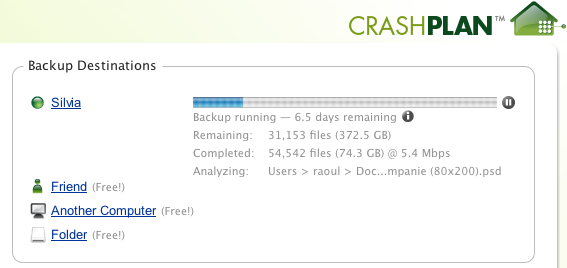
When I wrote the other post, I mentioned I kept hitting some bandwidth ceiling somewhere along the line between Romania and the US, around 2 Mbps. Somehow, that ceiling has since disappeared. I’m now getting speeds up to 25 Mbps, though it’s usually around 5-7 Mbps.

So if you’re in need of a way to back up to a remote location, inexpensively, then CrashPlan is the way to do it. If you don’t have a friend who’s willing to help, that’s okay, you can back up to the CrashPlan servers for $4.50/month, or you can get the family plan, which covers all of your household computers, for $8.33/month. That’s very reasonable, and it’s definitely worth it.

Standard
Thoughts

Bring back POP3 for Gmail, Apple

Due to some file corruption issues, I’ve recently had to re-install Snow Leopard on my MBP. Afterward, as I set up Mail, I found out there was no way to configure my Gmail account for POP3 access. IMAP was the only choice. I searched for this on the internet, and it’s a confirmed “design” behavior in Snow Leopard.

I really dislike it when I’m told by someone else how to manage my digital stuff. I’m an IT professional, and I like the POP3 protocol. I don’t care if IMAP is better. I use IMAP on my iPod Touch or iPhone or iPad or Nokia N95, and for those, it works great. But all I want to do on my laptop/desktop is to download my emails via POP3 and archive them by year, then move them into long-term digital storage. (I have an email archive going back to 1996.)

I also want to keep the emails in my Gmail account, so I have them in two places, just in case. You can’t do that with IMAP. You drag an email onto a local folder, and it’s gone from the cloud. I also dislike the fact that IMAP stores a local cache of the cloud emails, eating up space on my hard drive.

Thankfully, I was able to use Time Machine to retrieve a previous version of the Mail Preference file, restored it, and I was back in business with POP3. But everyone who chooses to do a fresh install of Snow Leopard (not an upgrade) is out of luck if they want to use POP3 for Gmail.

Now along comes Apple and says I can’t use POP3 for Gmail anymore, because they don’t feel like including it as a config option in Snow Leopard’s Mail. That really bugs me. It’s not like it cost them anything to have it in there. The code for POP3 was written more than a decade ago. It’s a simple, light protocol (much simpler than IMAP).

Apple, why are you forcing me to do something I don’t want to do? If I like using Mail and POP3 works for me, why take it away? That’s rude. Work on improving the OS, and making it do more, but don’t take away something as basic and simple as POP3!

Standard
Thoughts

Where’s the SmugMug Publish Service for Lightroom?

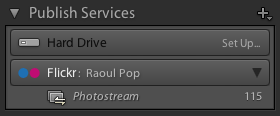
I love the Flickr Publish Service in Lightroom 3, and would love to see SmugMug make their own.

The only thing missing for the Flickr service is for it to know which photos I’ve exported and uploaded to Flickr before the service became available, in previous versions of Lightroom. I for example have either tagged the photos uploaded to Flickr with, obviously enough, “Flickr”, or have added them to a Flickr collection in Lightroom, so I could easily find them.

Here’s where SmugMug has the chance to shine! I’d love to be able to publish my photos to SmugMug directly from Lightroom, using the Publish Services functionality, so I could always sync up any photos that I’ve re-developed or where I’ve updated the metadata. But for this service to really stand out, it needs to know which photos I’ve already uploaded.

You can see where this is going, right? I’ve already tagged all my SmugMug photos, and have already placed them in collection sets and collections that match my SmugMug categories breakdown exactly. With a little bit of computing power and some smart algorithms, the folks at SmugMug could put together a killer Publish Service for Lightroom that incorporates all the Flickr functionality and bests it by matching my already-uploaded photos.

What about the cost? The Flickr Publish Service is free to use for all Flickr users, but you cannot re-publish uploaded photos if you’ve changed them in Lightroom. (You can, but if you’re not a Pro, it’ll wipe out any comments and faves on the photo, so it’s not advisable.)

SmugMug could use a similar approach. Their Publish Service could be free for basic SmugMug users, with limited functionality, and it could offer full functionality to Power and Pro users. (I myself have the Pro membership.) I’d even be willing to pay a one-time fee to download and install the service, because I think the functionality would be amazing.

Standard
Thoughts

Metadata: DNG vs RAW

Generally speaking, I prefer the Adobe DNG format over the proprietary RAW format given to me by a camera, because I like the fact that it’s more or less future-proof. With a DNG file, the meta-data resides inside the file — like with a JPG — but the format is lossless, same as a RAW file — and unlike a JPG.

In spite of the fact that it’s a “publicly available archive format”, I would like to see more camera manufacturers adopt it, so I can feel more comfortable using it. I realize companies like Hasselblad and Leica have already adopted it, and you can take photos directly in DNG format on some of their cameras, but until the big camera manufacturers like Canon and Nikon adopt it, it won’t have the mass acceptance it needs to ensure its long-term survivability.

Still, I have begun to convert the RAW files in my photo library to DNG. By my count, I have converted about 30% of my 77,000 photographs to DNG format, and I am converting more of them every day. Let’s hope Adobe sticks to its word in the future and I’m not left holding the bag, having locked my photos into a format that might become obsolete.

Long-term benefits and potential caveats aside, I should point out a more current disadvantage between DNG and RAW. It has to do with metadata.

Yes, it’s true that with a RAW file, you’re stuck working with your metadata in sidecar XMP file, and that file may get corrupted, or you may lose it, thus losing your metadata and the processing directives for Camera Raw or Lightroom or whatever you’re using to process your photos. With a DNG, everything resides inside the file. There’s no XMP file, which is a good thing, most of the time.

But when you’re backing up your library, and let’s say for the sake of the argument that you’ve got to back up 20,000 photos, which is what I’m doing right now, and you’ve made minute changes to the metadata of all those files — only changed one EXIF or IPTC field — the backup software won’t care. You’ll have to back up 20,000 DNG files, each (in my case) between 12-24 MB. That’s going to take a LOT longer than backing up 20,000 XMP sidecar files, each of which is only 15-25 KB, because those are the only files that will have been changed if I update the EXIF or IPTC data for a whole bunch of RAW files.

That’s one area where RAW trumps DNG. I’m willing to overlook it if DNG will indeed prove to be a future-proof format, but that remains to be seen.

Standard
Reviews

CrashPlan works for transatlantic backups

Updated 11/01/16: I’ve revised my opinion of CrashPlan. See here for the details.

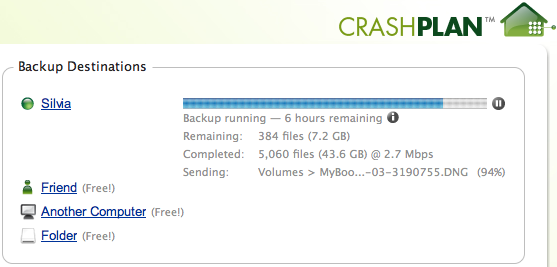
Last week, I wrote an article called “What’s On Your Drobo“, and in it, I mentioned that I was going to try to use an app called CrashPlan to do backups from my photo library in Romania to my backup location in the US. I’m happy to say that it works as expected, and no, this isn’t an April Fool’s joke. Here’s a screenshot of an active backup. At the time, I was getting 2.7 Mbps throughput.

There is a bandwidth bottleneck somewhere, though I’m not sure where it is. My broadband connection in Romania sits at 30 Mbps up and down, as I mentioned here, and my parents’ broadband connection clocks in around 16 Mbps down and 4 Mbps up. Theoretically, since I’m uploading and they’re downloading, I should be getting at least 15 Mbps, but I’m not. So it looks like there’s either a bottleneck as my data exits Romania, or as it goes through the transatlantic fiber optic cables. If someone can chime in on this, I’d love to find out more. I do know that I hit that same 2.5 Mbps ceiling as I upload to SmugMug, YouTube and blip.tv.

Bottlenecks aside, I’m just happy I can do off-site backups, and at least given my current setup, it’s free! CrashPlan works as advertised! I have to admit I was a skeptic when I downloaded it and installed it. I figured it would work on the local network, which is where I did the initial backups, but it would surely run into some firewall issues when I tried it from another location. Nightmares of re-configuring my parents’ firewall remotely flashed before my eyes… Amazingly enough, I didn’t have to do any of that! It just works!

So, if you’re interested in doing this sort of thing, download CrashPlan (it’s multi-platform), install it on both computers where you want to use it, configure it (use the help section), test it, then let it do its thing!

One thing I need to mention is that if one of the computers falls asleep, the backup will be paused until it wakes up. Even though I set my parents’ iMac to wake up for network traffic, CrashPlan doesn’t seem to be able to wake it up when I try to start the backup from my end. Keep that in mind and plan your backups accordingly.

Standard