How To

The cat house – part 1

This is part one of a personal carpentry project whose stages were recorded on video: building a cat house for our two kittens. Here are the other parts:

The materials used are a mix of reclaimed and leftover lumber, insulation and double-pane glass from the renovation of our place. Instead of letting them go to waste, I decided to build a solid shelter that could withstand the cold temperatures of the coming winter and also provide adequate insulation and ventilation against the summer heat.

In this video clip, I show the frame and the joints of the cat house. You’ll also get to see our two kittens.

See this video on blip.tv, SmugMug or YouTube.

Standard
How To

Site optimization — the order of your scripts and styles

I watched this video yesterday, where a Googler talks about the importance of ordering your scripts and styles correctly in order to speed up the rendering of your website, made a quick change to my header file, then ran the Page Speed extension for Firefox to see how I was doing. While there still some things to address that could make my site load faster, some of which don’t depend on me but on external JavaScript files from ads and stats and such, I’m glad to see things are a little snappier today.


Google Webmaster Central — Optimizing the order of scripts and styles

There’s extra documentation on this very topic available from Google, in the help files for its Page Speed extension. It’s worth a read, because a quick re-ordering of the code in your site’s header could shave as much as 50% off your site loading times, depending on how much JavaScript you’re using.

Standard
How To

How much water should I drink daily?

Falling upwards

Several years ago, the common advice was 6-8 cups of water a day. Lately, I’ve been hearing 8-10 cups a day. Thankfully, there’s a easy formula you can use to calculate the amount you need.

½ * bodyweight = x ounces of daily water

I didn’t come up with this on my own. It’s a formula you can find on the Hippocrates Health website. So let’s see, for my 160 lbs. body, I’d need 10 cups of water per day.

½ * 160 = 80 ounces / 8 = 10 cups of daily water

For those of you on the metric system, 1 ounce is about 25.6 ml, and 8 ounces (1 cup) is 237 ml (or a little more than a quarter liter).

For my needs, that would work out to 2.36 liters per day. It’s really not that much, particularly on these hot summer days. The sad thing is I’m not drinking enough, and then I end up with these monster headaches. The lack of water may not be the main reason, since I’ve got plenty of other things going on, but it sure is one of the contributing factors.

Standard
How To

How to display recent photos from your SmugMug feeds

I was asked by a reader (Andrew M.) how I display the most recent photos from my SmugMug galleries on my home page. He was aware that I use the SimplePie plugin for WordPress, but wasn’t sure how to get the same look when starting from scratch.

Before you read any further, keep in mind this is a very specific tutorial about WordPress, SimplePie and SmugMug. It has other applications, like for other image feeds and with some code tweaking, for other blogging platforms, but if you want to do those things, then Google is your friend.
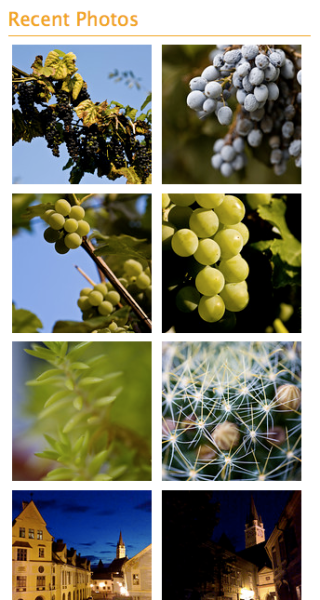
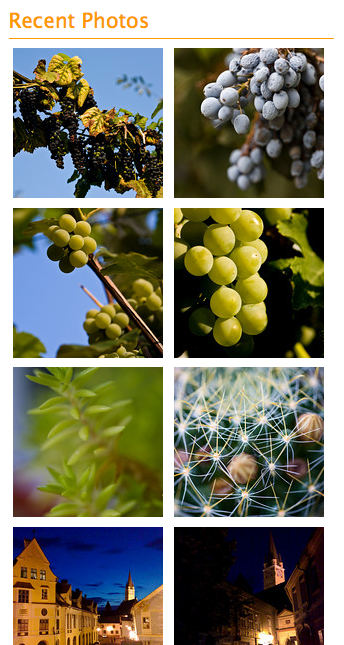
recent-photos-screenshot

The thing that makes things a little complicated in my situation (as opposed to other image feeds) is the somewhat non-standard structure of the SmugMug feeds. For one thing, they don’t provide a URL for the image thumbnail where you’d expect it to be, and for another, they provide the image description instead of the image title. (To check this, mouse over a SmugMug thumbnail, and you’ll see the description pop up over the image.) But as long as you’re willing to dig into the feed code and find the names for the fields you need, then you can plug that info into SimplePie and go from there. Thankfully, I’ll do it for for you below. Lucky you.

Just a quick general disclaimer before I start though: I don’t do handholding. I’ll provide the instructions for how I did it. But in the unlikely event that things still don’t make sense to you, do me a big favor and read the SimplePie Manual, before you ask me questions. I did it and it helped me work things out. It should do the same for you if you use a little elbow grease. Thanks.

Okay, onto step 1: find the SmugMug feed URI. SmugMug provides several feeds for each user account. Go to the bottom of your gallery page and click on the Available Feeds link to see all of them. We’re going to use the Recent Photos Atom feed. In my case, it is:

http://www.raoulpopphotography.com/hack/feed.mg?Type=nicknameRecentPhotos&Data=raoulpop&format=atom10

smugmug-available-feeds

Step 2 is creating an Images Only template for SimplePie. If you’re not sure what this is, you need to read through the SimplePie documentation. The location where you need to place the new template is:

[WP Install]/wp-content/plugins/simplepie-plugin-for-wordpress/templates/

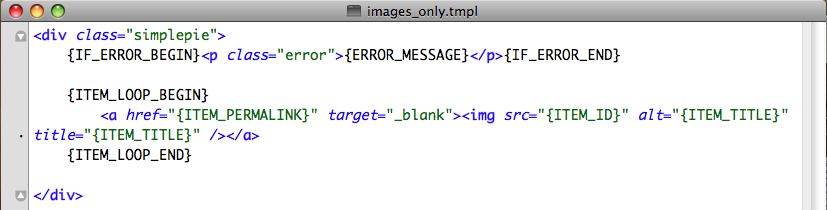
This is not arcane info, btw. It’s provided in right on the SimplePie general settings page, which is what I’ll talk about in Step 3 below. Now let’s talk about what you’ll put in the template file. This is where the digging through the feed code part comes in. I kept things simple, and this is what my images_only.tmpl file looks like.
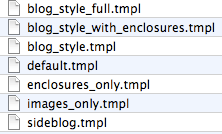
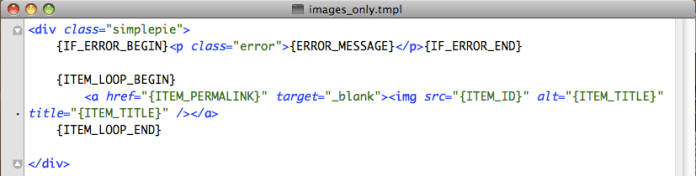
simple-pie-template-files

images-template-code

As you can see, the code is minimal, which is the way I like things. I am specifying a simplepie class in the code, but as you can see from my CSS file, I’m not styling the div in any way. I’m letting the rest of the CSS code and the other divs handle the way the images flow within this particular section.

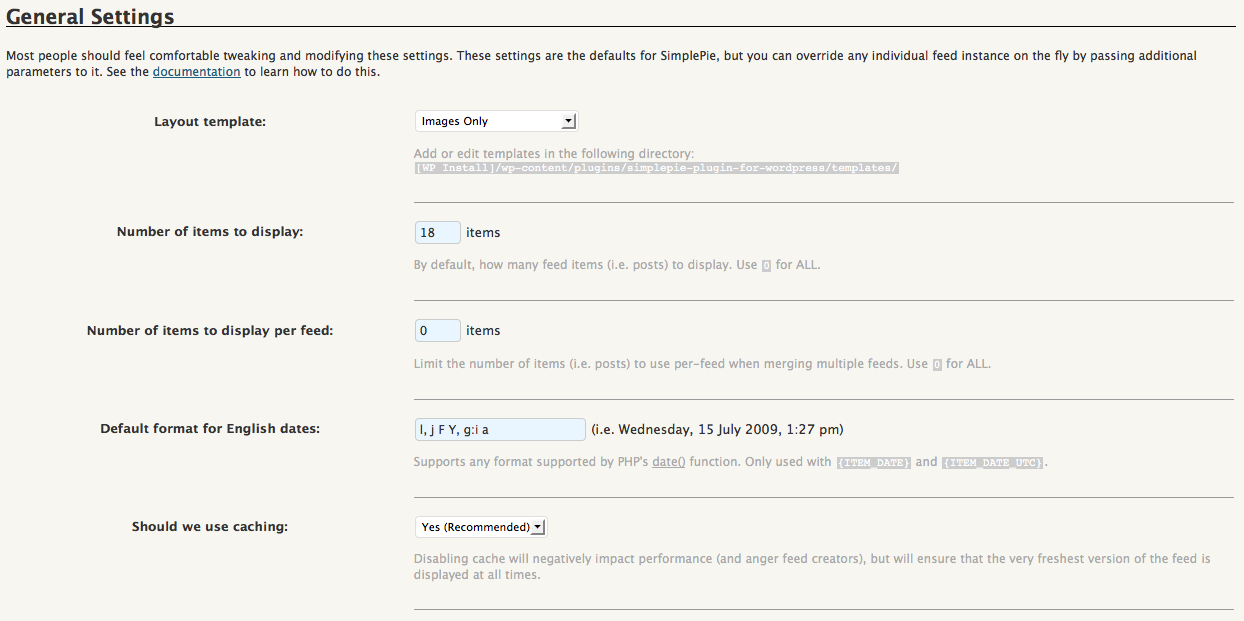
Step 3 is adjusting the general settings for SimplePie. Now that we’ve created an Images Only template, we need to let SimplePie know that it should use it. Go to the WP Admin Panel and locate the SimplePie settings. Match my settings as you see them below.
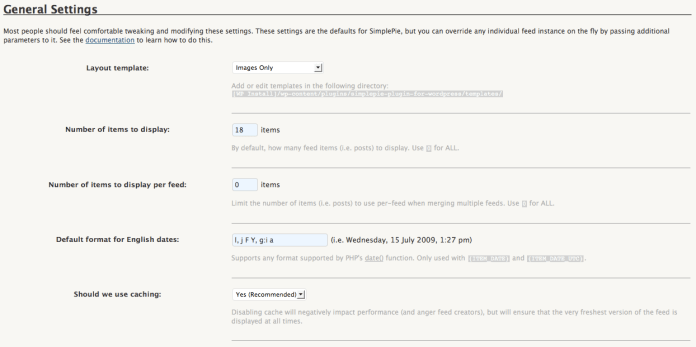
simple-pie-rss-general-settings

I’m telling it to pull the latest 18 photos. You may find you need to pull less or more. It’s really up to you. Use the caching option, it’s faster, but know that you’ll need to create a cache directory where SimplePie can store the images. It’ll walk you through it when you say Yes, and you may need to adjust privileges on the server side. Check out this chmod tutorial from WordPress if you’re not sure how to do that.

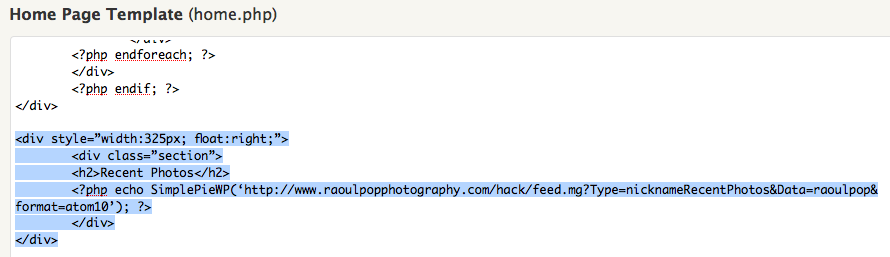
Step 4 is placing a code snippet on the home page. Now that you’ve gone through all that fun, you’ve got to wrap things up. Go to your home page template in WordPress, and where you want the images to appear, place the following code snippet — it’s what triggers SimplePie to pull your SmugMug photos feed and display the feed items how you want them, in accordance with the code in your Images Only template.
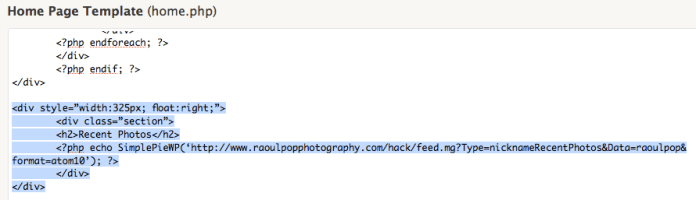
home-page-simple-pie-codeSee the highlighted text, but you only need to worry about the php code line. The rest is my own code that specifies the div and section styles. Use your judgment about how to style the thumbnails, and how you want them to display. It may take a bit of trial and error until you get it right, but if you persist, it’ll look good in the end.

Hope this helps!

Standard
How To

Luigi Cornaro and the simple life

Luigi Cornaro

A Venetian nobleman on the brink of death discovered a way to stay healthy and alert to the ripe old age of 102. He lived in the 15 century, and his name was Luigi Cornaro (1464-1566).

At that time, Venice was a thriving commercial port — one of the main shipping hubs in Europe — and a life of abundance with little thought for health was the norm for all wealthy people there. What also factors into the equation is the average life expectancy during that time, which was somewhere around 40 years. Yet Luigi Cornaro was a nobleman who chose to live a balanced life, eat a healthy diet, and lived to 102 years. That is truly remarkable.

How did he do it?! It’s really no mystery. At the age of 83, he wrote a treatise on the subject, entitled “Tratatto de la vita sobria”, followed by three more treatises on the same subject, published at the ages of 86, 91 and 95, respectively. In his treatises, he described in detail just how he lived his life and what he ate, hoping that others would follow his advice and reap the same benefits.

He believed in consuming the best quality and most easily digestible foods in small amounts. He reduced his food intake, cutting it down to twelve ounces a day of solid foods, divided into two meals with fourteen ounces of light wine, also divided into two servings. He sometimes ate a little beef, but mostly he would eat one egg yolk, vegetable soup, coarse, unrefined bread, salads, small quantities of locally grown fresh seasonal fruits and vegetables, and he’d drink slightly fermented wine. His stomach didn’t agree with fish or chicken, so he avoided them.

The amazing part is that all his faculties stayed intact and even better, improved with age, right up to the day of his death. He had no memory loss, his eyesight and hearing grew keener with the years, and he was able to stay active, physically and mentally, in his advanced age. In his nineties, he even studied singing and horseback riding.

His writings are now part of the public domain and thus freely available for download. If you want to live a healthy life, do yourself a favor and read through them. Google Books, has an 1833 English translation of his writings, entitled “Discourses on a Sober and Temperate Life“, translated and edited by Sylvester Graham. You can download the entire book as a PDF there, or here on my site (see 1st PDF below). You can also download an abridged version of Cornaro’s writings as a 6-page PDF (see 2nd link below). It was sent to me via email, and am not sure who its translator is, but would be glad to give credit if someone will contact me.

If you’re interested in modern advice on the subject, US News recently published an article entitled “10 Healthy Habits that Will Help You Live to 100“. They didn’t mention Cornaro, but their advice is easy to follow, if you’ve got the willpower.

Download Luigi Cornaro’s writings:

Standard