Places

Selected photos from Vadu, Romania

The beaches at Vadu and Corbu, two adjoining villages on the shores of the Black Sea in Romania, are some of the last wild (more or less untouched) beaches on the Romanian seaboard.

Vadu has recently been made part of a large natural reservation called Rezervatia Biosferei Delta Dunarii. Nothing has changed as a result of that, except some hefty fees now get levied on every visitor to the beach (20 RON/person/day and 100 RON/car/vacation).

I don’t know where that money goes, and what good, if any, it’s being used for. Perhaps it goes to pad someone’s pockets, as is often the case in Romania. What I do know is the fees are expensive, and the garbage left by some tourists still doesn’t get picked up by the park staff, as you’ll see in pretty much any of the photos shown here if you look carefully. It seems the paramount concern of the park staff is to make sure every person that enters the beach area pays their fee.

The landscape is very flat near Vadu. As far as the eye can see, the fields are wide, flat as a pancake, and the horizon is but a thin line, far, far away. Dobrogea, the province where Vadu is located, is a flat place, it’s true, but it does have gentle rolling hills, gorges and the oldest mountains in Romania (they may look like hills, but they’re mountains). (See my Dobrogea gallery for more photos from the province.)

When we visited Vadu, we didn’t have time to stay and spend a day there, but we did take some time to walk on the beach, and through the barren fields near the beach.

The sunset was beautiful that day.

Standard
How To

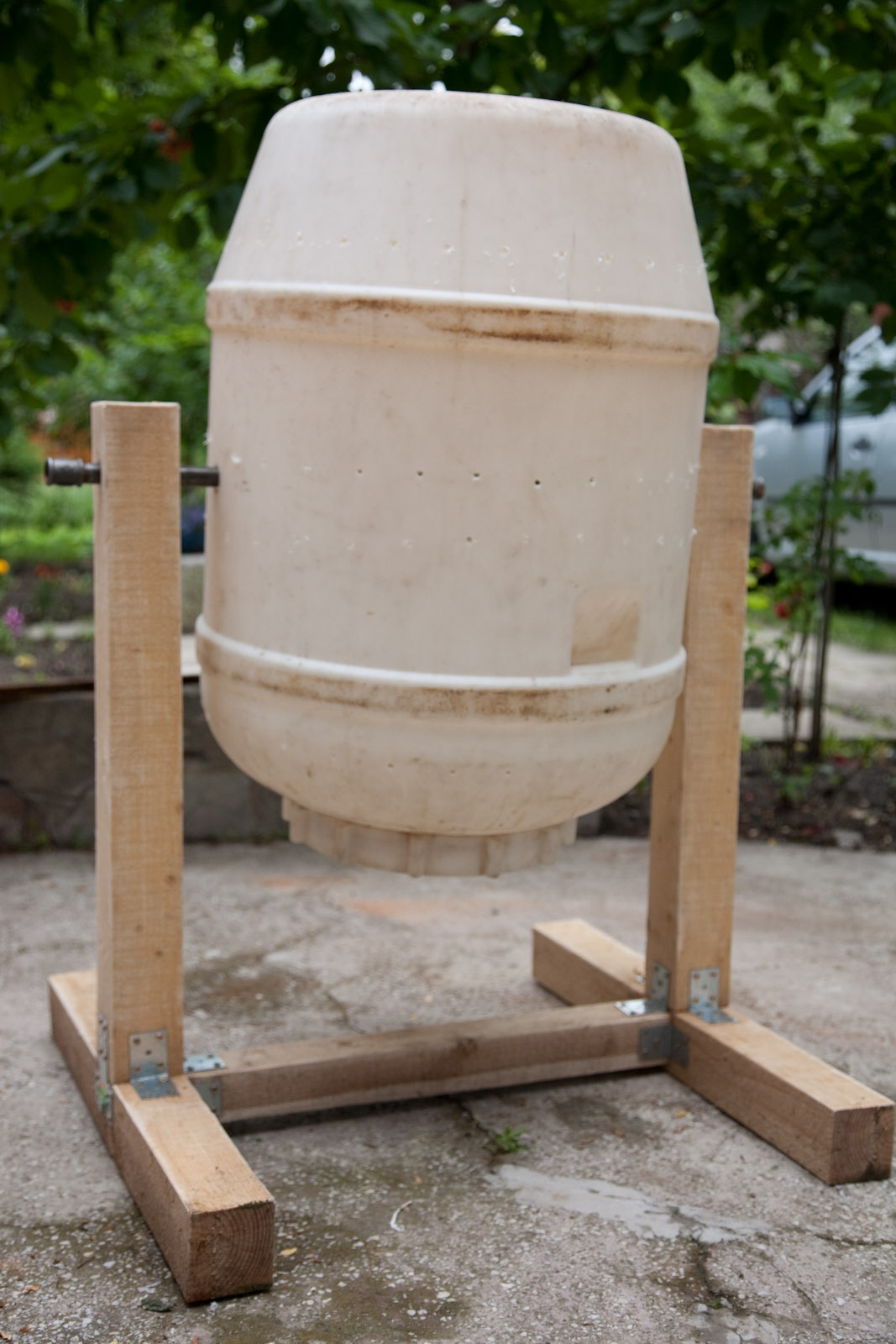
How to make a compost tumbler

Last year, I made a composter using this plan from Boys’ Life Magazine. I modified the wooden frame somewhat, in order to use more wood screws and brackets — not bolts, nuts and washers — because that’s what I had to work with.

Before I recommended the design to others, I wanted to see how well it would hold up over a winter, and after proper use. It’s a year later, and I can tell you it’s held up just fine, so feel free to build your own if interested.

There are a few things to know that might help as you put your composter together:

  • Make the legs as wide as possible. There is a lot of torque generated by the tumbler as you rotate it to mix the compost. If the legs are too short, your composter is liable to tumble over.
  • Don’t drill the holes for the center axis (the pipe) at the middle of the barrel. Do it more toward the bottom of the barrel. This is because you can’t load the barrel completely with compost — it’ll become impossible to turn it, and the weight may also tear its sides, as you’re using them for support. You’ll likely load it a quarter-full or half-way full, and this means its center of gravity will be lower than the middle of the barrel. If the axis of rotation is at its middle, but the center of gravity is lower, you’ll be struggling to rotate it as you bring its bottom up. So make the axis lower, and it should make it easier for you to tumble it.
  • The pipe running through the barrel may be a nice and simple way to get the barrel to rotate, but it makes it difficult to unload the compost with a shovel. It doesn’t all come out by simply turning it upside down, so be prepared to reach in there with a scoop or something smaller than a shovel and dig out the compost. It’s not going to be pretty, I’ll tell you that right now.
  • Be prepared to drill more aeration holes into the side of the barrel than you think are necessary. Drill as many holes as you think are needed at first, but if your compost starts to smell bad even though you’re tumbling it, that means it’s not getting enough air, so drill more holes.

I think that’s it. Happy composting!

In case the original article from Boys’ Life Magazine ever goes offline, you can also download it in PDF format here: Make a compost tumbler — Boys’ Life magazine.

Standard
Events

Interviewed by Jen Consalvo

I was recently interviewed by Jen Consalvo about my photography. She’s conducting a series of interviews with selected photographers. The series, along with photos from each one, will be included in an upcoming book she’s writing, entitled “Love Your Photos“.

If you’ve been wondering why I write so much about Romania these days, you’ll find the answer in Jen’s interview.

Quoting from her intro:

“as i mentioned in my last post, i’m thrilled to kick off my interview series with photographer raoul pop. i think i first saw raoul’s work when he photographed a tech cocktail event in dc, and was quickly enamored with his style. raoul can turn a seemingly mundane scene into something completely eye-catching, romantic or exciting, which is why i’ve looked to his work for my own inspiration. his photos speak for themselves, but raoul was gracious enough to answer my questions with amazing energy and detail and provide some beautiful examples of his work. i hope you enjoy this interview and raoul’s gorgeous photos as much as i do.”

If you don’t know Jen, she works at AOL along with Frank Gruber, is involved with TECH cocktail, and runs her own projects from Shiny Heart Ventures — websites such as ThankfulFor, BodySoulConnect and Shiny Maine Lobster. She blogs at JenConsalvo.com.

Jen, thank you very much for the wonderful interview, and I’m very glad you find inspiration in my photographs! I wish you all the best in your endeavors!

Standard
Reviews

Time of capture metadata bug in iPhone 4 movie clips

Updated 9/12/10: I’m not sure any more if this is an iPhone 4 glitch or an Adobe Lightroom 3.2 bug. A thread has been opened in the Adobe Lightroom Forum, if you’d like to chime in there.

After upgrading the iPhone with iOS 4.1, I recorded a new video clip, imported it and some new photos into Lightroom, and the same wrong date and time appear for it.

According to a comment on my thread in the Apple Support Forums, the correct time of capture is displayed for iPhone 4 video clips elsewhere but Lightroom. And I also noticed that Lightroom displays the very same incorrect date and time of capture for video clips taken with the Nokia N95.

Updated 9/27/10: I’ve been in touch with Adobe, and it turns out this is a “designed” behavior. That is, because movie clips do not have EXIF data (there is no standard for EXIF data when it comes to them), they are assigned a random date and time as they’re imported into Lightroom. HDSLR video files are accompanied by a .THM file which stores the necessary EXIF data, and that’s why they show up properly.

Quoting from Davide M.’s (Adobe) response:

So I then had a look at our bug database and it turns our this is a known issue with mobile phones although somewhat out-with our control. Movie files do not technically have EXIF data or at least the standard has not yet been established. Since the import process can assign a timestamp to a movie file, we ignore this time stamp since it can be inaccurate, as shown by the example of your video file being changed by the simple process of email. Other applications while appearing to work fine, in fact are simply showing you the files creation date. If you were to duplicate the file, you will see that the timestamp in these other applications will change to the time the file duplication took place.

The reason why most DSLRs work is because they create a sidecar file containing that information. Files with no timestamp, such as the ones from the iPhone and the Nokia N95 do not create this and hence default to 1/1/04 when looking at the Loupe information overlay.

In the example you used, the Canon 7D creates a .THM sidecar file with the same name as the video file it generates. This contains all the data associated with the video file.

Still, this is problematic behavior, as it introduces erroneous times of capture in these movie files. So I asked Davide if it would be possible for Lightroom to be updated so that it writes a more accurate time of capture for these movie files. Thankfully, he agreed to log it as a feature request. Time will tell if this will make it into a future LR update. Quoting him below:

That’s certainly something I can log in our feature request list. Because this has been deemed ‘as designed’ by our engineering team (due to the lack of EXIF data in movie files) it is not technically a bug. None the less, I can see that this would be a useful addition to our application. Thanks for bringing this to our attention.

Thank you, Davide!

After downloading a few movie clips taken with an iPhone 4 (running iOS 4.0.1) onto my computer, I saw right away that their time of capture was incorrect, even though the iPhone’s time had been set up correctly. I took a few screenshots of the movie clips in Lightroom, which you can see below. Click on each to view them large.

This time metadata error happens when using either the main (back-facing) HD video camera, as shown above, or the front-facing VGA camera, as you can see from the screenshot below.

It looks like iPhone 4 records the same time for all video clips recorded with it, set at 1/1/04 1:44:24 AM.

It goes without saying that any digital video camera worth its salt will record the time of capture properly. The question, naturally, is when Apple will fix this glaring bug?

For comparison purposes, here is a screenshot of a Canon 7D movie clip, also shown in Lightroom. The time of capture was recorded properly, as was to be expected.

Standard
Thoughts

SmugMug, are you listening?

I’m disappointed with SmugMug over their continued lack of support for proper export and maintenance of photographs directly from Lightroom. Back in July, I wrote about the Flickr Publish Service in Lightroom, and wondered when SmugMug would introduce their own.

What I was really looking for (and I said this in the post) was a way for the publish service to identify what I’ve already uploaded and allow me to re-publish those photos where I’ve made changes to the metadata or to the processing. The official Flickr Publish Service didn’t offer that option.

A few of my readers (Gary, Chris, Russell, thanks!) pointed me to Jeffrey Friedl’s excellent plugins for Lightroom, and I’ve been using them ever since. As a matter of fact, I’ve switched over to them completely. I use them for all four web services where I currently publish photos (SmugMug, Flickr, Facebook and PicasaWeb). I don’t know what I’d do without them. Wait, I do know — I know for sure I’d be doing a LOT more work and spending a LOT more time uploading and maintaining my online collections.

With Jeffrey’s LR plugins, I was able to identify about 90% of the photos already uploaded to SmugMug, and about 75% of the photos already uploaded to Flickr. In the case of Flickr, I then did manual updates and re-identifies so I could get it to know 95% of the photos already uploaded. This means Lightroom now allows me to quickly identify, update and replace almost any photos I’ve got at SmugMug, Flickr, Facebook and PicasaWeb. This is huge.

There is a catch, though, and it’s a BIG one. I keep running into the same “Wrong Format ()” error with SmugMug, which means I still haven’t been able to straighten out the photos I’ve uploaded to them. Here are a couple of screenshots of the error messages I get. It starts with a “TimedOut” error, then I get the “Wrong Format ()” error, then the upload process aborts.

I get these errors almost every time I try to re-publish an updated photo, but I don’t get them as often when I try to upload new photos. To give you an idea of how bad things are, I’ve currently got 109 photos to update in one of my galleries at SmugMug, and last night, I had about 167 photos. I’ve had to restart the re-publish process about 30-40 times since last night. You do the math, but I think it works out to 1-2 photos per error. This sucks. I should be able to just click the Publish button and walk away, knowing all of my changes will propagate correctly.

I’ve contacted Jeffrey, and I’ve contacted SmugMug. I’ve had extensive email conversations with each. SmugMug alternates in their replies. They’ve said the following to me:

  • It’s a fault with the plugin
  • It’s something on their end but they’re working on it
  • There’s nothing they can do about it
  • I should use something else to upload photos
  • They blamed my setup, which we ruled out after some internet connectivity tests

Jeffrey says there’s nothing he can do about it, and I believe him more than I believe SmugMug. Want to know why? Because his other plugins work just fine. I’m able to re-publish updated photos to Flickr and Facebook and PicasaWeb without any problems. Only SmugMug somehow can’t handle my uploads.

I’ve tried reloading the plugin, installing it anew, removing and re-adding the publish service, upgrading the plugin, but nothing. I still get the same errors.

My question for the smug folks at SmugMug is this: how is it possible that Facebook and Flickr and PicasaWeb have worked out the re-publish issues, but you haven’t? What’s taking you so long? Why can’t you work out the same problem on your end?

I was hoping that with the release of Lightroom 3.2, and the release of the official SmugMug Publish Service for LR (hat tip to David Parry for the advance notice), that SmugMug would work out the kinks in their API, but it looks like they still haven’t done it. I tried their plugin, but of course they took the easy route, like Flickr, and haven’t introduced any functionality that would identify photos already uploaded to their service. Only Jeffrey Friedl’s plugins offer this feature.

This leaves me terribly disappointed. As a SmugMug Pro, I don’t want to bother with error messages. I don’t want to bother with posts like this. I’d rather post photographs and update my SmugMug galleries in peace, but I can’t.

If you’re having the same problems with SmugMug, please, write to them, and ask them when they’re going to get their act together. This problem’s existed for several months. How much more time will it take until they deal with it?

Standard