How To

A quick maintenance operation that will prolong the life of your laptop

I upgraded the RAM in my laptop yesterday, and stumbled onto a really easy maintenance job that will most certainly prolong the life your laptop, and help it run faster, cooler and quieter. It sounds impossible to do all that in one fell swoop, but it’s really easy to do, and it works. I’ll give you a hint: it has to do with your laptop’s cooling.

I realize your laptop is going to be different than mine, so my photos may not help you much when it comes to doing this on your own laptop, but bear with me, the principle is the same, and this simple clean-up job will really help.

What I’m talking about is the laptop’s cooling fan assembly. It’s the fan that cools the processor’s heatsink, and is responsible for keeping the processor below the upper temperature threshold. It’s like your car’s radiator. If it wasn’t working, your car would overheat very fast, wouldn’t it? Same thing here, except your laptop’s “radiator” is prone to getting clogged up with dust – lots of it, too.

After about a year and half of using my laptop mostly on clean tables — not on carpets, or my lap, or on tablecloths, as some of us do [!] — I was very, very surprised to find out how much dust had accumulated on my laptop’s cooling grill. I didn’t even open my laptop in order to inspect it. I just wanted to install some extra RAM, but saw the cooling fan and figured, hey, let me open it up even though it looks clean enough from the outside. Boy, was I in for a shocker! Have a look at this photo to see for yourselves.
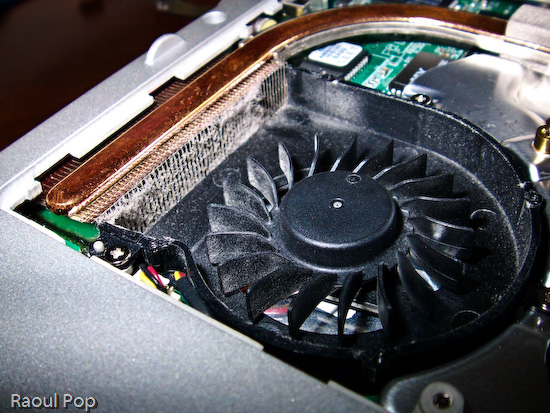
Cleaning an Averatec 6240 series laptop

You may not think that layer of dust is much, but have a look at a macro photo I took of a piece of it. I used a moist cotton swab to pull off the dust from the grill. Can you see how thick it was? It’s a wonder any air managed to get through!
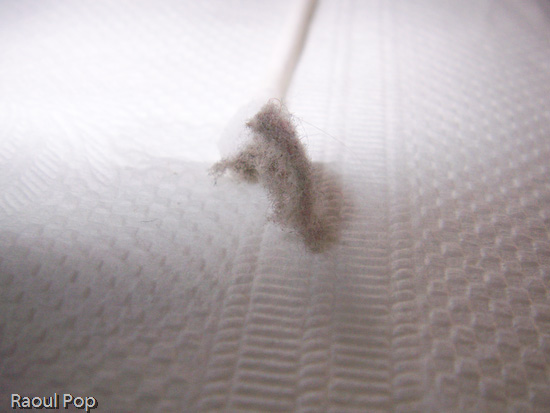
Cleaning an Averatec 6240 series laptop

In case you’re wondering how I removed the cover from the cooling fan, it’s simple. There were four small screws holding it in place. They were each about the size of those screws you find in the frames of your eyeglasses, so you can use the small screwdriver from a frame repair kit. (If you’re a geek like me, you probably have your own mini-screwdriver set.) After using moist cotton swabs to thoroughly clean the grill, I blew through the grill from both sides of the laptop to make sure no dust was stuck inside. I was out of air spray, so I just used my lungs — if you do the same, be careful, don’t inhale the dust, it doesn’t taste good… Then I also wiped the fan blades clean with more moist cotton swabs, after which I used a couple of dry ones to wipe the entire assembly. Have a look at the finished product. Looks pretty good, doesn’t it?
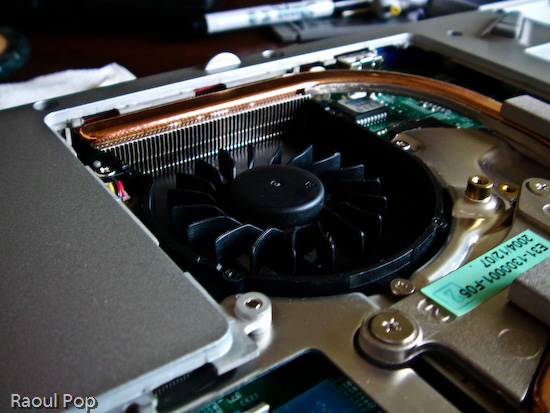
Cleaning an Averatec 6240 series laptop

The important thing to remember is that most people can do this at home, and it’s a completely user-serviceable operation. I didn’t have to remove any warranty stickers (although my laptop’s out of warranty anyway). As a matter of fact, I only removed the panel that’s supposed to give me access to the RAM. It’s a big panel, so it really gives me access to a lot more stuff.

Cleaning an Averatec 6240 series laptop

If my laptop managed to get that much dust inside after only a year and a half of normal use (on tables and desks), I can’t imagine how much dust there is in other laptops that get used everywhere, and never get cleaned! To me, it’s a miracle that most survive through their projected 3-year lifetimes, and even last beyond that. I have to wonder how much better they’d run if their owners would take the time to clean them out once in a while. My suggestion is that you schedule time to do this cleaning once a year.After I finished, I noticed a difference right away. My laptop is cooler now, and runs much quieter. Before, the fan ran in overdrive most of the time. Now, it only runs at higher speeds when the processor is crunching through difficult operations, which is the way it should be. It also runs a little faster, and it’s more responsive. This also makes sense, because a cooler processor works better. It’s the same principle behind water-cooled processors, which can be overclocked because their temperatures are kept low.

At any rate, I encourage you to open up your laptops and try this for yourselves. But please, make sure they’re turned off, unplugged from any power source, and the batteries are removed before you even think of opening them up. Also, ground yourselves before you touch the circuits. You don’t want to short anything inside with any static electricity you might generate.
Standard
Reviews

Hardware review: HP Pavilion m7480n desktop

I’ve been using the Pavilion m7480n desktop for the last 2 and a half months, and I’m pleasantly impressed. This is a great desktop system, it’s fast, stable, packed with great features, but most of all, it’s well designed, and that’s what sets it apart from other desktops on the market.

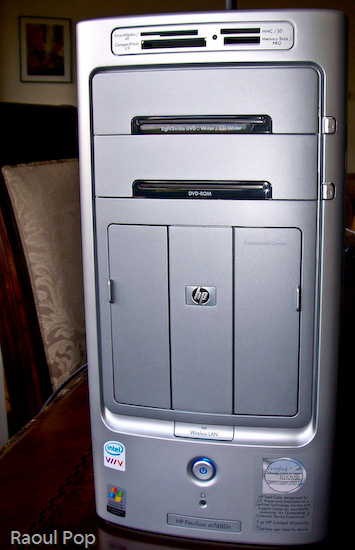
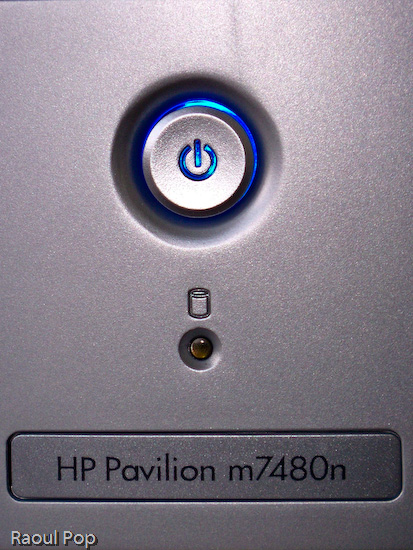
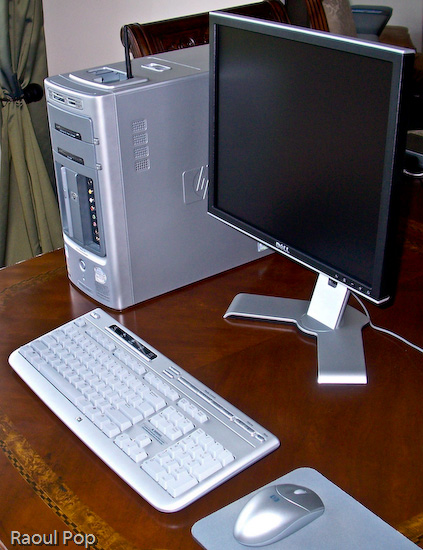
HP Pavilion m7480n Desktop

HP Pavilion m7480n Desktop

I have never seen so many great and useful features packed into the desktop form factor. Let’s start with the front side of this computer, which is, as far as I’m concerned, fantastic.

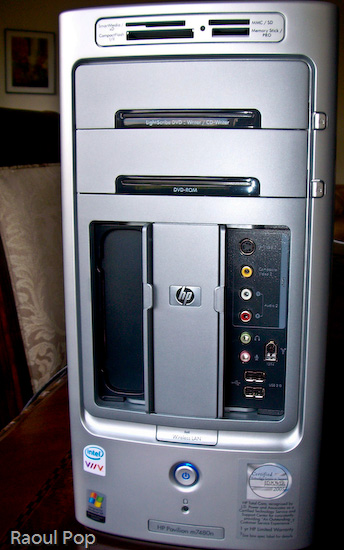
HP Pavilion m7480n Desktop

HP Pavilion m7480n Desktop

A lot of computers have flash memory readers, but not a lot of them have them custom-built into the desktop case, located right at the top for easy access, and have so many choices when it comes to card formats.Want an all-in-one solution for writing DVDs and CDs? The LightScribe drive is it. Not only will it write single- and double-layer DVDs, DVD-RWs, CD-Rs and CD-RWs, but it will also print your label for you. Also included is an extra DVD-ROM/CD-ROM drive, just for fun.

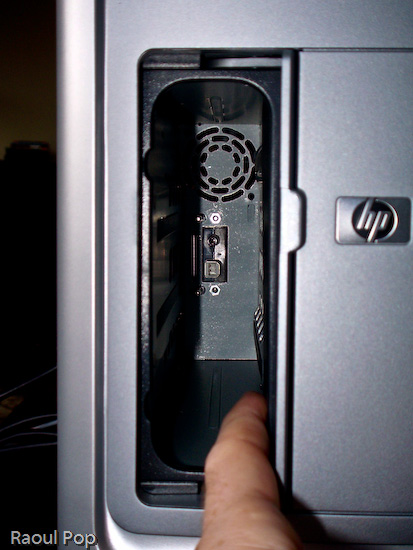
See the two panel doors? One of them is for the Personal Media Drive Bay, which is hands-down, the coolest feature you’ll find in any desktop computer. Want extra storage? Just slide in a Personal Media Drive. Want to add another hard drive? Just slide in another Personal Media Drive. Seriously, it’s that easy! The drive slides in, and automatically connects to the computer through USB, and is also powered by a special connector, no wires required. I don’t know about you, but I’m really annoyed by the extra power cords and power adapters that come with external storage drives. Sure, the drive may look nice by itself, but when you add the bulky adapter and power cord, it’s suddenly not so nice and neat. So the great thing about HP’s Personal Media Drives is that there are no cables and power adapters – you only need the drive, which is a beautiful thing.

HP Pavilion m7480n Desktop

You’d think HP would charge you a ridiculous price for this extra convenience and the custom form factor, but they don’t, which is also nice. Currently, they come in three sizes: 160GB, 300GB and 400GB. The 160GB PMD is $149.99, the 300GB PMD is $249.99, and the 400GB PMD is $319.99, which runs a little above the low margin of the market for personal storage, but not by a lot.

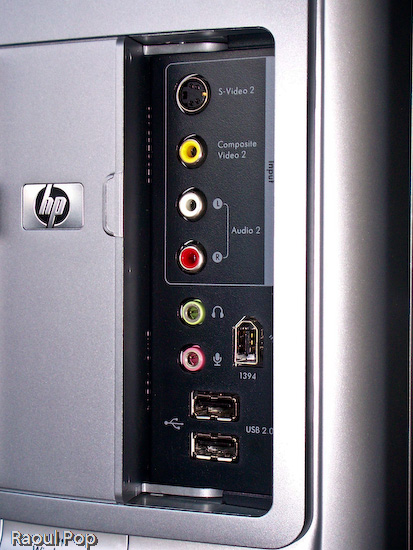
Let’s look at the other useful front panel: the Connectivity Center. Tell me honestly, have you seen such a thorough front panel on any other computer line? I haven’t. There’s an S-Video port, composite video ports, the standard headphone/microphone jacks, two USB ports, and — a really nice thing — a Firewire (1394) port. Finally, a computer manufacturer gets it, and puts a ready-to-use Firewire port on the front of a computer.

HP Pavilion m7480n Desktop

Also on the front side of the desktop, let’s not forget the little things, like the sliding doors that hide inside the chassis for the front panels (the Personal Media Drive Bay and the Connectivity Center). They’re very useful because when you don’t use the panels, you can close the doors and hide away the ports. And, you don’t have to flip them up, like on a Dell desktop (yuck), or you don’t have to slide them up and have the door fall back down after it’s gotten a little used — no, you simply slide them to the side. It just works. An added bonus on the front is a Wireless Lan light that turns on when a connection has been established — this is a great visual indicator for those of us who are less tech savvy.

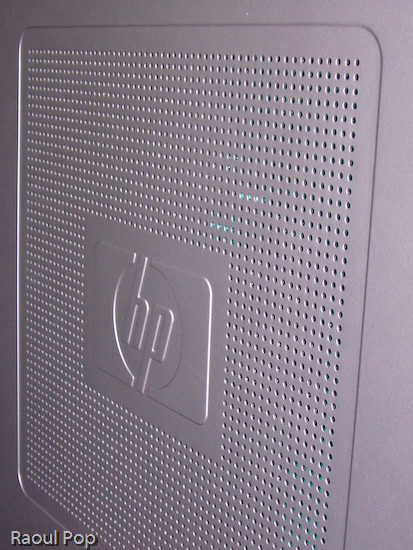
It isn’t just the front of the desktop that’s interesting. I like the side cooling grille as well. One small note: although the finish of the desktop case looks like plastic, it’s actually metal. Only the front and top side of the case are plastic — the sides are metal. Another useful feature is that this desktop runs very quietly. I’ve had desktops in the past that really made a lot of noise, so I can readily appreciate the silence in the room when I use this system. The only sound I can hear out of it is the hard drive — and that only when I really push it.

HP Pavilion m7480n Desktop

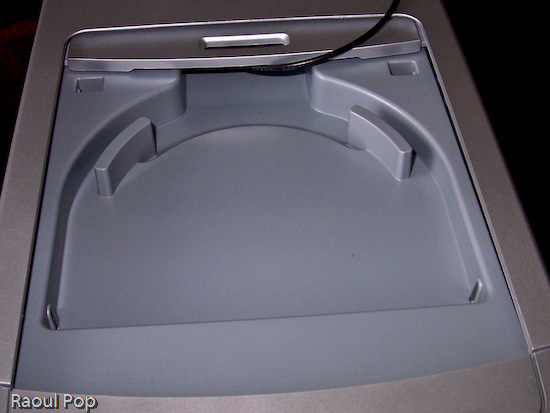
Another notable feature is the dock for an HP Photosmart printer right on top of the computer. Like the Personal Media Drive Bay, this is a feature that’s unique to HP desktops, and I really like it. Who’d have thought of building in a dock for a photo printer on top of the computer — but it makes perfect sense. You have the card reader right on top as well, so you simply slide in the flash card containing your photos or you connect your camera, and print your photos right away. You don’t have to worry about where you place the printer, because it’s right on top of the computer. This is beautiful, functional design.

HP Pavilion m7480n Desktop

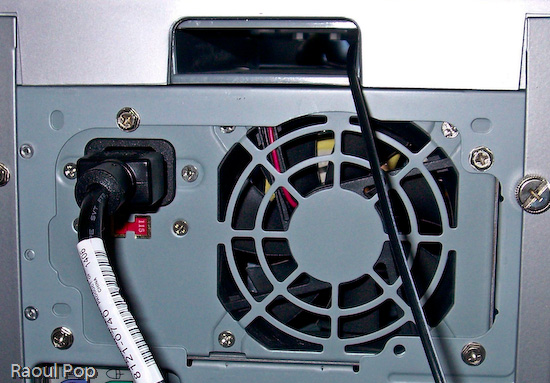
The cover for the dock is easily removed, and the really nifty thing is that HP designers included a slot at the back end of the dock for the printer wires (USB, power). That way, you can slide them right through the case and out the back, easily connecting the printer to the computer and the power supply. Very, very nice! For example, I used the dock to sit my wireless antenna in it, and I slid the antenna cable through the very same slot, pulling it out through the back of the case, as you can see below.

HP Pavilion m7480n Desktop

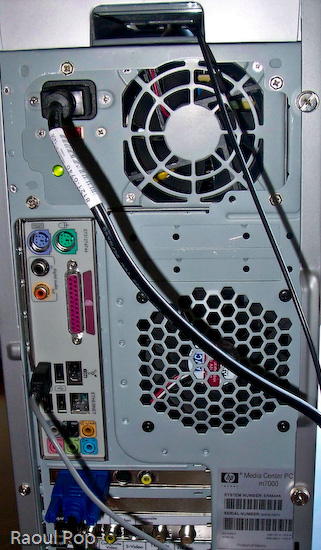
The back panel itself is also very useful. Besides the usual connectors and ports, it has digital sound in and out, connectors for 5.1 speakers, 4 USB ports and another Firewire (1394) port, a video card with S-video and RCA video out ports, and an input slot with the following ports: composite A/V, S-video, TV/Cable antenna and FM antenna. I would have liked to see a DVI-out connector on the video card, but other than that, this is a pretty good collection of connectors and ports.

HP Pavilion m7480n Desktop

This system comes standard with a wireless keyboard and mouse, and they both work great. The battery life is as expected or longer: I only had to replace the batteries in the mouse after 2 months, and the keyboard batteries are still going strong. The only thing that could be improved on the keyboard are the keys. While they work fine, they’re a bit loud, and could stand to be made quieter. The multimedia controls on the keyboard also work all the time, which, at least for me, is a departure from the norm. I’m used to seeing multimedia keys on other laptops and desktops be unreliable, so it’s nice to see them working non-stop for a change.

The HP Pavilion m7480n is one great desktop. It comes with an Intel Dual Core chip, which clocks in at 3.00GHz for each core. My system had 2GB of RAM in it, and it ran wonderfully on that. The hard drive was 300GB, and HP reserved 10GB of it for a separate recovery drive that can be used to restore the OS and applications when needed. But what sets this desktop apart isn’t necessarily the specs (which are top of the line anyway) but the amazingly useful design. Serious thought was given to functionality and ease of use when it came to the case of this desktop, and that’s what impresses me and really counts.

Standard
Thoughts

Onion tea is really gross, onion tea I hate the most

Those of you who are regular readers know that I’ve been sick with some sort of flu-like viral infection – whatever it is, it’s nasty, and it still hasn’t gone away. As a matter of fact, it came back this week for another in-home stay. I’d like to evict it, but I don’t know how.

One “nice” fringe benefit of this thing is that I get to cough a lot, and my throat hurts when I swallow. My PCP says I shouldn’t worry – thanks, doc, thanks a lot! – because it’ll go away eventually. She didn’t prescribe any medicine at all – no antibiotics, no cough medicine, nothing… So, I had to resort to finding some sort of cure, and apparently onion tea is the thing for coughing. Everyone swears it works, although they say it tastes really gross. So, after much prodding from Ligia, I caved in and decided to try it out. Boy, is it nasty! I have to drink 2-3 cups a day, and I almost vomit every time. When you look at it, it’s innocuous enough, but the taste is what kills me. Photos don’t do it justice, but I posted two of them below anyway.

I really think the only thing that would do it justice is a poem. That’s right, a poem! Let’s call it Ode to Onion Tea. I wrote it last night after drinking a cup…

You onion stew, such vile brew,
You make me sick – a nasty trick,
I know.

There you are, a filthy cur,
You stand aloof, nary a spoof,
But real!

I’m all grossed out, your stench
Is all about, you lout!
Anon –

I’ll drink you now, I must,
I know, but I’ll wince, and pinch
My nose.

I can’t complain, th’effects are known,
They’re not a bluff; you heal
My cough.

But must you stink to heaven high
And taste a bit like stale lye
And when I gulp, I want to cry
Enough!

You leave behind a fart-like taste –
I kid you not, the aftertaste
Is smelly.

My pores now reek, right as they leak
In highest feverish pitch,
Of leek.

My urine smells of onions fried,
At least that’s what I hope!
Belied!

How gross you are, o how I wish
That something better did exist
To cure my ill!

The remains of the onion tea

Onion tea

Now, dear reader, after this, could you be able to drink this vile thing?

[The title of this post is a bow to Charlie and The Chocolate Factory (2005). The song lyrics in that movie were fantastic!]

Standard
Thoughts

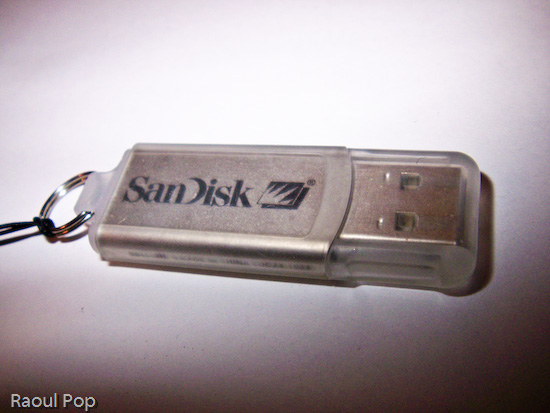
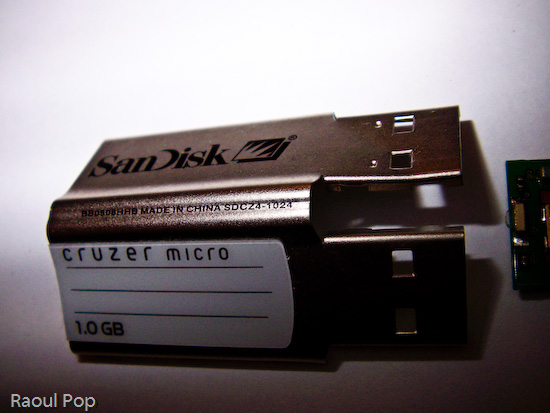
Want to see the inside of a SanDisk Cruzer 1.0GB USB flash drive?

Yes, you read correctly. That is a Google-compliant post title. It may give away the entire post, but I can be sure it’ll get indexed properly now…

Now for the raison d’etre, or the why, as we say in these here parts. My friend Peter is the owner of the USB flash drive in question. Actually, he has two of them, and one stopped working. Ever curious, he wanted to see what was inside, so he took it apart. One of the fringe benefits of having a geeky friend and being a geek yourself (and I mean that in the nicest way, honest) is that you get to share such delightful experiences. So when Ligia and I visited them, Peter showed me the parts, and suggested I post the photos to my site. Well, he didn’t have to ask twice! He had me when he pulled out the broken drive! I mean, what self-respecting geek would say no when presented with the chance to:

  1. Have a look at mini circuit boards,
  2. Take macro photos with his new digital camera,
  3. Post said photos online,
  4. Write a blog entry about it

So, without further ado, here are the photos, starting with the external components and progressing to the internal ones.

SanDisk Cruzer flash drive

SanDisk Cruzer flash drive

SanDisk Cruzer flash drive

SanDisk Cruzer flash drive

SanDisk Cruzer flash drive

SanDisk Cruzer flash drive

SanDisk Cruzer flash drive

Standard
How To

Turn your doberman into a poodle

Hey, are you sick of tired of dirty looks from your neighbors, just because you have a doberman? Then you need the Poodle Disguise Kit for Dobermans!

The Poodle Disguise Kit for Dobermans

I kid you not. This site called attackchi put it together. It’s tongue-in-cheek, I’m sure, but it’s also in protest at what they say is the unjustified treatment of breeds like the dobermans, mastiffs, rotweillers, etc. – which have acquired a reputation for biting when in truth, all dogs can bite.

So, you want to see the fantastic kit in action? Here it is:

What the heck have you done to me?

Want to hazard what the poor dog’s thinking? I think it’s: “What the heck have you done to me? You think this is funny?!”

How about this lovely pic?

Mark my word: your day is coming soon!

I think it’s saying: “Mark my word: your day is coming soon!” And people wonder why dobermans turn vicious…

(Pics courtesy of attackchi)

Standard