How To

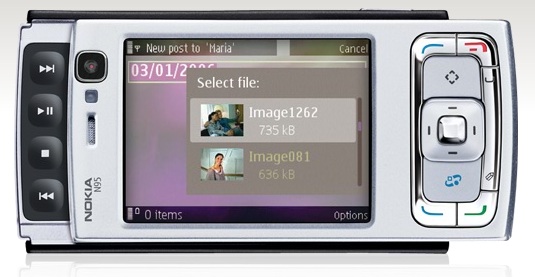
Get the Nokia N95 for $390

I’ve been amazed by the capabilities of the Nokia N95 smartphone since I first heard about it in 2007. Its price though put it sadly out of reach for me, until a couple of days ago, when I saw it at Micro Center for $389.99. This is a new, unlocked Nokia N95 V3.

If you’ve been watching the price for this phone, like me, then you know that’s at least $60-70 off the lowest price listed anywhere else, if not more. When I search the internet, I still see it listed at some places for over $580.

Of course I bought one. You might want to do the same. If you find it for a lower prices somewhere else, let me know. Keep in mind this isn’t the new N95 8GB model. This is the older N95 that runs the 3rd edition of the S60 software, also known as V3. Btw, the specs say the max size for its MicroSD memory card can only be 2GB, but mine runs fine with a 4GB card.

Standard
Reviews

I like Snapple Lime Green Iced Tea

Not much to say other than I like it. I had it this past week, and it’s got a nice, refreshing taste. I already like green tea anyway, and if you’re going to flavor it with lime, then sweeten it just right, I can’t say no. Oh, and it’s definitely much better than this stuff.

Standard
Reviews

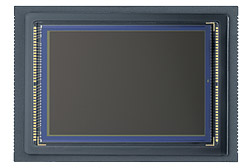
Camera preview: Canon EOS 5D Mark II DSLR

I’m a little late to the table with my thoughts on the new 5D, but I have an excuse: I’ve been traveling abroad (see this, this and this) and only now managed to sit down and think about it. There’s also an advantage to this: I got to read through the other reviews that have come out before I wrote mine.

So, what sources did I consult?

  • The Canon website was the first place I looked. There’s the official press release for the new 5D, and then the 5D Mark II pages. (I looked at the press release back on September 20th, when it came out.) Canon has also published 1080p HD video clips shot with the new 5D on their website, and they’re definitely worth checking out. They make a point to specify that the clips were shot with a pre-production 5D Mark II, so they may not accurately represent the quality of the production camera.
  • Digital Photography Review put together a very detailed review of the new 5D, as usual. Their review was very helpful to me.
  • The Online Photographer talked about the quality of the 5D’s HD video, and he brought up a good point. I’ll mention it here because I felt the same way when I saw Vincent LaForet’s video: it just wasn’t very good in terms of realization. It didn’t tie together, it felt empty… In a way, this was to be expected when there were only two days to write it, produce it, film it and edit it. But the quality of the video from the 5D Mark II was definitely worth seeing.
  • Robert Reichmann from the The Luminous Landscape posted pre-production video shot with the new 5D and gave his first impressions of the camera. He was in a hurry as well, as he was leaving for a trip to Africa and had only 48 hours with the camera. He says that the video is very high quality (so high that MBPs playing the full resolution video will skip frames), and there is no jellocam effect, where you see balooning artifacts due to slow recording of the data by the CMOS.
  • PopPhoto chimed in with a quick preview that did a little feature comparison between the old and new 5Ds.
  • On Taking Pictures had an interesting first reaction. He pointed out that the AF system should have been improved. It’s still the same 9-point AF found on the original 5D, and it has its limitations, as I can attest.
  • Thomas Hawk wrote up his impressions. He’s excited and plans to get one as soon as they’re available.
  • I found out about a new review aggregation site while I was writing this post. It’s called TestFreaks, and it’s one of the places where I looked for other reviews of the 5D. So far, they’ve posted links to four reviews for this camera, out of which an Italian review was worthwhile, particularly their side-by-side comparison of the old and new 5Ds. The rest of the linked reviews simply spewed the press release, which involves no effort or thought whatsoever. But I think the site is useful as a place to check for reviews when you want to learn more about a product.

What about me? Well, I wrote about the original and new 5D back in August 2007, when I took a shot a predicting the features of its new iteration. And I also wrote another article a little over a month ago, on August 28, where I talked about the coming convergence of DSLRs and video, and predicted that after the launch of Nikon D90’s 720p HD video capabilities, 1080p HD video wouldn’t be far off. Amazingly, Canon had already been at work on that very same feature, and launched it with the new 5D shortly afterward.

Let me first indulge myself and see how right (or wrong) I was in my own predictions about the 5D Mark II:

  • EOS integrated cleaning system (YES)
  • Live View (YES)
  • 16 Megapixels (NO, even better)
  • Up to 3200 ISO (NO, even better)
  • Increased battery life (YES)
  • Weatherproofing (YES)
  • AF upgrade (NO, unfortunately)
  • Increased zones for exposure metering (YES)
  • Shutter durability up to 300,000 cycles (NO, but still increased to 150,000 cycles)
  • 3″ LCD (YES)
  • Retail price $3,300 (NO, it’s $600 lower)

What I did as I read through the official specs found on Canon’s website and through the other reviews was to take notes of the interesting differences between the original 5D and the new 5D.

Original 5D 5D Mark II
12.8 megapixels (4368×2912 pixels) 21.1 megapixels (5616 x 3744 pixels)
DIGIC 2 processor DIGIC 4 processor
12 Bit A/D conversion 14 Bit A/D conversion
Pixel size 8.2 ÎĽm Pixel size 6.4 ÎĽm and reduced microlens gap
Native ISO capabilities 100-1600;
expanded capabilities 50-3200
Native ISO capabilities of 100-6400;
expanded capabilities 50-25600
Frame rate 3.0 fps Frame rate 3.9 fps
Shutter life 100,000 cycles Shutter life 150,000 cycles
Full HD (1080p) movies encoded with H.264 codec and PCM sound;
1080p movie mode (1920×1080) records clips up to 12 minutes;
480p movie mode (640×480) records clips up to 24 minutes;
Single file size (for movie clips) is limited to 4GB
No internal microphone/speaker;
No microphone input socket
Has microphone input socket to record higher quality audio for video files;
internal microphone on front of camera, and built-in speaker on back of camera
Viewfinder coverage 96% Viewfinder coverage 98%
Can use infrared remotes
Battery BP-511A;
up to 700 shots per charge;
1390 mAh
Battery life LP-E6;
up to 850 shots per charge;
1800 mAh
No additional batter info other than remaining charge improved battery status displayed on screen; camera can memorize batteries by their S/N and show you exactly how much power you have in each one.
RAW shooting enabled in Auto mode
Exposure bracketing +/-2 EV Exposure bracketing up to up to +/-4 EV
Creative Auto mode makes depth of field and exposure adjustments easier (for those that don’t bother to learn the basics…)
Auto Lighting Optimizer evens out harsh highlights and strong shadows
Peripheral Illumination Correction minimizes vignetting effects
Can embed copyright info but not intuitive at all Easier embedding of copyright info and photographer name in each photo taken with camera
Accessory shoe painted black, which leads to paint scratches as speedlites are mounted to camera Accessory shoe now left bare (metal-colored), which is better
2.5″ LCD, not very good at all in sunlight, low resolution 3″ LCD, great in sunlight, high resolution
Uses CF Type I and Type II cards Uses CF Type I, Type II, UDMA and CF+ cards
Auto ISO (100-3200);
can be turned on everywhere but in M mode, which is the way it should be
AF microadjustment
Live View with three AF modes: passive (mirror flips down briefly to focus), contrast detection (mirror stays up) and face detection (self-explanatory)
No water resistance, although I have taken my 5D out in the rain and it did fine as long as I didn’t get it completely wet Water resistance (10mm rain in 3 minutes)
Some dust resistance
2.5″ LCD, not very good at all in sunlight, low resolution 3″ LCD, great in sunlight, high resolution
No Quiet Shooting mode;
mirror slap is pretty loud
Quieter shooting mode available;
mirror will either lock up, or it will move slowly to the halfway position and close normally from there, creating less noise

How could the new 5D be even better?

  • AF should have been upgraded to something faster and more accurate
  • RAW files still CR2 format; it would have been nice to standardize on the DNG format
  • Color space options are still only sRGB or AdobeRGB; what about ProPhotoRGB?
  • HDMI Out miniport puts out great video but NO audio, which is unfortunate
  • Hand grip now slightly thicker, but space between grip and lens barrel slightly smaller, which means you may end up jamming your fingernails into the lens as you hold the camera, should you have thicker fingers. This was a point of contention with the 30D, was addressed in the 40D, and now I see it potentially coming back (though to a lesser degree) in the 5D Mark II.
  • No controls for video other than focus and exposure compensation once you start recording. It really does seem like the video mode was grafted onto the camera, as Luminous Landscape puts it in their review. Plus, the microphone input socket isn’t a pro-level socket, but a plastic one that can easily break if you’re not careful.
  • Recording video will drain the battery a LOT faster than shooting photos. And it will take up space. You’ll go through a single 4GB CF card in about 11-12 minutes if you’re shooting video. I guess this is to be expected given that the camera records full HD video on a huge 35mm sensor.

On the plus side, it’s interesting to note that I paid $100 more for my original 5D back in April of 2007 than what the new 5D Mark II will cost at retail when it hits the market. I bought my 5D for $2800 from Costco, and the new 5D will cost $2,700, but it will have all these incredible new features. Something to think about. I suppose I shouldn’t complain, since I did get about 1 1/2 years about of my 5D before it was rendered outdated by its successor.

So, will I be getting one? Not at the moment, no. My original 5D is still very usable, and I don’t have the deeper pockets of some other folks. I’m still without a good zoom lens. Coincidentally, the same great zoom lens that I like (EF 24-105mm f/4L IS) can be bought as a kit lens with the new 5D, so I definitely encourage you to get it if you don’t have it in your inventory. It will prove its versatility over time, and you will be glad you have it.

At some point in the future, I will be glad to buy the new 5D. Perhaps by that time they’ll have made the video mode more streamlined, and integrated it a little better within the menus and external buttons of the camera, not to mention that I’ll have had a chance to save up for it.

If you’d like to get it though, don’t let me stop you:

Photos used courtesy of Canon.

Standard
Thoughts

A clever bit of marketing

I was driving to work a couple of days ago, and as a MINI passed me from the opposite direction, the owner stuck his hand out the window, making the victory sign at me. I smiled, and responded by raising my hand. This sort of thing has happened countless times since I bought my MINI.

Why do MINI owners do this? Because it’s in the MINI literature. The pamphlets that come with our cars will tell you just how to salute other MINI owners. The victory sign was one of the recommended gestures.

MINI’s marketing stood out from the start. It was different, it was likable, and it was fun. The salutes were one of the things that really stood out. After all, saluting other MINI owners is a nice and friendly thing to do, and on some level, it makes one feel like they’re part of a club that’s not open to everyone — which, incidentally, is another notion taught in the MINI literature and reinforced on the MINI website, where the owner section is called the Owner Lounge.

Let’s face it though, the club isn’t that exclusive. You can get in if you have the money to buy a MINI. And this club’s membership is growing. In 2003, when I bought my MINI, there weren’t that many on the roads. Now, five years later, I see a lot more, particularly in the DC area, where I currently live. If you want to talk about an exclusive car club, take the classic MINI owners. You can’t make those cars any more, and there are very few of them here in the States.

Since there are only going to be more MINI cars on the roads, it begs the question: at what point do you stop waving at other MINI owners? I’m not asking this because it bothers me to wave back, or even to start a salute; I enjoy doing it. It’s the nice and sociable thing to do. It puts a smile on my face, and that’s always a good thing.

But I see plenty of other MINI owners that aren’t interested in it. I look at them as I pass by, hoping for some sort of little wave (after all, I’ve gotten used to this clever bit of marketing), and I see nothing. Then I wonder, did they read the pamphlets? Don’t they agree with the marketing? What could make them so uninterested in being nice to other people? How could they be glum while they’re driving a MINI?

Then I catch myself, and I chuckle. Because let’s face it, it’s the marketing that makes me think and do those things. It’s powerful stuff, because it appeals to the basic human need for company, for social interaction. It’s good stuff.

Standard
Reviews

A Dell order and return experience

On 7/31, I placed an order for a Dell S2409W 24-inch Widescreen Flat Panel LCD Monitor, a new model from Dell which has a 16:9 display ratio and runs about $350. I needed an external display for my MacBook Pro, because it’s getting cumbersome to edit photos on a 15″ screen.

On 8/21 (three weeks later), it finally arrived. After connecting it to my Mac, I discovered it just didn’t have the display quality I needed, and started thinking about returning it.

A couple of days later, after I tested it and calibrated it as much as I could, I filed a request for a Return Authorization on Dell’s website. I had to fill out a form with all of the order information and with my address (which I had to enter twice), because the website isn’t designed to pre-populate the fields based on the information already present in your account. There is a way to log in, which promises to pull that information for you, but even if you do log in, nothing gets pulled. You can’t just go to an order and click on a Return option.

I got an automated confirmation right away which assured me they are “working 24 hours a day, 7 days a week, to answer customer inquiries”, and that I could expect a response in “24 hours or less”.

Their response did not arrive within 24 hours. When it did, it said they are “unable to process a return authorization for the order,” and to “please contact Dell Consumer Customer Care at 800-624-9897.” I called them.

I was greeted by the Dell phone robot, and followed the various prompts to navigate the menus, until it was satisfied and passed me off to a real person. That’s when the fun really began.

Rep 1 (Indian): “Could I have the order number? What is your name? How can I help you?”
Me: “I’d like to return that order.”
Rep 1: Okay, let me connect you to someone that can help.”

Rep 2 (Indian): “Could I have the order number? What is your name? How can I help you?”
Me: “I’d like to return that order.”
Rep 2: “Okay, let me connect you to someone that can help.”

Rep 3 (Indian): “Could I have the order number? What is your name? How can I help you?”
Me: “I’d like to return that order.”
Rep 3: “Okay, let me connect you to someone that can help.”

Rep 4 (American): “Could I have the order number? What is your name? How can I help you?”
Me: “I’d like to return that order.”
Rep 4: “Why?”
Me: “Display quality is not satisfactory when connected to a Mac.”
Rep 4: “Have you tried to adjust it?”
Me: “Yes, but it just won’t display colors the way they need to be displayed.”
Rep 4: “Do you have a video card?”
Me: [Couldn’t believe what I’d just heard… Pause] “Of course, otherwise my computer wouldn’t work.” [Which is true — to my knowledge, you need either a graphics card or an embedded graphics chip to display video with a normal computer, and besides, they don’t ship Macs without some sort of video cards.] “Look, I just want to return the order…”
Rep 4: “Okay, I wanted to make sure, because you’ll be charged a 15% restocking fee.”
[Then she got to work on processing the Return Authorization and issued it to me.]

I spent 19:06 minutes on the phone to get the Return Authorization, and had to go through all of that stuff listed above. I’m not counting the time spent digging on the Dell website to submit the web request, which obviously didn’t come to anything.

You would think:

  • Dell would want to make it less onerous for its customers to get their business done when they deal with them over the phone.
  • It’d take less than four people to get to the right person.
  • I wouldn’t have to speak to three Indian reps at some call center in India, then get transferred to an American rep somewhere here in the States, before someone could address the reason for my call.
  • Someone who processes RMAs wouldn’t try to troubleshoot a product, especially when I’m not interested, and when they don’t know how a computer works.
  • Dell would have a way to pass the order number and customer name from rep to rep, so I wouldn’t have to say them over and over and over.

You’d be right to think all those things. Unfortunately, every time I interact with Dell, I see that they still don’t have their act together. They’re too big, disorganized, they don’t treat their customers properly, and they make it a hassle to deal with the company. As for their design philosophy, it’s practically non-existent, unless making ugly stuff counts — except for their recent Studio laptops and Studio Hybrid desktops. Is it any wonder they’re not doing so well?

And what’s up with the 15% restocking fee? I thought the industry “standard” was 14%.

Standard