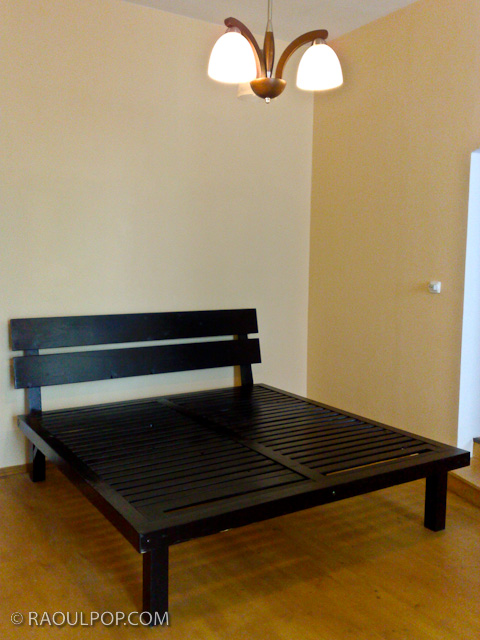
Last summer, I made a custom king size bed frame for our bedroom, out of solid wood. I held off on writing about it until now, nine months later, because I wanted to make sure the end result was solid and worth writing about. We’ve been sleeping on it ever since, and there’s nothing wrong with it, so yes, I can heartily recommend it.
I was fed up with the laminates and particle board garbage they call furniture these days, and I wanted to build something that would last, out of a quality, sustainable material like wood. I chose pine, because it was softer and easier for me to work with. Although I’ve also built a custom cat house for our three cats, I’m no expert carpenter. I just like to work with wood. It’s a wonderful material.
In December of 2005, I wrote an article on wet shaving. Back then, there wasn’t a lot of shaving advice on the internet — at least none I could find. So I wrote the article with the sincere desire to help others like me, who were having a tough time with disposable razors and electric razors, and with constantly irritated faces and necks. For me, it got so bad at times that my whole face and neck would just bleed from every pore, every time I took a razor to my face. It was crazy.
What worked for me then was using a Gillette Mach 3 Razor, because I didn’t know better. I would use a safety razor from time to time, just to troubleshoot where my shaving techniques needed improving. Since then, I graduated to using the safety razor all the time. What helped me improve my shaving technique was watching mantic59‘s videos on YouTube about three years ago. I was really glad to find him again today so I could link to his videos. I haven’t seen them since, and I wasn’t sure if he was still around.
Now that it’s been more than a few years since I wrote the original article, I thought I’d update it with a how-to video on wet shaving with a safety razor, where I show how a typical shave goes for me. I shot the video in 720p HD, with the wonderful Olympus PEN E-P2. My wife acted as my trusty camera-woman.
Shaving is an art, and it has to be learned. It doesn’t come naturally to us. One’s shaving form must by necessity differ, depending on the type of shaving utensil used: straight blade, safety razor, disposable razor, electric razor, etc. For me, a safety razor is the perfect balance between sustainability and shave quality, and that’s what I’m going to talk about here and in the video.
A straight blade is too scary for me. There’s that potential of slitting one’s throat. A safety razor still gives you the benefit of shaving with a sharp blade, but this time it’s contained within an apparatus that won’t let it cut your throat. A disposable razor, whether it has one, two, three, four or five (who cares!) blades, doesn’t offer as good a shave, because it’s less maneuverable, it’s made to be even safer — or in this case, useless — and creates non-recyclable waste, thus polluting the environment.
Just think how many blades and handles you use every year — all of those end up in a landfill. They can’t be recycled, because the plastic can’t be separated from the steel. It’s waste that can be easily avoided. On the other hand, all you throw away from a safety razor is a thin steel blade, which is perfectly recyclable. The razor itself lasts practically forever, which is why the companies that make shaving products would rather you get the disposable stuff. I say consequences have to trump profits sometimes, even in a capitalist society.
And, as Cary Grant says in “Mr. Blandings Builds His Dream House”, I like a safety razor because “I prefer the clean sweep of tempered steel as it glides across my face.” Yes indeed, Cary, yes indeed.
I hope you enjoy the video and come away from it with a better appreciation for the art of shaving, and with a few tips that will help you get a better shave!
The folks at Data Robotics put together a short video that showcases Drobo owners talking about what they store on their Drobos, and asked their Twitter followers what’s on their units.
That got me thinking about what I store on my Drobos. I have four Drobos in total: three 1st Gen Drobo units (USB 2.0 only) and one 2nd Gen Drobo (Firewire 800 + USB 2.0). Perhaps that makes me a bit unusual. Most people have one or two units, not four. But there’s reason to the seeming excess.
For one thing, I have a huge photo library. (You can find the photos I edited and published here.) For another, my wife and I have a huge video library. These are movies and cartoons we had on VHS tapes, which we digitized, or on DVDs, which we archived for easy viewing, or TV shows and movies that we recorded from TV. We’re big fans of classic movies and cartoons from the 1920s, 30s and 40s, and we collect all the ones we like. We also digitized most of our old paperwork. My medical records are all digital. So are my dental records. So are a bunch of our other documents. I scanned all the stuff I could scan, and now when I need to look something up, it’s right there at my fingertips. I’ve also started shooting video more intensively this past year, in SD and HD. (You can find my published videos here or here.) All that stuff takes a fair amount of space — terabytes to be more precise. And to top off this whole list, we live our life on two continents (North America and Europe).
Here’s what I do to make sure I don’t lose my data:
I keep a Drobo with my parents, at their place. On it, I store a backup of my photo library and our video library, along with their files. I back up my live photo library to it using CrashPlan, a piece of software that will let you back up your data to a friend’s machine. I’ve actually just started using it, and while I’ve been able to back up just fine with both machines on the same network, being able to do it from thousands of miles away will be a litmus test of the software’s capabilities. I’ll be sure to write about it if it proves workable. The video library gets backed up every once in a while in a pretty simple manner: I carry movies and videos to them on a hard drive and copy them onto the Drobo. Updated 4/21/10: CrashPlan does indeed work as advertised!
I keep two Drobo units at our home. On one of them, I keep our video library, and an extensive, historical file archive. On another, I keep a mirror copy of my live photo library, which is currently stored on a WD Studio drive, because it’s smaller and easier to transport than a Drobo, and I do a fair bit of traveling. I mirror my photo library with an app called Synkron, which works great. I switched to the WD Studio when I started traveling extensively and realized the Drobo couldn’t always fit safely into my luggage. (Where oh where is that Drobo carrying case I wrote about last year?)
I gave the fourth Drobo to my brother, who needed a solid data storage device to begin to archive his ever-growing library of ethnological videos. He’s a documentary filmmaker who travels around Romania studying and recording religious and secular customs, which are being forgotten and buried along with the old folks. He wants to preserve these things for posterity. You can learn more about what he does at his website, called ORMA.
So that’s how I use my Drobos. However, I’ll have another logistical issue to deal with in the near future. I’m running out of space on the WD Studio drive, which has 2 x 1 TB drives in it. I run it in RAID 1, and in another month or two, it’ll be completely full. I’ll need to start using one of my Drobo units as my primary photo editing/storage device again. This means I’ll shuffle all my data around once more. A possible new arrangement will see me using the 2nd Gen Drobo for the storage and editing of my photos and videos, and the other for the storage and retrieval of our video library and historical file archive, while the WD Studio drive will see some backup duty or be relegated for travel-only purposes.
The current drive distribution among the three Drobos I use actively is as follows:
2 x 2 TB drives + 2 x 1 TB drives in the Drobo that stays with my parents
4 x 1 TB drives and 4 x 500 GB drives, respectively, in the two Drobos that are with us
I can’t speak for my brother, but I believe he’s using 4 x 1 TB drives in his Drobo
I’d love to hear how you are using your Drobo. Perhaps you have some ideas for me?
Image and video used courtesy of Data Robotics. The 2nd Gen Drobo is available for purchase from Amazon or B&H Photo. The 1st Gen Drobo has been discontinued as of 2009. Be sure to also check out my reviews of the Drobo S, DroboPro and DroboElite.
We’ve recently finished putting together a “severe weather” garden shed in our yard, made by a company called Arrow. We wanted a model that could withstand hurricane-force winds, since we live in South Florida, where hurricanes do occur from time to time. The particular model that we purchased was the Homestead 10′ x 8′ (HS108). We filmed our progress along the way (it took 1½ months from beginning to end), and you can see the video below.
The process of selecting and getting the garden shed approved and built highlighted several areas of concern when it comes to the manufacturing, retail and inspection aspects of this particular model. It all turned out to be more involved and more costly than we thought. It certainly was an adventure in do-it-yourself construction.
We looked for guidance from our city (Hollywood, FL) when we made the decision about what garden shed to get, but they were not helpful. All they told us was that many of the sheds sold at local building stores may not be approved for use and may not pass the inspections, and that we needed a product approval sheets for the shed.
We went to Home Depot looking for sheds, but we thought the pre-assembled ones they had on display were flimsy and might not withstand strong winds. Then we went to Lowe’s looking for a shed, found one made by a company called Arrow, only to be given the run-around when it came to the product approval sheets. The store clerk thought they were on the Lowe’s website. They weren’t. The management thought the Contractor Services department had them. Perhaps they did, though we couldn’t get them to help us. Then we tried the Arrow website, where they should have been listed alongside the shed specs. They weren’t.
Fortunately (or perhaps unfortunately), we did find a particular model on the Arrow website, called the Homestead, rated for “severe weather” and engineered for the Miami-Dade county building code, which is stricter than what we have in Broward county. That meant it was sure to be approved for use here, and would pass the inspections if assembled correctly. The price was much higher than we thought though (about $1,700) for a pre-fab, un-assembled shed that came in two flat boxes and was only 10 feet by 8 feet (80 sq ft). Still, I remembered seeing a Homestead model at Lowe’s, so we went back to check. To our surprise, it was on sale for a little under $500. We thought ourselves in luck, but the clearance price should have raised a red flag for us. We bought it, knowing we’d at least have no problems getting it approved with the city.
Sure enough, it was approved, and the time for the initial inspection came. The clerks at Lowe’s told us we’d need to pour a six-inch concrete slab. Fine, no problem. Wrong. According to the building inspector, the engineering plans for the shed (put together by Arrow to supposedly comply with the Miami-Dade building code) required a house-sized foundation, which meant digging a trench all around the edge of the foundation that was 1 foot wide by 1 foot deep, with a 45-60 degree slope on the inner lip, using re-bar around its perimeter, not just wire mesh, and naturally filling it all up with concrete. That more than quadrupled our original estimate of the amount of concrete that we needed to purchase. We thought 1 pallet would be enough for a 6-inch slab. We ended up buying over 4 pallets of concrete (almost 5) in the end.
Forget the clearance price! The ridiculous foundation requirements in effect raised the price of the shed to well over its original retail price once again!
I have to lay the blame for this squarely in Arrow’s lap. After all, they were the ones who hired an engineering firm to put together the plans for the shed, and to get them approved with Miami-Dade. I sincerely doubt there’s anything in the Miami-Dade building code that specifies one must have a house-sized foundation for a flimsy pre-fab shed. That makes no sense whatsoever. All other sheds on the market do just fine with a 4-6 inch concrete slab, yet this model, which is shorter and smaller than the rest, somehow needs a house-sized foundation? No way. Someone was careless or fearful when they drew up the plans, and the customers are now paying for it!
I might have been more lenient in my overall view of the shed, had it proven sturdier during the assembly and in the final review. But it’s just as flimsy and cheaply made as the rest of the pre-fab garden sheds on the market, many of which come pre-assembled and cost a third of this shed’s original retail price. There’s nothing to set it apart for me from the rest, other than the presence of extra wall beams at waist height, and the lack of a need to use hurricane anchors to strap it to the ground once it’s assembled. The sheet metal used for its walls and doors is just as cheap and easily bent or dented, the doors open and close just as badly as on other pre-fab sheds, and to top it all off, it’s so darn short I bang my head on the lintel every time I go in and out!
Oh, and lest I forget, let me mention that Arrow forgot to provide the sufficient number of bolts and nuts needed to assemble the shed properly. We were delayed by a day during the assembly process because we needed to make a trip to the store to get some more hardware, which should have been included with the shed to begin with. On the bright side, they did include the Hilti anchors needed to anchor the shed to the concrete foundation, though I expected to need to get those myself.
Yes, the shed is now fully assembled, approved, and we’re using it. But it proved to be much more expensive in the end than it should have been, it took much more time and effort to get the project completed, and in my eyes at least, it wasn’t really worth all that. Imagine how those people who bought this shed at its original retail price felt! They must have felt they were ripped off royally. Thank goodness we at least got it at clearance price.
The City of Hollywood could also have been more helpful when I called them asking for guidance on garden sheds. Instead of dismissing me with some generic advice, they could have said, hey, here’s one of our building inspectors, talk to him and he can recommend sheds that he knows will get approved, cost less, and take less time to put together. While I understand that a government employee can’t recommend specific brands and models, at least I could have gotten helpful advice that could have saved us money, time and effort. Instead, the City of Hollywood was the only city in Broward County to raise property taxes this year, during a big recession, making me wonder exactly what we’re paying for, if they’re not helpful to us, its residents.
All I can say is this shed better hold up when the next hurricane comes, or Arrow will hear from me again.
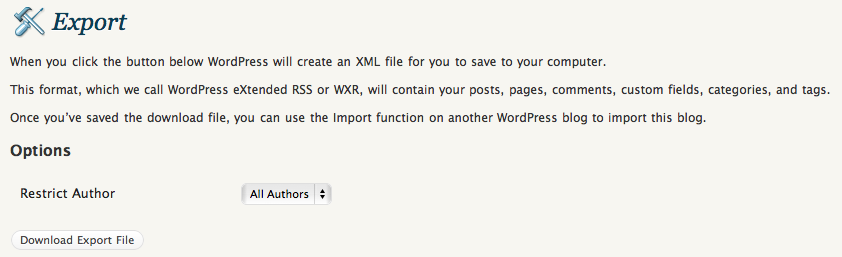
When those of us with self-hosted WordPress blogs back up our content using the built-in WXR functionality, do we ever check the downloaded XML file? Until recently, I didn’t worry about it. I’d click on the Export button, copy the WXR file to a backup folder and think my blog was safe, but I was wrong.
You see, what may be happening is the creation of the WXR file on the server side may be terminated before all the content gets written to it, and we’ll end up with a partial backup of our blogs. This is no fault of the WordPress platform, but will happen when the server settings don’t allow enough resources to the PHP script which writes out the XML file. When that’s the case, this is what the end of the WXR XML file looks like.
In the screenshot you see above, the script ran out of memory (I’d set PHP’s memory_limit at 64 MB, which was too little for my needs), but it can also run out of time, if PHP’s max_execution_time is set too low.
Depending on your scenario, you may or may not have access to the original php.ini file on your web server. If not, check with your host, you may be able to create a php.ini at the root of your hosting account to adjust these parameters (within limits). The thing to do is set the memory_limit and the max_execution_time high enough to allow PHP enough resources to generate the full WXR file. I can’t prescribe any specific limits here, because the amount of memory and time the script needs depends on how big your blog is. All I can suggest is that you experiment with the settings until they’re high enough for the WXR file to generate fully. You don’t want to set them too high, because your server will run out of memory, and that’s not fun either. This is what my setup looks like.
What happens if you use a cheap web host is that you’ll get crammed along with hundreds of other sites on a single virtual server where all the settings are tightly reined in, to make sure no one’s hogging any resources. Chances are that as your blog grows, your WXR file will get too big and will need more resources than are available to write itself, which means you’ll start getting truncated backup files. If you never check them by opening up the XML and scrolling to the end to rule out any error messages, you’re not really backing up your blog.
Keep this in mind if you want to play it safe. Always check the WXR file. A good backup should close all the tags at the end, particularly the tag, like this screenshot shows.






 Raoul Pop