
This past autumn, I recorded this short video of fall foliage as I drove home on a sunny afternoon. It’s on I-495, Washington’s beltway. I was near Bethesda, MD at the time.
Download Fall Foliage on I-495 (also on Vimeo)
This past autumn, I recorded this short video of fall foliage as I drove home on a sunny afternoon. It’s on I-495, Washington’s beltway. I was near Bethesda, MD at the time.
Download Fall Foliage on I-495 (also on Vimeo)
Meet Jim Morris, a 72-year old California man, who has been working out every day for most of his life and has won many bodybuilding competitions. He does it because he loves it. There’s a video of him working out on YouTube, originally broadcast one one of the local TV stations where he lives. The photo you see below is him at age 71, about a year ago.
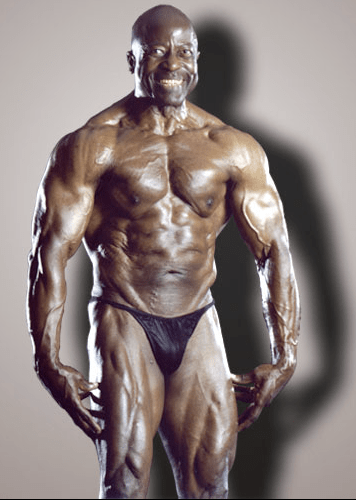
You can read more about his life and dedication to the sport of bodybuilding on his website. He is a personal trainer, and has helped many people get fit over the years, starting in the early 1950s. His diet is also something special. He only eats nuts, fruits, beans and vegetables.
Can it be done by anyone? I think so. You just need the inspiration, which Jim Morris has just provided, and the drive, which you must work up yourself. I think it’s worth it. Do you?


Images used courtesy of Jim Morris.

PictureSurf is a new WordPress plugin that launches today (February 10, 2009). It aims to make it easier for bloggers to upload galleries to their WordPress sites.
I spoke with PictureSurf’s founder, Alan Rutledge, via chat this morning, and I wanted to find out what makes his plugin different from the standard WordPress functionality. You may or may not be aware of the fact that WordPress offers an Image Gallery feature that’s built into the core WP install.
From Alan’s perspective, the PictureSurf plugin differentiates itself by offering:
As I told Alan, I don’t see enough of a difference between this plugin and what WordPress already offers to convince me to use it myself. The PictureSurf website claims that it’s faster to build a gallery with their plugin than with WP, but I ran into a glitch when I tried to use it. I couldn’t upload any photos. The upload engine froze and even though I hit Cancel and tried to re-upload the photos a few more times, I wasn’t able to do it. Still, that’s not too important. I’m sure that if I had more time, I could have gotten it working properly.
The thing is, I built a WordPress Image Gallery for this review in under 30 seconds. Each thumbnail links to its own photo page, very much like PictureSurf does it. I was able to choose how many images I wanted in each row. And I was also able to drag and drop the images to change the order in which they appear in the gallery. You can see the gallery below.


Another claim made by the PictureSurf plugin is that you can monetize your blog much better when an image sits on its own page instead of displaying on a blank page. I’ll agree with that, but I’ll also add that WordPress lets you do the very same thing. In WP’s Image Gallery options page, you get to choose where the thumbnail links go: they can go to the images themselves, or to something called attachment pages, which are pages that WP generates dynamically for each photo, using your blog’s own theme. So I ask again, what is it that differentiates PictureSurf from WP’s built-in functionality?
As much as I love WordPress plugins, I’m a big believer in built-in functionality. I don’t want to be stuck in a situation where I need to stop using a plugin, for whatever reason, and have my post archives become unusable because the plugin is no longer there. I ran into that issue with a video plugin I used in the past. It stopped being supported, and then I had to modify all of my old posts where I embedded videos, in order to make them playable again. If the long-term survival of your content is not a concern for you, then don’t worry about it. It is a concern for me though.
Last, but not least, I found PictureSurf’s design somewhat rough. It just doesn’t integrate as well as it should into the WordPress Editor. Furthemore, if it aims to take over the image gallery role, then it should fully take over that role. If I install PictureSurf, once I click on the Image Upload button in the WordPress Editor toolbar, it’s the PictureSurf AJAX window that should open up, not the WordPress Image Uploader. And when I access an old post that uses an image gallery, written before I installed PictureSurf, it should automatically take over that gallery and display the images using the PictureSurf gallery settings. But none of this happens. Old posts remain the same. I’d have to modify each and every one, manually, in order to get PictureSurf working there. As a publisher and writer, that’s a labor I’m not willing to undergo.
For me, the PictureSurf plugin does not differentiate itself enough from the standard WordPress functionality and does not offer enough added value in order to make it to my roster of active plugins. I find the WordPress Image Gallery feature quite adequate and necessary, and therefore, using the PictureSurf plugin becomes a matter of preference, not need. I myself do not need it, therefore I won’t use it. Your situation may differ. Feel free to try it out and see what you think.
This past week, I spent a feverish few days working on this new site design. I have been working on several different layouts during these past few months, but liked none of them except the one you see now. I built it from scratch, since that’s the way I like to do things.

One of the decisions I pondered was whether I should go with a three-column or a two-column design. The three-column layout would have allowed me to reserve one of the columns for ads. In the end, I thought good taste should trump ad space, unlike what’s happening on so many other sites.
If you find my articles useful and you’d like to support my site, please use the sponsors listed in the sidebar. Buy the stuff you need from them. I’ll get a small percentage of each sale.

I’m also looking for a main site sponsor, whose logo and link will be featured in the top right corner of my site. I’d like the arrangement to be simple: a flat monthly fee over a certain period of time; the fee and period can be negotiated. See the Advertising page for more details.

Here are this week’s seven cool gadgets. Did you see last week’s Gadget Monday?
The Aptera 2e, the wonderfully designed electric car that gets over 100 mpg and has a 0.15 drag coefficient, will begin to deliver on its orders this October, in 2009. The car is lightweight, fast, strong and impact resistant, and will have all of the amenities we’ve become used to in our cars: AC, stereo, etc. It can charge overnight in your garage using a standard 120V socket, and the projected cost is $0.50 per charge, which will last up to 100 miles.





Samsung launched the first 10 megapixel camera phone in Korea, the SCH-B600. Guess when? I did a double-take when I saw the date of this press release: October 10th, 2006!
US mobile phone users, it’s time to feel ashamed of the pathetic specs of your cellphones! Seriously, the iPhone is still at 2 megapixels. As a matter of fact, most cellphones are still at 2-3 megapixels. My Nokia N95 is only at 5 megapixels, yet the Koreans have had a 10 megapixel cellphone with 3x optical zoom — not a crappy digital zoom — for over 2 years! Did I mention they can also watch satellite TV on it?

Don’t feel too bad, though. T-Mobile users in the US will soon get the Samsung Memoir (SGH-t929), an 8 megapixel cellphone with no optical zoom and a touch screen. It’ll run on T-Mobile’s 3G (EDGE in most areas) network.

Let me get this straight: US users get an 8 megapixel cellphone with no optical zoom and no TV, more than 2 years after the Koreans have had a 10 megapixel cellphone with 3x optical zoom. Yeah, that makes sense. Just wanted to make sure.
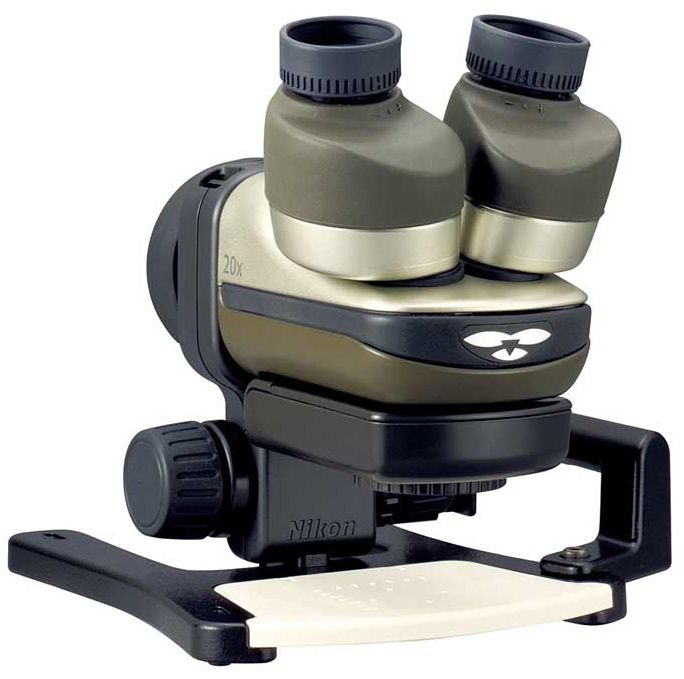
This upgraded version of the Fabre Photo microscope from Nikon, originally introduced in 2006, will launch on February 20th. It will let you connect any Nikon DSLR to it via a NAS-L1 digital SLR attachment. If you use a FSB-U1 compact digital camera bracket, you can attach any Coolpix series camera.
The optical system has 20x magnification, and field of view of 11mm in diameter. Shooting magnification varies with the camera, but it will range from 45x without extension tubes to 66x with two extension tubes and a DX-format camera.
(DX is Nikon’s cropped-sensor format; FX is their full sensor format, equivalent to the original 35mm film.)

[via Engadget]
Mission Motors, an SF-based company, has built an all-electric road bike. It’s designed to be the fastest all-electric motorcycle. It’ll go up to 150 mph. Its range is 150 miles on a single charge. Recharge time is under 2 hours at 240 V, or 8 hours at 120 V. It was engineered to have a constant 100 foot-pounds of torque anywhere between 0 and 60 mph. I tried to look up the spec 0-60 time, but couldn’t find it anywhere.




[via DesignBoom and Mission Motors]
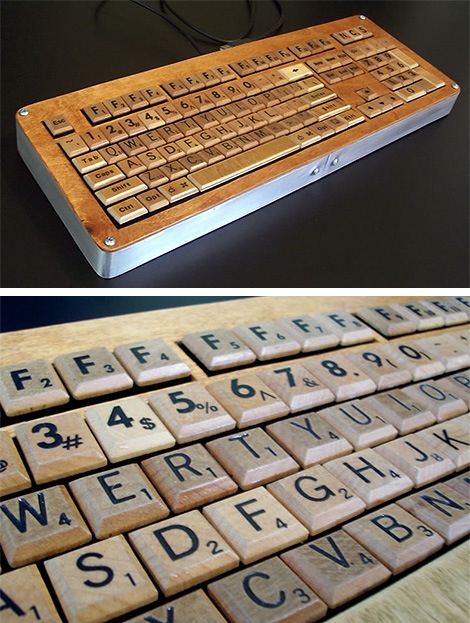
Someone took the time to assemble a full set of keyboard keys from wooden Scrabble playing bits, bevel their edges, and fit them to a keyboard enclosure that can connect to your computer via USB. I love the effort they put into this, and I love the idea of a wooden keyboard as well.

[via LikeCool]
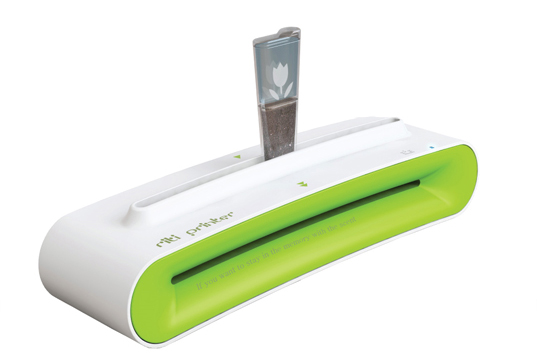
This new printer uses the pigment from used coffee grounds to print on regular paper. You simply pour the coffee grounds into the ink cartridge, print a document, then move the cartridge back and forth to print each line and advance the paper through the printer. This printer not only uses less electricity but also no expensive ink whatsoever. I don’t know what its print resolution is, but I imagine it’s decent enough for readable text.


[via The Design Blog]
It’s a classic Vespa, and it’s built of wood. It looks amazing. Enough said.


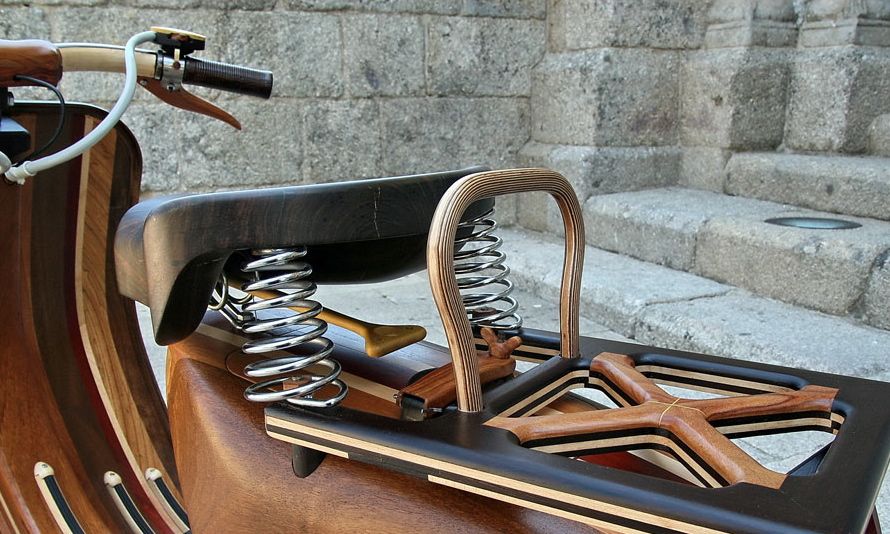


Make sure to visit Carlos’ website (use link below) to see the-making-of photos.
[via Boing Boing and Carpintaria Carlos Alberto]
 Raoul Pop