Places

Grosvenor metro station

There’s a neat tunnel that goes under 355 (one of the main roads in our area) and surfaces right at the Grosvenor-Strathmore metro station, under a beautiful canopy of curved glass, framed with steel ribs and anchored with pillars.

Descent

Ascent

If you’ve ever seen one of the old classic cars (early 1910s and 1920s) that had the pull-down roof which folded in the back, the glass canopy follows the same concept, except (of course) it’s anchored in the up position all the time. Come to think of it, the design also recalls the large, see-through fuselages of the big bomber planes of WWII. The effect is a successful combination of post-modernism with industrial-age design elements.

Fuselage

Radiate

The same canopy design (initially restricted to just a few metro stations) has now been extended to all of the stations I’ve visited. The canopy sizes are varied based on the size of the tunnel that leads down to the metro. I’m glad to see a good design philosophy being consistently applied and adapted to existing conditions, and I congratulate WMATA on making sure the work was carried through to completion.

This is my Week 6 submission for the 2008 Community Challenge.

Standard
Thoughts

Seems quiet, but it's not

I’ve been helping Ligia launch her re-designed personal site over the past several days. While my own site may seem a little quiet (except for the regular Condensed Knowledge posts), I’ve been quite busy behind the scenes.

Ligia has been working on her own line of greeting cards since January. She makes them by hand, from scratch, using only sheets and strips of paper and glue as her materials. Having seen her do the work, right here beside me, I can tell you it’s painstaking, slow and hard. I fear for her eyes if she keeps going like this. All that meticulous work is bound to have an effect. It takes her about a half hour to 45 minutes to craft a single card. It’s hard to understand why it takes that long until you sit there and watch her at work. You can’t argue with the results though. They’re beautiful.

She’s really excited about the cards, and has asked for my help in setting up a little shop on her site so she can sell them. I helped her do just that, and modified her site design to allow her to post nicely-sized photos of the cards. I’m happy to say her site is pretty much done now, and yes, it’s open for business. I made the store within her WordPress install, using the existing options, without extra plugins. Simple is better in my book.

The cards are priced from $2.95 to $4.95. It doesn’t take an accountant to figure out that $5 for three quarters of an hour isn’t optimal pay, but this is a labor of love for her, and I support her in that. She’s not going to get rich selling the cards, but she wants to make people happy with them.

Being the enterprising little woman that she is, she’s already gone into downtown Bethesda and walked around to find stores that might pick up her cards and sell them there. (It’s more than I’ve done for my own photography, and I’m ashamed to admit that.) She found three stores that wanted to keep samples, and she’s going to find out soon whether they’ll be interested in buying first batches.

Wish her luck, and if you like one of the cards, pick it up for your special someone.

Thanks!

Standard
Reviews

Camera review: Olympus SP-560 UZ

The Olympus SP-560 Ultra Zoom is just about as good and versatile a camera as you can get, short of a DSLR. I’ve been using this late-model digital camera for the last month, and I’m very impressed with its design and capabilities. A detailed write-up is available below, as well as a video review (approximately 46 minutes long). Sample photographs are enclosed at the end of the review.

How is this camera different from the rest?

  • Amazing focal range (18x zoom or 27-486mm equivalent)
  • Great design
  • Image stabilization (both sensor shift and digital)
  • High ISO capabilities (50-6400 ISO)
  • Both JPEG and RAW shooting modes
  • Face detection
  • Shadow adjustment (brings details out of the shadows)
  • Uses AA batteries
  • 3-15 frames per second
  • 8 megapixels resolution
  • Timelapse (in-camera)
  • Alarm clock (yes, you read that right; it’s got an alarm clock built in)
  • Image editing (in-camera; lighting and redeye fixes, RAW and color editing, frames and labels, calendar creation, face selection and cropping, movie editing)

Let’s get to the details

I was impressed with the great design of the camera as soon as I pulled it out of its box. As a matter of fact, the first thing that attracted me to the camera was its design, and that’s why I requested a review unit from Olympus. I’m glad to say I wasn’t disappointed by either the camera’s design or its capabilities.

The SP-560 UZ is not a camera for a complete beginner to photography. In order to use it fully, you need to be comfortable with basic camera controls, and to know how to change camera settings. The people who will appreciate this camera will be those who want a long focal range, high ISO capabilities, great optics and print-worthy resolution. As a matter of fact, this would be a good secondary body for a DSLR user that wants to get extended focal reach without spending thousands on expensive telephoto lenses. They’ll be able to use their DSLR at close ranges and use the SP-560UZ to fill in for macro photography and far-away shots.

As soon as you look at the camera, you’ll notice something unusual: every portion of the camera that can be gripped is covered with soft rubber. The eyecup and the lens barrel are lined with rubber as well. You’ll also notice the great-looking metal frame on the side of the camera, with eyelets where the camera strap attaches. The frame not only makes the camera look great, but it reinforces the body as well, guarding against bumps.

This camera is called an Ultra Zoom for a very good reason. It has an 18x zoom. That translates to an equivalent focal range of 27-486mm. This was previously unheard of, and it’s one of the largest zooms out there. I believe the only camera that currently tops the SP-560 in zoom length is the SP-570, with its 20x zoom. It is also made by Olympus.

As you can see below, the camera features a 2.5″ color LCD at 230,000 pixels. The LCD display will compensate for exposure and WB changes in order to approximate the look of the finished photograph. It’s pretty accurate in real world practice, which is great, especially when you consider that other digital cameras like the Fuji S9100 do not have accurate LCD displays.

The controls are all well-placed and easy to reach and use, even in the dark. I found myself using them with no problems while shooting at night, after only a day or two of using the camera during daylight hours. One thing I love about Olympus is that they carry their design language through their entire lines. The mode dial, buttons and colors used for the symbols are all easily recognizable and perform the same functions on all their cameras. This means that once you’ve shot with any Olympus camera, you can pick up another and continue using it without having to worry about how to change settings and options. This makes their cameras easy and enjoyable to use.

The great design of the camera becomes self-evident when you look at it from the top. Here you can see that the camera has a proper, nicely-sized grip, and the top controls are well-spaced. When you hold it in your hand, it’s well-balanced, even with the lens barrel extended. It’s a pleasure to use it.

Another couple of characteristics that become visible when you look at the camera from this angle are the lens specs: ED (which stands for Extra-low Dispersion), increases contrast and sharpness, as well as decreases chromatic aberration, 4.7-84.2mm is the focal range (27-486mm equivalent), and f/2.8-4.5 (aperture).

I find the aperture specs amazing. For a lens with this mind-boggling range, the aperture stands out as an achievement. First, the lens starts out wide at f/2.8, which is one of the highest apertures possible for zoom ranges at the moment. (f/2.0 is the lowest, but very few lenses have it.) Then, at its full focal range, its aperture is f/4.5 instead of f/5.6, which is the norm even for much more expensive lenses. Keep in mind this is not a professional zoom lens, but a lens built into a digital camera! That amazes me.

One of the buttons that’s visible from the top view is the Image Stabilization button. It lets you toggle IS on and off. I used IS extensively while shooting with the SP-560 UZ, and it’s definitely worth it. It works by stabilizing the image through shifting the sensor on the X and Y axis, and by providing an extra layer of digital image stabilization as well. It’s a must-have feature on a camera with this focal range, and the fact that it works so well makes it remarkably useful.

Another benefit this camera offers is that it uses AA batteries instead of the custom-made rechargeable batteries of other cameras. I consider this a huge plus in my book, since I can use my existing cache of rechargeable batteries and not have to worry about having to carry the camera’s charger along with me, or purchasing an additional custom battery for it.

The battery life is remarkably good – better than I’d expected. I was able to get about 275 photos with the camera after putting in freshly charged NiMH AA batteries. Keep in mind digital cameras use up batteries a lot more than DSLRs, because they have to power the LCD display all the time, and they also use electricity to power the zoom motor.

The camera is remarkably lightweight without batteries inside, and remains lightweight even with 4 AA batteries inside.

One other detail that speaks volumes about the quality of the camera’s build is the lens cap. You know how lens caps usually work by some latch or notch that extends outward and secures the cap against the lens barrel? Not with this lens. It was fitted with special felt on the inside, and this creates enough friction to hold the cap onto the lens barrel nicely. The result is a beautiful, fluid sliding movement when attaching and detaching the lens cap. It’s poetry in motion.

The camera is sturdy and weather resistant. I took it outside during a snowstorm and took photos while barely shielding it from the weather. It handled the situation without any problems, and even though it was dripping wet when I got it back inside, no damage occurred. I should mention the camera is not waterproof or weatherproof. Its build quality alone sustained it during the wet weather.

With every new Olympus camera I review, the on-screen menus seem to get better and better. They’re well laid-out, the colors are perfectly chosen to increase visibility, settings are easy to find — I’m impressed every time.

The picture quality is there, surprisingly. I say “surprisingly” because I expected the photos to be somewhat fuzzy, or some defects to exist in the lens given its extreme 18x zoom. I was pleasantly surprised when I discovered that the photo quality does not suffer at all, even with the extended focal reach. I saw no chromatic aberration, no fringing, no vignetting (if you see vignetting in my sample photographs, it’s because I added it in post-processing). The photos were slightly less sharp at the upper end of the zoom (14-18x), but the only way you can get sharper optics at those ranges is to pay thousands of dollars for them. Given this camera’s price, and the fact that the lens is built-in, the optics are great, and so is the photo quality. You’ll see what I mean when you look at the sample photographs shown at the end of my review.

A few issues

While high ISO noise is remarkably lower than on other digital cameras and even some DSLRs I have used, there is an odd transition that takes place in noise levels as one goes from ISO 800 to 1600, 3200 and 6400 ISO. Noise levels start to go up around 800 ISO and continue that way up to 3200 ISO, then are drastically reduced at 6400 ISO.

This is because resolution is cut back to 3.3 megapixels at 6400 ISO in order to cut back on noise. This is very effective and yields very usable photographs at that setting. The camera does not reduce the resolution at 800, 1600 and 3200 ISO, noise levels remain higher, and photos taken at those ISO settings, particularly at 3200 ISO, are not that usable. It would have been better to scale back on the resolution starting at 800 or 1600 ISO in order to cut back on noise levels at those settings as well.

Don’t let this make you think the camera has high noise levels. As stated above, the noise levels are lower than on other digital cameras I’ve tried, including some DSLRs. The Olympus EVOLT E-500, for example, only went up to 1600 ISO, and the chroma noise at that setting was unbearably high.

I tried to get the time lapse feature to work on three separate occasions, and couldn’t. I followed the directions as outlined in the manual, and the camera simply wouldn’t obey my instructions. I’m not sure why, and if you’ve managed to get that feature to work, do let me know in the comments. Perhaps I did something wrong, but then again, I followed the instructions to the letter. I think this may be something that will need to get fixed with a firmware update. It is fixable.

The zoom motor is fast, which is needed for the long focal range, but fine zoom adjustments couldn’t be obtained for the very same reason. When I wanted to adjust the framing of a photo, the camera would move past my desired framing when I used the zoom lever, simply because it moved too fast. This is something you may want to keep in mind as you use the camera. Fine zoom adjustments are somewhat possible, but only through very short touches on the zoom lever.

Although RAW capability is present and it works, it’s not usable in situations where you have to depend on a decent frame rate. I used RAW for about a day on the camera, then promptly went back to JPG mode, because it takes over 15 seconds to write a photo to the card when using RAW mode.

The manual focus feature on the camera isn’t accurate. It’s really more like an electronic approximation of the focus, adjusted manually. I don’t think this issue is camera specific. It’s probably present on all digital cameras that don’t have a real manual focus ring on the lens barrel. The camera provides a little picture-in-picture magnification of the photo, in order to help you gauge whether things are in focus as you adjust it manually, so rely on that instead of the feet or meters gradation present on the side of the screen. This will work for close ranges, but will not work for things or objects that are far away. You’ll see what I mean if you try it out.

What you’ll need to do in those situations is to switch the AF to area selector, and to move the focus area to a point in the photograph that the camera can use to adjust its focus automatically. That way things will work properly. You’re pretty much on your own for sky photographs. Switch to a small aperture (up to f/8) and hope for the best there. Again, this is not a camera-specific issue, all non-DSLR digital cameras seem to have this problem.

A few wishes

I would have been thrilled if this camera had a hotshoe mount. It does have a built-in flash, but it would have been great if I could have put an external flash on it. It does, however, have the ability to work with external flashes wirelessly, so if you have those, you’ll be able to use them with this camera just fine.

I would have loved to see it use a remote control. It’s really nice to be able to photograph or start video recordings via remote control.

A dedicated button that could turn the face detection feature on and off would have been very useful. I know the IS button can be programmed to control face detection, but dedicated buttons for each feature are needed. Face detection is a hot feature and should be “featured” more prominently.

Last but not least, a manual focus ring would have been awesome. Maybe even a manual zoom ring — that would have helped with the battery life, although, like I said before, I’m not complaining about that. The battery life is already pretty great.

Video review

You can view it below or here. And you can download it as well.

Summary

This camera feels like a luxury item. Really, it does. It’s beautifully designed and finished, and overall, it works great. Its amazing focal range makes it a very versatile camera that’s worth bringing along everywhere, even indoors in low light. It can yield usable photographs without a flash at 6400 ISO, and that’s remarkable.

Don’t let my few gripes fool you. This is a great and highly usable camera. I really do wish I could have reviewed this camera during spring, summer or fall instead of winter, because you would have been able to see how well it reproduces color and handles details throughout the focal range.

The sample photographs are shown below.

Buy the Olympus SP-560 UZ

More information about the Olympus SP-560 UZ

You can view even more sample photographs taken with the SP-560 UZ by visiting these two posts of mine:

  • Vantage point photography, where I photographed North Bethesda from the top of a local skyscraper (skyscraper being used loosely here, but it was one of the tallest buildings around at 18 stories high)
  • January snowfall, where I photographed a recent snowstorm in our area
  • Watching the skies, where I took photos of my community
Standard
Thoughts

My take on the fading car culture

2003 MINI Cooper S

As I read through my feeds, I noticed a headline about the fading car culture. It seems a Nissan executive has noticed how interest in cars is waning due to congestion costs, interest in public transportation, and a desire to spend money elsewhere, like gadgets.

I also noticed something disingenuous in that article. It was his response to the 35 mpg mandate by 2020: “It is not an issue,” he said. Really? Is that why Nissan was one of the car companies that lobbied against it? I don’t want to lay the blame for this on Nissan alone, as most of the major car companies lobbied against fuel regulations in the past and some are still doing it. By the same token, the blame for the fading car culture does fall on most car companies, though there are other factors at play.

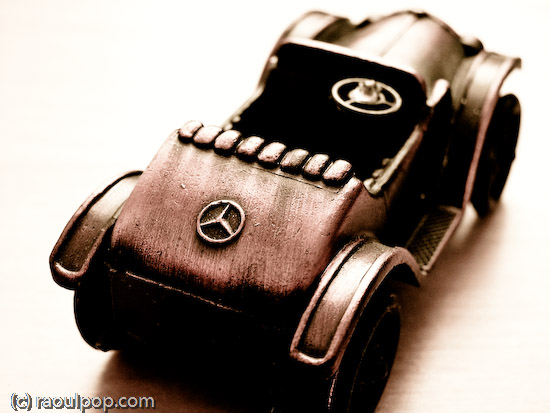
For one thing, car designs got horribly bad at some point in the late 60s. While cars are made better and they last longer, car designs have lost their soul. There isn’t that visceral response to a car nowadays that one has when they look at a classic car, one that was built to look good, not just function well. Everything is about streamlining nowadays — the wrong kind of streamlining, that is. There are no bold design decisions made anymore. Every great conceptual design gets neutered before it enters the production floor. I’m talking about curves that serve no purpose other than to make the cars more appealing. I’m talking about bold grilles, wooden or metal accent dashboards, gauges and textures that make you want to touch them. I’m talking about classic design elements. Just look at cars made in the 20s, 30s, 40s and 50s.

The old Mercedes

Fiat

Tears from the headlight

Stout and solid back

I’m not suggesting these photos are the best examples. This is what I have in my photo library, so that’s what I used. I’m sure there are a ton of great examples out there, and those familiar with car history know what I mean. That’s what I’m talking about. And that’s exactly what you won’t see on the market today. The few companies that might still include classic styling elements don’t do it wholeheartedly. We’ve got most people driving around in boxes nowadays. And they’re supposed to like it?

Another reason is an increase in fuel prices. Let’s face it, it’s no fun to drive around in a car that will put a serious dent in your monthly budget. Who’s to blame? Well, besides things that can’t be helped, like a dwindling oil supply, unstable world conditions and an increase in demand, I can think of a certain group I could finger: car companies. After all, they’ve been lobbying against fuel economy regulations for some time, and they’ve also refused to focus on economical models. Well, that same desire to save pennies on the dollar on improvements here and there is now going to cost them dollars — lots of them, and they’re the ones that have helped to dig the hole they’re in.

What’s another problem? Congestion on the roads. It’s no fun to drive bumper to bumper. Yet, increasingly so, that’s what driving has come to mean for those living in urban areas. When driving equals commuting, and when commuting means teeth-gnashing and extra stress you don’t need, do you really think people will want to drive, or that they’ll associate their cars with warm, fuzzy feelings? With the cost of new roads being so prohibitive, we know this isn’t going to change. If anything, we’ll start incurring more tolls in the future.

Congested highway

There are other costs that are driving this trend, such as car insurance and the high cost of traffic tickets, particularly when they’re falsely given out, which happens quite a bit when police departments want to put some money in their coffers. It happened to me, and that false ticket not only cost me about $150 but a day in court as well, and an extra $700 as well because of an increase in my car insurance. You think someone’s not going to consider public transportation options when driving starts costing them that much, particularly when they did nothing wrong? And what do you think they’re going to think about the crooked police officers that put them in that mess? I tell you, every time I remember what that thieving bastard did to me, smoke comes out of my ears. I hope he gets all that’s coming to him for what he did to me and probably to countless others…

More importantly perhaps is this: public companies react in unhealthy ways to market plateaus. That’s because they’re geared toward constant economic growth. Their market share or number of products sold or profits have to continually increase in order to satisfy the hungry appetites of investors and market analysts. Anything less than an increase on last year’s take is considered a failure. An extreme case of this very screwed up way of looking at things is Intel’s current situation. They earned 45% more in 2007 than in 2006, and yet their stock price dropped when they announced that their projected earnings in 2008 would be about the same as those of 2007. Instead of rejoicing over a stellar performance, our faulty economic expectations want more and more out of a market that’s performing very well.

That puts public companies in a very awkward and hard to sustain position. We’ll leave the microprocessor market alone, since I’m talking about cars at the moment. But do they honestly think that they can sustain (no, increase) their growth rate in a plateauing market? Who are they fooling? The demand for cars is going to continue to plateau, and quite possibly decrease. Sure, China and India are starting to develop, but they haven’t got the infrastructure or the economy to sustain a similar car-per-family ratio that we see in the States or Europe. What’s more, petrol supplies have already peaked. They are now going to start decreasing. Even if their infrastructure and economies could support a lot of cars, the Earth couldn’t, thank goodness. Have you driven in China or India lately? Their urban areas are packed chock full with cars of all makes and 2-cycle scooters already. They’re polluted to high heaven. I doubt we’d want more cars in those places. Add to that the upcoming flooding of the car market with cheap cars (enter India’s Tata car), and you’ve got a worldwide car market in serious trouble.

It seems to me there are a few things that could be corrected:

  • Stop the insanity of always expecting more from the market. Economic supply is not unlimited. Economists that made up that cockamamie idea should be taken out and horsewhipped, and recordings of those punishments should be posted to YouTube… Car companies need to realize that demand for their products will plateau. It’s a given. (Do I really expect public companies and their investors to change their perspectives? Yes, but it’s not going to happen. People are inherently greedy.)
  • Boring designs need to be retired for good. Serious inspiration needs to be drawn from the era of automobiles when the term motoring really meant something. Give people a reason to be passionate about their cars. Look at what Apple is doing with computers. Well-designed cars will sell, but they’ve got to look and feel so good people will drool over them.
  • A true focus needs to be placed on fuel efficiency and alternative propulsion methods. Ethanol-enhanced gasoline or even pure ethanol is not going to be the solution. I doubt it, and only one of the reasons is that corn agriculture cannot be sustained at the levels needed to mass-produce ethanol without turning all of the fields into dust bowls. Read up on soil erosion in agriculture if you want more info on this. Hydrogen fuel cells are expensive and still need oil to be produced. Not viable long-term. Now is the time to really look at other ways, such as bacterially-produced fuels, or steam/other water-based fuels. Electricity, if made through solar or wind power, is infinitely sustainable, and electric cars are already viable alternatives.
  • Car companies could focus on producing efficient, well-made public transportation vehicles in addition to personal vehicles. We know they’re going to be needed more and more in urban areas, and yet very few of the major car manufacturers have focused their efforts on fleets. Buses are still horribly inefficient when it comes to fuel usage, and they’re ugly and non-aerodynamic to boot. They usually get 5-8 miles per gallon, they’re loud, slow, unsafe, and they start rattling after only a few months of usage. They could stand a lot of improvement. The market is there and will continue to grow. Did you know, for example, that the Washington, DC metro cars were made in Italy and are very expensive? While it’s nice to know that DC metro goers ride in Italian-made wagons, why couldn’t they be made here in the US?

These are just a few ideas, but they’re meant to get the discussion started. Want to know what Nissan is doing about it? They’re ready to follow in the footsteps of the Tata car, and are readying their own designs for a cheap car. How that’s going to play out in the large scheme of things, no one knows for sure. But what we do know is that we don’t need more pollution and more congestion…

I leave you with a photo of the car that acted as a catalyst for change back when it was introduced. It can be done again, and in all the right ways. We just need a daring and willing company.

The classic MINI

Standard
Reviews

Hardware review: Drobo

âž¡ Updated 1/14/19: I have revised my opinion of Drobo devices. After experiencing multiple, serious data loss events on multiple Drobo models, even recent ones, I no longer consider them safe for my data.

âž¡ Updated 3/18/09: My review of the new Firewire Drobo is now published. You may want to have a look at that as well.

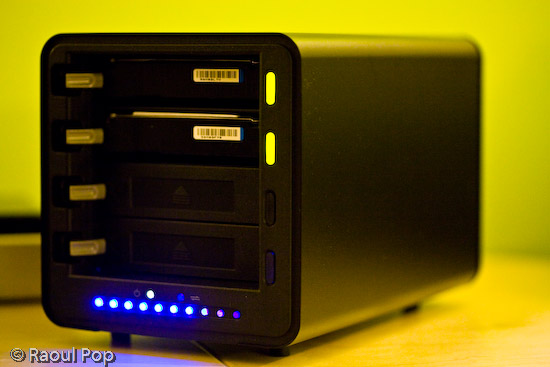
The Drobo is a new way to store your data. It works like RAID, only better. Made by Data Robotics, the Drobo is an enclosure that can use anywhere from 2 to 4 SATA hard drives of any size and brand to keep multiple copies of your files and ensure against hard drive failures.

Drobo (front view with cover on)

It’s all about the data

The main advantage is that consumers are freed from the problem of having to use identical hard drives (which is how things work in RAID) and can rely on the largest and cheapest drives they can find on the market for their data storage. In a word, the Drobo turns hard drives into a commodity, a building block of your data storage that can be replaced at any time with any SATA hard drive without negatively affecting your data.

Depending on the amount of total space available on the Drobo, it can withstand the failure of one or even two of its hard drives without losing any data. (Naturally, you’ll need to have more than two hard drives in there in order for it to protect against a double hard drive failure…)

It is its capacity to withstand drive failures and use any SATA hard drives that makes it both remarkable and unique for a consumer product.

I bought a Drobo a few weeks ago, and have been using it since to store my photo library. You may recall I first tried a WD My Book World Edition II, then a WD My Book Pro Edition II to store my photos, and both failed me. The My Book Pro failed me miserably, but that’s another story. (Incidentally, I’m working with WD’s advanced tech support to see if my issues can be resolved, so I may have an update on that in the near future.)

I believe I’ve finally found my storage solution with the Drobo. It offers the data redundancy I need to keep my over 36,000 photos alive and well, and it works on both my Mac and my PC. Not only that, but I know it will grow with me as my data storage needs expand.

âž¡ Updated 1/6/08: Since writing this article, I purchased two more Drobos. An additional one to store my videos and other files, and one more for my parents.

How it works

I bought two 500 GB SATA hard drives with 32 MB buffers and installed them in my Drobo. Installation is a snap, you just need to slide them in and a locking lever snaps into place, securing them in their slots. (If you think a 32 MB buffer is overkill for a hard drive, you might want to have a look at my review of the Dell OptiPlex 745.)

The two drives give me about 464 GB of total storage. There’s a wonderful tool called the Drobolator that lets you see exactly how much storage you’ll get with your Drobo when you stick in drives of various sizes.

Drobo (front view with cover off)

There is one detail I want to point out here that you may or may not be aware of, depending on how well you read through the Drobo literature. Because there’s an upper limit of 2 TB on a single USB volume, if your Drobo’s storage capacity exceeds that limit, your computer will then see two Drobo volumes.

Let me put it another way. If you use the Drobolator and you stick 4 (four) 1 TB hard drives into the Drobo, your total available storage will be 2.7 TB. This means, according to Drobo’s literature, that you will see two volumes on your computer. (This is because of that pesky 2 TB limit on USB devices.) Given that USB 3.0 specs are in the works now, and that Data Robotics has acknowledged they’re looking at the possibility of Firewire connectivity in the future, that may be a non-issue at some point, but it is something to know about now.

âž¡ Updated 1/17/08: Data Robotics will soon release a firmware update that will bump the upper limit up to 16 TB for a single USB volume. Those who already own the DroboShare accessory will already be able to format the Drobo volume at 16 TB. To get the details on how this works, read my comment below.

The perceived vs. actual size of the volumes can be confusing, so let me explain it a bit further. Even now, my computer sees my Drobo as having a size of 2 TB. The Drobo only has 2×500 GB drives in there, and the total size of my available storage is 464 GB. But since the Drobo’s storage can expand or decrease, and it needs to be a platform-independent device — one that does not depend on the computer for sizing information or partition tables — it has to declare its maximum size (2TB) from the start. That’s the perceived size. The actual size is indicated by the capacity meter, and if you’ve installed it on your machine, the Drobo software, which communicates with the device and displays information from it locally. In our case, if we were to put in 4×1 GB hard drives in the Drobo, we would have two actual volumes: a 2 TB volume, and a 700 MB volume. Their perceived size will be 2 TB each. If this is still confusing to you, don’t worry. Just go by the Drobo’s capacity meter to monitor how much free space you have left, and don’t worry about the perceived size.

Transfer speeds

Some people are saying that it’s slower than other storage solutions. In terms of speed, I’ve found it to be equivalent to RAID 1 drives like the My Book Pro II (which can be configured in RAID 0 or 1). I haven’t done benchmark testing, and I don’t intend to — I focus on real world use in my reviews, not lab tests — but it’s not what I’d call slow, and it’s not what I’d call fast. It’s somewhere in the middle, and it’s good enough for me. I’m willing to give a little when it comes to transfer speeds in exchange for data redundancy and safety.

âž¡ Updated 5/1/08: When the Drobo will get up to and a little over 70% used space, and even before the orange light will turn on in a drive bay to indicate that you need to puchase additional hard drives, the transfer speeds will start slowing down. I’ve experienced significant slowdowns in transfer speeds, to the point where copying a 1 GB file onto the Drobo takes 10 minutes or more (when it usually takes 1-2 minutes) when the used space was 80% or more, and the orange light wasn’t yet turned on. You may want to keep this mind as you plan your storage needs. As soon as I put in another drive and the used space dropped back down, the transfer speeds went back to normal.

âž¡ Updated 7/1/08: Data Robotics has released a firmware fix for the issue pointed out above, and it doesn’t occur any longer.

âž¡ Updated 7/15/08: Data Robotics has recently released the Drobo 2.0, a Firewire/USB version of the Drobo, which is much faster than the original USB-only Drobo.

How it looks

In terms of physical size, or footprint, you should know that the Drobo is significantly larger than other consumer-level storage products out there. It’s big, as you can see from both the photos and the video that accompany this review. If you’re thinking about buying it, make sure you have enough space on your desktop to accommodate it.

Drobo (top view - size comparison with other external drives)

In the photo shown above, I’ve got a NewerTech miniStack (1st generation) sitting next to the Drobo. I’ve also got a WD Passport Drive on top of the miniStack. This is to give you an idea of how it compares to other external hard drives. The miniStack, for example, is the same size as a Mac Mini, and is actually meant to be stacked with it. I’m using it as a standalone drive, because it has both a USB and Firewire hub built in, so it’s quite versatile.

I like the design of the Drobo. I like rounded corners and glossy surfaces. Apple has spoiled me that way. The Drobo’s black, glossy ends (front and back) are really beautiful.

How it sounds

I think it’s quiet — when not accessed. Even though it has a big fan in the back, it makes barely any noise. The Drobo becomes audible when you are reading or writing to the hard drives. Because it’s a metal enclosure, the sounds generated by the seek operations are amplified slightly by it. The metal adds a melodious echo to each sound. It’s not what I would call loud, and I find it somewhat interesting. Ligia doesn’t share my opinion, but I guess you can’t please everybody. At any rate, just be aware of the fact that you will hear sounds coming from the Drobo when you’re actively using it.

âž¡ Updated 4/2/08: I had some noise issues with my Drobos, which were resolved nicely by Data Robotics. You can read the details at the end of my review.

âž¡ Updated 5/1/08: When you fill up the Drobo (all four drive bays are taken) you will notice that the fan will kick into high gear a lot more often, and even when the Drobo is barely being accessed, or not even accessed at all — only plugged into the computer’s USB port. It’s not an overheating issue, because I put my finger on all four drives, and they weren’t hot to the touch, only warm, so I think it’s a firmware issue. This has happened with two of my Drobos. It seems that if the temperature gets above 75 degrees Fahrenheit in the room, the fan will start spinning faster, and if it gets close to 80 or over it, the fan will start going nuts and will generate quite a bit of noise. For a consumer device which isn’t meant to sit in a server room (controlled temperature environment), I think this is excessive, and the fan speed needs to be adjusted in one of the next firmware releases.

Drobo (back view)

Video review

I hope this video will give you a better idea of Drobo’s looks, size and functioning, as well as its sounds. I tried to make the video as useful as possible by looking at the Drobo from various angles and by comparing its size with other external drives that I own. I also pulled out one of the drives with the Drobo turned on, so you could see that that they’re hot-swappable and that it wouldn’t miss a beat. You can also watch it here, and download it as well.

If you’ve just finished watching the video, don’t worry, the hard drive status lights stopped blinking after the data check. It’s just that when you remove a drive and stick it back in, the Drobo does a thorough check to make sure all the data that should be there is there. It may even re-sync all the data across the drives. It took a few hours for that check to complete since I had over 300 GB of data. By the way, all of it (the data, that is) was accessible during the check, so yes, you can work with the Drobo immediately after you do a hard drive replacement.

A few thoughts on the design

I like the idea of the lights on the front of the drive. It’s great to have an easy-to-use capacity meter, and to indicate the health of each drive through different-colored lights next to it. What I don’t like is the blue LEDs used for the capacity meter. They’re very blue, and very strong.

Generally speaking, blue LEDs cause headaches, because the eyes can’t focus properly on them. They always seem out of focus when you look directly at them. Every time I see blue LEDs on something that’s meant for constant use I cringe. Fortunately, the Drobo isn’t meant to sit directly in front of the user, but off to the side, which is where I have it.

It would be nice if Digital Robotics would do something about the capacity meter in their next build of the Drobo. They could even leave the blue LEDs in there, but obscure the light slightly by orienting them at an angle instead of having them point straight out toward the user. I’ve found that when I look at blue LED light from an angle, it doesn’t cause the same vision problems.

Drobo (front view with cover off)

I like it

Is the Drobo a keeper? I think so. I’m happy with it. Even though there are a few sticking points, it’s nothing that would have dissuaded me from buying it, even if I had known about them beforehand. As a matter of fact, I’m so satisfied with it, that I signed up for the Drobo Evangelist program. That means that between now and December 31st, if you buy a Drobo from the Digital Robotics online store and you mention my evangelist code (EVPOP), you’ll get $25 off its purchase price. In the interest of full disclosure, you’ll also help me, because I’ll get $25 for each successful sale as well. Remember, this is only until 12/31/07, unless Data Robotics extends the program — and I haven’t heard anything about that. (Updated 1/2/08). I heard from Data Robotics today: they’ve extended the evangelist program until 6/30/08. That means the discount code will work until June 30th if you decide to use it.

Let’s review

The good points:

  • Data redundancy ensures availability, even if up to 2 hard drives fail
  • Virtually unlimited data storage (but remember the 2 TB limit for each volume when connected through USB 2.0)
  • Independence from hard drive size and manufacturer: as long as it’s SATA, it’s fine
  • Size can expand as your storage needs grow
  • Great design
  • Ease of use

The sticking points (nothing bad, just some things you need to consider):

  • Price is hefty: total cost is significant when you count in the enclosure and the individual hard drives
  • You may or may not like the sounds it makes when data gets accessed on the drives: make sure you listen to my video carefully to see what I mean (if yours is making too much noise, you may need to get it replaced)
  • Blue LED lights used for capacity meter are too intense and may cause headaches if you look directly at them
  • Transfer speeds may not be fast enough for you

Buy a Drobo

If you’re interested in buying one, here’s where you can find one:

Updates

âž¡ Updated 1/6/08: Since I now own three Drobos, I can tell you that my first impressions about the noise were wrong. It seems my first Drobo is unusually loud. My other two Drobos are very quiet. I can barely hear them, even when writing or reading to the hard drives actively and for prolonged periods of time. I’ll need to contact Drobo Support to see if I can get my first Drobo replaced.

âž¡ Updated 1/7/08: I called Drobo today to ask them why one of my Drobos is making more noise than the other two. I described the situation to them, and told them I’m using the exact same drives inside each Drobo (2x500GB Seagate SATA drives with 32MB cache). Their initial response was to blame the hard drives. I doubt they’re at fault, but it’s possible, since it’s the hard drive churning noises that are louder in this particular Drobo of mine. So what I’m going to do later today, since I have the luxury of having more than one Drobo at home, is I’m going to take out the two hard drives from the louder Drobo and stick them in one of my two quiet Drobos. We’ll see what happens next. If the hard drives are at fault, then the quiet Drobo will start being loud. If not, then there’s a problem with my original Drobo. I told them all this, and asked for a case number. I indicated that I’ll be looking for a replacement if it turns out that the Drobo is at fault, not the hard drives. I’ll keep this review updated with my findings.

âž¡ Updated 1/7/08: Okay, spoke with Drobo again about the noise, and it turns out that the hard drives are at fault. I did just what I described above. I wouldn’t have thought it, but these two drives that I’ve got in the original Drobo are louder than the four I use in the other two Drobos, even though they’re the exact same size, brand and model. I’m going to return them and order new ones, and I believe the noise will go away. This is definitely something to keep in mind if you’re having noise issues with your Drobo. Don’t assume it’s to blame. If you can, check the hard drives first. Remember to do it properly though. You have to turn OFF the Drobo and unplug it BEFORE removing the hard drives, or you’ll lose your data. Read this clarification, and if you’re still not sure, don’t take risks, call Drobo Support and have them stay on the line with you while you swap out the hard drives.

âž¡ Updated 1/9/08: I still have noise issues with that original Drobo even after swapping out the hard drives. At this point, I’m not sure what to think. Could it be that Adobe Lightroom, the application I use to process my photos, places such a high I/O load on the Drobo that the hard drives will churn heavily no matter what, or could it be that this particular Drobo of mine is not phonically isolated as well as my other two? Not sure. I ordered hard drives of a different brand, to see if those will be quieter. I’m going to try those out for a day or two to see what happens. Then I’m also going to switch Drobos, and use one of my quiet Drobos for a day or two with the new hard drives and with the old hard drives, and then I’ll be able to get a better idea of what’s going on. Perhaps it’s just Lightroom causing this. Perhaps it’s the Drobo. Perhaps it’s the hard drives. But one thing’s for sure, while I was on the phone with Drobo Support, I didn’t use Lightroom heavily enough in order to compare the noise levels.

âž¡ Updated 2/6/08: I sent two of the original Seagate 500 GB drives back, and purchased two Western Digital 500 GB drives. The difference between them, specs-wise, is that the Seagate drives have 32 MB caches, and the WD drives have 16 MB caches. But it turns out that there’s a problem with the Seagate drives where their caches default to 8 MB if the latest firmware upgrade isn’t applied. And there is NO way to apply a firmware update to the drives while they’re in the Drobo. Doesn’t work, I tried it. At any rate, the two WD drives are quieter than the Seagate drives, although they run hotter. At least noise-wise, things are alright now, and the Drobo’s cooling system seems to handle the extra heat just fine.

âž¡ Updated 2/6/08: You’d think now that I’ve got the noise issues straightened out, things have quieted down, but they haven’t. I’ve got noise issues with one of my other Drobos, and this time it’s related to the fan for sure. I’ve swapped out the drives, and I’ve swapped the Drobos, and I’ve pushed on various drive bay flaps and listened carefully, and it’s the fan. Trust me, I spent about a month ferreting out this particular noise issue. I arranged for an RMA, which arrived today, only to disappoint me thoroughly.

Guess what? I received a heavily used Drobo from Data Robotics in return for my brand new Drobo (thanks for nothing!), even after I’d asked them kindly over the phone not to send me a used one or a damaged one. To make things worse, there’s serious dust in the crevices of this Drobo. The drive bays themselves are lined with dust that sticks to my finger when I touch it. One of the blue LED capacity indicators doesn’t light up (it’s broken), and as if that’s not enough, one of the ejection springs for the drive bays doesn’t work. When I wanted to take out a drive, it wouldn’t push it out. I had to point the Drobo’s mouth downward and shake it. To top it all off, it makes the same fan noise as my own Drobo.

But wait, there’s more! The firmware versions are different! While this replacement Drobo was able to read all of my data from the drives, when I turned it off (disgusted by all its problems) and removed the drives, intending to put them back in my own Drobo, I found out I couldn’t! That’s right, because the firmware versions are different, my original Drobo now can’t read any of my precious data. I’m stuck. My Mac wanted to initialize the Drobo, which would have meant erasing all of my data. I think at this point I’m stuck transferring all of my data to external USB drives and reformatting my Drobo, only to stick all of the data back onto it afterwards.

Understandably enough, I’m upset and disappointed with Data Robotics. To send me a heavily used Drobo with existing problems, and then to also put my data in danger when they’re supposed to make my data safer, is simply not acceptable. I notified them by phone and email, and will give them a chance to make things right. I’ll keep you updated of what happens.

âž¡ Updated 2/7/08: Drobo’s Tier-3 Support replied to my emails. They were courteous, apologized for the experience, and promised to make it right. I believe they’ll try to ship out a new drive to me in replacement in a few days. Until then, they emailed me the latest version of the firmware (which is not yet available to the public) and showed me how to upgrade my Drobos manually. I upgraded the firmware on all of my Drobos, successfully, and now my original Drobo can read my drives without any problems. I didn’t lose any data after all. I’m very glad things have worked out!

Standard