Thoughts

Photography, take two

Over this weekend and the last several days, I’ve gone through posts that contain photographs, and replaced all of the images with ones hosted directly at ComeAcross. In the past, I’ve used photos hosted with third party photo sharing services, and I realize now that’s a folly.

If a third party service goes down, which is very likely with beta services, my photos become unavailable. Even if that service is not in beta, a simple action like closing one’s account shuts down access to all of the photos uploaded there. It’s much more practical to host the photos together with my website. That way, I am fully responsible for making sure that all of my content is accessible. If something goes down, I can take care of it. If I need to change web hosting providers, I simply transfer all of my files over to another server.

It’s not as simple to transfer one’s content with photo sharing services, no matter what they may promise. Image and meta data portability is still not 100% there, and it doesn’t help when a photo sharing service advertises their API’s availability for more than a year, yet fails to put it out for public use. It also doesn’t help when said portability is rendered useless by the amount of compression used on the uploaded originals, or the deletion of meta data embedded in the originals…

You see, everyone is ready to promise the world to you when they want to sell you on something. Quite often, that “world” is nothing more than an empty little shell. I speak in general terms here, from the things I’ve learned through my various experiences — mostly recent ones…

At any rate, I’ve still got to modify a number of posts, but I thought I’d point out the ones I’ve already worked on. They’re quite a few, and I’m happy with the results so far. Here they are:

Also see Photography, take two, part two for more updated posts.

Standard
Reviews

Lens comparison: EF 24-70mm f/2.8L Zoom vs EF 24-105mm f/4L IS Zoom

Have you ever wondered how the EF 24-70mm f/2.8L and EF 24-105mm f/4L zoom lenses would do if compared side by side? Which one would come out as the winner in real-world use? Here’s my answer to that question.

First, some recommended reading:

Those two reviews of mine should give you a good idea of what each lens can do. Now let’s talk about how they do when they’re together. 🙂 Here’s a photo of the two lenses. As you can see right away, the 24-105mm is smaller in both height and girth — it’s shorter and a little narrower than the 24-70mm.

When we look at the rear lens elements, we can see some differences there as well. The 24-105mm lens is on the left. If you look carefully, you can see a baffle in place. The 24-70mm lens has no baffle.

It’s possible that the baffle is there in order to reduce possible flare effects, since the focal range is longer. It could also be there to baffle us — after all, it is a baffle. 🙂 It’s also possible that the optics aren’t as high quality as those in the 24-70mm lens — they’re both priced the same, but the 24-105mm has image stabilization and an extra 35mm of range. On the other hand, I’ve seen a very similar baffle on the EF 14mm f/2.8L prime lens, and no one can say that the 14mm lens is made with cheap glass. So the more likely explanation is that it’s there to reduce lens flare due to the increased focal range.

(By the way, the baffle can be seen even more clearly in this product advisory from Canon warning about unacceptable levels of lens flare in early builds (2005) of the 24-105mm lens.)

Here’s another look at the lenses side by side, this time with the lens controls visible. As you can see, the only thing that’s different on the 24-105mm lens is that it’s got the IS switch. The controls seemed a little thicker on the 24-70mm lens. As for their durability, I assume they’re both long-lasting since these are L series lenses.

Chances are you can already know that the 24-105mm lens is lighter than the 24-70mm lens. It’s no small difference, by the way. The 24-105mm lens is 670g, while the 24-70mm lens is 950g — that’s 280g of difference! While both lenses extend outward as you zoom, the 24-70mm lens is more top-heavy than the 24-105mm lens, and that makes a big difference in wrist fatigue — the 24-105mm lens is less punishing and can be held comfortably for longer periods of time.

The weight difference is remarkable to me because the 24-105mm lens has 18 elements, while the 24-70mm lens has 16 elements. Canon managed to keep the weight down even though they placed extra glass in there and added image stabilization.

There are some limitations to being lighter and smaller though. The 24-105mm lens’ closest focusing distance is 1.48ft or 0.45m, while the 24-70mm lens’ closest focusing distance is 1.25ft or 0.38m. It also looks like the general consensus is that images obtained with the 24-105mm lens are somewhat softer than those obtained with the 24-70mm lens.

Other than the difference in focal lengths, another obvious difference between them is the maximum aperture. The 24-70mm lens opens up to f/2.8, while the 24-105mm lens only opens up to f/4. That’s a full f-stop difference, or a 2x reduction in the amount of light that can enter the lens. This is where the baffle comes in again. Since the baffle itself limits the amount of light that can hit the sensor in order to reduce glare, it stands to reason that the aperture can’t open up any wider. Even if it did, we’d end up seeing the baffle contours in our photos.

What the 24-105mm lens has going for it is the built-in image stabilization, which, in my experience, more than compensates for the reduced maximum aperture. See the photo below. I took it completely handheld (I didn’t prop myself up against anything) at a shutter speed of 1/15th seconds.

I tried to get similar photos with the 24-70mm lens, and I couldn’t, not without leaning against something to stabilize the lens. The slowest shutter speed I could use was 1/30th seconds with that lens. As I concluded in my previous review of the 24-105mm lens, the image stabilization counts for a lot and makes the lens truly versatile and useful.

While I’m talking about versatility, let’s not forget that extra 35mm of focal range. At close distances (6-15 feet), you don’t notice how much it matters, but when you start focusing on things farther away (30-100 feet or more), you realize how valuable those extra millimeters really are!

Let’s not forget bokeh. Both lenses have gorgeous bokeh, but the 24-70mm produces a creamier bokeh. That’s because it opens up all the way to f/2.8, while the other only opens up to f/4. If you do a lot of close-range photography, in tighter spaces, and you really need that bokeh (portraits, etc.), the 24-70mm would probably be a better candidate. This next photo was taken with the 24-70mm lens.

If you’ve got a little wiggle room and can position your subjects further away from things (walls, trees, background), don’t discount the 24-105mm lens. Its bokeh is right up there with the best of them. Have a look below.

In the end, it really comes down to your own, precise needs. I’ve heard of some people who only carry two lenses in their bag: the 24-70mm and the 70-200mm (both of which I reviewed here). They’re both professional-grade, L series lenses. They’re heavy, but they deliver the goods, and they’re versatile.

For my needs, I’d go with the 24-105mm lens. It’s lighter, has extra range, and has built-in image stabilization. I really enjoyed using it, and I seemed to get better photos with it than with the 24-70mm zoom. While it may not be as sharp, I didn’t notice anything that would turn me away from using it. I thought it was a superb lens and couldn’t believe the quality of the optics when I looked at the photos I got with it.

At least one commenter here asked how these two lenses compare, and I hope that I’ve answered that question in as much detail as I could give. If you have any other questions, pose them in the comments on this post, and I’ll try to answer them.

More information:

Standard
Thoughts

Book giveaway: SUSE Linux by Chris Brown

I’m giving away “SUSE Linux” by Chris Brown, a book I reviewed here at ComeAcross. It’s the first edition of the book, published in July, 2006, and it’s about 430 pages. It covers pretty much everything you’d like to know about SUSE Linux. I encourage you to read my review to see if you’re interested. Retail price is $39.99, but you’ll get it for free if you simply tell someone you know about ComeAcross and encourage them to subscribe to the ComeAcross feed.

Now that I’ve re-designed ComeAcross, you can choose to subscribe only to the feed that interests you. See this post for more details on that.

To qualify, just leave a comment on this post, letting me know you’ve told someone. If more than one person is interested in the book, I’ll hold a quick drawing and pick their name at random this following Sunday morning. I’ll announce the winner on my blog, and link to his or her site, if they’ve got one. The winner will be responsible for the shipping cost.

By the way, there’s another book giveaway going on. It’s a book on Change Management.

Standard
Thoughts

Something happened to ComeAcross

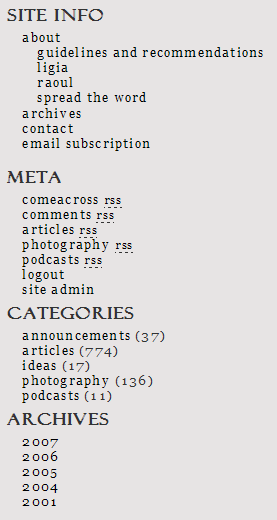
Something really good, that is. Over the weekend, I worked on improving the site functionality and on presenting a unified front, so to speak. I eliminated some sections, created some new ones, deleted tons of categories, and introduced some new feeds. The best way to explain it is to show you a screenshot of the sidebar. Have a look at it, then scroll past it to read the details.

The new ComeAcross sidebar

First, let me explain why. The gist of this effort is simple, at least to me. I’m trying to build an online brand, and it’s no good to have my online properties looking scattered and isolated, even when they’re part of the same brand. Second, I needed to value my work a little better, and to present it in ways that are easier to digest. I have a ton of content, but it’s not easy to find. I write on many subjects, but most people aren’t necessarily interested in all that I write. Add to that my constant lament about having too many categories, the release of WP 2.3 which allowed for native tagging, and finding John Godley’s awesome Redirection and Headspace plugins for WP, and it all adds up to some serious blog work that I’d been aching to do for some time.

You may remember I had other site sections just a little while ago, sections such as Blog, Photos, Videos, Podcasts and Faves. Those were located on individual sub-domains. ComeAcross resided under Blog, my photos posted to Flickr or Zooomr resided under Photos, and my videos posted to Vimeo or YouTube resided under Videos. The ComeAcross Podcasts resided under Podcasts, and I was using a podcasting platform called Loudblog to publish them. The Faves section displayed my Shared Items from Google Reader. But the problem was that all of these sections were separate. They were part of the same brand, but to search engines, they were different properties. I needed to bring all of my online content under one fold. I decided to do away with all of the subdomains and integrate everything into my blog, and that’s just what I did. I thought long and hard about this, and realized it was best to have everything under one roof, even though that meant my podcasts wouldn’t have a dedicated podcasting platform.

You’ll notice I’m advertising multiple feeds in the Meta section. I’d been sitting on some really good feed URIs from FeedBurner and not really putting them to good use. After re-categorizing my posts, I was able to re-dedicate those feeds to the my various categories, in order to allow you to subscribe to whatever interests you. I’ve got the main site feed, the comments feed, the articles feed, the photography feed, and the podcasts feed. It adds up to more choice for the reader. Incidentally, mouse over the articles and photography feeds, and look at the URIs. Isn’t that awesome? Can you believe I actually have those URIs? 🙂

Related to the feed changes mentioned above: my apologies to anyone currently subscribed to the following feed: feeds.feedburner.com/Information. I’ve been using it for my podcasts, but changed my mind and decided to use it for my articles instead. I know there were some diehard subscribers who stayed with that feed even though I put out no new podcasts in over a year (!), and they’re probably pretty confused right now. If you’re one of those, many thanks for sticking with me, and I’m sorry for switching content on you like this. The new feed for my podcasts is: feeds.feedburner.com/Raoul-Podcasts. And yes, in case you’re wondering, I’m working on a new podcast which I’ll put out soon (this month). 🙂

This brings me to the Categories. At some point, I had over 60 categories for my posts. What I was really doing is using categories as tags, and I shouldn’t have done it. After upgrading to WP 2.3, I decided to use categories as categories and tags as tags. I deleted almost all of my categories, and ended up with only five: articles, photography, podcasts, ideas and announcements. Now each one of my posts goes into only one category. Since I’m using tags as well, you can explore ComeAcross via categories, then click on the tags that interest you to get only the posts that you want. (I haven’t tagged all of my posts yet, that’s an ongoing process. I’m also displaying a tag cloud at the bottom of the sidebar, but I’ve got to work on the formatting of that text. I’m not quite happy with how it’s getting displayed. )

Finally, have a look at the Archives section. This is a small change, but it makes a big difference to the reader. I’m only displaying the years for my posts. This allows you to get a better idea right away of the spread of my content, and to explore the time period that you’d like to see. I still need to do some work on Archive and Category browsing, and on the Search results page.

I’m constantly working to improve ComeAcross, because I really want it to grow into a useful, well-read source of information. Here are just a few of the posts that talk about other changes and progress I’ve made:

Standard
Thoughts

Book giveaway: Making Change Stick, by Richard C. Reale

I reviewed “Making Change Stick” a while ago, and liked it. Now I’ve decided it’s time for it to benefit someone else. Have a look at the review and see if you’d be interested. (Retail cost for the book is $19.50.)

The rules are the same as for the last book drawing. Just tell someone you know about my site, and invite them to subscribe to the site feed. If you can email two people, great! If not, email just one and introduce them to my site. Then leave a comment on this post telling me you did it.

I’ll hold the drawing Thursday evening, and announce the winner on my blog. I’ll also link to his or her site/blog. The winner will be responsible for the shipping cost.

Standard