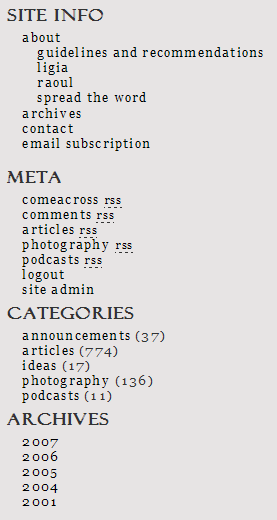
Something really good, that is. Over the weekend, I worked on improving the site functionality and on presenting a unified front, so to speak. I eliminated some sections, created some new ones, deleted tons of categories, and introduced some new feeds. The best way to explain it is to show you a screenshot of the sidebar. Have a look at it, then scroll past it to read the details.
First, let me explain why. The gist of this effort is simple, at least to me. I’m trying to build an online brand, and it’s no good to have my online properties looking scattered and isolated, even when they’re part of the same brand. Second, I needed to value my work a little better, and to present it in ways that are easier to digest. I have a ton of content, but it’s not easy to find. I write on many subjects, but most people aren’t necessarily interested in all that I write. Add to that my constant lament about having too many categories, the release of WP 2.3 which allowed for native tagging, and finding John Godley’s awesome Redirection and Headspace plugins for WP, and it all adds up to some serious blog work that I’d been aching to do for some time.
You may remember I had other site sections just a little while ago, sections such as Blog, Photos, Videos, Podcasts and Faves. Those were located on individual sub-domains. ComeAcross resided under Blog, my photos posted to Flickr or Zooomr resided under Photos, and my videos posted to Vimeo or YouTube resided under Videos. The ComeAcross Podcasts resided under Podcasts, and I was using a podcasting platform called Loudblog to publish them. The Faves section displayed my Shared Items from Google Reader. But the problem was that all of these sections were separate. They were part of the same brand, but to search engines, they were different properties. I needed to bring all of my online content under one fold. I decided to do away with all of the subdomains and integrate everything into my blog, and that’s just what I did. I thought long and hard about this, and realized it was best to have everything under one roof, even though that meant my podcasts wouldn’t have a dedicated podcasting platform.
You’ll notice I’m advertising multiple feeds in the Meta section. I’d been sitting on some really good feed URIs from FeedBurner and not really putting them to good use. After re-categorizing my posts, I was able to re-dedicate those feeds to the my various categories, in order to allow you to subscribe to whatever interests you. I’ve got the main site feed, the comments feed, the articles feed, the photography feed, and the podcasts feed. It adds up to more choice for the reader. Incidentally, mouse over the articles and photography feeds, and look at the URIs. Isn’t that awesome? Can you believe I actually have those URIs? 🙂
Related to the feed changes mentioned above: my apologies to anyone currently subscribed to the following feed: feeds.feedburner.com/Information. I’ve been using it for my podcasts, but changed my mind and decided to use it for my articles instead. I know there were some diehard subscribers who stayed with that feed even though I put out no new podcasts in over a year (!), and they’re probably pretty confused right now. If you’re one of those, many thanks for sticking with me, and I’m sorry for switching content on you like this. The new feed for my podcasts is: feeds.feedburner.com/Raoul-Podcasts. And yes, in case you’re wondering, I’m working on a new podcast which I’ll put out soon (this month). 🙂
This brings me to the Categories. At some point, I had over 60 categories for my posts. What I was really doing is using categories as tags, and I shouldn’t have done it. After upgrading to WP 2.3, I decided to use categories as categories and tags as tags. I deleted almost all of my categories, and ended up with only five: articles, photography, podcasts, ideas and announcements. Now each one of my posts goes into only one category. Since I’m using tags as well, you can explore ComeAcross via categories, then click on the tags that interest you to get only the posts that you want. (I haven’t tagged all of my posts yet, that’s an ongoing process. I’m also displaying a tag cloud at the bottom of the sidebar, but I’ve got to work on the formatting of that text. I’m not quite happy with how it’s getting displayed. )
Finally, have a look at the Archives section. This is a small change, but it makes a big difference to the reader. I’m only displaying the years for my posts. This allows you to get a better idea right away of the spread of my content, and to explore the time period that you’d like to see. I still need to do some work on Archive and Category browsing, and on the Search results page.
I’m constantly working to improve ComeAcross, because I really want it to grow into a useful, well-read source of information. Here are just a few of the posts that talk about other changes and progress I’ve made:

 Raoul Pop