Reviews

Camera preview: Canon EOS Rebel XSi DSLR

This past Thursday, Canon announced their newest DSLR, the Canon EOS Rebel XSi. This camera ups the ante for every entry-level DSLR out there and introduces a host of important new features.

Canon EOS Rebel XSi (front 3q)

In a nutshell, Canon has integrated features from its more expensive DSLRs, like the DIGIC III processing engine and better AF, it has replaced the cheap-looking grip material with soft rubber, and it has increased the resolution from 10 to 12.2 megapixels. There are a number of other significant differences between the XSi and the XTi (which I reviewed a few months ago), and I’m going to talk about them below.

Analysis

  • XSi now uses SD cards instead of CF cards. This was a bit of a shock to me, but there it is. I suppose with such a small camera body, it made more sense, but I prefer CF cards, they’re sturdier.
  • Higher resolution: 12.2 megapixels vs 10 megapixels for XTi
  • Soft rubber grip: no more of that cheap-looking plastic material used on the XTi
  • 3″ LCD at 230,000 pixels
  • Sensor equipped with microlenses over each pixel, to reduce noise and enhance sensitivity
  • 14-bit A/D processor means the XSI can record up to 16,384 colors per channel
  • DIGIC III image processor: previously only available on the 40D and 1D series cameras.
  • Live View now includes AF: on the XTi and 40D, you have to press a button in order to focus the camera in Live View
  • Better AF sensor: higher subject detection capabilities and more precise focusing with fast lenses (f/2.8 or better)
  • Faster frame rate: 3.5 fps vs 3 fps for XTi
  • Thinner, wider, taller than XTi: 5.1 x 3.8 x 2.4 in vs. 4.98 x 3.71 x 2.56 in
  • Different battery: LP-E5 vs. NB-2LH. Press release states 50% more shots per charge than previous battery, but specs state same approximate life. Hmm…
  • Highlight Tone Priority, High ISO Noise Reduction and Auto Lighting Optimizer are three features brought down from Canon’s more expensive cameras to improve image quality.
  • Backup battery now built in, not replaceable. The backup battery is the one that keeps camera time. It used to be a CR2016 Lithium battery, now it’s listed as a built-in battery. Perhaps this is a specs typo, someone correct me if they have more accurate information.
  • Offered with two kit lenses: the EF-S18-55mm f/3.5-5.6 IS and the EF-S55-250mm f/4-5.6 IS

Canon EOS Rebel XSi (back)

By offering the camera with two image-stabilized kit lenses whose 35mm effective combined range goes from 28.8-400mm, and by upping the resolution from 10 to 12.2 megapixels, Canon is clearly going after its competitors. It wants to continue to dominate the DSLR market, and with such an impressive entry-level DSLR, it will likely do so.

The resolution itself is another mind-boggling upgrade. I didn’t think 12 megapixels would be offered in the Rebel or another entry-level DSLR so soon, particularly when the 40D only has 10 megapixels and the 5D (my current camera) is the reigning king at 12.8 megapixels, but here’s the XSi, and there’s no arguing with that figure. If nothing else, this means the new 5D “Mark II”, which is expected to be announced in April, will have at least 16 megapixels resolution, possibly even 18 megapixels. It’s only natural, given that the new 1Ds Mark III stands at 22 megapixels.

Buy the Canon EOS Rebel XSi

Canon EOS Rebel XSi (front 3q with grip)

Get more information

Standard
Reviews

The next stage for Lightroom

Adobe LightroomI am a happy user of Adobe Lightroom. It has helped me get a handle on my growing photo library. While it largely replicates the functionality of Adobe Bridge, it does so with a much better interface, and includes extra functionality that makes its price worthwhile. I do most of my photo processing in Lightroom these days, and don’t go into Photoshop unless I absolutely need it.

There are a few things that need to change in order for Lightroom to become a truly valuable addition to a digital photographer’s tool set. Sure, there are some small features that could be introduced here and there, and there are some bug fixes that need to occur as well. By and large though, what I see as the biggest needed improvement can’t be explained in a few words. It requires a more detailed explanation.

Say someone starts getting into photography in a serious sort of way. They begin editing their photos on their computer, and soon find, as they get into the several hundreds and thousands, that they need something to help them organize and manage their photos. Right? Well, say they get Lightroom. They’re happy campers now. They take more photos, and then even more. They can edit the meta-data, batch process photos, export for web and print, put together photo galleries, etc. It’s great!

Here’s where things start to get tricky though. As that photo library gets bigger, it needs to be moved off the primary computer, be it a laptop or a desktop machine. Its sheer size demands a large external device, and hopefully one that stores the data in redundant fashion, to guard against hardware failures. Well, no problem, they get a huge drive and move their photos onto it. That drive is connected via USB or Firewire, and they continue to work with Lightroom. Things are just peachy.

Guess what: at some point, that photographer will need to shoot on location. They’ll take a trip either out of town, or out of the country. If they don’t have a laptop already, they’ll need to get one, because every digital photographer knows they’ll very likely need to process some photos on location, away from home.

But guess where their photo library is? It’s at home, of course. So what do you think happens when you open Lightroom while you’re away from your photo library? Why, you can’t! It tells you drive X is not available. (I should specify this occurs when the Lightroom library is stored on an external device. You can, of course, store the library locally and the photos externally, but as the library gets bigger, you’ll run into space problems. I did.)

So what can you do? You can create a new photo library, import the photos into it, and work with them that way. But wait a minute? Where’s all that beautiful meta-data that you worked so hard at? Where’s your keyword database, with its hierarchical structure, so you can tag easier without having to remember all the keywords you’d want to use? Where are all your locations? Where are your collections? Nowhere. You have to start fresh, and then when you get home, you have to re-import those photos into your main library, then reconcile keywords, locations, etc. It’s just not pretty, and it’s not practical. And on top of that, you may run into certain import bugs

What Lightroom needs is the ability to have a two-part library: a portable, main library, that travels with the machine where Lightroom is installed, and an archive library that can sit on an external device, or multiple external devices. This is NOT the same as the Vault concept one finds in Aperture. No, it goes far beyond that. The Vault concept is meant for backing up the photo library, but doesn’t address the problem of running out of space in the main library. It simply allows you to back up your work on multiple devices.

Hear me out, because I realize the concept I’m introducing is a bit complicated. The Lightroom user needs to have the ability to have access to all of their meta-data from all of their photos while traveling or while away from their main photo library. It doesn’t matter whether that person uses a laptop or a desktop. If they separate their computer from the external device that hosts their photos, they should still be able to have access to their photo library — everything but the actual photos which are to be found elsewhere.

Huh? Stay with me on this one. This isn’t the same thing as having your photo library on the laptop itself instead of the external drive. In that case, should you have your laptop with you, only the photos stored on the laptop will show up in the library, while the ones to be found on an external drive will not show up when you open Lightroom. But this points out two problems.

One, you’ll run out of space on your laptop very soon if you have a large library, even if you store the bulk of your photos elsewhere, because Lightroom builds either full-size previews, or fairly large ones (you decide this in the Preferences). Those previews are stored with the photo library, and if it resides on the laptop, the drive will fill up pretty soon.

Two, simply making those photos stored externally unavailable when Lightroom is separated from the external device doesn’t help you much. You need to be able to see at least the thumbnails, and have the meta-data available for searching, not crossed out or grayed out.

Let me outline the main points of my proposed functioning for the Lightroom library. Perhaps this will make it easier to understand:

  • A two-part library. A local/portable one, that holds all of the meta-data and thumbnails, plus a portable collection of photos that the photographer would like to have ready for processing and use no matter where they are. And the main/archive library, that holds a backup copy of the library’s meta-data and thumbnails, plus all of the photos that have been moved off the local/portable library.
  • Obviously, the ability to move photos freely from the local/portable library to the main/archive library, as needed. This would allow the photographer to decide which photos to keep local and portable, and move others to the archive in order to save space on the laptop or desktop that they’re taking with them on location.
  • The two-part library syncs the meta-data and thumbnails automatically and perhaps offers choices for conflicting data when the external device that holds the main/archive library is reconnected to the laptop/desktop.
  • Just to make things clear, the local/portable library would hold meta-data, thumbnails for all of the photos in the library, plus whatever group of photos the photographer decides to keep local. This would keep its size small and portable while allowing the user to view thumbnails for all of the photos in the library even when away from the archive library. They would even be able to do searches on the meta-data and update it as needed. The changes would sync when the archive would be re-connected. The photos stored in the archive would be marked by a special border or icon to let the user know they’re not available in their full size while the archive would be disconnected.

This is the sort of functionality I will expect from Lightroom. It would make it a truly powerful and portable piece of software. I know some people say that Bridge does the same things, but I’ve used both, and I like the Lightroom interface a LOT more.

Standard
Thoughts

Photography, take two, part five (finis)

I have completed the work of replacing photos hosted with third-party services. All of the photos that are published on my site are now hosted locally. If you’re not familiar with this effort, which took me a few months to complete, you might want to have a look at parts four, three, two and one. The main reason was to gain independence for my photographic content. Depending on third party services that might go down or go out of business for photos used in published articles is not the kind of strategy that can hold up in the long-term.

There were LOTS of posts I re-edited this time. Not only did replace the original images, but I also introduced new ones as well. This means that if you take the time to go through some of my old posts, you will see new photographs.

I’m not going to list all of the posts I modified. The list would be huge and it would dilute my message. Instead, I’m only going to point out the more significant ones. This post is the culmination of countless of hours of work. As a matter of fact, I’m going to have a little celebration. Enjoy!

If you’d like to see all of the posts that I modified in this last round of updates, just have a look through the Photography archives, and go all the way back to April 1st of 2007, starting from August 31st of 2007. Don’t worry, this is no April Fool’s joke…

Standard
Places

January snowfall

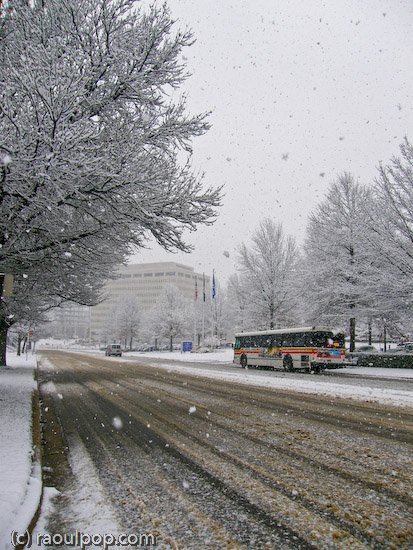
We had a snowstorm this past Thursday in the Washington, DC area. It started snowing around noon, and it continued to snow until about 4 pm. The snowflakes were big and fluffy, and they were coming down in thick waves. In the end, we have about 3 inches of accumulation, which started to melt overnight. By now, there are patches of snow here and there, but if this warmer weather continues, we’ll have nothing.

Here are photos taken during and after the snowstorm in various locations such as McLean (VA), Potomac River (MD side), and North Bethesda (MD).

Twigs weighed down by snow

Glass building in snowstorm

Road at Tyson’s Corner during snowstorm

Evergreen branch covered with snow

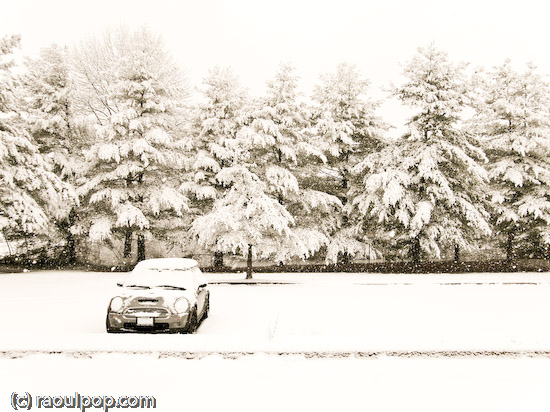
Here’s how my car looked during the snowstorm.

MINI covered in snow

MINI during snowfall

Visibility was (understandably) greatly reduced during the snowstorm. This tall crane normally dominates the skyline at Tyson’s Corner. Not during the snowstorm…

Tall crane during snowstorm

Always interested in shapes and abstracts, I couldn’t help photographing the tracks left in the snow by vehicles and people.

Bend it

Footsteps in the snow

Tracks in the snow

The fresh snow afforded me a different look at a spot I often visit: Lock 10 on the C&O Canal, which is located on the Clara Barton Parkway, somewhere between Great Falls and Glen Echo (MD).

C&O Canal at Lock 10 during snowstorm

Forest path at Lock 10

Potomac shoreline during snowstorm

Island

A bend in the river

Potomac River during snowstorm

A is for Abstract

Ice covers the buds

Finally, photos from my neighborhood. I’m glad I live in such a beautiful place.

Snowman rests on bench

Trees during snowfall

Branches covered in snow

During the snowstorm

Since this post includes photos from my community, let’s call it my Week 3 submission for the 2008 Community Challenge. My other submissions can be found under the “2008 community challenge” tag, right here on my site.

Standard
Places

Vantage point photography

It’s fun to change your photographic point of view every once in a while, especially if that opportunity is available to you. Fortunately, we live in an area with fairly tall buildings, so all we need to do is to get to the roof. The world sure is different from up there!

I took my own advice a couple of days ago, spurred on by the chance to try out a new camera: the SP-560UZ from Olympus, the most powerful ultra-zoom digital camera they make. It’s got a monster 18x zoom, the equivalent of 27-486mm focal range. I’m currently reviewing it, and should be able to publish my findings sometime in the 1st or 2nd week of February, perhaps sooner. So far, I like the camera a lot.

This is one photo that perhaps best exemplifies the camera’s powerful zoom. That Bethesda skyline is 5-7 miles away. With the naked eye, you can barely see those buildings, tiny as fleas, somewhere on the horizon. But the SP-560UZ bring them that close, and with its built-in image stabilization, lets me get a photo like this one while shooting handheld at maximum focal range.

Bethesda skyline

In another part of Bethesda, you can see this next building. I never noticed it was crooked before, but then again, I could never get this close to it before. I tried rotating the image to see if my horizon line was at fault — the cloud line was also crooked – but that wasn’t the case. When I line up the photo with the ground line horizontally, and with the trees vertically, the building clearly appears to be leaning to the right. I wonder if its owner knows of this.

Odd inclination

This is another photo I couldn’t get before: buildings near Montgomery Mall were always too far away for my reach.

Looking toward Montgomery Mall

Then I turned and looked toward Bethesda proper, which can always be recognized by the National Naval Medical Center tower. The National Institutes of Health are across the street from it, but they’re not tall enough to show above the tree line.

National Naval Medical Center at dusk

Here’s Wisconsin Avenue as it passes over I-495 and I-270.

Wisconsin Avenue at dusk

Here’s one of my favorite scenes. The photo shows NNMC, Wisconsin Avenue, the I-270 and I-495 overpasses, and the Metro Red Line, all at once. And to top it off, you can see the Metro itself rounding the corner as it climbs up from underground. That area is one of the most visually complicated transportation hubs I have ever seen. You’ve got two major interstate roads coming together in the valley below, Wisconsin Avenue bridging the gaps over the interstates (with the requisite exits onto each highway, of course), and above, the metro line, on an overpass bridge that comes up, out of the ground somewhere in the middle of the photo. And then you’ve got Tuckerman Lane and Grosvenor Lane, plus a bunch of other roads, spilling onto Wisconsin Avenue as well. It’s one big traffic spaghetti bowl, that’s what it is.

Looking toward Bethesda

While Ligia and I were up there, two news helicopters from Channel 4 and Channel 7 flew rapidly overhead, then hovered above over I-495 at some distance away. Looks like there was some sort of accident there, but we couldn’t see anything because of the tree cover.

Covering the news

The North Bethesda and Rockville skyline was something I’d always wanted to catch with a good tele lens as well. The SP-560UZ made it possible. These are the buildings near the White Flint metro station. I love the architecture of those buildings, and must make time to photograph them up close at some point.

Reflections at dusk

This is another view of North Bethesda that extends into Rockville. The tower in the lower left foreground belongs to Georgetown Preparatory School, which has been in existence at the same location since 1789.

North Bethesda skyline

This is another view of the North Bethesda skyline. That big building that fills the background is a huge condominium building, and the one with the golden windows is an office building. Every time I see those golden windows (and I’ve been seeing them for some time) I keep promising myself that I’ll get up close to photograph them, but it never happens. Perhaps I’ll manage to make time this year.

Rockville skyline

Finally, the road shown below is Tuckerman Lane, a major street that connects Rockville Pike to Old Georgetown Road and I-270 and I-495, at dusk.

Tuckerman Lane from above

You may or may not remember Tuckerman Lane from this photo I took last July.

Tuckerman Lane at sunset

This last photo was taken with the EF 100-400mm IS L series zoom from Canon, but to be fair, photos look a LOT better when it’s summer and you get that beautiful dusk light filling the scene than on a dreary, snow-less winter evening. Don’t judge the SP-560UZ harshly — its lens is very good given its price and intended market segment.

I keep talking about I-270 and I-495, and if you’re not from the area, you have no idea what they are. I-270 is a major local highway that cuts across Maryland from North to South and collects traffic going into and out of DC. I-495 is the beltway. You may have heard the expression “inside the beltway” with regards to Washington, DC. I-495 is that beltway, and it does just that — it surrounds DC and lets people travel around it as needed without having to deal with the major traffic delays associated with driving through DC. Of course, driving on the beltway itself it no picnic either. It’s one of the busiest highways in the US. At peak times, it’s bumper to bumper traffic, all the way…

By the way, this is my Week 2 post of the 2008 Community Challenge. Here’s Week 1.

Standard