Thoughts

Catching a code injection hacker in the act

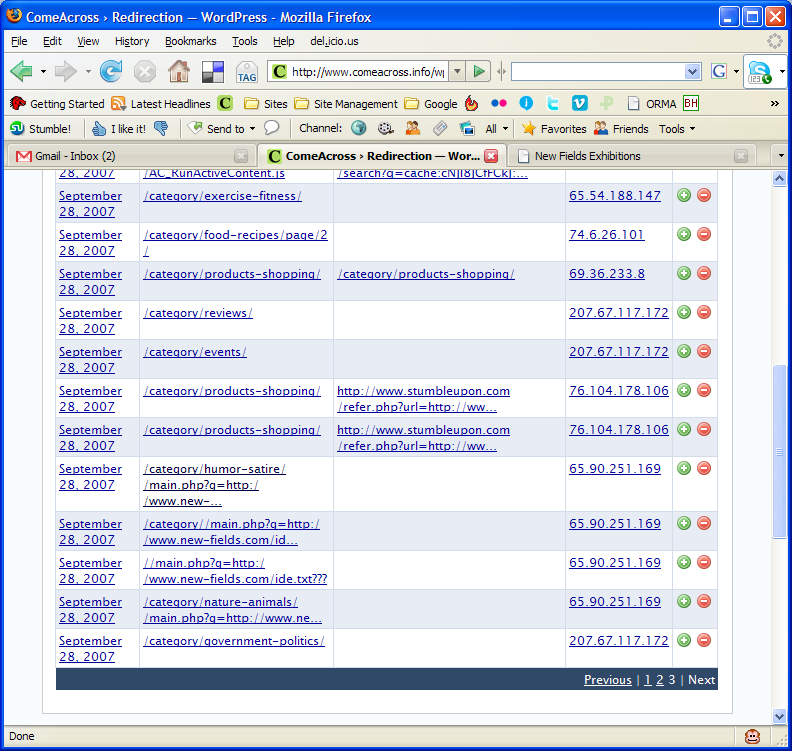
Several days ago, I installed the Redirection plugin from Urban Giraffe. It’s truly awesome, in more ways than one. John Godley, you are an amazing programmer! As I re-arranged the categories on my blog, I tracked the 404 errors through the plugin. On Saturday morning, I noticed the following bit of information in my log:

You can click on the thumbnail to view the screenshot at full size. Look at the entries for IP address 65.90.251.169. Notice something peculiar? That’s a hacker trying to inject malicious code into my pages. He was trying to call to code contained in a text file by the name ide.txt located on a possibly compromised domain.

First, I checked out his domain, new-fields.com. It looked legitimate. The text file was another story altogether. Have a look at the screenshots above. I also saved the code to my computer in case it ends up disappearing from the hacker’s website.

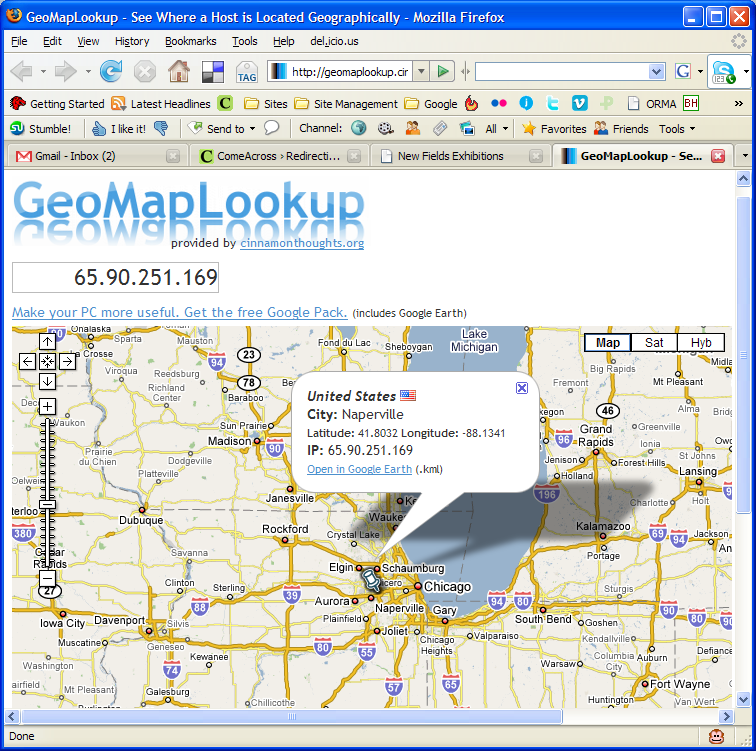
I tested the code, and it looks like some pages from the podPress plugin are targeted or affected — at least that’s what the error message given by WP referenced when I ran the code. I had that plugin enabled at the time, and I’ve disabled it since. It seems that the code tries to modify one of the header.php pages, along with checking disk space (?). So I thought, let me find out who this hacker is. Apparently, he’s from Napperville, IL, US, or at least that’s where his IP address lives.

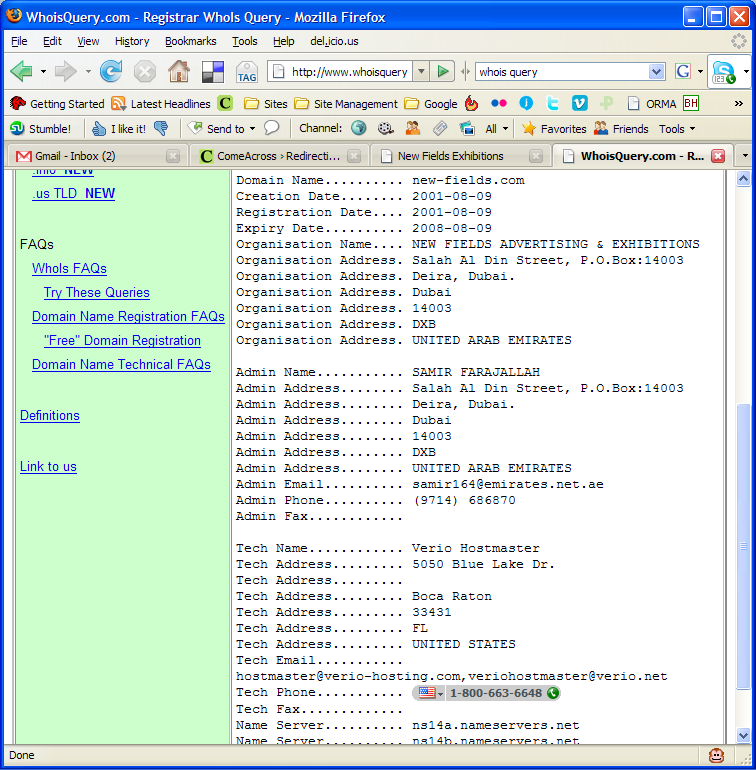
What’s more, I thought it’d be interesting to see who owns that domain name where his text file resides. It turns out to be one Samir Farajallah from Dubai.

So what we’ve got so far is some dude in Dubai who owns the domain where the malicious code resides, and some hacker in Napperville, IL, trying to exploit my blog using that malicious code.

Wait, it gets better… On Saturday evening, I have another look at my blog’s 404 log, and I find that some other hacker from Vietnam (IP address: 203.171.31.19) is trying to hack into my blog using that exact same code, but this time the text file’s located on some domain in Argentina. That last link leads directly to the text file with the malicious code, but it’s harmless if you browse it. It only works if you run it as PHP code, like these hackers are trying to do.

So far, it looks like I’ve got two hackers, who may or may not be working together, using the same malicious code, located on two different, possibly compromised domains, and trying to modify my header files, possibly to insert code in there that will display splog content or some other stuff.

Update: It looks like three more hackers are trying their luck today, on Sunday morning, 9/30/07. Their IP addresses are 65.98.14.194, 66.79.165.19 and 66.11.231.48.

What I can tell you is that they haven’t been successful. I checked all of my files, and none of them have been touched. Everything’s fine. At this point, I’m not going to waste any more of my time trying to hunt them down. If I see that the attacks continue, I’ll notify my web hosting provider, along with the hosting providers of the other domains, and I’ll also notify the ISPs who own the IP addresses used in the attacks.

My thanks go out to John Godley for the wonderful Redirection plugin. I wouldn’t have been able to catch these hackers without it. I don’t often check my 404 log files, although I should.

I’ve been working in IT for 13 years or so. Maybe I’m naive, maybe I’m too honest for my own good, but I’ve stayed away from this hacking business, and I’ll continue to do so. It’s just not a sustainable lifestyle. I believe that the bad stuff you do in life will catch up with you sooner or later. It’s inevitable. These hackers will get what’s coming to them, and I won’t even have to lift a finger beyond what I’ve done so far.

Standard
Thoughts

The winner of the "Object-Oriented PHP" book drawing

Trevor Carpenter… is Trevor Carpenter! I announced the drawing on Tuesday, 9/25, and the deadline was the evening of Friday, 9/24. I’m going to mail the book to Trevor shortly.
Trevor has a few websites, and they’re all worth mentioning. First we have his personal site/blog, then his photoblog, called CamarilloWalk, his professional photography site, called Scribe Photography, and finally, Photowalking, a site dedicated to photowalks. Anyone interested in organizing such events can request an author account on the site and write about them there. The goal is to turn the site into the main place to check for group photowalking events in one’s local area. Pretty cool!

Standard
Reviews

The value of microblogging services (part two)

This is Part Two of a mini-series on microblogging services such as Twitter, Jaiku and Pownce. You can read Part One here.

I promised you yesterday that I’d continue to discuss microblogging services in today’s post, and in particular, to show you how I use them to promote my own content and that of other bloggers.

First, let me tell you how I’m not doing it: I’m not typing my updates manually at both Twitter and Jaiku. That would be much too much work. It would almost be a full time job. Instead, what I do is to let the functionality of Web 2.0 do the work for me. I harness the power of feeds to do the foot work, while I go on about my regular day.

When it comes to my own content, I have my blog feed, my photos feed, and my videos feed. And when it comes to promoting the content I find on other blogs or websites, I use my Google Reader Share Items feed, and my del.icio.us feed. If it’s a blog post or a website that offers a feed, I’ll share it from Google Reader, and if it’s another website or web resources, I’ll tag it with del.icio.us. Between all of my feeds, I pretty much capture all of the interesting content that I or or other people create (well, at least the stuff I find interesting), and get to share it easily with others.

Jaiku itself offers a nice feed aggregation service, where I can point it to the feeds I want, and it’ll display the feed items on my Jaiku page. There’s no limit (to my knowledge) on the number of feeds displayed. I like the fact that this service is part of Jaiku’s feature set. There are some things I don’t like about it, and I’ll get to that in a bit. Here’s what my Jaiku feeds page looks like:

My Jaiku feeds

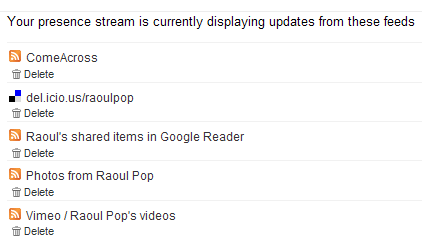
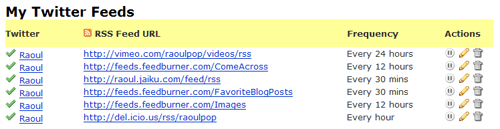
When it comes to Twitter, it has no feed aggregation service. As a matter of fact, the only way to get things in there is to type them in manually, but that’s not a lot of fun if you want to share a lot of stuff. (Remember to put that statement in the context of the differences between content creators and content consumers.) But what Twitter does have is a very nice and open API, and that means other people can build great functionality on top of the standard feature set. Wouldn’t you know it, someone went and did just that? I discovered a great service called Twitterfeed, which lets me aggregate my feeds just like Jaiku. Here’s a screenshot from my Twitterfeed page:

My Twitter feeds

As you can see, I’ve set up all of my relevant feeds to feed into my Twitter page, where they get posted very nicely every time my feeds get polled. If you look at my Jaiku and Twitter feeds closely, you’ll see that I have one more feed set up for Twitter — it’s my Jaiku feed. It’s because I use Jaiku primarily these days, and when I do type in a manual update, I don’t want to type it twice, at both Jaiku and Twitter. I publish it once at Jaiku and let Twitter pick it up through Twitterfeed. Works great!

I mentioned a bit back that there are some things I don’t like about Jaiku’s feed aggregation. Here’s the rub: I have no control over how often my feeds get polled, and my feed items get summarized in a single Jaiku instead of being displayed properly as individual items. This means a lot of the content gets lost, because there’s no way to click on each individual items. You can only click on the last item polled from a particular feed. Have a look at the following screenshot from Jaiku to see what I mean:

Jaiku items

As you can see from the screenshot, there were 19 new items in my Google Reader Share Items feed, yet only one got displayed. Where did the other 19 items go? They’re somewhere in virtual feed land, but they sure aren’t on my Jaiku page… It’s the same with my del.icio.us bookmarks feed. There were two new items, yet only one got displayed. Twitterfeed’s a lot better in this regard, because I can choose how often my feeds get polled, and because it converts each individual feed item into an individual Twitter. But it’s also got its limitations, because it can only display the last 5 items from a particular feed. So if I have more than 5 items, like I usually do in my Google Reader feed or my Images feed, they don’t all get displayed.

You might think that doesn’t happen very often, but I can read and share a lot of articles in the span of a half hour. Those 19 feed items you see in the screenshot above were shared in the span of 10 minutes, after reading through about 40 blog posts and articles. Plus, when I publish photos, I usually have more than 5. Yet the extra ones don’t show up on either Jaiku or Twitter. So yeah, this happens quite often for me.

At any rate, I can’t complain too much. The functionality offered by Jaiku, Twitter and Twitterfeed is fantastic for my needs. I can keep my various web presences up to date with my activities quite easily, and I can share a lot of interesting content in the process. Whether it’s mine or that of others, doesn’t matter that much to me. The important thing is that useful content gets promoted much faster and easier through feed syndication and the power of microblogging services like Jaiku and Twitter.

I hope you found this useful!

Standard
Reviews

The value of microblogging services (part one)

Twitter Jaiku

When Twitter came on the scene, no one knew quite what to make of it. “What’s the point?” was the most frequently asked question. When Jaiku got started about the same time, people again asked that same question. When Pownce got started recently, I was the one asking that question. As a matter of fact, I still am, and I’m not going to join Pownce until I can see what value it’ll bring me in addition to Twitter or Jaiku.

The thing is, that very pertinent question still hasn’t been answered. People are still trying to figure out what to do with them. Here are their current uses, from my observations:

  1. Publish simple activity updates
  2. Chat with friends asynchronously
  3. Self-promotion: point your contacts to something you’ve written or you’re working on
  4. Link sharing: point out interesting articles, videos or sites
  5. Marketing: fake/generic profiles are set up to talk up various products or events, and thousands of people get added as “friends” to that profile in the hope that some buzz gets created

I’ve been using both Twitter and Jaiku to do the first four activities listed above. After a while, #1 gets fairly old. Unless something highly unusual is happening, I’m simply not likely to visit the site and type in an update. I’ve got more important things to do. Plus, if I’ve got something interesting to say, I’d rather hold on to it and craft it into a nice blog post on my own blog than to share it on someone else’s website, where it brings me no added value.

Sure, others might say it’s fun to receive updates on your phone and participate through SMS. I say phooey to that. First, data plans for SMS are more expensive. Plus, I like my phone quiet. I don’t want it to buzz every minute with an update from a contact. And I’m not going to sit there thumbing on that keypad just so I too, can join the legions that say “I’m eating lunch” or “About to drop off my clothes at the cleaners.” Yes, this might be fun if I decided to get a fancy phone with a keypad, either a Windows Mobile device or an iPhone. But I think Windows Mobile devices are ugly, the iPhone is still a build or two away from the featureset I want, and both are too expensive. I don’t see the value in a fancier phone, even if I can surf the web on it, or do email. If I want to surf the web, I’ll grab my laptop and see it on a nice, big screen. So I have both Twitter and Jaiku set to web-only updates. I check both sites a few times a day, and that’s how I keep up with the various conversations.

Numbers 2, 3 and 4 is where the action is. If you are a content creator (refer to this post of mine for the details on that term) self-promotion can be valuable. If done in a non-sleazy way, it can make your contacts aware of something interesting that you’ve either just published or are about to publish, and can potentially extend the reach of your work. I publish links to my blog posts, my photos and my videos on both Twitter and Jaiku.

Link sharing is a very valuable feature of the microblogging services. I use it a lot to point others to various web resources or articles that I find interesting. For example, I read a lot of articles and blogs every day. I share all of the ones I find interesting on both Twitter and Jaiku. I’ll write in more detail tomorrow about just how I do that, and how I promote my own content.

As an aside, the only added benefit I see in using Pownce is for the file sharing feature. But where it could prove to be a value-added service for its founders, Kevin Rose being one of them, is in tight integration with Digg on link sharing. If a particular link is getting passed around between Powncers, that would be a pretty good indication that it could be Dugg as well, so having a section on Digg for popular Pownce links/articles would be a great way to capitalize on that, and to allow Digg users to do their thing with those articles, videos or whatever that link may be.

Last but not least, asynchronous chatting is an efficient way to conduct a conversation if you’re pressed for time or if your contacts are in different time zones. Instead of dedicating a slot of your schedule to a particular conversation, you simply tune in between your more important activities and share your thoughts. Your contacts do the same. Although it takes longer to get answers, I find it very useful for non-urgent matters. Jaiku is a lot better at this particular task than Twitter, because it has threaded conversations, while Twitter doesn’t.

The value of microblogging services lies in the fact that they’re another web presence for you. They’re another way to relate to your contacts and friends. Somehow, it’s easier for someone to Twitter or Jaiku me than to write a comment on my blog. Not sure why, because they get through both ways and I answer them just the same, but the immediacy of these services makes it easier to relate to me, and I assume, to others.

To sum up, these web presences can be used for asynchronous chats and for sharing your own content and other valuable articles, posts and resources with your contacts. I should point out that, just like a blog, if you’ll approach microblogging services with an entirely self-serving attitude, to engage in either shameless self-promotion or sleazy PR techniques, your little experiment’s going to fail. It’s important to maintain authenticity, and to have a good mix of interesting content, otherwise you push away people.

This is why I don’t add contacts left and right on either service, like some people do… I don’t see the point of adding complete strangers just for the sake of bloating my profile with fake friends, or just so I can shamelessly self-promote to a bigger audience. If I know someone, I’ll add them, or if someone adds me and I see from their update history that they have interesting things to say, I’ll add them.

Come back tomorrow because I’ll show you just how I use both Twitter and Jaiku for uses 3 and 4 from the list above.

One more thing. Here are the links to my profiles at Jaiku and Twitter:

[Updated 7/25/07: Part Two of this mini-series is now available. Read it here!]

Standard
Events

Happy (belated) Birthday to ComeAcross!

After getting home this evening, I remembered (and it wasn’t the first time) that I’ve neglected to write about my blog’s first birthday. It is, after all, a momentous occasion, and needless to say, one I won’t encounter for some time again… 🙂

If you haven’t already, have a quick look at the About page. It’ll give you a bit of the background information about my blog, whose roots go back as early as 2000, which is when I started self-publishing articles on the internet, through other sites of mine such as LupusPernix, Amalgamy and Dignoscentia. You may get a chuckle out of this: when I first heard about blogging, I thought it a fad and dismissed it as such. But that “fad” didn’t die out, and what’s more, I started seeing some really nice content created by bloggers.

After some hemming and hawing I decided to jump right in, and wrote my own blog software over at Amalgamy in March of 2004. It worked nicely to get my feet wet. Then I discovered Blogger, and started writing there in February of 2006. That was fun, but I really wanted to host the blog on one of my own domains, and wasn’t enthralled with Blogger’s publish-through-FTP features. That’s when I discovered WordPress (Thank you Tony!), bought the ComeAcross domain, and after a lengthy process where I took old content and ported it over to my new blog, launched the site on May 3, 2006. Incidentally, it would have been nice if I’d written this post on May 3, 2007, but two months late is still okay, I suppose.

Why comeacross.info, when there are so many splogs on the .info TLD? Well, I thought the title (come across) and TLD nomenclature (.info) meshed nicely with the scope of my blog, which is to present interesting information to people. It may sound corny, but to me, comeacross.info = come across information. I like to think of my blog as a nice surprise among the many crappy splogs you’ll find among the .info domains. I may at some point move it to a .com TLD, but for now, it works nicely right where it is.

Last October, I wrote a post entitled Who We Are, which was meant to give you, the readers, a nice, transparent look behind the scenes at ComeAcross. It accomplished its purpose, and I kind of like that post’s transparency. In that same spirit, I wanted to offer some updated stats on ComeAcross, via screenshots from my WordPress, FeedBurner and Google Analytics dashboards.

The first is right from my blog’s dashboard. As you can see, I’ve got 890 posts and 661 comments. Those 61 categories are weighing heavily on my mind. I really need to cut them down somehow, but it’s so hard for me to pigeonhole my content. The other cool stat comes from Akismet, my comment spam plugin. It has protected ComeAcross from 152,982 spam comments. None of them made it to the blog! That’s beautiful!

ComeAcross -- WordPress Dashboard

Next up are my feed subscriber stats, courtesy of FeedBurner. The feed subscribers are the folks who have clicked on the orange feed icon in the top right portion of my site, and added ComeAcross to their daily list of sites they read through their favorite feed reader.

💡 If you haven’t already, you’re welcome to do the same. It’s easy and it’s free. I recommend Google Reader. It’s also free and very easy to use. If you don’t like feeds and prefer to get my content via email, enter your email address in the field under “Get ComeAcross by Email” title in the right column, and click on Subscribe. Look for a confirmation email, click on the link, and you’ll be done. You can unsubscribe at any time, and this is also free.

What’s cool about my feed subscribers is that the number has been steadily growing since I started my blog. It’s really nice to see, and it’s very encouraging for me to see so many people enjoy reading my posts.

ComeAcross -- Feed Stats Dashboard

Now for some fun traffic stats, courtesy of Google Analytics. Apparently, over 42,000 people visited ComeAcross since I’ve launched it. That’s a huge number of people, and it’s humbling to see that my writing has reached such a large audience.

ComeAcross -- Site Visitor Stats

The pages on the site were viewed over 73,000 times, and if you’ll look below, you’ll see that my most-read pages to date are the index (as expected), the one about Zooomr’s Mark III release, the review of the HP laptops, my caveat emptor post about Davison Inventegration, and my post about our Betta fish. I’m truly amazed that I still get traffic to the Betta fish post. It was originally an article at Amalgamy, and I ported it over in 2006. I wrote it back in 2005, and we don’t even have Betta fish any more. 😕

ComeAcross -- Site Content Stats

Finally, I have to thank Google big time, because they send the most traffic to ComeAcross. I truly benefit from the long tail of web searches. Over 53% of my traffic comes from search engines, and more than 46% of my total traffic comes from Google. As you can see, I got some Digg and StumbleUpon traffic as well, along with some other Yahoo traffic.

If I had to choose between Digg and StumbleUpon traffic, I’d choose StumbleUpon any day. Digg traffic occurs in bursts that risk crashing my web server, it doesn’t monetize well, because the visitors only care about skimming the content, and it also doesn’t convert well (from casual visitor to subscriber). StumbleUpon traffic, on the other hand, grows slowly, is more constant, monetizes very well (people actually click on the ads once in a while) and some of the casual readers even turn into regular readers. So, StumbleUpon, thank you!

💡 Incidentally, if you, the reader, would like to do me a great service, submit either sections of the site or particular posts that are of interest to StumbleUpon. You can use either the StumbleUpon toolbar, or the “StumbleIt!” link below each post of mine. You have my thanks in advance for that!

ComeAcross -- Site Traffic Stats

With this, I close my post, and wish my blog a Happy, if belated, Birthday! 😀 It’s been a very interesting first year, and I look forward to more of them ahead! In the interest of increased transparency, I spent approximately one and a half hours researching and writing this blog post. It probably took you 5 minutes or less to read it.

Standard