How To

How to properly clean your keyboard

I found myself needing to clean our iMac’s keyboard a few days ago. I remembered watching a video recently that suggested we should simply stick the keyboard in the dishwasher. I wasn’t about to do that. I doubted the circuitry would have worked afterwards, particularly the Bluetooth link between the keyboard and the computer.

The safer route was to simply remove the keys, wash them separately with warm water and soap, then wash the keyboard base with a cloth moistened with water and a mild soap solution. Ligia also got some cotton swabs and rubbing alcohol ready, just to make sure we’d be able to get into all of the keyboard’s crevices.

This solution should work for all keyboards. A word of caution: before you start doing anything to your keyboard, take a couple of photos of the key layout! You don’t want to find yourself with a bunch of keys in your hand, clueless about where to stick them… Take photos of the keys and have them ready to display on your computer, or print them out ahead of time.

Removing the keys is quite simple. You take a quarter or any larger coin, put it under a key, and pry upwards. The key should pop right out. Be careful though, you don’t want to break them — that would render the keyboard quite useless afterwards.

After the keys are removed, the keyboard should look something like this:

Apple keyboard with keys taken off

Please excuse the distortion caused by the camera lens. I used my 24mm prime to make for fast work.

Once the keys are off, Ligia cleaned the keyboard, and I got to work cleaning the keys. I used a basin filled with warm water and I poured in some detergent, then gave each key a light scrubbing with a brush. You can also use the sink directly, but you’ve got to be very careful there. Sinks have drain holes under the top lip, and your keys might just run into them, since they’re plastic and they float. Once they go into the drain, good luck getting them out. You can open up the P-trap and see if they’re there, but chances are that they’re already gone. So be very, very careful as you wash the keys. You want to make sure that you don’t lose any of them.

After the keys were washed, I put them in an absorbent cotton towel and shook them around a bit to get drops of water dislodged from the keys’ undersides, then, while keeping them bunched up in the towel, I ran a hair dryer in there to make sure they got dry a little faster. Here you’ll need to make sure all of the corners of the towel are raised up, otherwise your keys will start flying around… You can also leave them on a towel overnight if you don’t want to bother with the hairdryer.
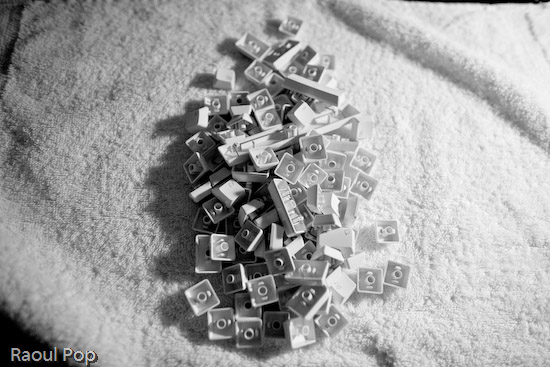
Keys from Apple keyboard

You also want to be careful that you don’t get excess liquid on the keyboard itself. The last thing you need after you go through the trouble of cleaning it is some problem with the circuits in there. Use a moistened cloth or paper towel, and clean it carefully, making sure you remove any debris or gunk or crumbs or whatever you find in there. Use cotton swabs moistened with rubbing alcohol to get into the tighter spots. When you think you’re done, examine it carefully under a strong light, to make sure you got everything off. Sometimes keys will stick because you or someone else in your house/office spilled sticky liquids on the keyboard, and if you don’t get that sticky gunk cleaned off, the keys will continue to stick even after you think you’ve cleaned them.

After Ligia got the keyboard base cleaned up, we stuck all of the keys back on the keyboard, and it looked quite beautiful when we got done. It was as if we’d gone out and bought a brand new keyboard. Just think of it! We did our part for the environment by re-using a piece of perfectly good hardware, and we also saved about $60. Pretty cool!

Apple keyboard after thorough cleaning

Standard
Reviews

Flushed Away (2006)

“Flushed Away” is an entertaining tale of a house rat named Roddy enjoying the good life as the spoiled pet of a rich girl. Just as the girl’s family goes on vacation and he can really let loose, an intruding rat comes in, gets a taste of the good life, and flushes Roddy down the toilet.

Roddy ends up in some sort of rat colony (more like a little city) down in the sewers, and he must find a way to get back home while negotiating life on completely new terms. He finds a girl rat named Rita, who helps him. The two make an unlikely pair since she hates him from the get go, but as they say, opposites attract. There’s a nice surprise ending that I don’t want to spoil for you, and tons of action throughout.

If you’re familiar with Nick Park’s work (think Wallace & Grommit) then you’ll recognize the animation style. The difference is that “Flushed Away” is computer-animated, not made with the usual stop-motion clay puppets that Nick Park works with. The same style was preserved, for the most part, but it was all done on the computer. There is a noticeable difference, and for the diehard Wallace & Grommit fans, it’s a bit of a letdown. The movement is neither smooth enough for good computer animation, or jumpy enough to fit Nick Park’s stop-motion style. But in the end, the movie stands on its own as an enjoyable adventure and one tends to forget about the animation’s shortcomings.

Nick Park actually voices one of the slugs in the movie. He’s not in the credits, and I can’t find out which slug it is, so I’ll let you all guess. If you find out, do let me know.

This movie also features famous actors for the main voice talents, and as I stated in other movie reviews, there’s no reason not to give real voice actors the chance to do these roles. I don’t know that Hugh Jackman and Kate Winslet added anything special to the voices of Roddy and Rita, other than their names and a bit of intonation. Now when it comes to The Toad, voiced by Ian McKellen, and Le Frog, voiced by Jean Reno, the story is entirely different. Their voices are distinct enough to fill out their characters and make them come to life.

At any rate, it’s a great family movie and I liked it.

More info:

Standard
Thoughts

Photography, take two, part two

I continued to work on replacing photos hosted with third party services. The list of modified posts is provided below. This has proven to be a huge effort. I had to locate the photos in my digital library — not all of which is keyworded yet, though I’ve got location information for all my photos — but I also chose to re-process, keyword and re-title the photos. You see, most of these photos were keyworded through bulk uploaders, for the purpose of displaying that data on third party photo sharing sites, not for my own library. Clearly that effort was wasted, but I didn’t know that back when I did it… Where applicable, I am also re-writing some of the text.

I want to make sure that the content I provide here at ComeAcross is truly top tier, as much as possible. What does that mean? Well, it means I spent my entire weekend, including Monday, working on the posts listed below, and on the posts listed in part one. I still have more posts to go. I don’t mind doing this — actually, I look forward to it — but I do hope that you, the reader, appreciate the effort that goes on behind the scenes. 🙂

Also see Photography, take two, part one.

Standard
Thoughts

Photography, take two

Over this weekend and the last several days, I’ve gone through posts that contain photographs, and replaced all of the images with ones hosted directly at ComeAcross. In the past, I’ve used photos hosted with third party photo sharing services, and I realize now that’s a folly.

If a third party service goes down, which is very likely with beta services, my photos become unavailable. Even if that service is not in beta, a simple action like closing one’s account shuts down access to all of the photos uploaded there. It’s much more practical to host the photos together with my website. That way, I am fully responsible for making sure that all of my content is accessible. If something goes down, I can take care of it. If I need to change web hosting providers, I simply transfer all of my files over to another server.

It’s not as simple to transfer one’s content with photo sharing services, no matter what they may promise. Image and meta data portability is still not 100% there, and it doesn’t help when a photo sharing service advertises their API’s availability for more than a year, yet fails to put it out for public use. It also doesn’t help when said portability is rendered useless by the amount of compression used on the uploaded originals, or the deletion of meta data embedded in the originals…

You see, everyone is ready to promise the world to you when they want to sell you on something. Quite often, that “world” is nothing more than an empty little shell. I speak in general terms here, from the things I’ve learned through my various experiences — mostly recent ones…

At any rate, I’ve still got to modify a number of posts, but I thought I’d point out the ones I’ve already worked on. They’re quite a few, and I’m happy with the results so far. Here they are:

Also see Photography, take two, part two for more updated posts.

Standard
Thoughts

Catching a code injection hacker in the act

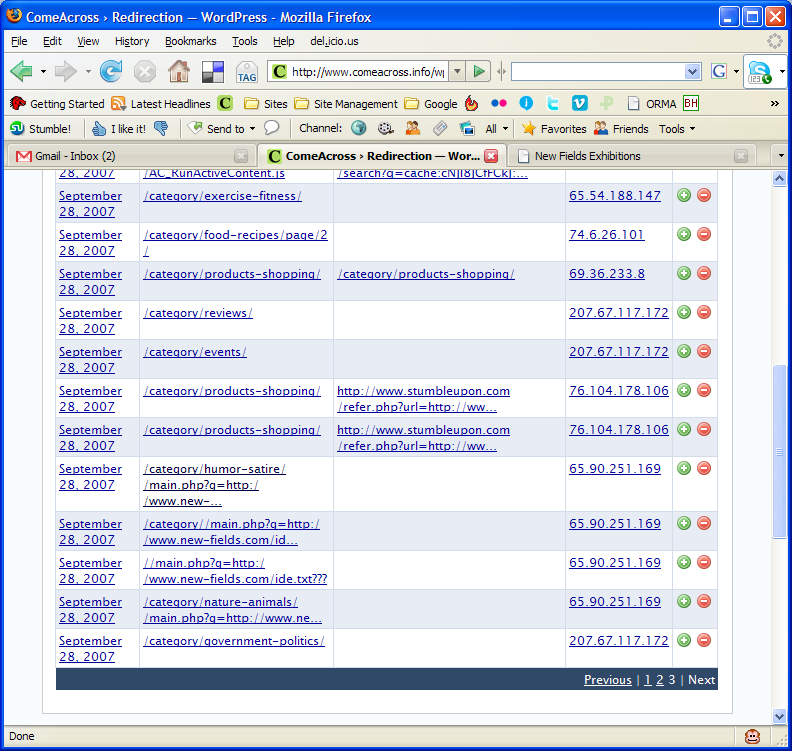
Several days ago, I installed the Redirection plugin from Urban Giraffe. It’s truly awesome, in more ways than one. John Godley, you are an amazing programmer! As I re-arranged the categories on my blog, I tracked the 404 errors through the plugin. On Saturday morning, I noticed the following bit of information in my log:

You can click on the thumbnail to view the screenshot at full size. Look at the entries for IP address 65.90.251.169. Notice something peculiar? That’s a hacker trying to inject malicious code into my pages. He was trying to call to code contained in a text file by the name ide.txt located on a possibly compromised domain.

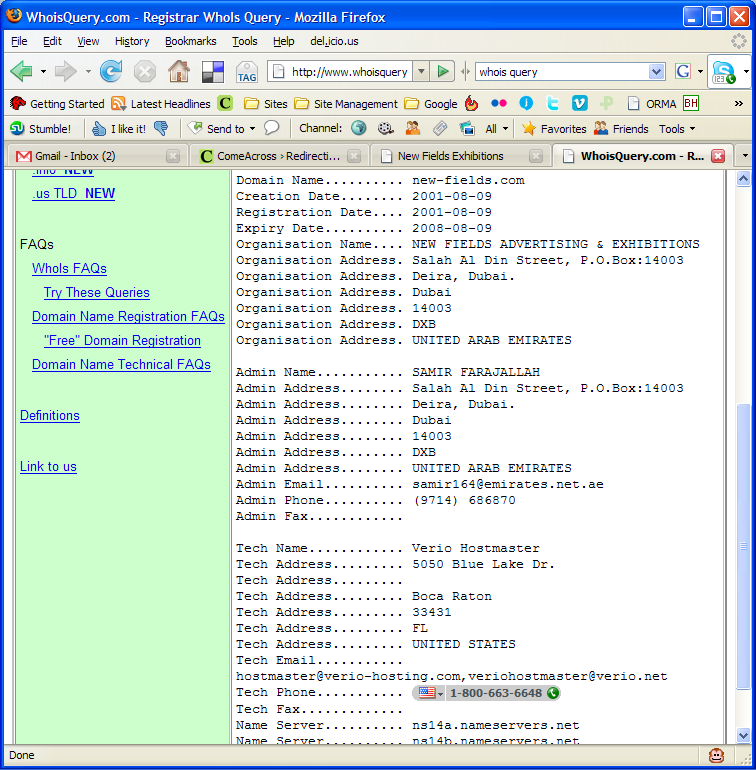
First, I checked out his domain, new-fields.com. It looked legitimate. The text file was another story altogether. Have a look at the screenshots above. I also saved the code to my computer in case it ends up disappearing from the hacker’s website.

I tested the code, and it looks like some pages from the podPress plugin are targeted or affected — at least that’s what the error message given by WP referenced when I ran the code. I had that plugin enabled at the time, and I’ve disabled it since. It seems that the code tries to modify one of the header.php pages, along with checking disk space (?). So I thought, let me find out who this hacker is. Apparently, he’s from Napperville, IL, US, or at least that’s where his IP address lives.

What’s more, I thought it’d be interesting to see who owns that domain name where his text file resides. It turns out to be one Samir Farajallah from Dubai.

So what we’ve got so far is some dude in Dubai who owns the domain where the malicious code resides, and some hacker in Napperville, IL, trying to exploit my blog using that malicious code.

Wait, it gets better… On Saturday evening, I have another look at my blog’s 404 log, and I find that some other hacker from Vietnam (IP address: 203.171.31.19) is trying to hack into my blog using that exact same code, but this time the text file’s located on some domain in Argentina. That last link leads directly to the text file with the malicious code, but it’s harmless if you browse it. It only works if you run it as PHP code, like these hackers are trying to do.

So far, it looks like I’ve got two hackers, who may or may not be working together, using the same malicious code, located on two different, possibly compromised domains, and trying to modify my header files, possibly to insert code in there that will display splog content or some other stuff.

Update: It looks like three more hackers are trying their luck today, on Sunday morning, 9/30/07. Their IP addresses are 65.98.14.194, 66.79.165.19 and 66.11.231.48.

What I can tell you is that they haven’t been successful. I checked all of my files, and none of them have been touched. Everything’s fine. At this point, I’m not going to waste any more of my time trying to hunt them down. If I see that the attacks continue, I’ll notify my web hosting provider, along with the hosting providers of the other domains, and I’ll also notify the ISPs who own the IP addresses used in the attacks.

My thanks go out to John Godley for the wonderful Redirection plugin. I wouldn’t have been able to catch these hackers without it. I don’t often check my 404 log files, although I should.

I’ve been working in IT for 13 years or so. Maybe I’m naive, maybe I’m too honest for my own good, but I’ve stayed away from this hacking business, and I’ll continue to do so. It’s just not a sustainable lifestyle. I believe that the bad stuff you do in life will catch up with you sooner or later. It’s inevitable. These hackers will get what’s coming to them, and I won’t even have to lift a finger beyond what I’ve done so far.

Standard